Introduction
Helia is a free, open-source stacker for pictures of the Sun. You point a telescope and a camera at the Sun and record a video, a few thousand frames long. Each frame is blurred a little differently by the air above you, because the atmosphere is never still. Helia ranks the frames by sharpness, lines them up (the whole disc, and many small patches of it, because the air bends the image differently across the Sun), and averages the best ones into one sharp picture, written as a 16-bit TIFF, an 8-bit PNG or a FITS file. It knows the common solar filters (H-alpha, calcium K and H, magnesium, sodium, helium D3, H-beta and white light), picks sensible settings for them, and can colour the result for sharing.
This technique is called lucky imaging. It does the job of tools such as AutoStakkert!, in a single program that runs on Linux, Windows and macOS, on x86_64 and ARM, and does its heavy maths on whatever GPU you have.
Helia is written in Rust. It comes as three front ends over the same engine:
helia-gui, a desktop app that walks you through the steps. See Using the desktop app.helia, a command line tool for scripts and batch work. See The command line.helia serve, an HTTP and WebSocket API for notebooks and other programs. See The API.
Where to start
- New to Helia? Download and verify, then Installation and First launch.
- Want to see every step? The step-by-step walkthrough goes from a raw capture to a finished picture with a screenshot at each step.
- Have a particular capture? The recipes cover H-alpha, white light, calcium K, phone video, a Bayer grid, batches and scripting.
- Something wrong? Troubleshooting and the FAQ.
Copyright and licence
Copyright (C) 2026 Laurence Horrocks-Barlow. Helia is free software under the
GNU General Public License, version 3 or (at your option) any later version,
with no warranty, and with the additional terms in ADDITIONAL-TERMS.md that
keep the author's name and this dedication with the program; the About page of
the desktop app, helia --version and the
contributing notes have the details. Helia is made by Laurence Horrocks-Barlow. If you are interested in anything else I make, visit 12hobbies.studio.
Dedication
Helia is dedicated to my daughter, the light of my life. Her middle name is Helia, because she has an energetic spark. She has not stayed still since the day she was born, which suits software whose whole job is catching the sharp moments in something that never stops moving.
Status
Helia is in early development. The stacking pipeline, the command line, the desktop app and the API work today, with sharpening, deconvolution and everyday adjustments, and it applies dark and flat frames and a bad-pixel map before it analyses anything. Drizzle and the other planned features are listed in the Roadmap, and each page of this guide says plainly when something is not available yet. The plan and every decision taken so far are kept in the project's private issue tracker.
Pre-release archives for Linux (x86_64 and aarch64) and Windows x86_64 are available to early-access users (contact 12hobbies.studio); macOS is built from source. See Installation.
Supported platforms and GPUs
Helia runs its heavy maths through wgpu, which talks to whatever graphics API your system has:
| Platform | GPU API | Hardware |
|---|---|---|
| Linux | Vulkan, GLES fallback | AMD, NVIDIA, Intel, Raspberry Pi 4/5 |
| Windows | DX12, Vulkan | AMD, NVIDIA, Intel, Qualcomm |
| macOS | Metal | Apple silicon, Intel Macs |
With no usable GPU, Helia falls back to a multi-threaded CPU path that gives the same results. GPU acceleration explains how the choice is made and what to do when your GPU is not found.
Optional machine-learning features are planned (they would run through ONNX Runtime on CUDA, ROCm, DirectML, OpenVINO or CoreML, with experimental Coral Edge TPU support). None of that exists yet.
How this book is organised
- The User guide takes you from installing Helia to a finished image, and explains what each setting does.
- The Reference pages list every option. The command line and API references are generated from the code, so they cannot drift from it.
- The Developer guide covers the architecture, how to build and test, and how to contribute.
- The Roadmap lists what is planned, with links to the issues.
Helia is licensed under GPL-3.0-or-later. If it helps your imaging, you can
support its development through the links in .github/FUNDING.yml in the
repository.
Helia is part of 12hobbies.studio.
Download and verify
This page takes you from nothing to a program you have checked is the one the project published. It is the first of three: this one, then Installation for your system, then First launch.
A pre-release
Helia is at version 0.x, which the project calls a pre-release: the stacking, sharpening, colour and export described in this manual all work and are tested, but some things the roadmap promises are not there yet (drizzle is the biggest) and the interface and file notes can still change between releases. Pre-releases are marked as such. Nothing is stored or sent anywhere unless you ask: Helia has no telemetry. See the roadmap for what is planned.
Get the files
Releases are not public yet: Helia is in early access, so get in touch through 12hobbies.studio and you will be sent the newest release. Each release contains the files below. Download the archive for your system and its checksum.
| You have | Download | Checksum |
|---|---|---|
| Windows 10 or 11, 64-bit | helia-<version>-x86_64-pc-windows-msvc-setup.exe (installer), or the .zip | SHA256SUMS, or the .sha256 file beside it |
| Debian, Ubuntu, Raspberry Pi OS | helia_<version>_amd64.deb or helia_<version>_arm64.deb | SHA256SUMS |
| Fedora and other RPM systems | helia-<version>-1.x86_64.rpm or ...aarch64.rpm | SHA256SUMS |
| Any Linux | Helia-<version>-x86_64.AppImage or ...-aarch64.AppImage, or the .tar.gz | SHA256SUMS |
| macOS | coming: Helia-<version>-macos.dmg | SHA256SUMS |
| Windows on ARM | not published | build from source: Installation |
Every file in the release, the Windows ones included, has its line in
SHA256SUMS. The Windows files are attached by a second build and can appear a
little after the Linux ones. The release also carries two *.cdx.json files, the
lists of libraries inside each program (a software bill of materials). You do not
need them to run Helia.
Check the download
A checksum is a short fingerprint of a file. If your copy gives the same fingerprint as the one the project published, the file arrived complete and unaltered. Do this before you run the program.
On Windows, in PowerShell, in the folder you downloaded to (the same works for the
-setup.exe):
(Get-FileHash helia-0.2.0-x86_64-pc-windows-msvc.zip -Algorithm SHA256).Hash.ToLower()
Get-Content helia-0.2.0-x86_64-pc-windows-msvc.zip.sha256
The two lines must match. For version 0.2.0 both read:
27930fae6620307520ebdc4af51e472756934ba7f7d50986f4528bf2f2ac498b
(the second line also names the file after the hash). Use the version you downloaded, not this one.
On Linux, in the folder holding the file and SHA256SUMS (a .deb, .rpm, AppImage or
archive):
sha256sum -c SHA256SUMS --ignore-missing
helia-0.2.0-x86_64-unknown-linux-gnu.tar.gz: OK
--ignore-missing skips the lines for archives you did not download. If you see
FAILED, download the file again; if it fails a second time, do not run it, and
tell the project (see Sending feedback).
The programs are not code-signed yet. Windows SmartScreen shows "Windows protected your PC" the first time you run the installer; choose More info, then Run anyway. The checksum above is how you know it is the file the project published. See Installation.
Next
- Installation: the Windows installer, the
.deb,.rpmand AppImage, uninstalling, Raspberry Pi notes, and the optional ffmpeg for MP4 files. - First launch: what you will see when you start it.
Installation
There are two ways to get Helia: install a release (Windows, Debian and Ubuntu, Fedora, any Linux through an AppImage; macOS is coming) or build it from source (every platform, a few minutes). Releases are built by the project and shared with early-access users (contact 12hobbies.studio; releases are not public yet).
You get two programs:
helia, the command line tool (which also runs the API server);helia-gui, the desktop app.
Download a release
Each release has an installer or package for your system, the plain archives, a
SHA256SUMS file and the release notes. Releases before 1.0 are marked as
pre-releases. Pick one of the rows that matches your system.
| Platform | Install with | File | Status |
|---|---|---|---|
| Windows 10 or 11, 64-bit | the installer | helia-<version>-x86_64-pc-windows-msvc-setup.exe | available |
| Windows | unzip and run | helia-<version>-x86_64-pc-windows-msvc.zip | available |
| Debian, Ubuntu, Raspberry Pi OS, Mint | .deb | helia_<version>_amd64.deb, helia_<version>_arm64.deb | available |
| Fedora, RHEL and relatives | .rpm | helia-<version>-1.x86_64.rpm, helia-<version>-1.aarch64.rpm | available |
| Any Linux with glibc 2.35 or newer | AppImage | Helia-<version>-x86_64.AppImage, Helia-<version>-aarch64.AppImage | available |
| Any Linux | unpack the archive | helia-<version>-<arch>-unknown-linux-gnu.tar.gz | available |
| macOS | disk image | Helia-<version>-macos.dmg | coming |
| Windows ARM64 | not published; build from source |
The Windows files are attached by a second build, so they can appear a little after the Linux ones. Download and verify shows how to check a download against its checksum before you run it.
Windows
Run helia-<version>-x86_64-pc-windows-msvc-setup.exe.
The first run shows a SmartScreen warning. The installer is not code-signed yet (#70), so Windows says "Windows protected your PC" and "Unknown publisher". After you have checked the file's checksum, choose More info, then Run anyway. The warning goes away once the project has a signing certificate.
The installer:
-
shows the GPL and the additional terms that go with it (you must read, not sign: Helia is free software and the pages are there so you know what you are getting);
-
asks Who is this for? The default, Just for me, installs to
%LOCALAPPDATA%\Programs\Heliaand needs no administrator rights. All users installs toC:\Program Files\Helia; if you are not an administrator the installer asks Windows for permission and starts again with the choice made, so the licence pages show a second time; -
offers these parts, ticked as shown:
Part Default What it does Helia always helia-gui.exe(the app),helia.exe(the command line tool), the licencesStart menu shortcut on Helia in the Start menu Desktop shortcut off an icon on the desktop Add the helia command to PATH off lets you type heliain any new terminalOpen with Helia on lists Helia under Open with for .ser,.aviand.fitsfiles. It never becomes the default program for them
Helia then appears in Settings > Apps > Installed apps with its version and
publisher, and uninstalls from there. Double-clicking helia-gui.exe opens the
window with no console behind it; helia.exe is the command line tool and stays
a console program.
To install for a whole lab without the pages, from a terminal:
.\helia-0.5.0-x86_64-pc-windows-msvc-setup.exe /S /ADDPATH /DESKTOP
The switches are /S (silent), /AllUsers (needs an administrator), /ADDPATH,
/DESKTOP, /NOSTART, /NOASSOC and /D=C:\Where\To\Install (last, with no
quotes). Without /AllUsers the install is for the current user and needs no
administrator rights, even when silent. With /AllUsers from a prompt that is not
elevated the installer stops with exit code 740 and installs nothing; run it from
an administrator prompt. The start menu shortcut and Open with are on unless you
pass /NOSTART or /NOASSOC; the desktop shortcut and the PATH entry are off
unless you pass /DESKTOP or /ADDPATH.
Uninstall: Settings > Apps > Installed apps > Helia > Uninstall, or run
uninstall.exe in the install folder with /S. For an all-users install add
/AllUsers and run it from an administrator prompt (uninstall.exe /AllUsers /S);
the entry in Settings does that for you. It removes the programs, the
shortcuts, the Open with entries and the PATH entry. It leaves your settings
(%APPDATA%\helia) and your images alone; delete the folder if you want them
gone.
If you prefer no installer, unzip the .zip anywhere and run helia-gui.exe.
If something goes wrong on Windows
| What you see | What it means and what to do |
|---|---|
| "Windows protected your PC", "Unknown publisher" | SmartScreen, because the installer is not code-signed yet. Check the checksum, then More info > Run anyway. If the button is missing, More info has not been pressed yet. |
| "This app has been blocked by your organisation", or SmartScreen offers no way to run it | A policy on a managed PC. Ask your administrator, or use the .zip, which needs no installer. |
| "Installing for all users needs administrator rights" (exit code 740 when silent) | You passed /AllUsers without elevation. Run the installer from an administrator prompt, or leave out /AllUsers. |
| "Error opening file for writing: helia-gui.exe" | Helia is running, so Windows will not replace the file. Close it, then choose Retry. |
helia is "not recognised" in a terminal | The PATH entry is off by default and a terminal that was open during the install keeps its old environment. Open a new terminal; if it still fails, run the installer again and tick Add the helia command to PATH, or call helia.exe by its full path. |
| Helia is missing from Open with | The Open with Helia part was unticked (or /NOASSOC was used). Run the installer again with it ticked. Helia never becomes the default program for the files: choose it under Open with, then Choose another app if the first list does not show it. |
| Helia is not under Installed apps | An all-users install is listed for every user, a current-user install only for the account that ran it. Look under the account that installed it. |
| The uninstaller left a folder | It removes only the files it installed. Your settings (%APPDATA%\helia) and any file you added to the install folder stay; delete the folder by hand. |
Debian, Ubuntu and Raspberry Pi OS
sudo apt install ./helia_0.5.0_amd64.deb # arm64 on a Raspberry Pi
(apt install ./file.deb also pulls in the packages Helia recommends, such as
the Vulkan loader and Mesa drivers; plain dpkg -i does not.) You get helia
and helia-gui in /usr/bin, a Helia entry in your applications menu with
its icon, and Helia in the Open with list for SER, AVI and FITS files.
Install ffmpeg too if you want to open MP4 files.
Uninstall: sudo apt remove helia. (sudo apt purge helia is the same; the
package keeps no configuration. Your settings are in ~/.config/helia.)
If something goes wrong on Debian and relatives
dpkg: dependency problemsorlibc6 (>= 2.35) but ... is installed: the system is too old (Ubuntu 20.04 and Debian 11 are). Build from source, or use a newer system.Unable to locate package ./helia_..., orUnsupported file ... given on commandline:apt installneeds the path to start with./(or be absolute), and the file must be the one for your CPU (amd64on a PC,arm64on a Raspberry Pi with a 64-bit system;dpkg --print-architecturetells you).helia: command not foundright after installing: open a new terminal. The programs are in/usr/bin, so a fresh shell finds them.- No Helia entry in the applications menu, or it is not under Open with:
log out and in, or run
sudo update-desktop-databaseandsudo update-mime-database /usr/share/mime. The package installs the desktop file and a MIME type for SER files (video/x-astro-ser); AVI and FITS are known to the system already. - The window opens but the top bar says
CPU: no Vulkan driver was found. Installlibvulkan1andmesa-vulkan-drivers, or NVIDIA's driver. See GPU acceleration.
Fedora and other RPM systems
sudo dnf install ./helia-0.5.0-1.x86_64.rpm # aarch64 on ARM
It installs the same files in the same places, and the troubleshooting notes
for the .deb apply, with sudo dnf install ./file.rpm for apt install ./file.deb
and the architectures x86_64 and aarch64 (uname -m tells you which).
Uninstall: sudo dnf remove helia. The RPM is built for glibc 2.35 or newer, which every supported Fedora
has. It has not been installed on a Fedora machine by the project's own tests
(there is none), only unpacked and checked on Debian; report what you find.
AppImage
One file, no installation, runs on most Linux desktops:
chmod +x Helia-0.5.0-x86_64.AppImage
./Helia-0.5.0-x86_64.AppImage                  # the app
./Helia-0.5.0-x86_64.AppImage --cli --version  # the command line tool
Pass a capture to open it: ./Helia-0.5.0-x86_64.AppImage capture.ser. If it
says it cannot mount itself, your system lacks FUSE; run it with
APPIMAGE_EXTRACT_AND_RUN=1 or install libfuse2. An AppImage does not add a
menu entry by itself; tools such as AppImageLauncher do that, or copy the
.desktop file from the tarball. Uninstall: delete the file.
If something goes wrong with the AppImage
Permission denied: the file is not executable.chmod +xit; some browsers and file managers drop the permission.- It starts and stops at once with a message about
fusermountorlibfuse.so.2: see the FUSE note above (APPIMAGE_EXTRACT_AND_RUN=1orlibfuse2). - It will not run from a folder: a few systems mount
/tmpor the home folder withnoexec, which stops AppImages and extracted copies. Put the file in a folder that is not mounted that way. - The command line tool is the same file with
--clifirst:./Helia-0.5.0-x86_64.AppImage --cli stack capture.ser -o out.tif. - Open with is not set up: an AppImage does not register file types. Pass the capture on the command line, or integrate the AppImage with a tool such as AppImageLauncher.
macOS
macOS builds are coming. The project has no Mac to build on yet
(#75), so there is no
download today; build from source as described below. The packaging
is written and waits for a Mac build machine: a Helia.app in a disk image,
universal for Apple silicon and Intel, with .ser, .avi and .fits listed
under Open With.
When it arrives it will not be signed or notarised until the project has an Apple
Developer ID, so macOS Gatekeeper will say Helia "cannot be opened because the
developer cannot be verified". To open it the first time: drag Helia to
Applications, right-click (or Control-click) Helia and choose Open, then
Open again in the dialog. Or open System Settings > Privacy & Security,
scroll to the message about Helia, and choose Open Anyway. You only do this
once. Uninstall: drag Helia to the Bin; settings are in
~/.config/helia.
The plain archives
The .tar.gz and .zip archives hold the same programs without an installer, for
people who want to put them somewhere themselves:
# in the folder you downloaded the archive and SHA256SUMS to
sha256sum -c SHA256SUMS --ignore-missing
tar -xzf helia-<version>-x86_64-unknown-linux-gnu.tar.gz
cd helia-<version>-x86_64-unknown-linux-gnu
./helia --version
./helia-gui
Each archive holds helia, helia-gui, the licences, this project's README and
changelog, and THIRD-PARTY-LICENSES.txt for the libraries inside. The Linux one
also has share/applications/helia.desktop and the icons under share/icons;
copy share/ into ~/.local to get a menu entry.
Things to know about the Linux downloads
- They need glibc 2.35 or newer: Ubuntu 22.04, Debian 12, Raspberry Pi OS (Bookworm), Fedora 36 or anything newer. On an older system, build from source.
- They do not bundle a graphics driver. Install the Vulkan loader and a driver
(
libvulkan1andmesa-vulkan-drivers, or NVIDIA's driver); without one Helia uses the CPU. The.deband.rpmrecommend them. The desktop app also needs the usual X11 or Wayland andlibxkbcommonlibraries, which a desktop installation already has. - The aarch64 packages are cross-compiled and checked by running the binaries under an emulator, not on real Raspberry Pi hardware. Report what you find.
- Each release also carries two CycloneDX SBOM files (
*.cdx.json) listing the libraries each program was built from. Every package carries the licences:/usr/share/doc/heliain the.deband.rpm, inside the AppImage, in the install folder on Windows.
Open a capture from your file manager
With the installer or a package you can right-click a .ser, .avi or .fits
file and choose Open with > Helia. The same works from a terminal:
helia-gui capture.ser. Helia remembers the size of its window and, under
Recent in the top bar, the last eight captures you opened.
Optional: ffmpeg for MP4 and other video
Helia reads SER and uncompressed AVI by itself. To open MP4, MOV, M4V, MKV and WebM files, and AVI files that use a compressed codec (MJPEG, H.264), it uses the free ffmpeg program if it is installed. Nothing else changes if it is not: Helia never bundles or links ffmpeg, and without it those files are refused with a message that says how to install it.
You need ffmpeg and ffprobe (they come together) at version 4.4 or newer.
| System | Install |
|---|---|
| Windows | winget install Gyan.FFmpeg (or choco install ffmpeg), then open a new terminal |
| macOS | brew install ffmpeg |
| Debian, Ubuntu, Raspberry Pi OS | sudo apt install ffmpeg |
| Fedora | sudo dnf install ffmpeg (enable RPM Fusion first on Fedora) |
| Anything else | a static build from ffmpeg.org/download.html |
Check it with ffmpeg -version. Helia finds the programs on your PATH. To use
others, set HELIA_FFMPEG and HELIA_FFPROBE to their full paths. The
helia info command on a video file is a quick test that it all works, and
Troubleshooting lists what the
errors mean.
Decoded frames are written to a cache directory (the operating system's cache
folder by default, --cache-dir or HELIA_CACHE_DIR to choose another), and
removed when Helia is done with them. See Capturing
for why raw SER or AVI is still better.
Build from source
What you need first
- A current stable Rust toolchain. The minimum version is the
rust-versionin the repository'sCargo.toml(1.95 at the time of writing). Install it with rustup. - A source checkout of the repository.
- Optionally a GPU with a working driver. Helia runs without one; see GPU acceleration.
Windows
- Install the Visual Studio Build Tools with the "Desktop development with C++" workload. Rust needs the Microsoft linker.
- Install Rust with
rustup-init.exefrom rustup.rs, choosing the defaultx86_64-pc-windows-msvchost (or the ARM64 one on a Windows on Arm machine). - In a terminal, in the checkout:
cargo build --release
The programs are target\release\helia.exe and target\release\helia-gui.exe.
Helia uses DX12 or Vulkan; your graphics driver provides them. If a corporate
policy blocks programs built in the checkout (Windows Application Control can
do this to build scripts), point CARGO_TARGET_DIR at a folder that policy
allows.
Linux, including Raspberry Pi
Install a C toolchain, the Vulkan loader and, for the desktop app, the windowing libraries. On Debian and Ubuntu:
sudo apt-get install build-essential pkg-config libvulkan1 mesa-vulkan-drivers \
    libxkbcommon-dev libwayland-dev
mesa-vulkan-drivers covers AMD, Intel and the Raspberry Pi; NVIDIA owners use
NVIDIA's own driver instead. Then:
cargo build --release
On a Raspberry Pi use a 64-bit operating system (Raspberry Pi OS 64-bit or Ubuntu for Pi). Helia lists the Pi 4 and Pi 5 as supported GPUs, through the Mesa Vulkan driver with GLES as a fallback. The project's automated tests run on 64-bit ARM Linux with a software GPU, but not on Raspberry Pi hardware, so report what you find. Compiling on a Pi is slow; cross-compiling from a PC is an option.
macOS
Install the Xcode command line tools (xcode-select --install) and Rust. Helia
uses Metal, which needs no extra setup on Apple silicon or Intel Macs.
cargo build --release
Check it works
target/release/helia --version
target/release/helia info path/to/capture.ser
To try Helia without a capture, write a synthetic one with
cargo xtask sample, described in the Quick start.
To install the programs on your PATH instead of running them from target:
cargo install --path crates/helia-cli
cargo install --path crates/helia-gui
First launch
You have downloaded, checked and installed or unpacked Helia (see Download and verify and Installation). This page is what happens next.
Check the programs run
Helia is two programs, helia (the command line tool) and helia-gui (the
app). After a Debian, Ubuntu or Fedora package they are in /usr/bin, so in any
new terminal:
helia --version
helia-gui --version
From the Windows installer, helia is only on the PATH if you ticked Add the
helia command to PATH (and opened a new terminal afterwards). Otherwise run it by
its folder, by default %LOCALAPPDATA%\Programs\Helia:
& "$env:LOCALAPPDATA\Programs\Helia\helia.exe" --version. From the zip or a
tarball, run .\helia.exe --version or ./helia --version in the folder you
unpacked. From an AppImage, ./Helia-<version>-x86_64.AppImage --cli --version
runs the command line tool and the plain file runs the app.
Each program prints its version, when and how it was built and the licence. Neither
opens a window; this is the quick test that the program starts on your machine. On
Windows helia-gui.exe is a window program with no console of its own, so in
PowerShell its text can arrive after the next prompt has appeared; helia.exe is
the better tool for this test. A line such as wgpu: 30.0.1 is the graphics
library Helia was built with, not a requirement on you.
Start the desktop app
Choose Helia in the Start menu (Windows installer) or the applications menu
(.deb and .rpm), double-click helia-gui.exe or the AppImage, or run
helia-gui in a terminal. The first start after installing from Windows can show
the SmartScreen warning described in
Installation. A window opens
with the nine steps down the left and a dark, empty viewer. The top bar offers
About, Open capture and Export.
If Helia finds a graphics card it says so in the top bar, for example
Vulkan and the adapter's name. If it finds none, it says CPU and works anyway; the answers
are the same, only slower for sharpening previews. See
GPU acceleration.
The first-run strip
The first time, a Quick start strip lists the three steps: open a capture, press Stack with recommended settings, pick a colour and export. Press Got it and it never returns. Helia remembers that, and the look you choose for each filter, in a small settings file (see Settings file). Nothing else is saved, and nothing is sent over the network.
Open your first capture
Press Ctrl+O, drop a file on the window, pick one under Recent in the top
bar, or right-click a .ser, .avi or .fits file and choose Open with,
Helia (or run helia-gui capture.ser). Helia remembers the size of its window
and the last eight captures. If you have no capture to hand, any
SER or AVI of the Sun will do, or a short phone MP4 if you have installed ffmpeg.
From here, follow the step-by-step walkthrough: it goes
from the Open step to a finished picture with a screenshot at every step.
If you prefer a terminal, the Quick start shows the same journey on the command line, and the recipes are short, complete jobs for the common captures.
Quick start
A few steps take you from a capture to a sharp, coloured, shareable picture: open the file, press Stack with recommended settings, then look at the sharpening, choose a colour and export. Helia works out the rest. This page shows the desktop app first, then the command line. You need Helia built or installed as described in Installation.
Have a capture ready
Use a SER or uncompressed AVI file of the Sun (or, with the optional ffmpeg installed, an MP4), ideally a few hundred frames or more. Capturing for Helia explains how to record a good one.
Put the filter in the file name. Helia reads the name of the file, the
folder it is in, the SharpCap sidecar and the SER header for the filter, and
recommends settings for it: 2026-10-19_Sun_Ha_001.ser, CaK_session/capture.ser
and sodium-d.avi are all recognised. Part of a word does not count, so
Hampshire is not H-alpha. If Helia cannot tell, it asks once. The words it
looks for are in Colourising.
No capture to hand? From a source checkout you can write a synthetic one (a made-up sun with known blur and shifts, 400 frames, 320 by 288 pixels):
cargo xtask sample synthetic-sun_Ha.ser
It is a way to try the tools, not a picture of the real Sun. The _Ha in the
name makes Helia treat it as an H-alpha capture.
With the desktop app
Start the app, optionally with a file:
helia-gui synthetic-sun_Ha.ser
The first time, a short Quick start strip reminds you of these steps. Press Got it and it never comes back; Helia remembers in its settings file.
-
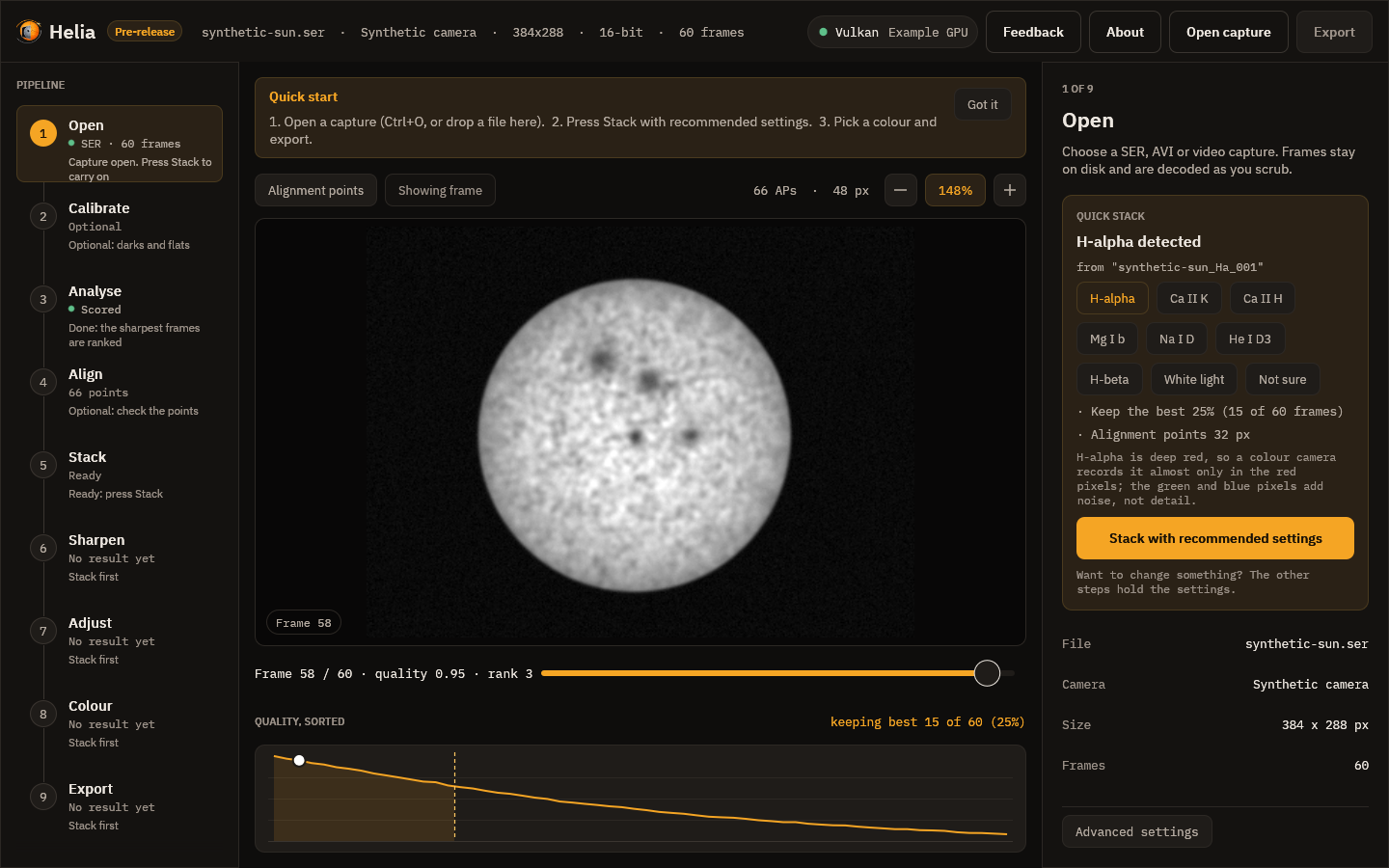
Open. Press Ctrl+O (or choose Open capture) and pick the file, or drop it on the window. The Quick stack card appears on the right. It says which filter Helia found and from what, and lists the settings it will use: the colour channel (for colour cameras), the share of frames to keep, and the alignment point size for your image. If it guessed wrong, press the right filter; if the filter is not in the list, press Not sure for plain defaults.
-
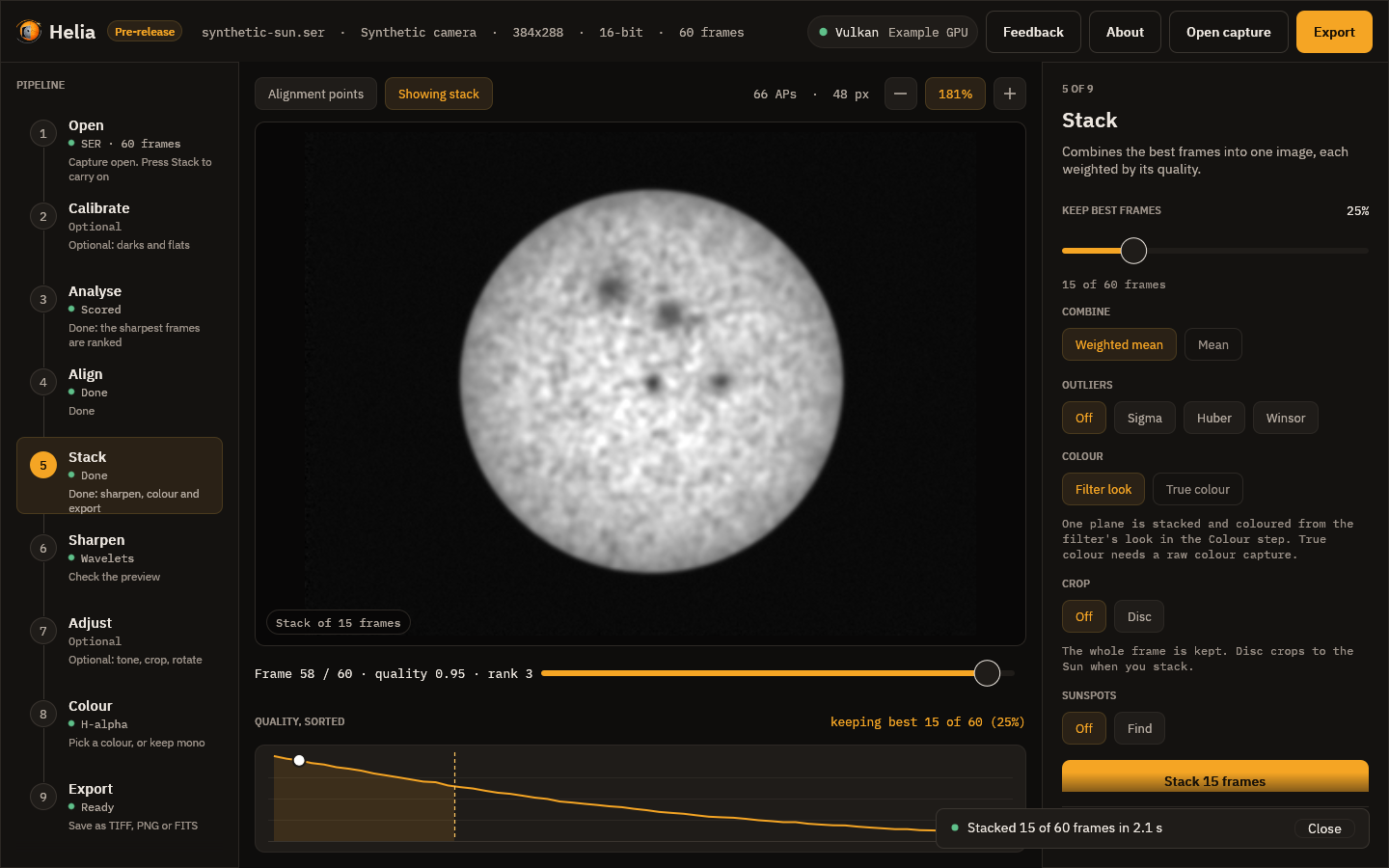
Stack. Press Stack with recommended settings. A notice above the picture says what Helia is doing (scoring the frames, aligning them, stacking) with a progress bar and the time left, and a Cancel button. When it finishes, a message says how many frames went into the stack and how long it took, and then fades away.
-
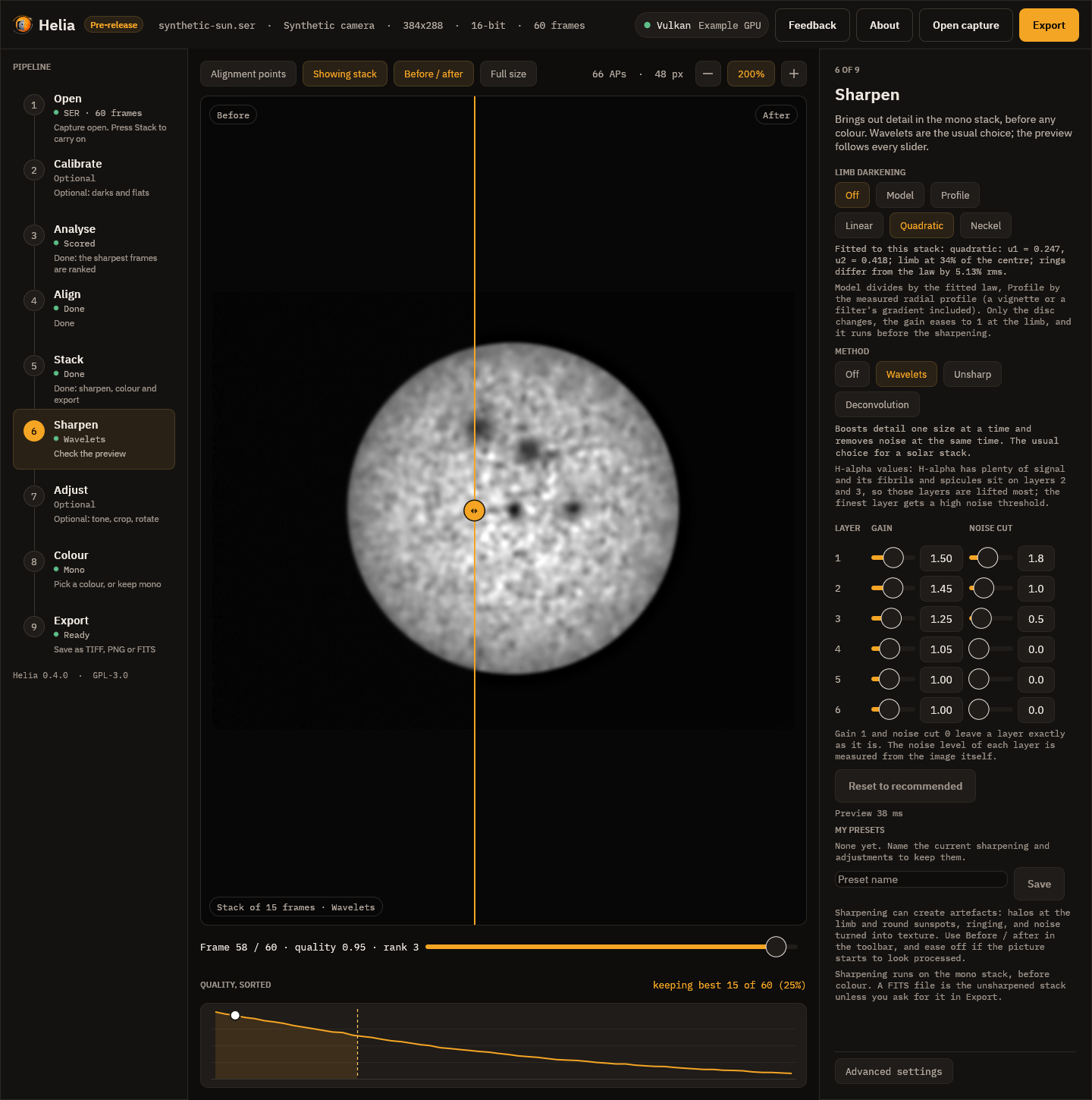
Sharpen. Helia moves on to the Sharpen step. The recommended wavelets for your filter are already applied, so the picture is sharpened; press Before / after to compare it with the plain stack, drag a slider to change something, or press Off to skip it. Sharpening can create artefacts, so look closely; see Sharpening and adjustments.
-
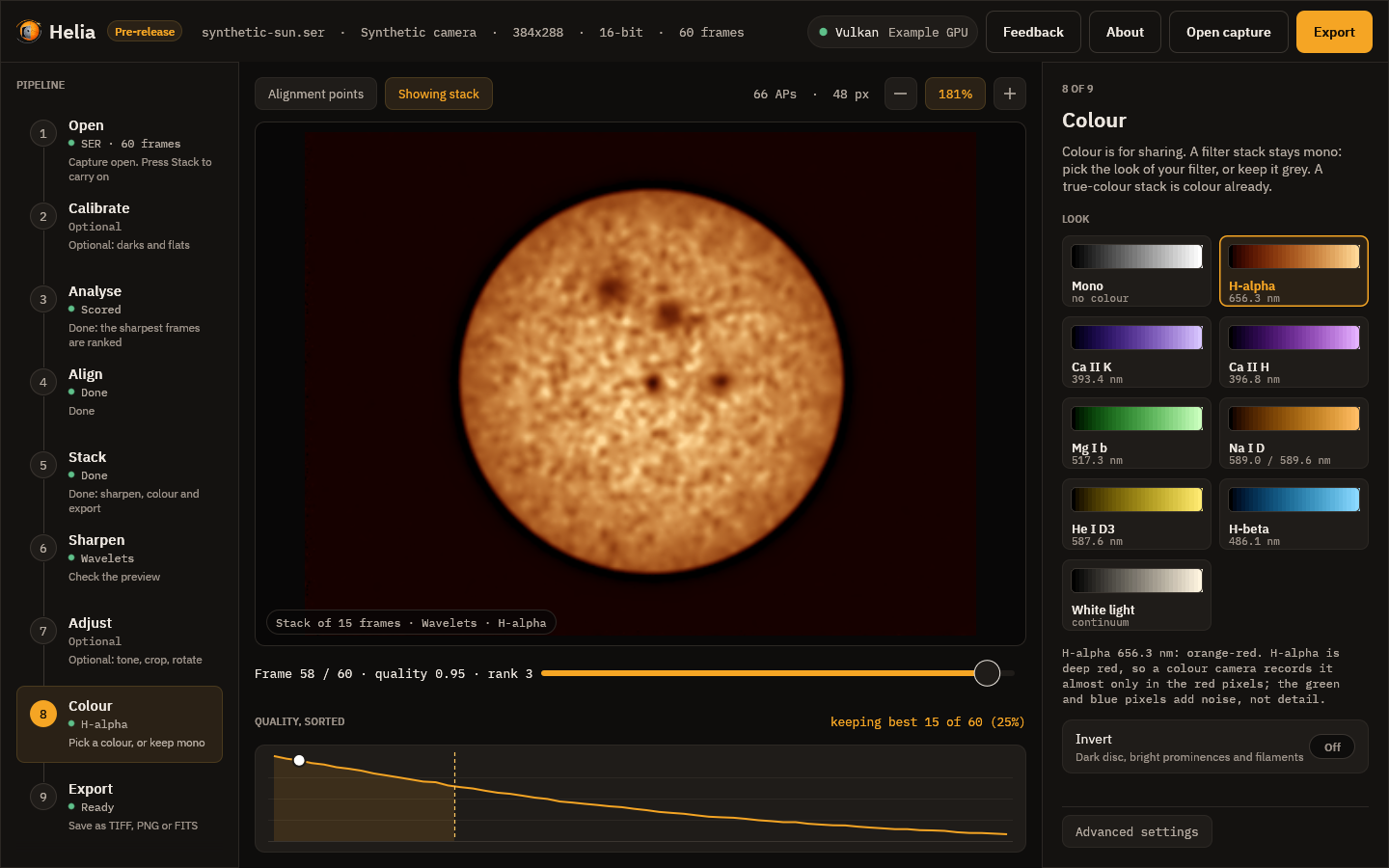
Choose a colour. Next is the Colour step. The stack is shown in the colours of your filter, such as orange for H-alpha. Pick another look if you like, turn on Invert to bring out prominences, or keep it grey. Colour is for sharing; see Colourising.
-
Export. Choose TIFF, PNG or FITS and press Save as, or press Ctrl+E. The step says exactly what will be written, such as 16-bit RGB TIFF, H-alpha colours, with the edits. A FITS file is the unsharpened stack unless you turn on Edit the FITS too.
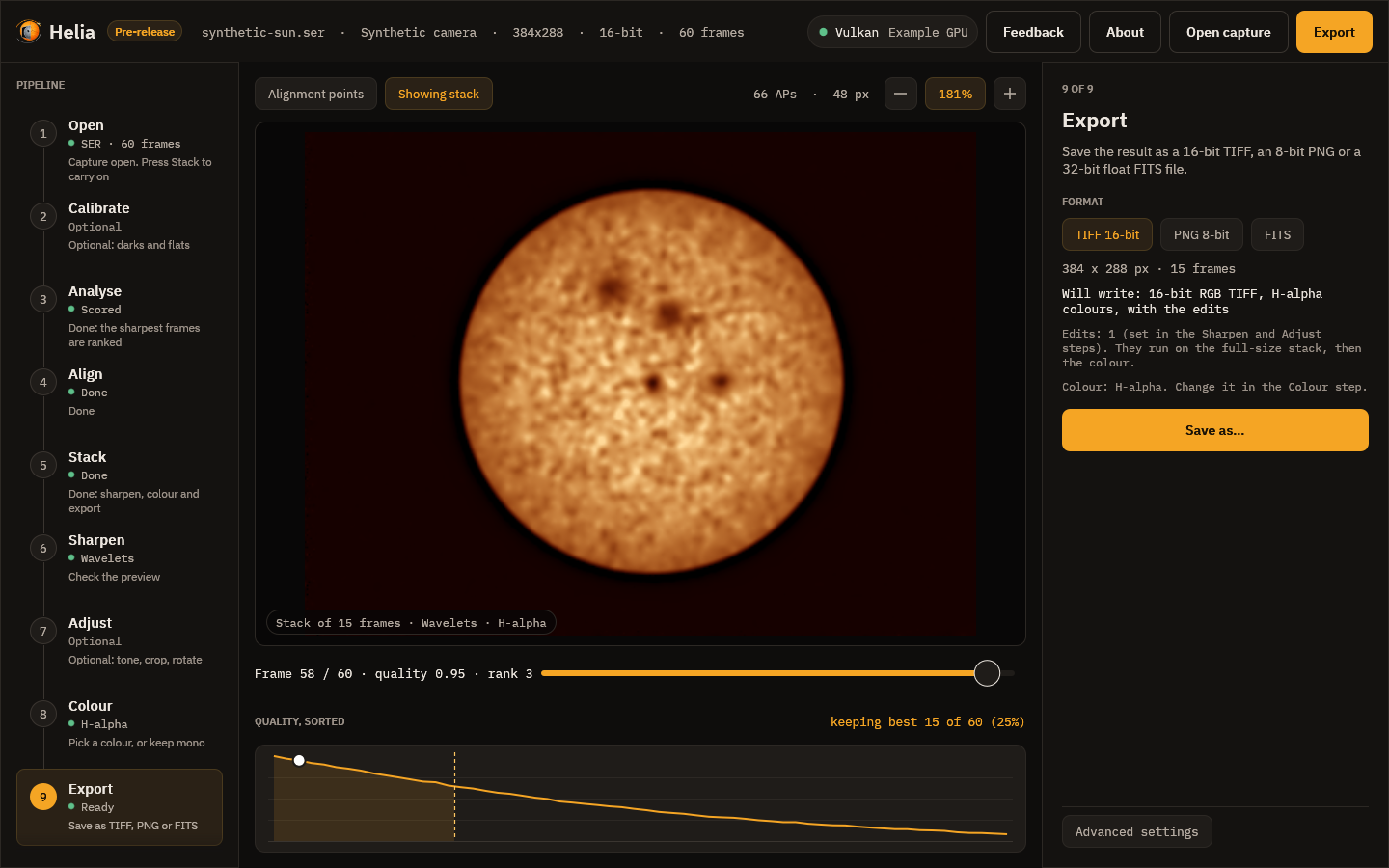
Every step in the rail on the left carries a one-line hint about what to do next: Open a capture, Ready: press Stack, Done: sharpen, colour and export. If you want to change a setting, the other steps hold them, and Advanced settings at the foot of the right-hand panel shows the backend, demosaic method and channel. Using the desktop app describes every control.
With the command line
First, check Helia can read the file:
helia info synthetic-sun_Ha.ser
file:        synthetic-sun_Ha.ser
format:      SER
size:        320 x 288
colour:      Mono
depth:       16 bit
byte order:  header flag says little-endian, pixel data decoded as little-endian
frames:      400
timestamps:  absent
Then stack it. With nothing but an input and an output, Helia detects the filter, the channel and the alignment point size itself:
helia stack synthetic-sun_Ha.ser -o sun.tif
The output extension picks the format: .tif for a 16-bit TIFF, .png for an
8-bit PNG, .fits for FITS. Helia prints the choices it made, a line as each
stage starts, and then a summary. This is the real output for the synthetic
capture above, run on the CPU of a 24-thread server (--backend cpu); the
timings are that machine's, not a promise:
input:    SER 320x288 16-bit, 400 frames
backend:  CPU (24 threads)
settings: H-alpha (from "synthetic-sun_Ha"); keep 25%, alignment points 32 px
tip:      add --colour auto for H-alpha colours
[   0.0s] scoring frames
[   0.1s] building reference
[   0.1s] aligning frames
[   0.1s] measuring alignment points
[   0.3s] stacking
[   0.3s] finishing
[   0.3s] writing
frames:  400 total, 100 kept, 200 registered
points:  123 of 399 alignment points active
disc:    centre (164.5, 146.9), radius 100.4 px
detail:  stack 0.00526 vs best single frame 0.00525 (1.00x)
timing:  scoring frames 0.06s, building reference 0.01s, aligning frames 0.03s, measuring alignment points 0.12s, stacking 0.06s, finishing 0.00s (total 0.31s)
wrote:   sun.tif
Reading it:
- settings is what Helia chose and why. A colour camera in H-alpha would
also say
red channel. Anything you pass on the command line (--keep,--ap-size,--channel) wins over the recommendation. - kept is the number of frames that went into the stack. The default is
the best 25 per cent (12 per cent for the photospheric filters, white light and Na D); change it with
--keep 10%or--keep-frames 500. - registered is how many frames were aligned. With multi-point alignment Helia registers twice as many frames as it keeps, so each alignment point can choose its own best ones. See How stacking works.
- points is how many alignment points were bright and detailed enough to measure.
- detail compares the sharpness of the stack with that of the best single frame (a synthetic capture has nothing to sharpen, so it reads 1.00x), and timing gives the time of each stage.
--quiet hides the stage lines, the progress bar and the summary.
The file is greyscale. To colour it for your filter, add --preset, which also
applies the filter's recommended channel and frame share:
helia stack synthetic-sun_Ha.ser -o sun-ha.tif --preset ha
helia stack cak.ser -o cak.png --preset cak --invert
helia presets                      # the presets and what each does
--preset colours .tif and .png output. A .fits file stays mono and
unaltered; the preset is noted in its header. See
Colourising for what each look is and why.
Useful variations:
helia stack sun.ser -o sun.fits --keep 10%     # fewer, better frames, FITS output
helia stack sun.ser -o sun.tif --ap-size 48    # smaller alignment points
helia stack sun.ser -o sun.tif --backend cpu   # force the CPU
helia stack sun.ser -o sun.tif --quiet         # no progress bar, no summary
Add --sharpen wavelet to sharpen the stack with the recommended values for the
filter (and unsharp, rl or none); it runs on the mono stack before any
colour. A FITS file stays the unsharpened stack unless you add --sharpen-fits.
helia edit sharpens and adjusts an image that already exists. See
Sharpening and adjustments. The full list of options is in
The command line and the CLI reference.
What next
- Sharpen well, and know the risks: Sharpening and adjustments.
- Understand the colours and the presets: Colourising.
- Record a better capture: Capturing for Helia.
- Understand the settings: How stacking works.
- Something not right: Troubleshooting and FAQ.
Step by step
This part of the manual follows one job from start to finish in the desktop app, a screenshot at every step. It goes from a raw video of the Sun to a finished, coloured, sharpened picture, and says at each step what the controls do and what to look for. Read it once in order; afterwards the steps are reference.
- Open a capture: the header, what Helia will use, the overrides
- Quick stack: the one-button route
- Calibrate (optional): dark, flat and bad pixels, before anything else
- Analyse: which frames are sharp
- Align: alignment points, exclusions, the limb fit
- Stack: combining the best frames
- Sharpen: wavelets, unsharp mask, deconvolution
- Adjust: denoise, levels, curve, crop
- Colour: the filter looks
- Export: TIFF, PNG and FITS
- About
- Send feedback
The captures used
Three real captures of the Sun, taken on 17 July 2022 with a ZWO ASI482MC colour camera, are used throughout. They are copies, renamed so that the pictures show no folder names.
| Name in the pictures | What it is | Used for |
|---|---|---|
disc-sample.ser | A full disc, 1920 x 1080, 16-bit, 100 frames | The main walkthrough: analyse, align, stack, sharpen, adjust, colour, export |
ha-sample.avi | An H-alpha capture at 720 x 540, 8-bit, 1000 frames, with the SharpCap CameraSettings.txt beside it | The Open step with a filter Helia recognises from the file name |
bayer-sample.ser | 1920 x 1080, 8-bit, 631 frames, a SER whose header says mono although the pixels are a colour mosaic | The header view and the Bayer notice |
You can follow the same steps with your own captures; the numbers on your screen will differ.
How the screenshots were made
They are real: the application itself, running on those captures with its real worker threads, drawn to an image by the test harness and saved without being touched up. The graphics adapter named in the top bar is the one of the machine that made them (an NVIDIA A100 on a Linux build server), not a recommendation. Where a picture of the finished image is shown (the before and after pairs, the colour gallery) it is the image Helia writes, cropped or reduced in size, not a window.
The set is made by one test, real_capture_shots in
crates/helia-gui/src/real_shots.rs, which does nothing unless it is given a
capture. See Building and testing. The
other pictures in the book, under images/ui, are the synthetic snapshots that
the ordinary test run checks against the interface.
The app has its own scripted mode, helia-gui --open FILE --shots DIR, which
writes screenshots of a live window as it opens and stacks a capture. It needs a
window that is being painted and stops at the Export step, so the book uses the
off-screen test, which also reaches Sharpen, Adjust, Colour and About.
1. Open a capture
Press Ctrl+O, choose Open capture in the top bar, or drop a file on the window. Helia reads SER and uncompressed AVI files, and with the optional ffmpeg installed also MP4, MOV, MKV and WebM (see Installation).
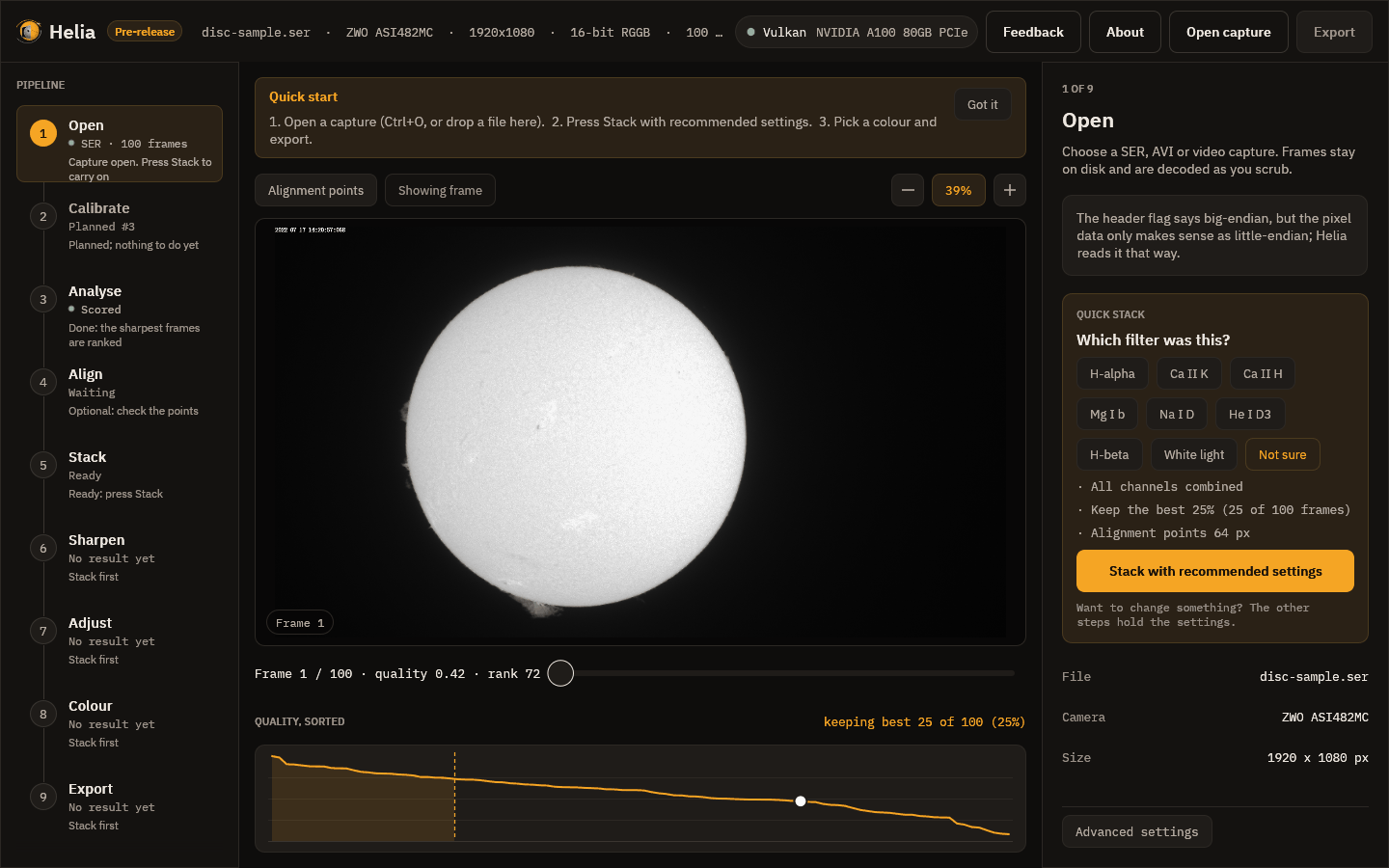
While it opens, a notice above the picture says Opening the file and indexing its frames. Nothing is loaded into memory: the frames stay on disk and are decoded as you scrub.
What you see
- Top bar. The Helia name with a Pre-release badge while the version is below 1.0, then the file name, the camera, the frame size, the bit depth with the Bayer pattern, and the number of frames (a long line is cut short with an ellipsis). On the right, the compute backend, then Feedback, About, Open capture and Export.
- Pipeline rail on the left: nine steps, each with its state and a one-line hint. Click a step to select it.
- Viewer in the middle: the first frame, a frame scrubber (drag it, or use the arrow keys) and the quality curve, every frame's sharpness sorted from best to worst. The dashed line marks where the frames you will keep end.
- Inspector on the right: the settings of the selected step. In Open it holds the notice about the file, the Quick stack card, the file facts and the overrides.
In the picture above, Helia noticed something about the file: the header flag says big-endian, but the pixel data only makes sense as little-endian; Helia reads it that way. That is a common quirk of SER files and it is handled for you. Every such decision is written down in the notice, never made silently.
A capture Helia recognises
Helia reads the filter from the file name, the folder, the SharpCap sidecar and
the SER header. This capture is called ha-sample.avi, so Helia knows it is
H-alpha and says where it got that from:
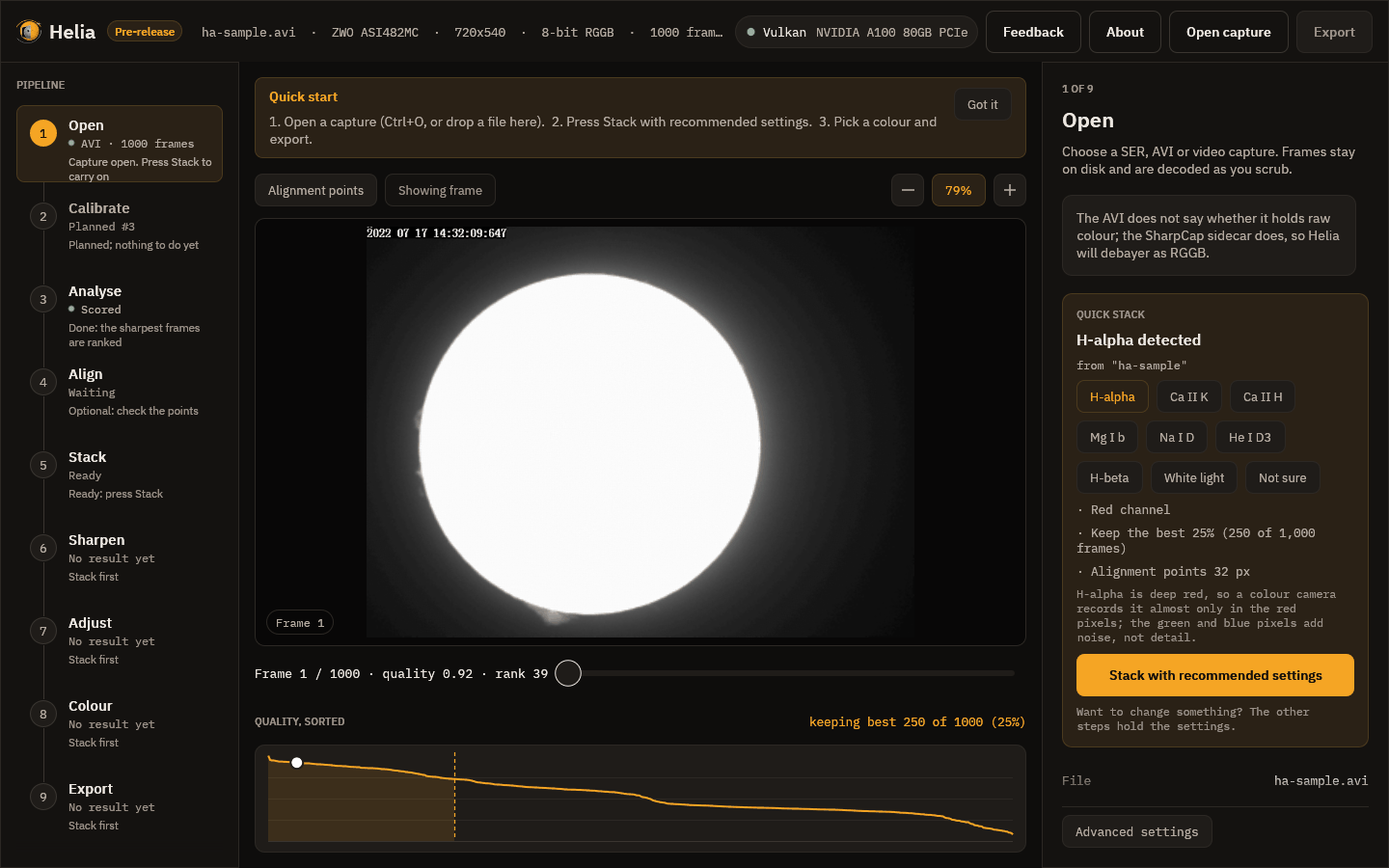
The card lists what it will use: the red channel (H-alpha is deep red, so a colour camera records it almost only in the red pixels), the best 25 per cent of the frames (250 of 1,000) and an alignment point size. The note above the card says the AVI does not state its Bayer pattern but the SharpCap sidecar does, so Helia debayers it as RGGB. If the filter's name is not in the file name, the card asks Which filter was this? and you press the right one, or Not sure for plain defaults, as in the first picture.
When the header is wrong
Some recorders label a colour camera's raw frames as mono. If you stacked such a file as it says, you would get a fine grid in the result. Helia checks the pixels of a SER file that says mono, and when it finds a mosaic it tells you:
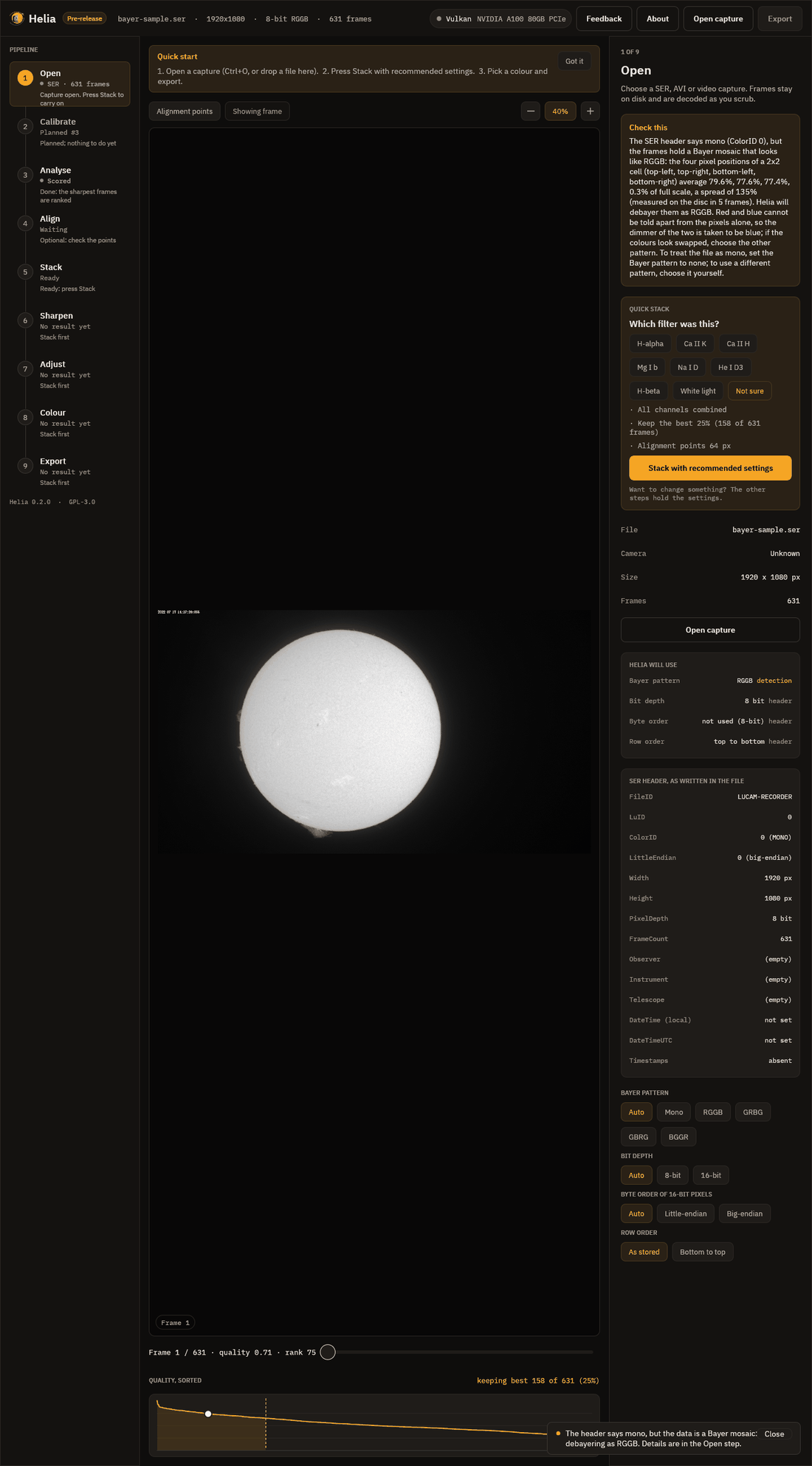
Read the picture from the top:
- Check this explains, in words, what the file says and what the pixels say. Here the header says mono (ColorID 0), the pixels are an RGGB mosaic, and Helia will debayer as RGGB. A short message also appears at the bottom of the window.
- Helia will use lists the Bayer pattern, bit depth, byte order and row order
with where each came from:
header,sidecar,detectionoroverride. Anything that is not straight from the header is shown in the accent colour. Here the Bayer pattern isRGGB, fromdetection. - SER header, as written in the file shows every field exactly as stored: FileID, ColorID with its meaning, endianness, size, depth, frame count, observer, instrument, telescope, and whether times are set.
- The overrides, the rows of buttons at the foot: Bayer pattern, bit depth,
byte order and row order. Each reopens the capture with your choice, and the
list above updates to show
overrideas the source.
If Helia is right, do nothing. If you know better, press the pattern that is true
(or Mono if the file really is mono). If the colours come out swapped after
stacking, try the other pattern of the same family: RGGB or BGGR, GRBG or GBRG.
The recipe Fixing a Bayer grid covers it, and
helia info on the command line prints the same lists.
Overrides belong to the file: opening another capture starts again from Auto.
Next
Quick stack is the one-button route. If you want to see each step instead, go on to Analyse.
2. Quick stack
The Stack with recommended settings button on the Open step does the whole middle of the job for you: it applies the settings on the card, scores and aligns the frames, stacks the best of them, and moves on to Sharpen with the filter's recommended wavelets already applied.
Use it when you want a good first picture. The rest of the steps then become a place to adjust, not a place you must visit.
What happens when you press it
- A notice above the picture names the current stage, with a progress bar, the time left, and a Cancel button. The stages are Scoring the frames, Building the reference image, Aligning the frames, Measuring the alignment points, Stacking the best frames and Finishing the image.
- When it ends, a message at the bottom right says how it went. For the full-disc capture: Stacked 25 of 100 frames in 1.9 s. For the 1,000-frame H-alpha capture: Stacked 250 of 1,000 frames in 2.7 s. (The times are those of one machine with a GPU, not a promise.)
- The viewer switches to the stacked image and the Export button lights up.
- Helia moves on to Sharpen.
If something looks wrong, the settings are in the other steps, and pressing the button again puts the recommended settings back.
Do I need the other steps?
Often not. The steps exist so that you can look closer when a result disappoints:
| If | Look at |
|---|---|
| Frames you expected to be best are ranked low | Analyse |
| The grid of alignment points sits on text or sky | Align |
| The stack is soft, or too noisy | Stack and Sharpen |
| The brightness or contrast is off | Adjust |
| You want colour, or want it differently | Colour |
Calibrate (optional)
The second step in the rail. It is optional, and skipped by the quick stack, but if you recorded darks and flats it is the first thing to do: everything after it works on the calibrated frames.
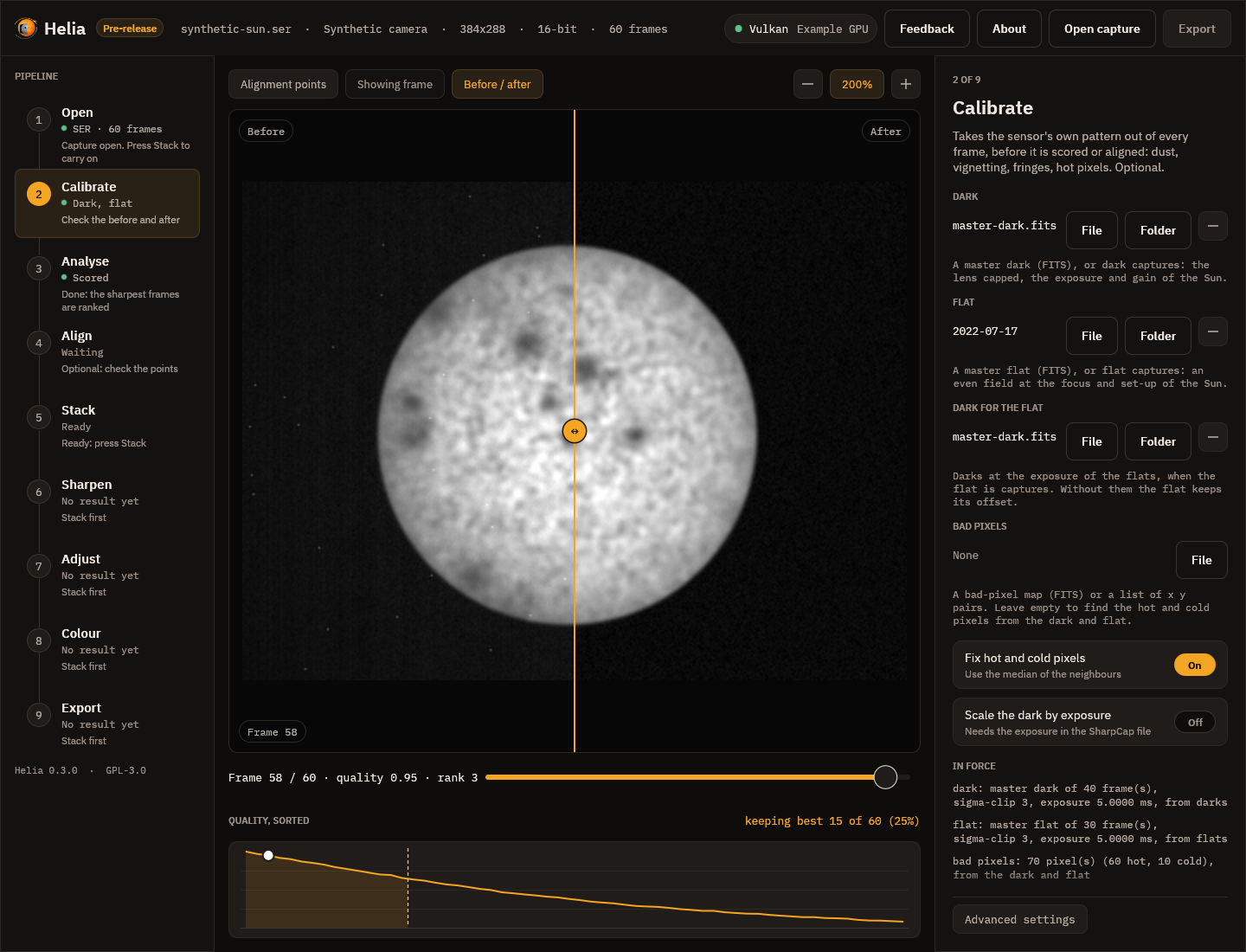
The picture is synthetic on purpose: a sun seen through a sensor with a strong vignette, dozens of dust shadows, a fixed pattern and sixty hot pixels, which the masters made from that sensor's own darks and flats take out. On a real capture the effect is subtler and this is how you check it: drag the line across the picture and watch the dust, the fall-off at the edge and the speckle in the sky.
What to do
- Press File under Dark and pick a master dark (
master-dark.fitsfromhelia calibrate), or Folder and pick a folder of dark captures. The rail shows Preparing while Helia reads or builds it. - Do the same for the Flat. If the flat is captures, a Dark for the flat slot appears; give it darks at the exposure of the flats.
- Leave Bad pixels empty and the hot pixels of the dark and the dead pixels of the flat are found and replaced, or give your own map.
- Read what the inspector says under In force: how many frames each master combines, the exposure and a fingerprint of the pixels, and any warning. A flat with Newton rings or an etalon's fringes is flagged here, and so is strong vignetting; see Etalons and Newton rings.
- Press Save the masters to write them to a folder, so that next time you can pick the files and skip the combining.
- Press Stack (or Stack with recommended settings) as usual. The frames are scored, aligned and stacked after calibration, and the file records the masters.
A master must come from the same camera, mode and region as the capture; Helia refuses a mismatch and says which. Changing a file scores the capture again, and a stack made before the change is out of date.
Next
3. Analyse
As soon as a capture opens, Helia scores every frame for sharpness, in the background. The rail shows Scoring and then Scored; while it works a notice shows a count and the time left. You can look at the capture meanwhile.
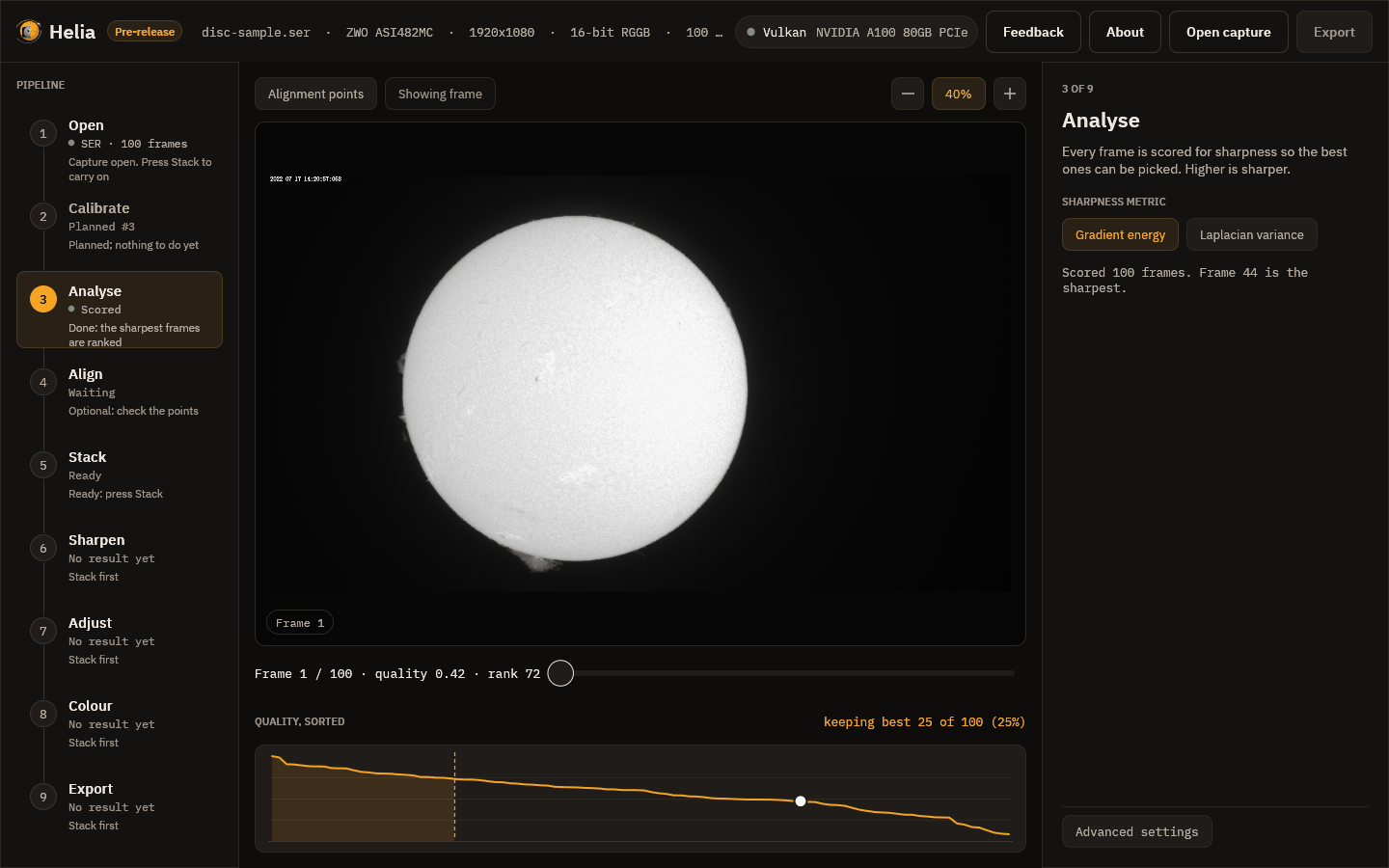
The quality curve
Under the viewer, Quality, sorted plots every frame's score from the best on the left to the worst on the right. Read it like this:
- A curve that falls steeply at the left and then flattens means a few frames were much sharper than the rest, which is typical in poor seeing. Keeping fewer frames helps.
- A curve that is nearly flat means the seeing was steady, or the frames are all about as good, and keeping more frames costs little.
- The dashed line marks where the kept frames end, the shaded area is the kept set, and the white dot is the frame on screen. Hover to read a rank; click to jump to that frame.
The scrubber reads, for example, Frame 1 / 100 · quality 0.42 · rank 72. Quality
runs from 0 (the worst frame) to 1 (the best); rank 1 is the sharpest. So this
first frame is not one of the best, which is why Helia ranks the frames itself and
does not trust the order they were recorded in.
The metric
The inspector offers two ways to score a frame:
- Gradient energy, the default, is the mean squared gradient of the frame.
- Laplacian variance is the variance of the Laplacian.
Both ignore overall brightness, so a brighter frame does not look sharper. Changing the metric scores the capture again. Most users never change it; see How stacking works.
Next
4. Align
The air bends the picture differently across the disc from moment to moment, so Helia does not only line the whole frame up with the others. It also measures the drift of many small windows, the alignment points (APs), and shifts each part of each frame separately. This step shows and controls those windows.
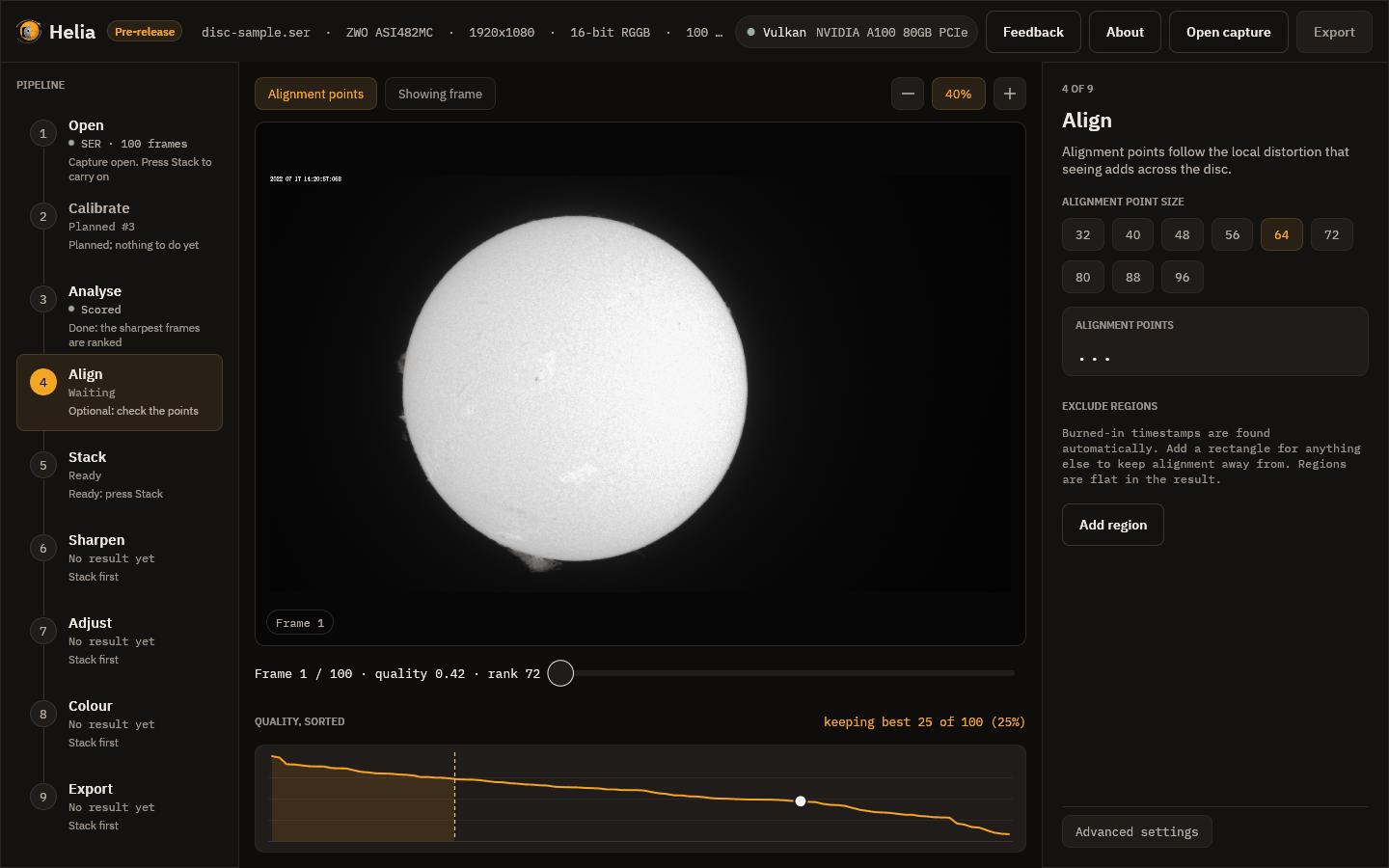
The grid
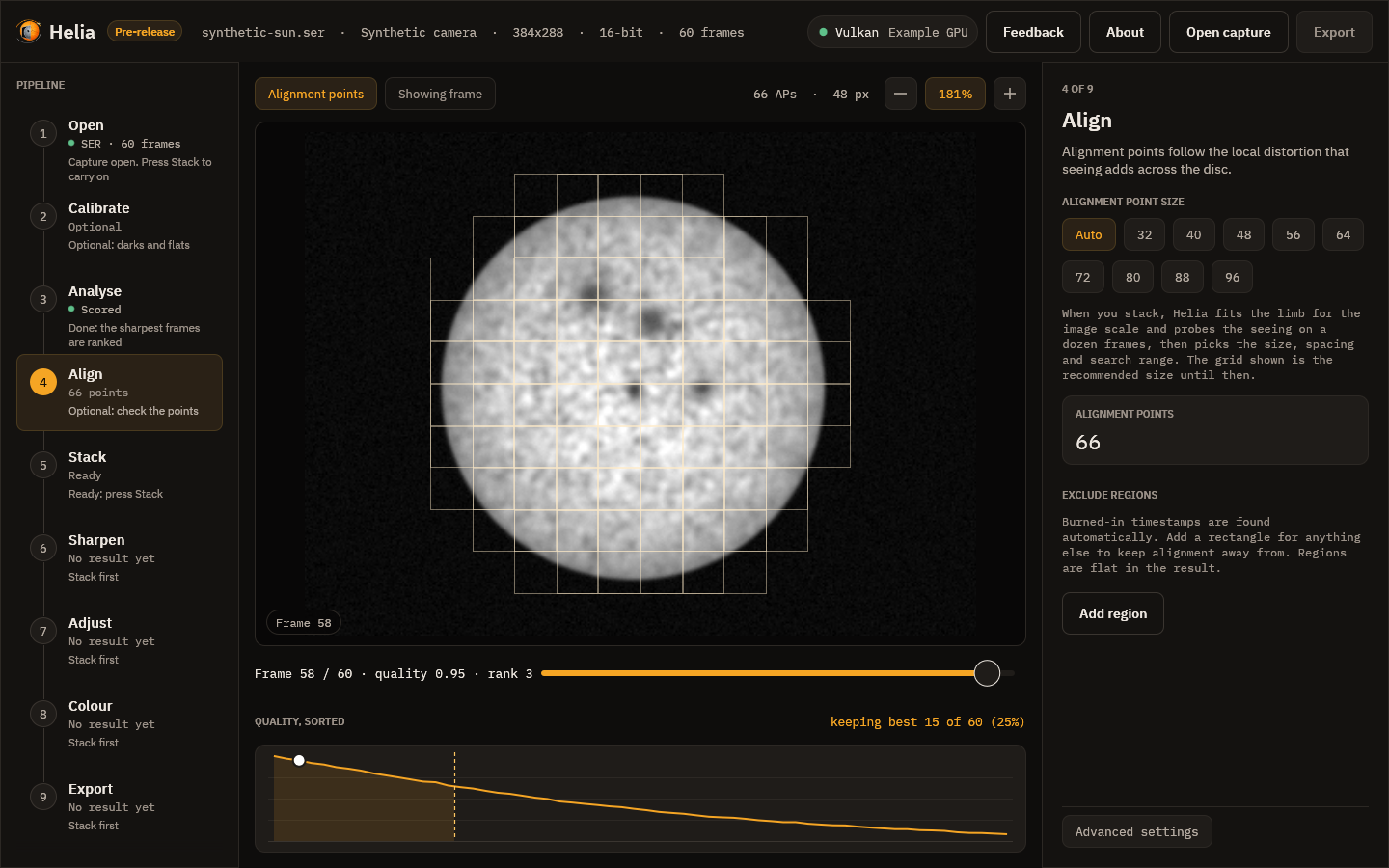
Turn the grid on with the Alignment points chip above the picture. Each thin square is one alignment point. In the picture there are 612 of them, 64 pixels across, laid over the disc only: a point is drawn only where the stack will use it, which means its centre is inside the fitted limb of the Sun, and no part of it touches burned-in text or a region you excluded.
Point size
The inspector offers sizes from 32 to 96 pixels in steps of 8. The size Helia recommends for your image is already selected (64 here, 32 for the smaller H-alpha AVI).
- Smaller points follow finer detail and distortion, but need contrast to lock on to. On a smooth, low-contrast area they cannot, and Helia marks them inactive.
- Larger points are steadier on soft detail but average the distortion over a wider patch.
The card shows how many points are active, that is bright and detailed enough to measure. After a stack, a second card shows the median drift of the frames from the reference, in pixels.
Auto
The Auto chip lets Helia choose when it stacks, instead of a fixed size. It fits the limb of the reference to get the image scale in arcseconds per pixel, registers a dozen of the frames it will stack and measures how far each alignment point strays from its frame's median shift, then picks the window, its spacing and how far to search. The line under the chips says what to expect, and after a stack what was chosen. Picking a size turns Auto off.
After a stack the grid drawn on the frame is the chosen size.
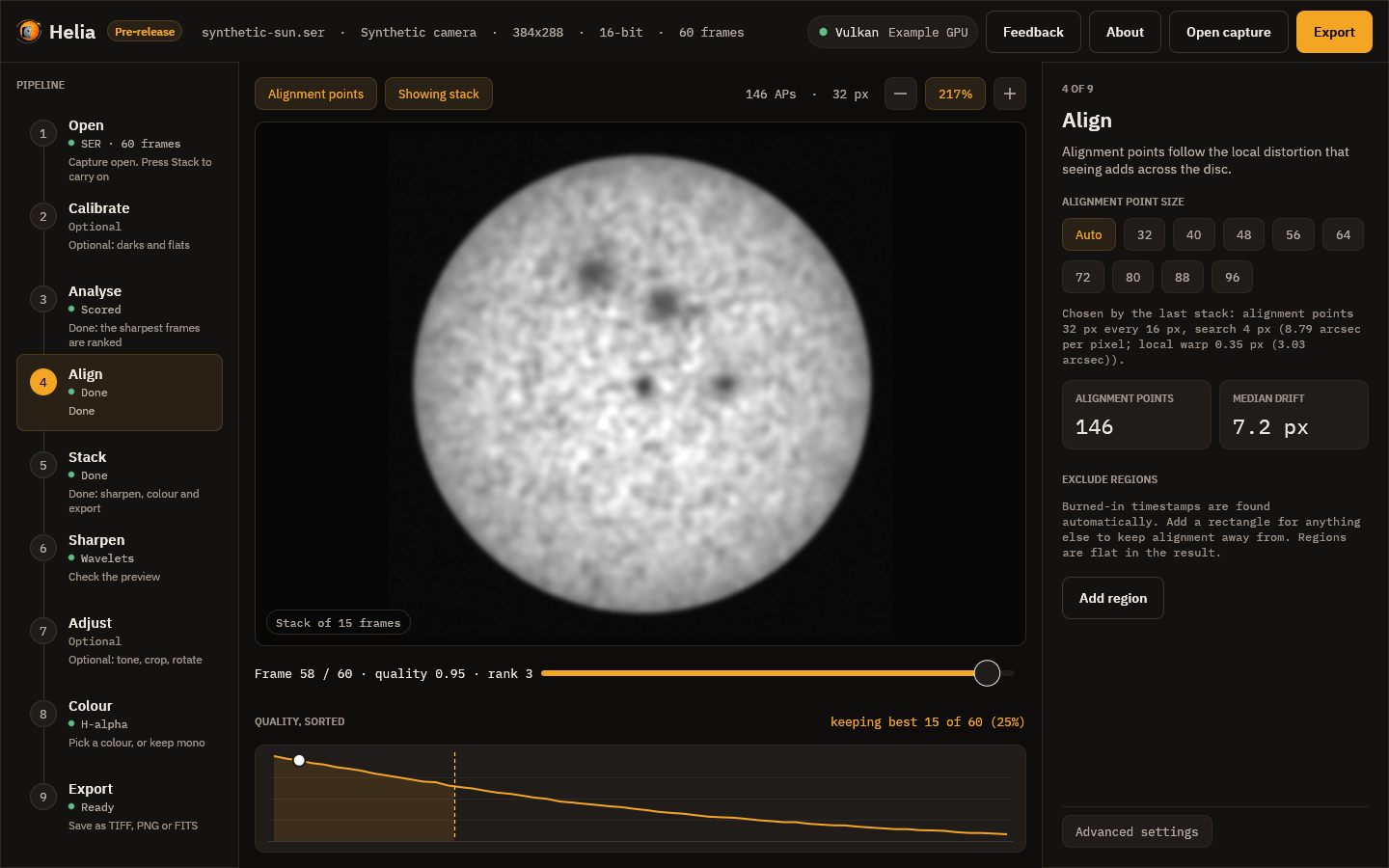
These pictures are of a synthetic capture. The note reads, for instance, Chosen by the last stack: alignment points 32 px every 16 px, search 4 px (8.79 arcsec per pixel; local warp 0.35 px (3.03 arcsec)). How the choice is made and how it measured on real captures is in How stacking works.
Exclude regions
A burned-in capture timestamp is found automatically (look at the top left of the
frame: Helia kept the grid off the date text). For anything else, such as a logo
or a stray label, press Add region, then set its x, y, width w and height
h in pixels. The rectangle is outlined in amber on the frame, and alignment and
quality scoring stay off it.
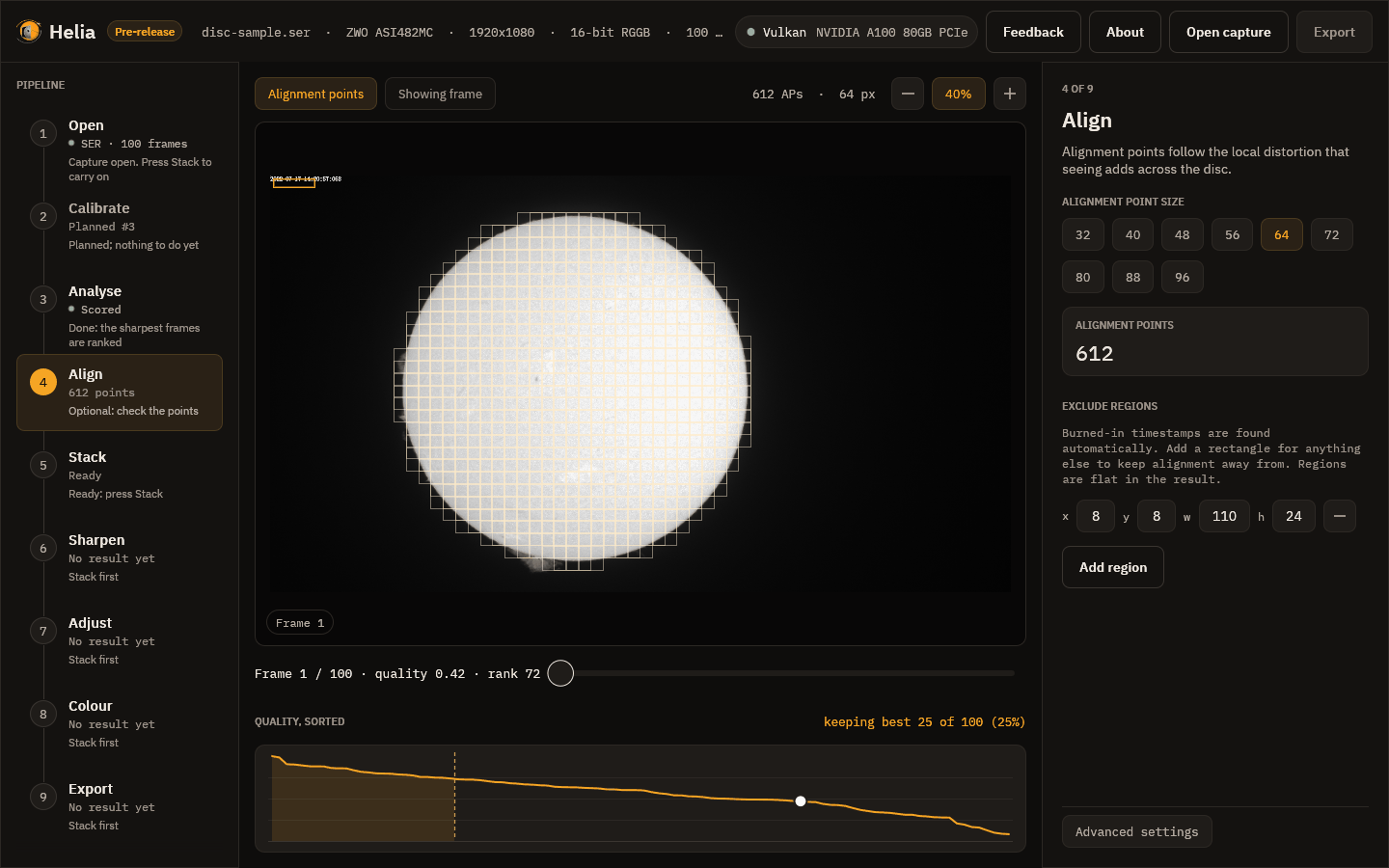
Excluded areas are flat in the stacked result, so do not exclude part of the Sun you care about. Use the minus button to remove a region. Changing the list scores the capture again, because the scores depend on it.
How whole frames are aligned
Before the points, each whole frame is lined up with a reference. Helia chooses:
- the solar limb when the full disc is in view and the fit is confident, which uses the edge of the Sun and so ignores sunspots and the timestamp;
- phase correlation for a cropped region, where there is no whole disc to fit.
After a stack, a line under the Stack button says which was used and how
confident it was, for example Aligned by limb fit, confidence 0.90; hover it for
the reason. The app has no switch for it. To force one, use --align limb or
--align phase on the command line, or align in an API job.
Prominences
By default points stay on the disc. To let them follow prominences just outside
the limb, use --prominence-band PX on the command line.
Next
5. Stack
This step holds the settings of the combine, and the button that runs it.
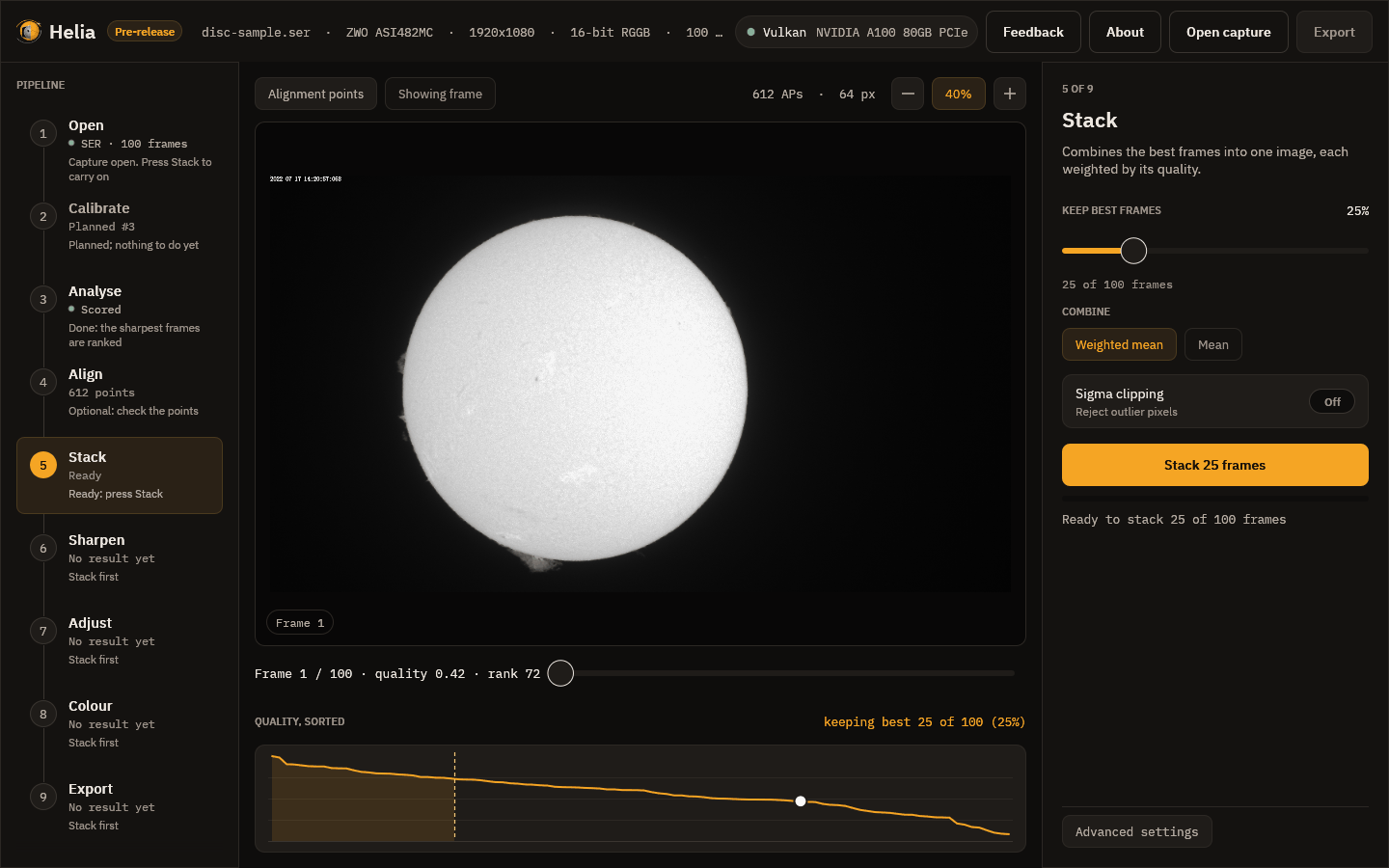
The settings
-
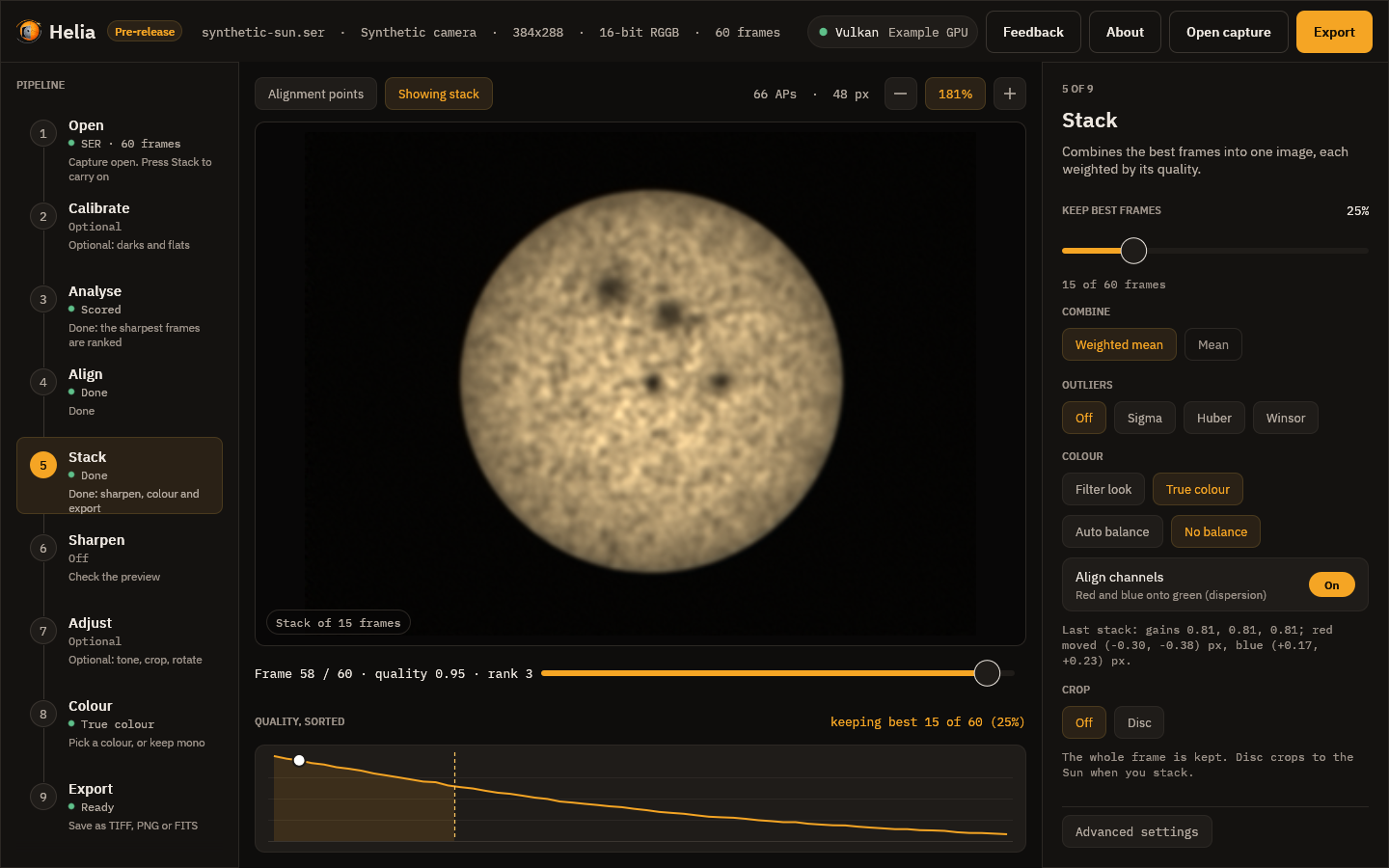
Keep best frames is the share of frames, ranked by quality, that go into the stack, from 5 to 100 per cent in steps of 5. The line underneath turns it into a count: here 25 per cent of 100 frames is 25. Fewer frames means a sharper but noisier picture; more means smoother and softer. The recommended share for a filter is the best starting point: 25 per cent for H-alpha, sodium, He D3 and white light, 30 per cent for the fainter lines (see Colour presets).
-
Combine is a weighted mean: each kept frame counts in proportion to its quality. A plain mean is listed but not available yet.
-
Outliers deals with pixels that are far from the others, such as a passing bird or a hot pixel: Sigma throws them out, Huber gives them less weight and Winsor pulls them in. It is off by default and makes the run slower.
-
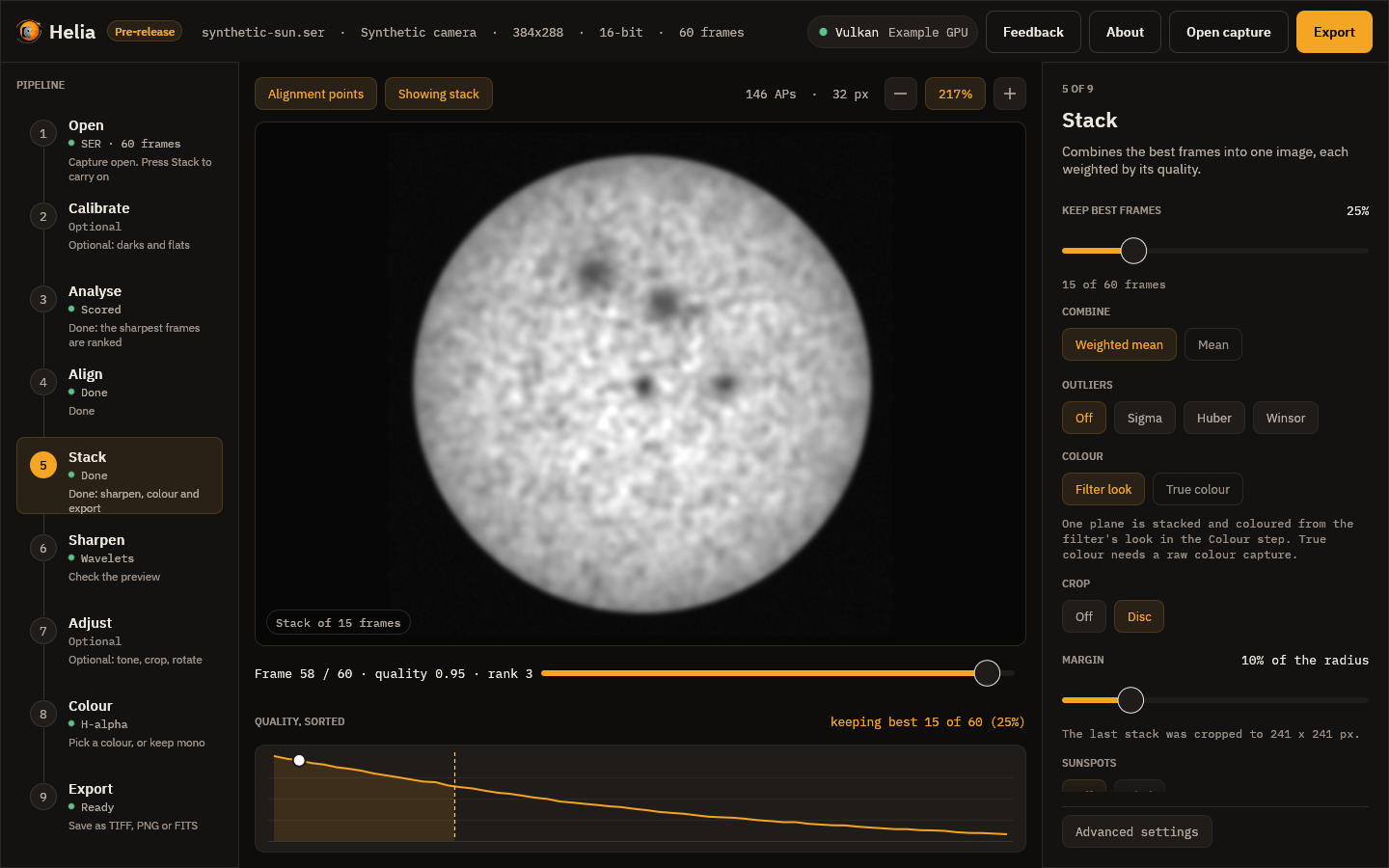
Colour is Filter look (one plane, coloured later in the Colour step) or True colour, which stacks red, green and blue of a raw colour capture on one alignment and balances them: for white light. Its Auto balance or No balance and Align channels (red and blue onto green, for atmospheric dispersion) appear when it is chosen, and the chip is disabled for a capture that is not a Bayer mosaic. See True colour.
-
Crop is Off (the whole frame) or Disc, which cuts the result to a square around the fitted solar disc with a margin you set (10 per cent of the radius to start with; prominences seldom reach 5 per cent). The note under it says what will happen and, after a stack, the size it was cropped to. A capture with no clear disc is left whole and the note says so.
-
Stack N frames starts the run.
While it runs
A notice above the picture names the stage, shows the percentage and the time left, and has a Cancel button; the thin bar in the inspector shows overall progress. Cancelling stops the run without losing your settings. These are the stages:
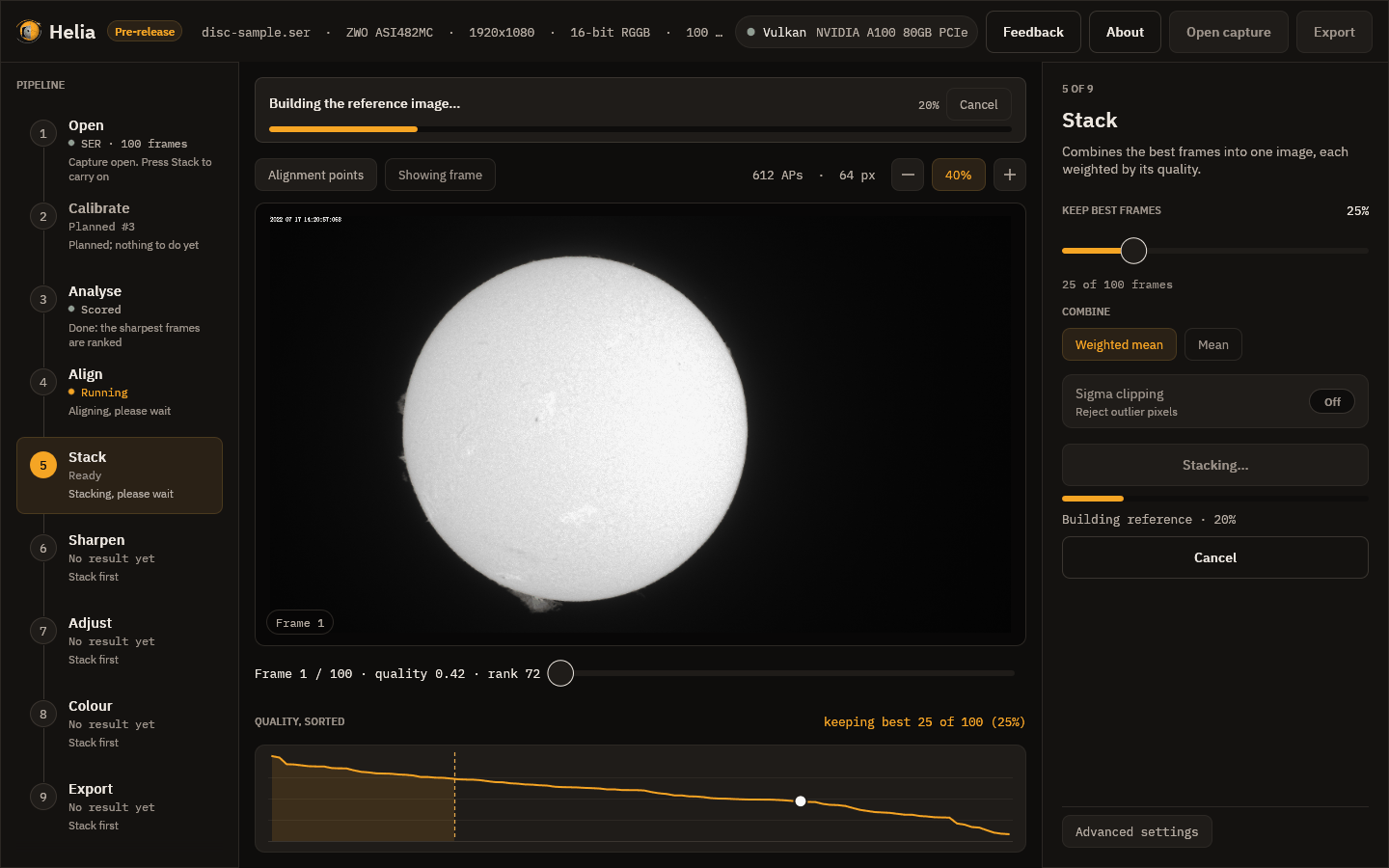
- Scoring the frames, if not already done.
- Building the reference image: a first stack of the best frames to align against.
- Aligning the frames: the whole-frame step.
- Measuring the alignment points: each point's drift in each frame.
- Stacking the best frames: the weighted mean with every point's shift applied.
- Finishing the image.
The result
When it finishes, a message reports the frames used and the time taken, the viewer switches to the stacked image, Export lights up and Helia moves on to Sharpen.
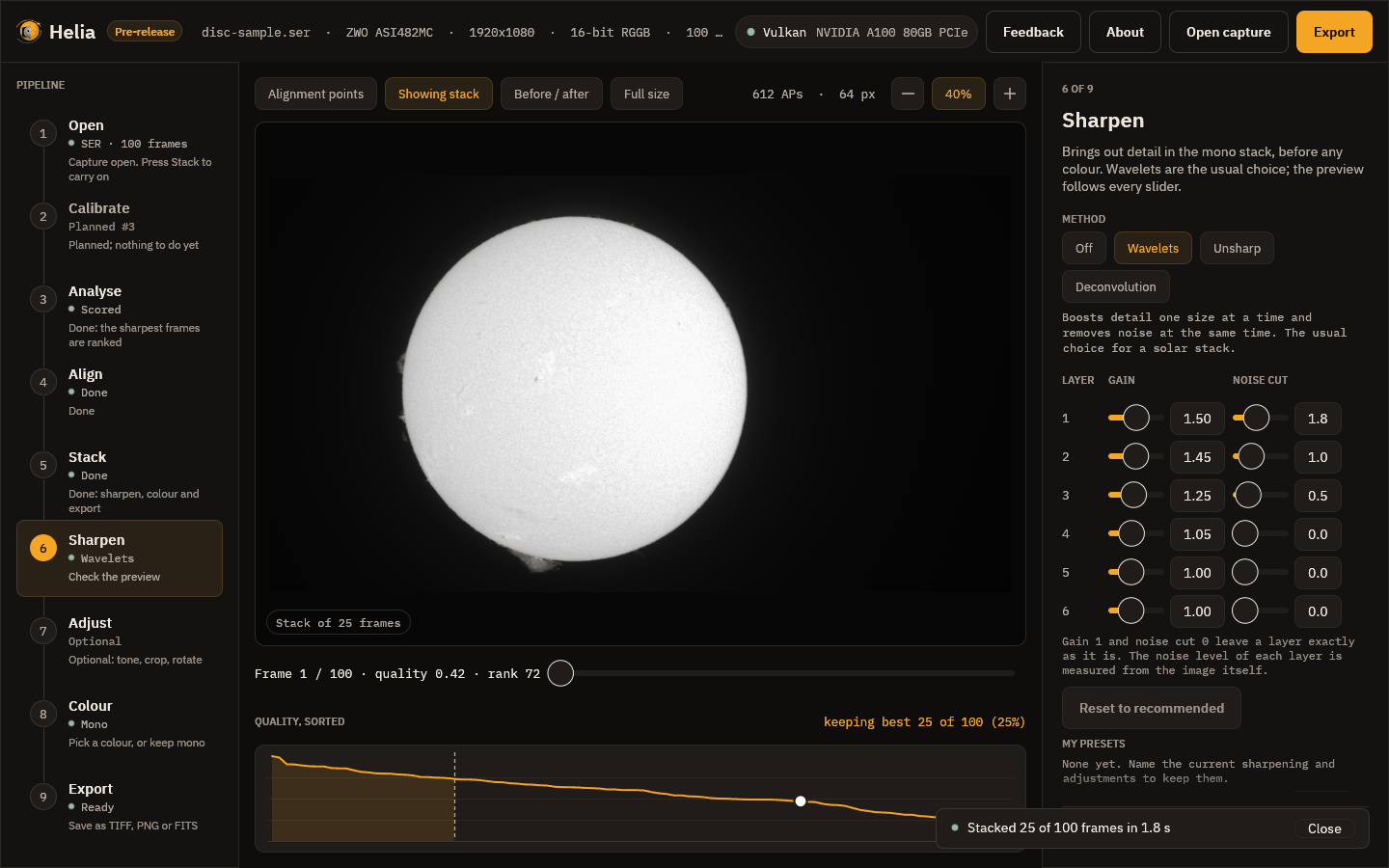
The stack is mono. It looks soft compared with a good single frame at first glance, and that is expected: it is smooth because the noise has been averaged away, and the sharpening step is where the fine detail is brought back. For how the maths works, see How stacking works.
Next
6. Sharpen
A stack is clean but soft. This step brings the fine detail back. It works on the mono stack, before any colour, and is non-destructive: your choices are a list of operations applied to the stack for the preview and again, at full size, when you export.
Sharpening can create artefacts. Halos beside bright edges, ringing at the limb and round sunspots, and noise that turns into a texture that looks like detail. None of the methods can add detail that the telescope and the seeing did not record. Ease off as soon as the picture looks different in kind rather than just crisper.
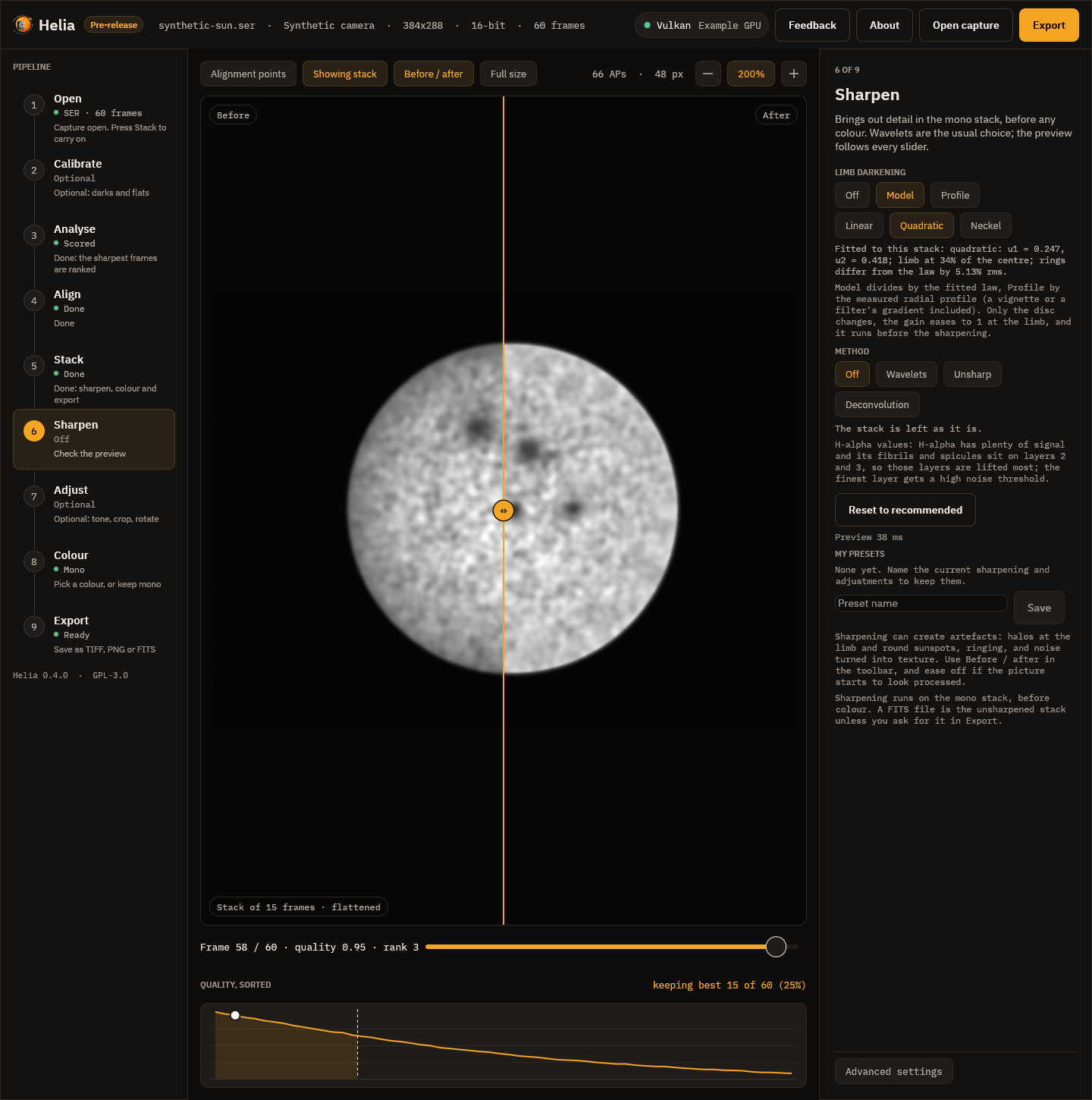
Limb darkening
The first control is Limb darkening: Off, Model or Profile, and the law to fit (Linear, Quadratic, Neckel). The line under the chips is the fit made on your stack, for example quadratic: u1 = 0.470, u2 = 0.046; limb at 48% of the centre; rings differ from the law by 0.67% rms. Model divides the disc by that law and Profile by the measured radial profile, so the sharpening below sees flat contrast from the centre to the limb. Only the disc changes. It is off by default; try it with Before / after, and see Limb darkening for what the fit measures on real captures.
The method chips
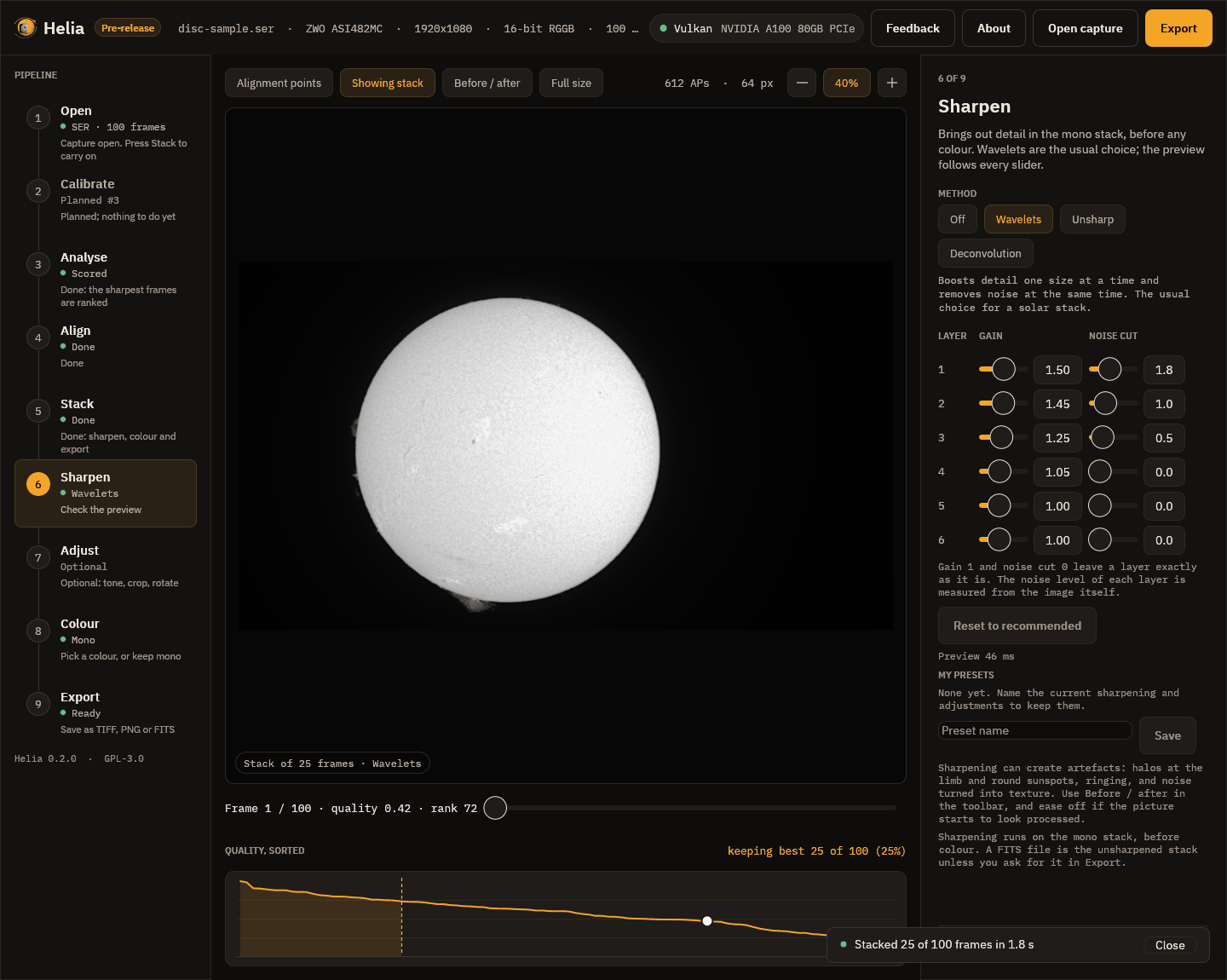
The row of chips at the top picks the method: Off, Wavelets, Unsharp or Deconvolution. Helia has already switched on the recommended wavelets for your filter, so the picture you see when you arrive is sharpened. Press Off to see the plain stack. Every slider updates the picture as you drag it, and a line says how long the last preview took (42 ms in the picture).
Two chips above the picture help you judge: Before / after splits the picture at a line you can drag (the stack as it was on the left, with your edits on the right), and Full size renders the preview at full size rather than shrunk. A preview is a close look, not a proof: what is written is always made from the full-size stack.
Wavelets
The image is split into six layers by the size of detail. Layer 1 holds the finest detail and most of the noise, layer 2 fine detail such as granulation and fibrils, and higher layers bigger structure. Each layer has a gain (1 leaves it alone, above 1 sharpens it) and a noise cut (detail weaker than this many noise sigmas is treated as noise and removed). The recommended values for a filter are in Sharpening and adjustments. Reset to recommended puts them back.
Here is the effect on the real full-disc stack. This is a crop of the stacked image, the plain stack on the left and the recommended wavelets on the right:
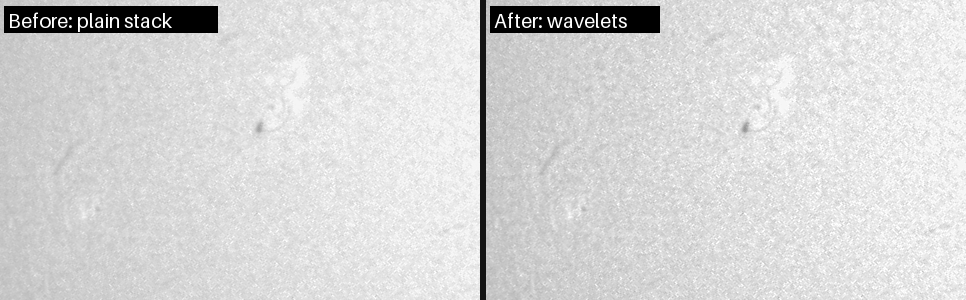
The change is modest, and it should be: this is 25 frames, in an ordinary afternoon's seeing. The filament at the left and the bright plage at the top right are crisper and the background grain is finer, not coarser.
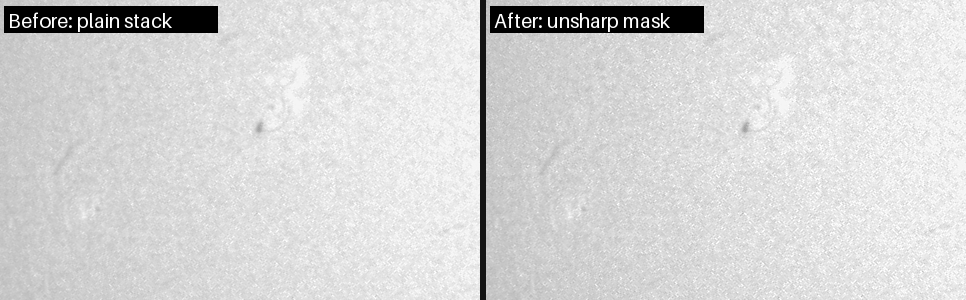
Unsharp mask
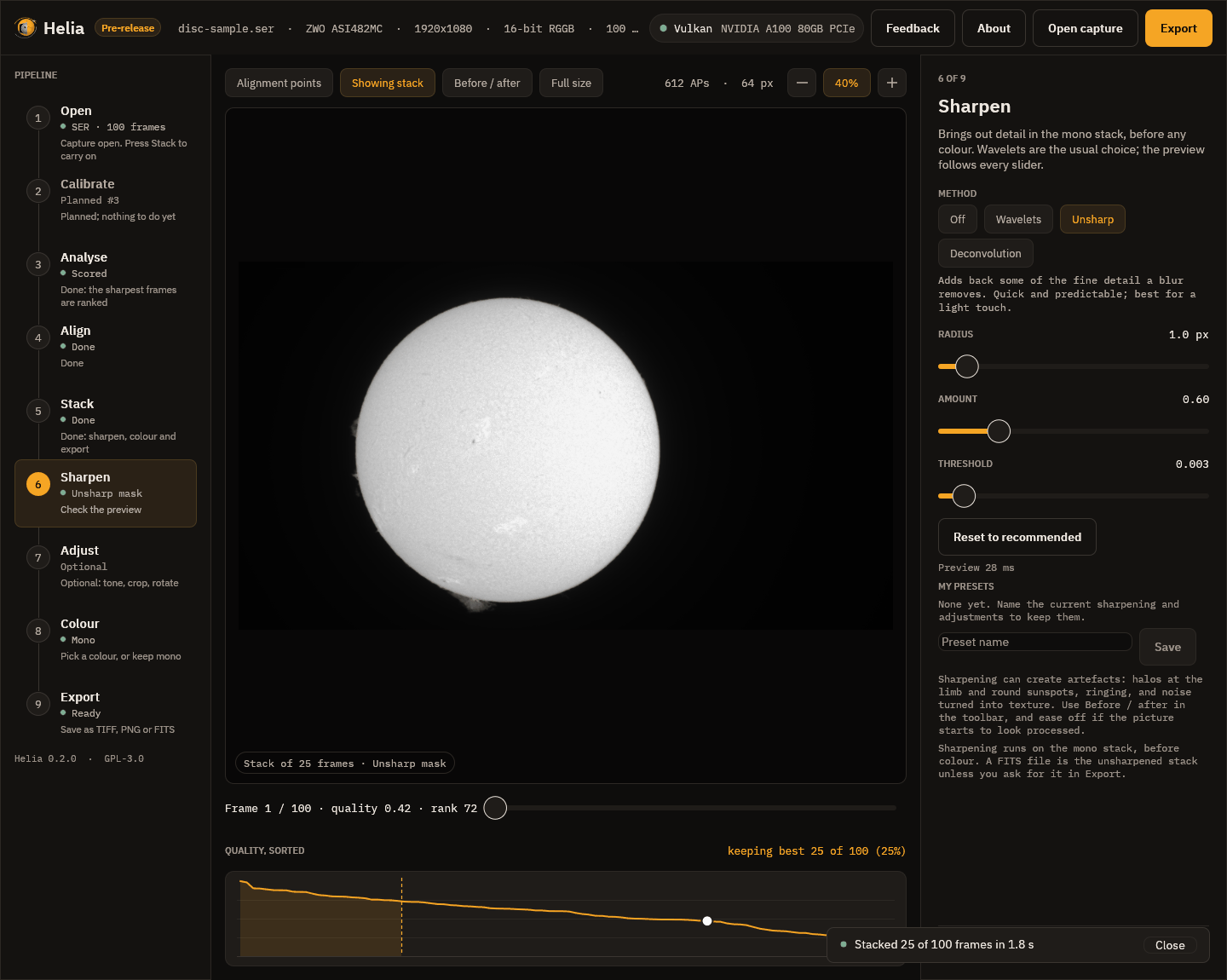
The radius is the size of the blur that is subtracted, which picks the size of detail that is boosted. The amount is how much of the difference is added back (0.6 is gentle, 2 strong). The threshold leaves weaker detail alone so noise is not boosted. It is a light, predictable touch:
Deconvolution
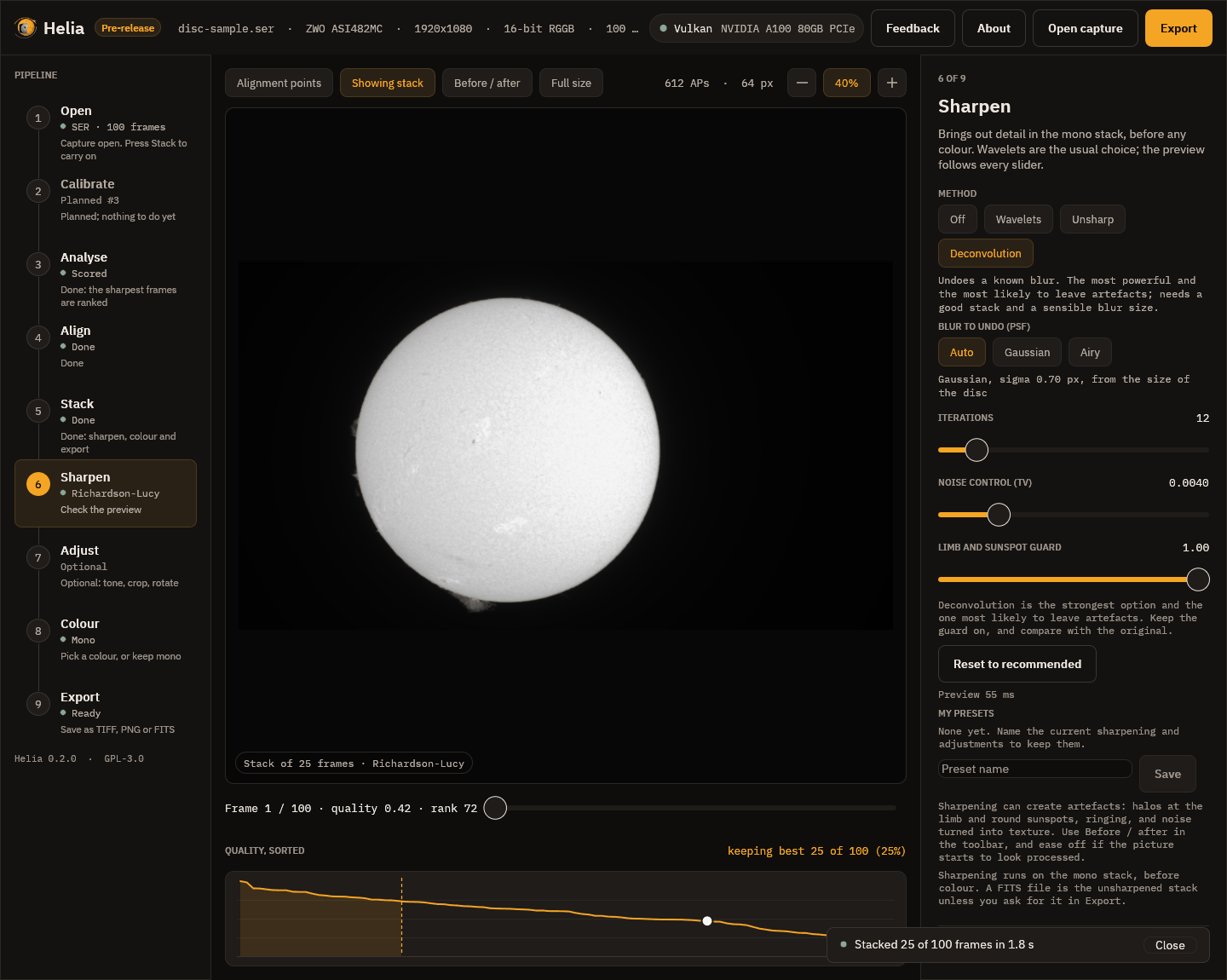
Richardson-Lucy deconvolution tries to undo the blur itself, by repeated correction. It has the blur to undo (the PSF), the number of iterations, a noise control and a limb and sunspot guard that stops the bright halo that a bright edge would otherwise grow. It is the strongest and the riskiest method.
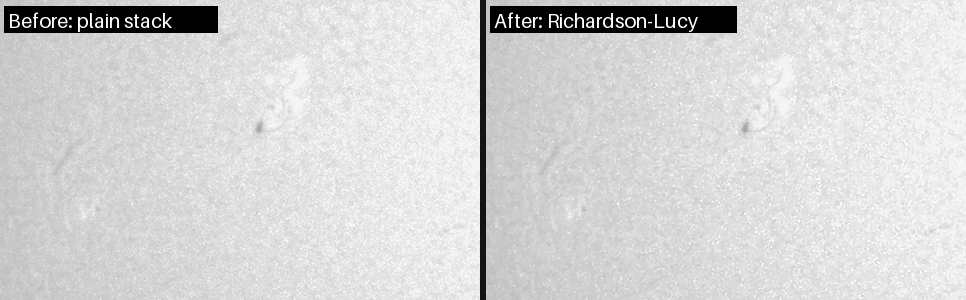
On this capture it gains little and makes the grain coarser, which is why wavelets are the default: stop when noise starts to look like texture. The page Sharpening and adjustments has the measurements on four real captures.
My presets
My presets, below the controls, keeps the whole set of sharpening and
adjustments under a name. Type a name and press Save; press a preset to use it.
The command line takes the same presets with --edits.
Next
7. Adjust
Everyday edits, each optional and each recorded in the file. They are applied after the sharpening, in a fixed order: denoise (before the sharpening), levels, curve, crop, rotate, flip, resize.
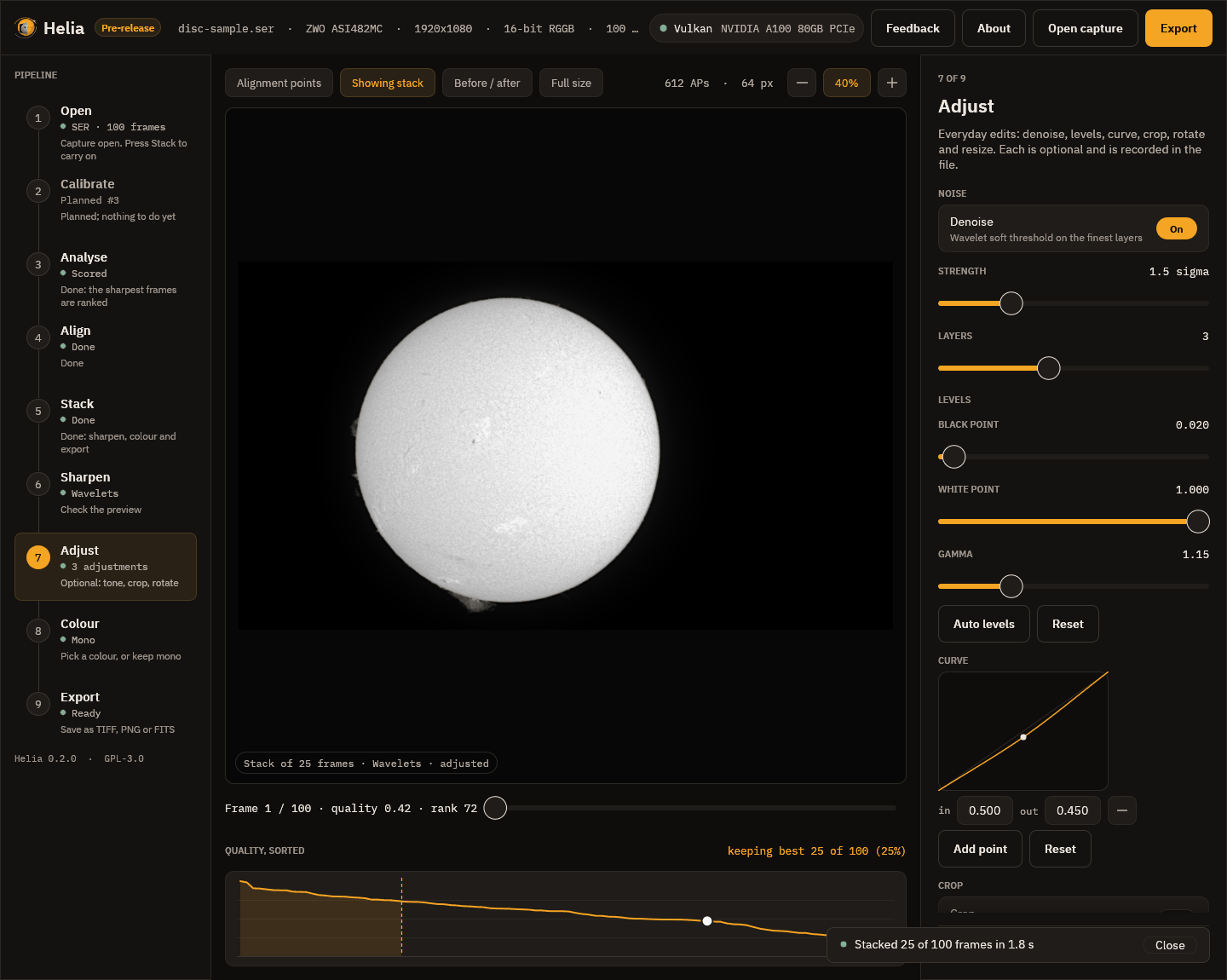
The screenshot has three adjustments switched on, which the rail counts (3 adjustments) and the pill at the foot of the picture mentions (adjusted).
- Denoise is a soft threshold on the finest wavelet layers. Strength is the threshold on layer 1 in noise sigmas (1.5 here) and Layers is how many layers it treats. It lowers noise on flat sky a good deal and leaves the contrast of a sharp edge alone.
- Levels: a black point, a white point and a gamma. Raising the black point a little (0.02 here) deepens the sky; a gamma above 1 (1.15) brightens the mid-tones. Auto levels sets the points to the 0.1 per cent and 99.9 per cent points of the stack; Reset puts them back.
- Curve: a tone curve through up to 16 points, drawn as a smooth curve that never overshoots. Press Add point, set its input and output, and the picture follows. Here a point at 0.5 in, 0.45 out gently darkens the mid-tones.
- Crop (a rectangle in pixels, or the whole image), Rotate and flip (quarter turns, a fine angle, mirrors) and Resize (10 to 400 per cent) are below the curve; scroll the inspector to reach them.
A line under the controls gives the size of the picture that will be written. Reset all adjustments switches everything off.
Tips
- Use levels and gamma first: they are the least likely to hurt.
- Denoise before you push the sharpening, not after: noise that is not there cannot be sharpened into texture.
- A curve is for looks, not measurement. If you want to measure the Sun, export the FITS and leave it unedited (see Export).
Next
8. Colour
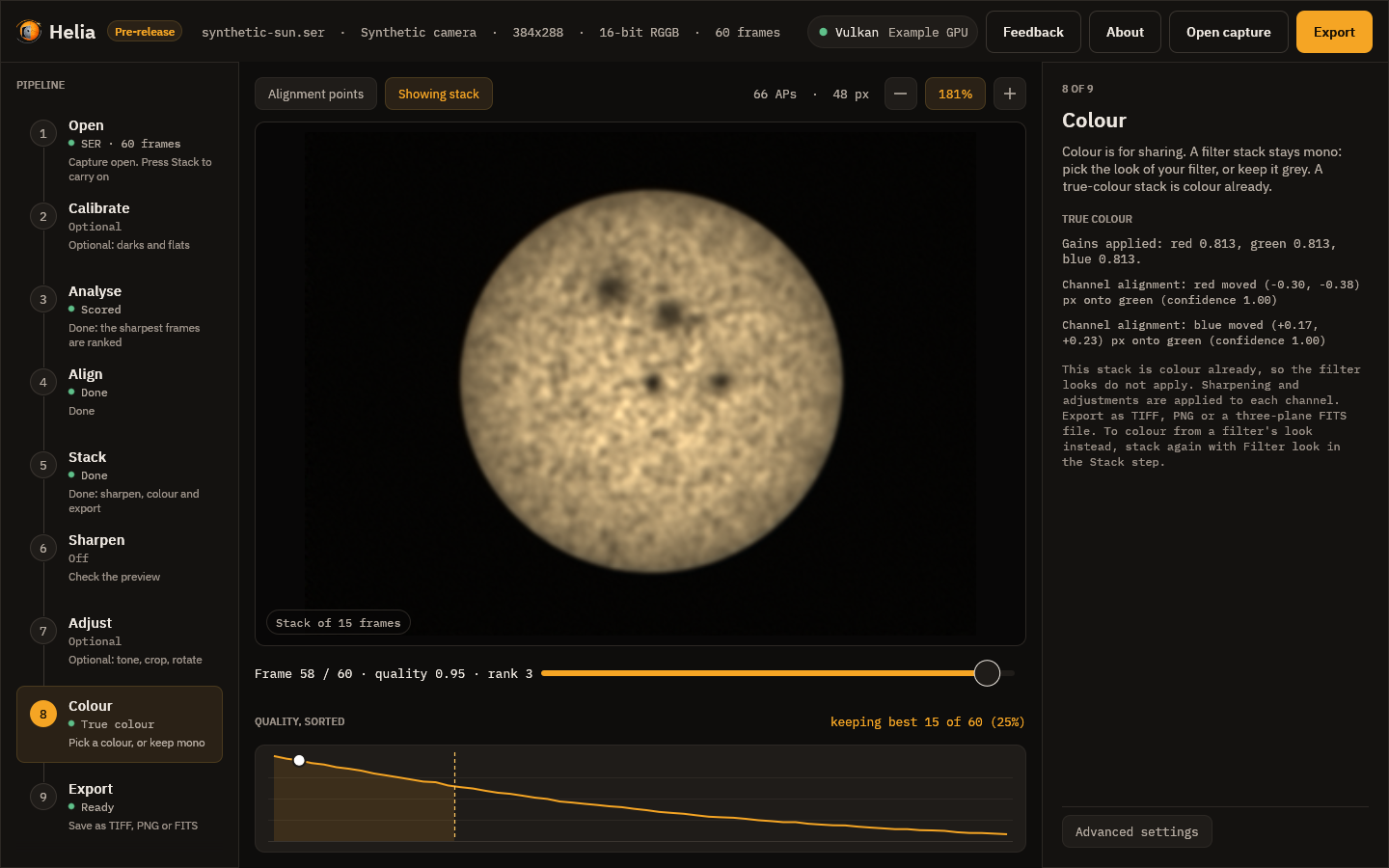
For a stack made with True colour (white light, a colour camera) this step shows the gains and the channel shifts instead of the look cards: the stack is colour already and no look applies.
Colour is for sharing. The stack stays mono; the look you choose here is applied to it when you view and when you export. A narrow-band solar capture is one colour of light, so the colours are a convention (orange for H-alpha, violet for calcium), not a measurement. See Colourising for the reasoning.
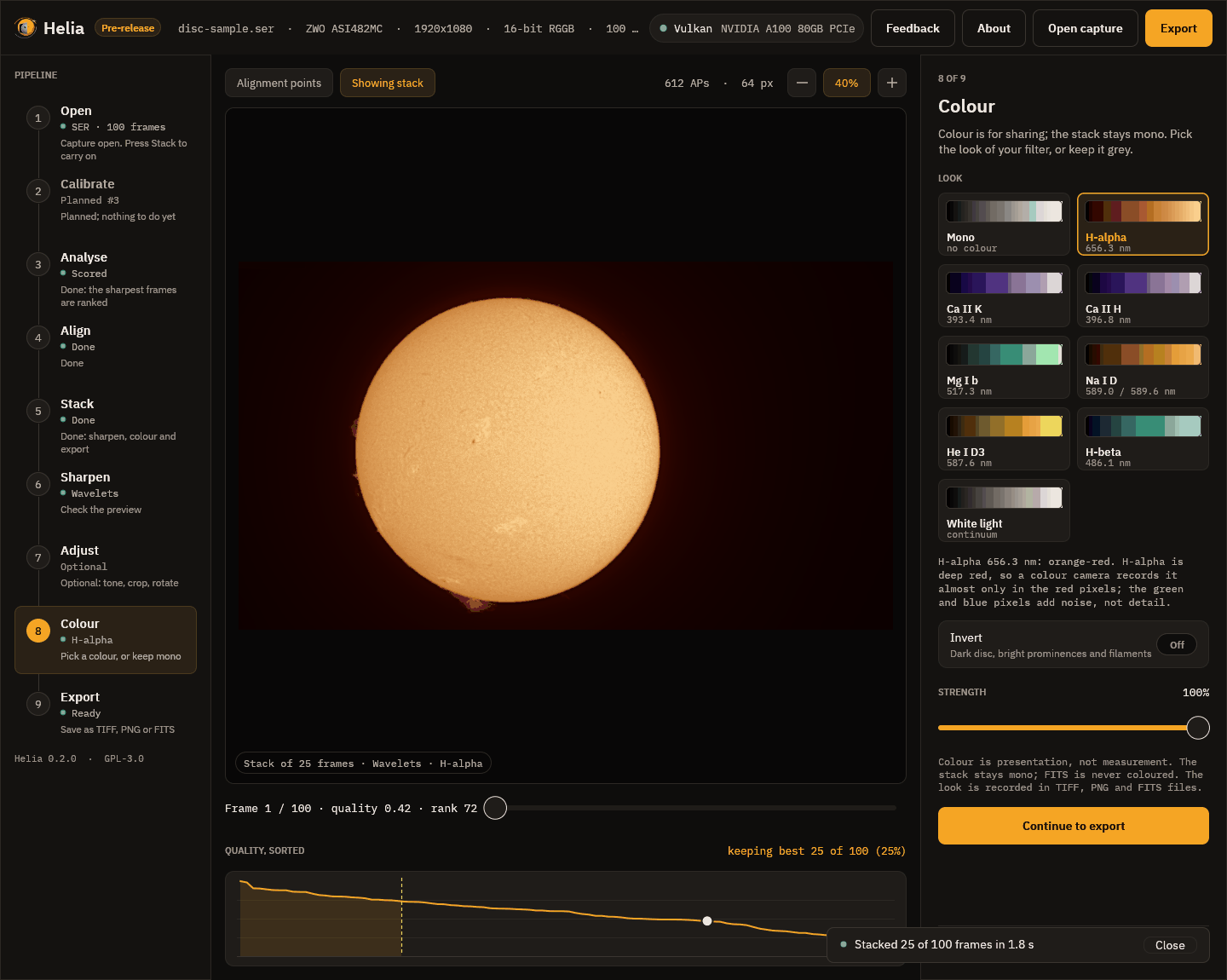
Each card shows a look as a ramp from black to white, with its filter and wavelength. Click one and the viewer shows the stack in those colours at once. Under the cards a line says why the look is what it is.
Every look
The same stack in each of the eight looks, reduced in size. The first card in the app, Mono, is the stack in grey.
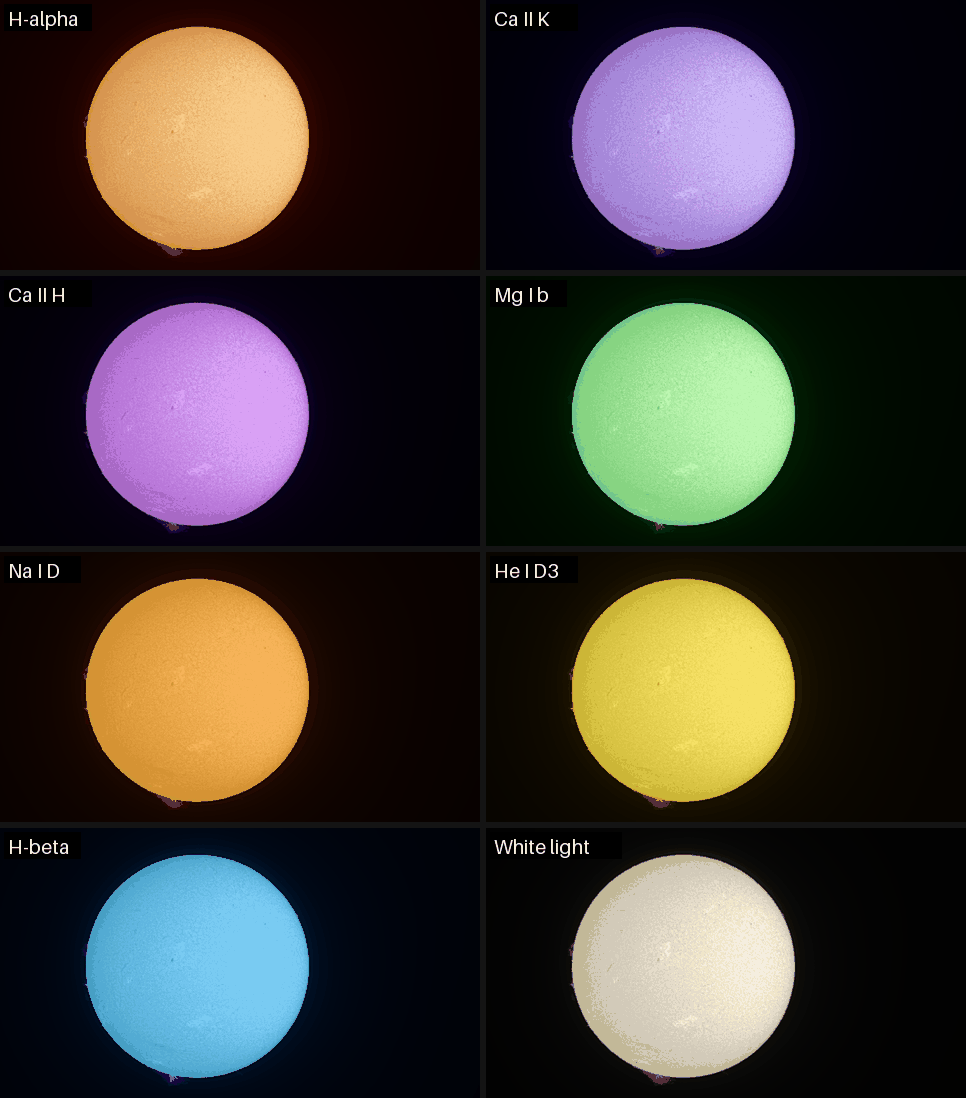
| Look | Wavelength | Colour | Use it for |
|---|---|---|---|
| H-alpha | 656.3 nm | orange-red | The chromosphere: filaments, plage, prominences |
| Ca II K | 393.4 nm | violet | The chromosphere and plage in calcium |
| Ca II H | 396.8 nm | violet, a touch redder | The same, so a K and H pair can be told apart |
| Mg I b | 517.3 nm | green | The lower chromosphere |
| Na I D | 589.0 and 589.6 nm | yellow-orange | Sodium |
| He I D3 | 587.6 nm | yellow | Faint prominences and flares |
| H-beta | 486.1 nm | blue-cyan | The chromosphere in H-beta |
| White light | continuum | warm neutral | The photosphere: sunspots and granulation |
The right look is the one of your filter. The look Helia recommends comes from the file name, folder, sidecar or header. The app remembers the look you chose for each filter, so the next capture in the same filter starts with it.
The two controls
- Invert makes a negative before colouring, with a dark disc and bright prominences and filaments, which shows prominences well.
- Strength mixes between grey (0 per cent) and the full colour (100 per cent).
Continue to export goes on.
The finished picture
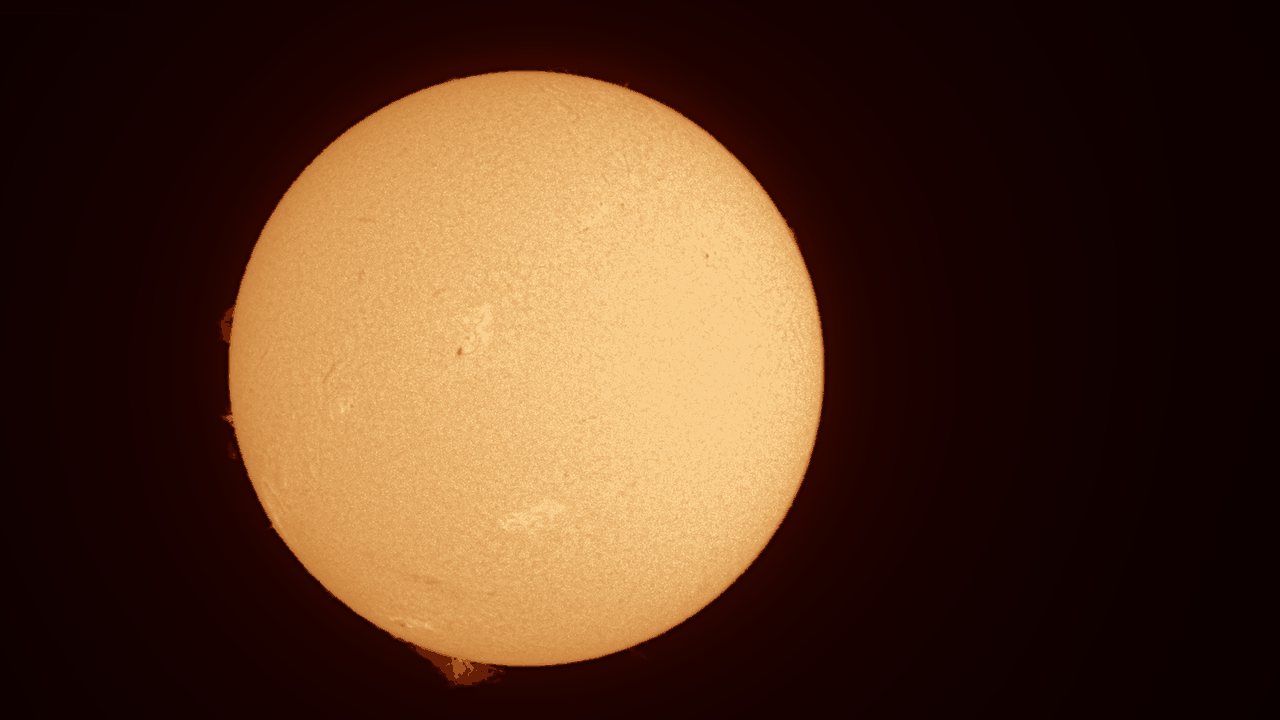
Here is the finished full-disc stack: the recommended wavelets, H-alpha colours, written as it would be to TIFF (this is a reduced copy):
Next
9. Export
Choose a format, press Save as, and say where to put it. Ctrl+E does the same from any step.
| Format | What it is | Use it for |
|---|---|---|
| TIFF 16-bit | Greyscale or RGB, 16 bits per channel | Your master picture, and any further editing |
| PNG 8-bit | Greyscale or RGB, 8 bits per channel | Sharing on the web and in messages |
| FITS | 32-bit floating point; mono, or a three-plane cube for a true-colour stack | Measurement and further processing |
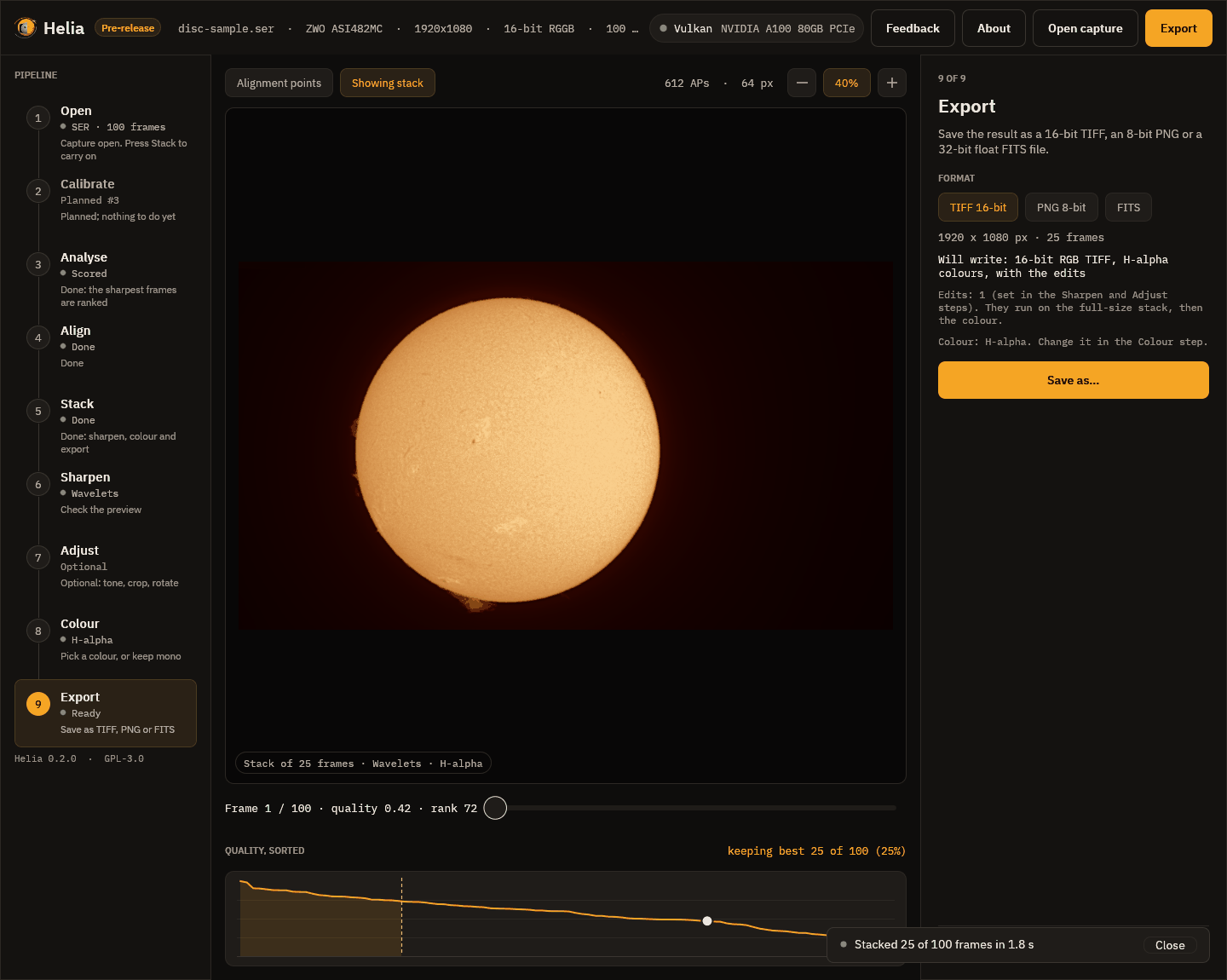
The step says exactly what will be written, here 16-bit RGB TIFF, H-alpha colours, with the edits, and what produced it: the edits (the number of sharpening and adjustment operations) and the colour look. The edits run on the full-size stack, then the colour is applied. Writing happens in the background with a notice, and a message confirms where the file went.
What the files say
Every file notes how it was made, so a picture can be repeated and understood
later. For TIFF the note is in the ImageDescription tag, for PNG in the
Description chunk, and for FITS in HISTORY cards. It lists the edits in words
and as a list that can be reused, and the colour look. The Bayer decisions
(including a header that was wrong) are recorded too. See
What the files say.
FITS and SOLARNET
A FITS file is the unsharpened stack, because it is for further processing;
the edits go into TIFF and PNG. Turn on Edit the FITS too if you want them in
it, and the step says which it will be. The header carries observation keywords in
the SOLARNET convention,
partially compliant (SOLARNET = 0.5), plus what Helia knows of the capture. The details,
including how to give your observing site for the position keywords (--site),
are in Output formats.
From the command line
The extension picks the format:
helia stack disc-sample.ser -o sun.tif --preset ha --sharpen wavelet
helia stack disc-sample.ser -o sun.png --preset ha --sharpen wavelet
helia stack disc-sample.ser -o sun.fits
Next
10. About
The About button in the top bar, or F1, opens the About page, which replaces the viewer until you press Esc or Close.
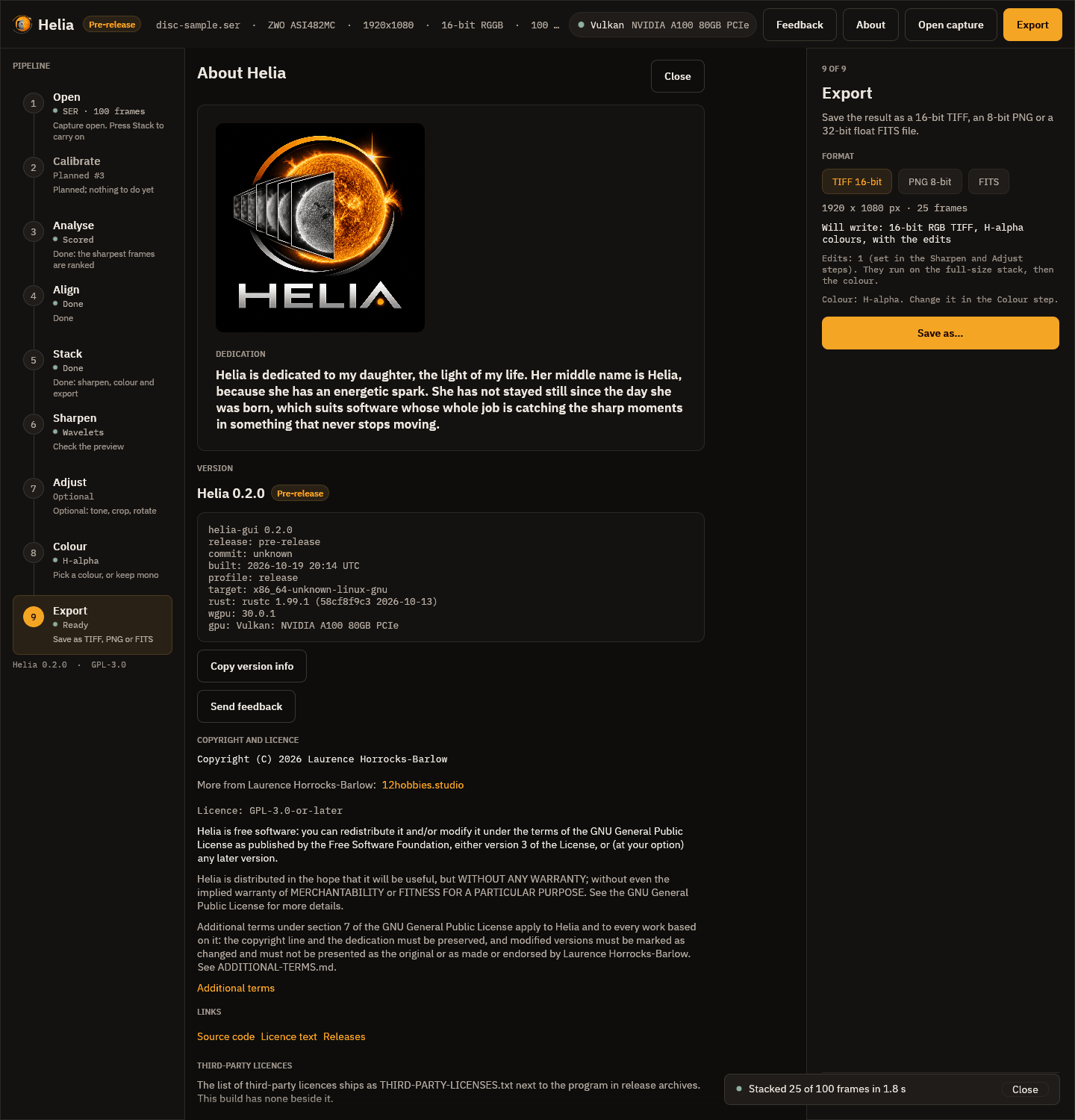
From the top:
- The dedication. Helia is dedicated to the author's daughter, whose middle name is Helia. The dedication is part of the licence terms and is preserved in every copy.
- Version. The version (with a note that it is a pre-release, below 1.0), and how this copy was built: the git commit (with
+dirtyif the tree had uncommitted changes), the build time in UTC, the build profile, the target, the Rust and wgpu versions, and the graphics adapter in use, or CPU. Copy version info puts those lines on the clipboard, which is what to paste into a bug report. The screenshot is of a test build: a release shows its own commit. - Copyright and licence. Helia is free software under the GNU General Public Licence version 3 or later, with additional terms under section 7 of that licence: the copyright line and the dedication must be kept, and modified versions must be marked as changed. The page links to the full text.
- Links: the source, the licence text, the releases page and, at the foot,
the third-party licences. In a release archive that list is
THIRD-PARTY-LICENSES.txtbeside the program.
The page makes no network connection. A link opens in your browser only when you click it.
Next
11. Send feedback
Helia is a pre-release, and the quickest way to make it better is to tell the project what is wrong or missing.
Version note. The Feedback button is in the release after v0.2.0. The released v0.2.0 does not have it; use the issue tracker as described under Without the button below.
With the button
A Feedback button in the top bar (and Ctrl+Shift+F), at any step, takes a picture of the Helia window and opens a page where you:
- draw rectangles on the picture round the problem;
- say whether it is a bug, a feature request, a question or something else;
- write a title and a description;
- choose whether to include the screenshot and system details, and look at exactly what will be sent;
- press Send.
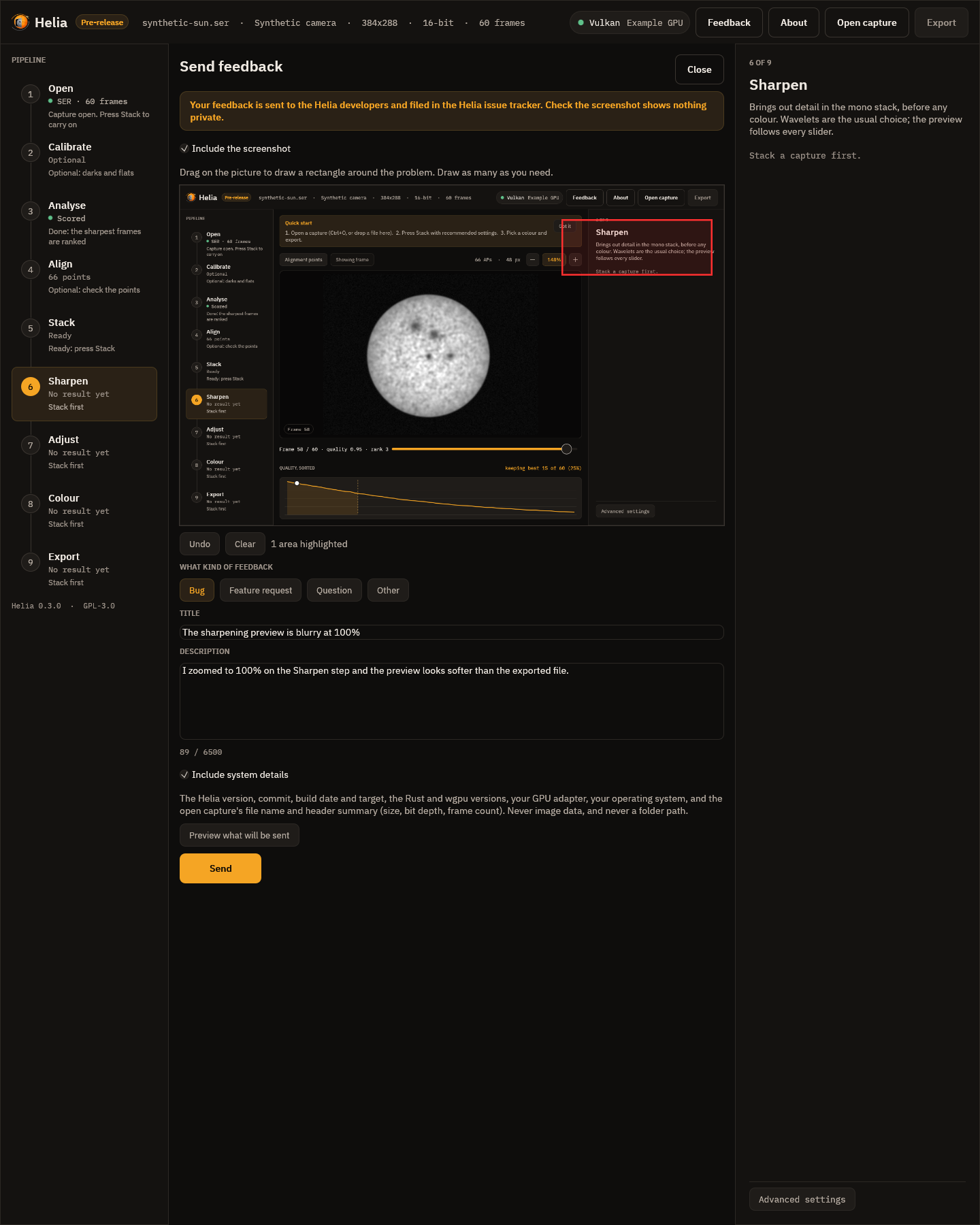
It is sent to the Helia developers and filed in the Helia issue tracker. Three things to know:
- Nothing is sent until you press Send. Helia has no telemetry: it never reports usage or errors by itself.
- Check the screenshot. It is filed with your report. The screenshot is of the Helia window, which can show the file name of your capture. Untick Include the screenshot if in doubt.
- If the service cannot be reached nothing is lost: you can save the report as a file, or open the new-issue page in your browser with the text filled in (that only works if you have an account on the project's issue tracker).
There is a matching command for people without a display, helia feedback. The
whole walk-through, what is and is not included, and what happens when the service
is down, are in Sending feedback.
Without the button
Contact the author through 12hobbies.studio. A report is most useful with:
- the output of
helia --versionor the Copy version info button on About; - your operating system, your graphics card and driver;
- what you did, what you expected and what happened;
- the output of
helia infoon the capture, which has no image data in it, and if you can, a short capture (a few hundred frames) that shows the problem.
H-alpha, full disc
Goal: a sharp, orange full-disc picture of the chromosphere from an H-alpha capture, as a 16-bit TIFF.
You need: a SER (best) or AVI of the full disc, a few hundred frames or more,
with the filter in the name (for example 2026-10-19_Sun_Ha_001.ser). See
Capturing for Helia.
In the app
- Open the file (Ctrl+O). Helia reads the filter from the name, so the Quick stack card says H-alpha detected and offers the red channel and the best 25 per cent of the frames. If the name does not say, press H-alpha.
- Press Stack with recommended settings.
- On Sharpen, the recommended H-alpha wavelets are already on (gains 1.50, 1.45, 1.25, 1.05; noise cuts 1.8, 1.0, 0.5). Use Before / after to check they help, and ease a gain down if the grain looks coarse.
- On Colour, H-alpha is already selected. Try Invert for prominences.
- Export a TIFF 16-bit.
The pictures for each step, from a real capture, are in the walkthrough.
On the command line
helia stack disc-sample.ser -o sun-ha.tif --preset ha --sharpen wavelet
This is the real output for a 100-frame, 1920 x 1080, 16-bit SER on a laptop with a mid-range GPU (the times are that machine's, not a promise):
input:    SER 1920x1080 16-bit, 100 frames
note:     The header flag says big-endian, but the pixel data only makes sense as little-endian; Helia reads it that way.
backend:  GPU (NVIDIA GeForce RTX 3050 Ti Laptop GPU (Vulkan, DiscreteGpu))
settings: H-alpha (chosen); red channel, keep 25%, alignment points 64 px
edit:     1. wavelet sharpen, 6 layers, gains 1.50,1.45,1.25,1.05,1.00,1.00, noise thresholds 1.80,1.00,0.50,0.00,0.00,0.00 (x MAD sigma)
[   0.8s] building reference
[   1.2s] aligning frames
[   1.9s] stacking
[   2.1s] sharpening and editing
[   2.1s] colourising
[   2.1s] writing
frames:  100 total, 25 kept, 50 registered
points:  615 of 2135 alignment points active
align:   phase correlation (limb fit not confident enough, 0.42); confidence mean 1.00, least 1.00 (sampled)
masked:  196 x 20 at (0, 0), flat in the result
disc:    centre (788.4, 553.1), radius 447.2 px
detail:  stack 0.00106 vs best single frame 0.00115 (0.92x)
sharpened: detail 0.00137 after the edits, 0.00106 before (1.29x)
noise:   finest-layer sigma 0.00017 before, 0.00001 after the edits
timing:  scoring frames 0.52s, building reference 0.12s, aligning frames 0.24s, measuring alignment points 0.32s, stacking 0.45s, finishing 0.01s (total 2.18s)
wrote:   sun-ha.tif
Reading it:
- settings is what Helia chose and why.
--preset hagives the red channel, 25 per cent of frames and the orange look. - masked is the burned-in timestamp it found and kept alignment off.
- align says whole frames were aligned by phase correlation because the limb fit was not confident (the disc is not entirely in the frame, or the limb is soft). It is a normal outcome; see Align.
- sharpened is Helia's detail measure, about 1.29 times higher after the wavelets, with the finest-layer noise much lower.
The result, reduced in size:

If it is not right
- A fine grid: see Fixing a Bayer grid.
- Soft: keep fewer frames (
--keep 15%) in good seeing, or look at the quality curve in Analyse. - Halos or grain after sharpening: lower the gains, or see Troubleshooting.
- Prominences too faint: add Invert, or a second export with stronger levels. Prominences and disc differ greatly in brightness; a single picture cannot show both fully (HDR compositing is on the roadmap).
White-light granulation
Goal: the fine cell pattern of the photosphere (granulation) and sunspot structure, from a white-light capture.
How far this is tested. The defaults below were measured on real captures of the photosphere through a sodium D filter (a colour camera, 8 and 16-bit), with
helia measure, and checked by eye on a crop. The project still has no white-light capture of its own, so the white-light preset borrows the sodium result; treat it as where to start, and look at your own picture.
You need: a capture of the Sun through a white-light solar filter (a Baader
film, or a Herschel wedge with a neutral density filter), with white, whitelight or wl in the
file name, recorded with a short exposure at a good image
scale. Granulation is small, of the order of an arc second across; see
Sampling.
Settings
Press White light on the Quick stack card, or use --preset white. The preset
is already tuned for granulation, because that is what a white-light picture is
for:
| Setting | Default | Why |
|---|---|---|
| Frames kept | 12% | Granulation has low contrast, so only the sharpest frames show it. Keeping 25% averaged soft frames over the granulation scale and lost it |
| Alignment point size | 32 px at full-HD scale; from the image scale when it is known | Two to three granules (a granule is about 1.5 arcsec). Seeing distorts a granule-sized patch differently from the next; small points follow it |
| Wavelet gains | 1.50, 1.80, 1.50, 1.10, 1, 1 | Granulation sits on layers 2 and 3, so they are lifted most |
| Wavelet noise cuts | 1.0, 0, 0, 0, 0, 0 | The finest layer keeps its cut, so pixel noise is not boosted. A cut on layers 2 and 3 removes low-contrast granulation along with the noise, so they have none |
The sodium D preset (--preset na) takes the same frame share and point size, with
gains 1.20, 1.80, 1.50, 1.10 and noise cuts 2.0, 0, 0, 0, and stacks the green
channel. The chromospheric presets (H-alpha, Ca K and H, He D3, H-beta) are not
tuned for granulation and keep their general values.
When the image scale is unknown, as it is before the limb has been fitted,
Helia uses 32 pixels for a capture about 1080 pixels high and scales that with the
short side of the frame. Give --ap-size if you know better.
On the command line
helia stack white_001.ser -o granulation.tif --preset white
helia measure granulation.tif
Everything above is a default, so the first command needs no more. To try other
values, --keep 15% --ap-size 40 --sharpen wavelet --wavelet-gains 1.5,2.0,1.6
replaces them (--wavelet-gains replaces the first layers and leaves the rest at
the recommended values), and helia measure says whether granulation went up.
Measuring granulation
helia stack also prints a granulation report for a white-light or sodium stack, and writes it into the FITS header; see the granulation and seeing report.
helia measure takes a finished image (TIFF, PNG or FITS) and prints the
band-pass contrast, the standard deviation over the mean, of a 240 pixel crop at
the centre of the disc in three bands:
| Band | Detail | What dominates |
|---|---|---|
| fine, 0 to 1 px | Pixel-scale structure | Noise |
| granulation, 1 to 4 px | Cells of a few pixels | Granulation, plus some noise |
| meso, 4 to 12 px | Larger groupings, slow variation | Brightness changes, seeing |
Compare images of the same capture, scale and bit depth. A rise in the granulation band with the fine band flat or falling is granulation; a rise in both is mostly noise, so look at the crop as well.
Measured with helia stack --preset na --sharpen wavelet on the sodium captures,
1920 x 1080 unless stated, with the 0.2.0 defaults (keep 25%, 64 px points, all channels, general
wavelets) against the current ones:
| Capture | Granulation band before | after | Fine band before | after |
|---|---|---|---|---|
Sun_Test.ser, 8-bit | 1.54% | 2.94% | 1.64% | 1.48% |
15_20_57.ser, 16-bit | 1.98% | 3.23% | 2.95% | 2.13% |
15_32_09.avi, 8-bit, 720 x 540 | 0.55% | 1.52% | 0.23% | 0.45% |
The fine band falls or stays level while the granulation band rises, and the cells are visible in a crop where before they were buried in the hatch of the colour mosaic.
In the app
The White light and Na D buttons set all of this. To go further, on Align choose a smaller point size; on Stack drag Keep best frames down to 10 per cent; on Sharpen raise the gains of layers 2 and 3. Use Before / after at Full size and zoom to 100 per cent to judge.
What to watch for
- Grain is not granulation. With few frames the noise has a similar size. If the "cells" differ from one export to the next with different frame counts, it was noise.
- Ringing round sunspots from too much gain. The deconvolution guard exists for this; with wavelets, ease the gain on layers 3 and 4.
- 8-bit captures limit granulation. Granulation is a few per cent of the brightness and one 8-bit step is about 0.4 per cent of full scale, so an 8-bit capture shows it coarsely however it is processed. Record 12 or 16-bit if the camera allows it (see Capturing).
- A FITS file is the unsharpened stack, so measurements are not affected by any of this.
Related: Sharpening and adjustments.
Calcium K
Goal: a violet picture of the Ca II K network and plage from a calcium K capture.
Not tested on a real capture. Helia's Ca K settings come from its filter preset; the project has no Ca K capture of its own yet, so this page has no real output to show. The advice follows what the preset does and why.
You need: a capture through a Ca II K filter (393.4 nm), with CaK in the file
name or folder (CaK_session/capture.ser works). Ca K is at the violet edge of
what a sensor sees and the line is faint, so the signal is weak and the noise is
the problem.
Settings
Press Ca II K on the Quick stack card, or use --preset cak. The preset
recommends:
- the blue channel for a colour camera, because the blue pixels are the ones that see 393 nm (a mono camera has only one channel);
- 30 per cent of the frames, a few more than for H-alpha, to average the noise down;
- gentler sharpening: wavelet gains 1.30, 1.40, 1.25, 1.05 with higher noise cuts (2.5, 1.5, 0.8, 0.3) and a short deconvolution of 8 iterations. Sharpening noise only makes a prettier mess.
helia stack cak_001.ser -o cak.tif --preset cak --sharpen wavelet
helia stack cak_001.ser -o cak-negative.png --preset cak --sharpen wavelet --invert
The second command inverts before colouring, which makes a negative; it shows filaments and prominences well, and some people prefer it for calcium. Try both.
Tips
- Exposure and gain: the line is faint, so light is the constraint. Keep the exposure short enough to freeze the seeing and raise the gain until the histogram sits at about 50 to 70 per cent of full scale; many frames beat few long ones. See Exposure, gain and bit depth.
- Do not push the wavelets. If the picture looks processed, lower layer 1 and 2 gains first.
- Ca H (
--preset cah) takes the same settings and a slightly redder violet, so a K and H pair can be told apart.
Related: Colour presets.
MP4 from a phone or DSLR
Goal: a good first picture of the Sun from a video recorded on a phone held to an eyepiece, or from a DSLR or mirrorless camera.
No output is shown here because the machine used for this manual has no ffmpeg. The commands, options and messages are as documented elsewhere in this manual; the messages are listed in Troubleshooting.
What to expect
An MP4 is compressed, and the compression throws away fine detail first, which is exactly what stacking needs. Helia can stack it and the picture will be a big step up from a single frame, but a raw SER or AVI from an astronomy camera keeps more. See When an MP4 is fine. When you open one, the Open step says so: lossy 8-bit 4:2:0 video (h264): fine for quick results, SER/AVI raw captures keep more detail.
1. Install ffmpeg
Helia never bundles ffmpeg; it runs it when it is installed (version 4.4 or newer).
| System | Install |
|---|---|
| Windows | winget install Gyan.FFmpeg, then open a new terminal |
| macOS | brew install ffmpeg |
| Debian, Ubuntu, Raspberry Pi OS | sudo apt install ffmpeg |
Check with ffmpeg -version. See Installation.
2. Record well
- Solar filter first. Never point a phone or camera at the Sun without a proper solar filter over the front of the telescope.
- Lock exposure and focus, so the brightness does not wander. Record a minute or more, at the highest frame rate the phone offers, with the Sun fully in frame.
- Keep the phone steady (a clamp), and use a self-timer or remote so you do not shake it.
- Put the filter in the file name when you copy it off the phone:
sun_Ha_001.mp4orsun_white_001.mp4. A phone names videosVID_2026...mp4, which tells Helia nothing.
3. Open and stack
In the app, open the file as for any other. A notice shows Converting the video with ffmpeg with a percentage while the frames are decoded once to a cache folder; afterwards scrubbing is as quick as for a SER file. The decoded frames are uncompressed, so the cache needs room for the whole video; Helia checks first.
On the command line:
helia info sun_white_001.mp4
helia stack sun_white_001.mp4 -o sun.tif --preset white --sharpen wavelet
helia info is the quick test that ffmpeg is working. To use a drive with more
room for the decoded frames, add --cache-dir /big/disk.
4. Choose what to keep
- Keep the recommended share of frames to begin with, and compare with a smaller and a larger one on the quality curve (Analyse). With a lossy video the sharpness measure partly ranks how the encoder behaved, so the best frames are less clear cut than in a raw capture.
- Go easy on the sharpening. Wavelets at the recommended values are fine; deconvolution will turn compression blocks into texture.
Colour video
A phone video is already a colour picture. Helia stacks colour video as
luminance, or as the red, green or blue channel you choose (--channel, or the
Channel chips under Advanced settings). For a white-light video leave it at
luminance (lum) or choose green (g). The stack is mono, and the colour of the
finished picture comes from the look you choose; see
Can it stack colour?.
Fixing a Bayer grid
Symptom: the stacked picture is covered by a fine grid or chessboard, with neighbouring pixels alternating between bright and dark.
Cause: a colour camera records one colour per pixel in a repeating 2 x 2 pattern (a Bayer mosaic). The pictures must be demosaiced before they are stacked. If a file says it is mono although the pixels are a mosaic, a stacker that trusts the header stacks the mosaic itself.
The picture shows the same 120 x 80 pixel patch of a real capture, magnified, once read as mono and once as Helia reads it by default:
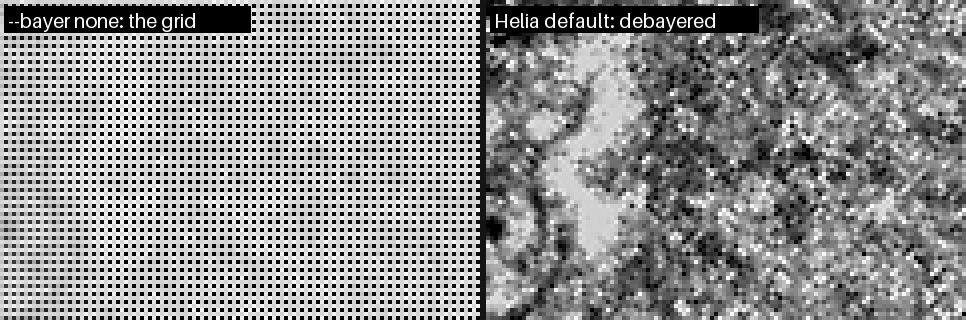
Behind a narrow-band filter such as H-alpha the grid is stark, because the blue pixels receive almost no light.
Helia usually fixes it for you
For a SER file that says mono, Helia measures the four pixel positions of a 2 x 2 cell on the disc in a few frames. If they differ in the way a colour-filter array would make them, it says so and debayers. Check what it decided:
helia info bayer-sample.ser
Header, as written in the file
  ColorID:           0 (MONO)
  PixelDepth:        8 bit
  FrameCount:        631
  ...

Helia will use
  Bayer pattern:     RGGB           (detection)
  Bit depth:         8 bit          (header)
  Byte order:        not used (8-bit) (header)
  Row order:         top to bottom  (header)

Mosaic check (2x2 pixel positions, share of full scale)
  means:             79.6%  77.6%  77.4%  0.3%
  spread:            135.0% over 5 frame(s)

warning:  The SER header says mono (ColorID 0), but the frames hold a Bayer mosaic that looks like RGGB: ...
Read the second list: the Bayer pattern is RGGB and its source is detection,
so the header was overruled by the pixels. The four numbers are the average
brightness at the four positions of a cell. Here one position is 0.3 per cent while
the others are about 78 per cent: the blue pixel of an H-alpha capture, which sees
almost nothing. In the app the same message is the Check this card on the
Open step.
If a stack that you made with an older Helia shows the grid, stack it again.
If it still shows, or the colours are wrong
Tell Helia what you know:
helia stack capture.ser -o out.tif --bayer rggb    # force a pattern
helia stack capture.ser -o out.tif --bayer none    # it really is mono
In the app, use the Bayer pattern buttons at the foot of the Open step: Auto,
Mono, RGGB, GRBG, GBRG, BGGR. The list above them then shows override as the
source.
- Red and blue swapped. The mosaic says which diagonal is green but not which of the other two pixels is red. Helia settles it from the layout a SharpCap sidecar states, the colour the filter passes, the camera model, and finally by taking the dimmer of the two as blue. If you stack a single channel (H-alpha takes red) a wrong pick matters, and the result looks like noise: try the other pattern of the same family, RGGB or BGGR, GRBG or GBRG.
- A mosaic too faint to see. If the four positions are within 2 per cent of each
other the data is called mono; between 2 and 5 per cent Helia cannot tell and
uses the sidecar's colour space if there is one. Give
--bayeryourself. - An upside-down picture is a different problem:
--flip-rows(or Bottom to top under Row order), and give--bayerfor the picture after the flip.
More: Troubleshooting.
Batch processing on the command line
Goal: stack a whole session, or many captures, without opening the app.
Every helia stack run needs only an input and an output. Helia reads the filter
from each file name, so with names such as Sun_Ha_001.ser and Sun_CaK_002.ser
one command suits both and each gets its own recommended settings.
A folder of captures
In a POSIX shell (Linux, macOS, or Git Bash on Windows):
mkdir -p stacks
for f in captures/*.ser; do
  helia stack "$f" -o "stacks/$(basename "$f" .ser).tif" --sharpen wavelet --quiet \
    || echo "failed: $f"
done
In PowerShell:
New-Item -ItemType Directory -Force stacks | Out-Null
Get-ChildItem captures\*.ser | ForEach-Object {
  helia stack $_.FullName -o "stacks\$($_.BaseName).tif" --sharpen wavelet --quiet
  if ($LASTEXITCODE -ne 0) { Write-Warning "failed: $($_.Name)" }
}
Both carry on after a failing capture, so one bad file does not hide the others.
--quiet hides the progress bar and the summary; the exit status is non-zero on
failure. Leave --quiet off to keep each run's summary in a log:
helia stack "$f" -o "stacks/$(basename "$f" .ser).tif" > "logs/$(basename "$f" .ser).txt" 2>&1
Test the batch on one file first
helia info captures/Sun_Ha_001.ser     # what Helia will use, and any notice
helia stack captures/Sun_Ha_001.ser -o test.tif --sharpen wavelet
Other formats and options
- A PNG for sharing and a FITS for measurement from the same capture: run it twice,
with
-o x.png --preset haand-o x.fits. - All sharpening, colour and alignment options work in a batch; see the CLI reference.
- Make the same edits to existing images with
helia edit, with a saved preset:
for f in stacks/*.tif; do
  helia edit "$f" -o "edited/$(basename "$f")" --edits "H-alpha gentle" --quiet
done
One at a time, or all at once
The GPU is one device, so running several helia stack jobs at once rarely helps.
Run them in turn, as above. If you want a queue that other programs can add to,
use the API, which runs one job at a time by default.
Scripting with the API
Goal: drive Helia from your own Python, a notebook or any program that can speak HTTP.
The server is the helia serve command. It runs the same pipeline as helia stack
with the same options. The guide is The API and the full
list of operations is the API reference.
1. Start the server
helia serve --data-root ~/captures
listening on http://127.0.0.1:7870
data root: /home/you/captures
warning: no token set; any local process can read files under the data root
- Every path in a request is relative to
--data-root, and cannot escape it. - It listens on the loopback interface only. To listen on another address you
must set a token (
--token-file, orHELIA_TOKEN); see the security model.
2. A complete script
This script, which uses only the Python standard library, queues a job, watches its progress and downloads the result. It was run against the released v0.2.0 for this manual.
#!/usr/bin/env python3
"""Stack a capture through a running `helia serve` and download the result.

    helia serve --data-root ~/captures
    python stack_via_api.py sun.ser stacks/sun.tif --preset ha --sharpen wavelet

Standard library only. Paths are relative to the server's data root.
"""
import argparse
import json
import os
import sys
import time
import urllib.error
import urllib.request

BASE = os.environ.get("HELIA_URL", "http://127.0.0.1:7870/api/v1")
TOKEN = os.environ.get("HELIA_TOKEN")  # only if the server was started with one


def call(method, path, body=None, raw=False):
    data = json.dumps(body).encode() if body is not None else None
    req = urllib.request.Request(BASE + path, data=data, method=method)
    if data is not None:
        req.add_header("Content-Type", "application/json")
    if TOKEN:
        req.add_header("Authorization", f"Bearer {TOKEN}")
    try:
        with urllib.request.urlopen(req) as resp:
            payload = resp.read()
    except urllib.error.HTTPError as err:
        detail = json.loads(err.read() or b"{}").get("error", {})
        sys.exit(f"{method} {path}: {err.code} {detail.get('code')}: {detail.get('message')}")
    return payload if raw else json.loads(payload)


def main():
    ap = argparse.ArgumentParser(description=__doc__.splitlines()[0])
    ap.add_argument("input", help="capture, relative to the data root")
    ap.add_argument("output", help="result, relative to the data root (.tif, .png or .fits)")
    ap.add_argument("--preset", help="filter id: ha, cak, cah, mg, na, he-d3, hbeta, white")
    ap.add_argument("--sharpen", choices=["wavelet", "unsharp", "rl", "none"])
    ap.add_argument("--keep", help="share of frames to keep, e.g. 20%%")
    args = ap.parse_args()

    config = {k: v for k, v in {
        "preset": args.preset, "sharpen": args.sharpen, "keep": args.keep,
    }.items() if v}
    job = call("POST", "/jobs", {
        "input": args.input, "output": args.output,
        "config": config, "overwrite": True,
    })
    print("queued job", job["id"])

    while job["state"] in ("queued", "running"):
        time.sleep(0.5)
        job = call("GET", f"/jobs/{job['id']}")
        print(f"  {job['state']:9} {job.get('stage') or '':24} {job['progress']:4.0%}")

    if job["state"] != "succeeded":
        sys.exit(f"job {job['state']}: {job.get('error')}")

    local = os.path.basename(args.output)
    with open(local, "wb") as f:
        f.write(call("GET", f"/jobs/{job['id']}/result", raw=True))
    print("saved", local)


if __name__ == "__main__":
    main()
Run on a 100-frame capture, it prints:
queued job 1
  running   opening                    0%
  running   reference                 25%
  running   global_align              31%
  running   local_align               65%
  running   stack                     95%
  succeeded write                    100%
saved disc.tif
3. Things you can ask
GET /healthandGET /version: is it up, and what is it (version, commit, backend, limits).GET /presets: the filter presets and their colours.POST /captures/inspect: what a file contains, with the same noticeshelia infoprints (for example the Bayer notice).GET /captures/frame: one decoded frame as an image, for your own viewer.POST /jobs,GET /jobs/{id},DELETE /jobs/{id}: queue, watch and cancel.GET /jobs/{id}/preview.pngand/result: a PNG preview and the file itself.GET /jobs/{id}/events: a WebSocket stream of progress, instead of polling.GET /openapi.jsonandGET /docs: the machine-readable description and a small browsable page, served by the running server.
A job's config takes the same choices as the command line: keep, ap_size,
preset, sharpen, edits, colour and so on. The errors are always
{"error": {"code": ..., "message": ...}} with a stable code, which is what the
script above prints. See The API.
4. Notebooks and other languages
Nothing here is Python-specific: it is JSON over HTTP, and a WebSocket for events.
In a notebook, replace urllib with requests if you have it; the
API guide shows that form.
Capturing for Helia
Stacking can only recover what the capture contains. This page says what to record so that Helia has the most to work with. The reasoning, and the sources for it, are in the imaging methods research; that document marks each claim as checked against a source or as background knowledge, and so does this page where it matters.
The short version
- Save as SER, 16-bit if your camera offers it. An MP4 from a camera or phone works for quick results, but it has been compressed and loses detail (see below).
- Use a short exposure, a few milliseconds or less, so each frame freezes the seeing.
- Record many frames, at 50 frames per second or more, by cropping the sensor to a region of interest.
- Set the gain so the histogram peaks at roughly half to two thirds of full scale, and never clip.
- Sample the image properly: roughly f/13 for a 3.76 micron pixel in white light (table below).
- Keep the files: darks and flats are not applied yet, but you will want them.
SER, AVI or MP4
| SER | AVI (uncompressed) | MP4, MOV, MKV, WebM (compressed) | |
|---|---|---|---|
| Made for astronomy | Yes | No | No |
| Raw sensor data (Bayer) | Yes, with a pattern code | Only 8-bit, and the pattern is not stored in the file | No: already converted to colour and compressed |
| Bit depth | 8 or 16 | 8 or 16 (Y16) in the formats Helia reads | Usually 8-bit, 4:2:0 colour |
| Per-frame timestamps | Optional | No | Not used |
| Compression | None | None | Lossy (H.264, H.265, MJPEG and similar) |
| Needs | Nothing | Nothing | The optional ffmpeg program |
Prefer SER. It is simple, uncompressed and carries the colour layout.
Helia also reads uncompressed AVI, including the large OpenDML files (over
1 GB) that SharpCap writes. It reads BI_RGB, Y800/GREY, Y16 and 24-bit
BGR video. A compressed AVI (for example MJPG) is handed to ffmpeg, like an
MP4, described next.
For a raw colour camera recorded to AVI, SharpCap also writes a
CameraSettings.txt next to the video, and Helia reads it to learn the Bayer
pattern. See Troubleshooting if the colours or the
channel look wrong.
When an MP4 is fine
Helia reads MP4, MOV, M4V, MKV and WebM files, and compressed AVI, through
ffmpeg when it is installed (see Installation).
Helia itself stays free of video codecs; it runs ffmpeg as a separate program.
Raw SER or AVI captures keep more detail, for reasons that matter to stacking:
- The codec throws away fine, low-contrast detail first, and granulation is exactly that. What was thrown away cannot be stacked back.
- H.264 and H.265 compress in blocks and across frames, which adds blocking and smears detail from one frame into the next. The sharpness measure then partly ranks how the encoder behaved, not how the air behaved.
- Typical video is 8-bit with colour detail halved in each direction (4:2:0), and a camera that records MP4 has already demosaiced and sharpened the picture.
An MP4 is fine for a quick look at a day's seeing, for a camera or phone with no
other output, or for an archive you have no raw copy of. Helia then says so:
helia info, the Open step of the desktop app and the API's inspect response all
carry a note such as "lossy 8-bit 4:2:0 video (h264): fine for quick results,
SER/AVI raw captures keep more detail". If you can choose, record SER.
Two practical points. Frames are decoded once, by ffmpeg, into an
uncompressed file in a cache directory, and removed afterwards, so you need
free space for the whole video as raw frames: a 4K clip of 7,500 frames is about
60 GB. Helia checks the space before it starts and says what is missing. And
colour video is stacked as luminance, or as the red, green or blue channel you
choose with --channel (the desktop app has the same chips).
Why a SER header can be wrong
A SER header is 178 bytes the recording program fills in once, from what it believes about the camera. It is not checked against the pixels, and programs differ in what they believe. Known ways it goes wrong:
- Colour mode. SharpCap has written raw Bayer data from a colour camera
(a ZWO ASI482MC, for example) with
ColorID0, which means mono. Nothing in the file then says the frames are a mosaic. Helia checks the pixels of a SER file that says mono; see Troubleshooting. The same camera and program do not always do it: of two SER files from one ASI482MC session in Helia's test captures, the 16-bit one saysBAYER_RGGBand the 8-bit one saysMONO. Check withhelia infoafter the first capture of a session rather than assuming. - Byte order. The flag for the byte order of 16-bit pixels has been written inverted by some programs. Helia checks it against the data.
- Bit depth. A program can write the depth of its sensor (12 bit) or its mode where the data is stored as 16.
- Dates. The
DateTimefields are often zero, and the per-frame timestamps at the end of the file are optional.
Run helia info on the first capture of a session: it prints every header field
as written next to the values Helia will use, and says where each came from. If
the header is wrong in a way Helia does not catch, --bayer, --bit-depth,
--endian and --flip-rows on the command line (and the same choices in the
app's Open step and in the API) override it; the choice is recorded in the
output file.
Exposure, gain and bit depth
- Exposure. Keep it short enough to freeze the seeing, which is a few milliseconds in the research notes (that figure is background knowledge, not a measured value). In white light this is easy. In H-alpha through a narrowband filter you are short of light, and the trade between exposure and noise becomes the main constraint.
- Gain. Raise it until the histogram sits at about 50 to 70 per cent of full scale, without clipping. Many frames at higher gain beat fewer frames with longer exposures: stacking averages the read noise down, and frame selection throws away the frames that moved during a long exposure.
- Bit depth. Use 16-bit if you can. Granulation contrast is only a few per
cent in white light, and 8-bit steps are about 0.4 per cent each, which is a
real limit on a single frame (stacking dithers it). Helia reads 8 and 16-bit
data and works in 32-bit floating point. 12 or 16-bit helps most where the
detail is faintest, and granulation is:
helia measureshows how much of it a stack holds.
Region of interest and frame rate
The atmosphere keeps changing while you record, and the sharp moments are brief. A study of 160 Hz solar sequences at the GREGOR telescope (Denker and others, 2018) concluded that rates above about 50 frames per second are needed to catch a good share of the best moments. On USB cameras the frame rate rises almost in proportion as the region of interest shrinks, so cropping to the part of the Sun you care about is the usual way to reach 100 to 300 frames per second.
How many frames? Helia keeps the best 25 per cent by default (12 per cent for white light and sodium D, where granulation needs only the sharpest frames), so a capture of a few thousand frames leaves hundreds in the stack. Longer captures help, but the Sun changes: granulation evolves over minutes, and for long captures or mosaics the field rotation and the Sun's own rotation matter (derotation is on the Roadmap).
Sampling: focal ratio and pixel size
To record all the detail your telescope can deliver, the pixel pitch p should
be no larger than wavelength x f-ratio / 2, which means a focal ratio of at
least 2 x p / wavelength. Worked values:
| Wavelength | Pixel size | Focal ratio for Nyquist sampling |
|---|---|---|
| 550 nm (white light) | 3.76 microns | f/13.7 |
| 550 nm (white light) | 2.4 microns | f/8.7 |
| 656.3 nm (H-alpha) | 3.76 microns | f/11.5 |
| 393.4 nm (calcium K) | 3.76 microns | f/19.1 |
Seeing blurs the image below the diffraction limit, so in poor seeing a little
under-sampling costs little. In good seeing, slightly over-sampling (up to
about one and a half times Nyquist) helps the sub-pixel alignment and later
sharpening. Helia does not compute your sampling for you yet, and sizes its
alignment points in pixels, so if you change your focal ratio you may want to
change --ap-size too (see How stacking works).
Darks and flats
Helia applies dark and flat frames, and a map of bad pixels, before it analyses anything: see Calibration. Record them in the same session as the Sun, because they are cheap and you cannot take them afterwards:
- Flats matter a great deal for solar work. Dust on the sensor window stays put while the image moves, so a missing flat leaves a fixed pattern that stacking can make look sharper, and after local alignment it can be mistaken for granulation. Take flats at the same focus as your science data. In an etalon-based H-alpha system the interference fringes move with focus, so a flat at another focus will not match them.
- Darks matter little for bright white-light frames, but in H-alpha, where the signal is low, they remove hot pixels and fixed-pattern noise. Record 50 to 100 with the lens capped, at the exposure and gain you used on the Sun.
- Darks for the flats at the exposure of the flats, if that differs from the Sun's (it usually does): 20 to 50 frames.
The research notes also point out that an etalon passes a slightly different wavelength across the field unless the beam is nearly telecentric, so a disc brightness gradient is normal for such systems. A flat corrects the brightness across the field, not the shift of the pass-band, so Helia warns when a flat shows strong vignetting; see the sweet spot.
Naming and keeping files
For SharpCap AVI captures keep the CameraSettings.txt file next to the video
with the name SharpCap gave it (capture.avi goes with
capture.CameraSettings.txt). Helia finds it by that name.
Calibration: darks, flats and bad pixels
Calibration takes out of every frame what belongs to the camera and the optics in front of it and not to the Sun. It is optional, and it is the one step in Helia that needs frames you record separately.
Why it matters more for the Sun
Dust on the sensor window, the fringes of an etalon, a vignette and a camera's own fixed pattern are all fixed to the sensor. The Sun is not: seeing moves it over the sensor, and Helia's alignment moves every patch of every frame to line it up. A pattern that stays put while the picture moves is, to the alignment, not part of the picture; it comes out of the stack as faint detail that was never there, and a sharpening step then makes it crisper, not fainter. Calibrating first, before the frames are scored, aligned or stacked, takes it out while it is still a fixed pattern that can be measured.
What to record
| What | How | How many |
|---|---|---|
| Darks | Lens capped (or the telescope covered), the same exposure and gain as the Sun, the same temperature if you can | 50 to 100 |
| Flats | An evenly lit field at the same focus, gain and set-up as the Sun: the clear sky or a screen through the filter, moved a little during the capture so any structure averages out. Aim for about half of full scale | 20 to 50 |
| Darks for the flats | Lens capped, at the exposure of the flats. The flats' exposure is almost always different from the Sun's | 20 to 50 |
| Bias (optional) | The shortest exposure the camera allows, lens capped. Only needed to scale a dark to another exposure | 50 |
Record them in the same session, in the same file format as the Sun (SER, AVI or FITS stills), at the same size and region of interest: a master made at another size, mode or mosaic is refused. A flat for a different focus is worse than no flat for the reason given under Etalons and Newton rings.
Building masters
helia calibrate --darks darks.ser --flats flats.ser --flat-darks flat-darks.ser \
                --preset ha -o masters/
Each input is a SER, AVI or video file, a FITS still, or a folder of them; give
several paths to combine several. It writes master-dark.fits, master-flat.fits
(and master-bias.fits, master-flat-dark.fits) and bad-pixels.fits to the folder
and prints the line to use them. The options are in
The command line.
- Masters are single planes, as stored. For a raw colour camera they are the mosaic, before any demosaicing, so a master made from one capture applies to any other of the same camera and mode.
- Combining. Each pixel of the master is the sigma-clipped mean of that pixel in
every frame (values more than three standard deviations out are dropped, and the
rest averaged), or the median with
--combine median. A cosmic ray or a satellite in one frame does not reach the master. Frames are used up to a memory limit of 3 GiB (many hundreds of 2 megapixel frames);--max-framessets it by hand. - The flat. The dark for the flats is subtracted from each flat frame, the frame is scaled to a mean of one in each colour of the mosaic (so a lamp or sky that drifts while you record is not a pattern), the frames are combined, and the result is normalised to a mean of one within each colour. Per colour, so that the colour balance of the sensor is not changed by the flat: it corrects the shape of the field, not the white balance. A flat from another program (a FITS or TIFF with no Helia header) is normalised the same way when it is read.
- Written with a record. Each master's FITS header holds how many frames made it, how they were combined, the exposure and the input's name, and a fingerprint of its pixels (FNV-1a 64, to tell masters apart in a log; not a cryptographic hash). Reading a master back checks the fingerprint, so a file that was edited or damaged is refused.
Using them
helia stack sun.ser -o sun.tif --dark masters/master-dark.fits \
            --flat masters/master-flat.fits --bad-pixels masters/bad-pixels.fits
--dark and --flat also take the captures themselves (a file or a folder), which
Helia combines on the spot; build the masters once with helia calibrate if you will
stack the session more than once. In the desktop app it is the
Calibrate step, and in the API the calibration object of a
job (The API).
What is done to each frame
In this order, on the stored pixels of each frame as it is read, before it is demosaiced, scored or aligned:
- Dark.
raw - dark. - Flat.
/ flat, where the flat is at least 0.05. Pixels under that read as dead and are replaced as bad pixels, not divided by (a gain of more than 20 would only amplify noise). - Clamp at zero.
- Bad pixels are replaced by the median of the good pixels around them of the same colour: the eight at distance one, or at distance two in a raw colour mosaic, widened to a second and a third ring when fewer than four are good.
Because it is done in the one place that serves frames, the CPU, the GPU's decode kernel and every stage after it see exactly the same numbers. The calibration itself runs on the CPU as each frame is read; the calibrated frame then goes to the device as 32-bit floats (twice the bytes of a 16-bit frame), and everything from the decode onwards runs where it did before. The parity tests compare the decoded frames, and a whole calibrated stack, on both backends.
Scaling the dark
A dark taken at another exposure can be scaled: --scale-dark multiplies the dark by
the ratio of the exposures (the Sun's comes from the SharpCap file beside the capture).
With a master bias (--bias) only the part above the bias is scaled; without one the
whole dark is, which also scales the offset, and Helia says so. If either exposure
is unknown the dark is used as it is, and Helia says that too. For the short
exposures of solar work the dark current is negligible and a dark at about the right
exposure and gain is simply used.
Bad pixels
Hot and cold pixels are found three ways, and merged:
- In the dark: a pixel more than 6 robust standard deviations (
--hot-sigma) above the median of its same-colour neighbours is hot, and one that far below is cold. A deviation under 0.012 of full scale never counts, so a dark that is nearly noise-free does not condemn pixels that differ by one grey level. - In the flat: a pixel that reads under half of its neighbours is cold or dead. Dust is not: a shadow covers many pixels together.
- In the light frames (
helia calibrate --lights capture.ser): a pixel whose mean over the capture stands out from its neighbours by more than 6 local deviations and more than 6 standard errors of the mean, lies outside the range of its neighbours (so a pixel on the slope of the limb is never one), and fluctuates no more than its neighbours do. The Sun moves over the sensor and a bad pixel does not. Burned-in text is as stuck as a bad pixel and is left out. This is for cameras you have no darks for; it finds pixels that stay off, which includes outliers of the pixel-to-pixel response as well as hot ones.
With a dark or a flat and no map, helia stack finds the first two itself
(--no-cosmetic stops it). Your own list is a text file with an x y pair per line,
counted from 0 at the top left, # starting a comment.
A flat from the Sun itself: displaced-disc frames
A diffuser or sky flat cannot reproduce everything the Sun's own light does to the sensor: the fringes of an etalon depend on the solar spectrum and the focus of the moment. If you can move the Sun over the sensor, Helia can solve the flat from the Sun frames themselves (#52; Kuhn, Lin and Loranz 1991). The sensor's gain stays where it is while the Sun moves, so the two can be told apart from the data alone.
helia calibrate --displaced sun-moved.ser --darks darks.ser -o masters/
helia stack capture.ser -o stack.tif --dark masters/master-dark.fits \
            --flat masters/master-flat.fits
# or in one go, from the frames themselves:
helia stack capture.ser -o stack.tif --dark darks.ser --displaced sun-moved.ser
What to capture. The ordinary Sun capture, but with the mount off tracking, or nudged between frames, so the disc lands in different places on the sensor: at least six frames, 30 pixels or more between the two furthest (Helia refuses less), a tenth of the field is better, and 20 to 60 frames in all. The limb must show in each frame (a disc cut off by the edge of the field is fine). Switch the timestamp overlay off, and take darks at the same exposure. Keep the Sun and the seeing steady; the Sun is taken to be the same in every frame.
How it works. Frame k is the gain g times the Sun O moved by s_k:
frame_k(x) = g(x) O(x - s_k). The displacements come from the limb fit of each
frame. Two steps alternate, 30 times: the Sun given the gain (move each frame
back, divide by the gain, average with weights g^2), and the gain given the Sun
(the least-squares ratio over the frames, using only where the Sun is bright and
down-weighting what does not fit). A colour mosaic is solved one colour plane at a
time, and a colour the filter leaves empty (the blue pixels behind a sodium
filter) is left at 1.
What cannot be recovered. A smooth change of the gain across the field cannot
be told from a smooth part of the Sun (limb darkening, a gradient across the disc):
moving by s changes a smooth mode of wavelength L by only s / L of itself. So
by default the solution is high-passed: divided by its own Gaussian blur, with a
width of a quarter of the span of the displacements (6 to 120 pixels), which keeps
the dust, the fringes and the column pattern and drops the vignetting. The
vignetting comes from an ordinary flat (or is left alone: it is mild next to dust).
--displaced-keep-smooth (helia calibrate) keeps every scale, which is only right
when the Sun was moved by much more than anything smooth in it. The printed
selfcal: line gives the span and the wavelength above which the gain is not
recovered well (eight times the span).
How well it works
On synthetic frames (a disc with limb darkening and granulation in a 520 x 420
field, a gain with 25% vignetting, 14 dust rings of 4 to 12% and a column pattern,
noise of 0.2% of the mean, the Sun moved up to 90 pixels in each direction),
cargo test -p helia-core selfflat. The error is the RMS of the recovered gain
over the true gain, after matching their means, over the middle of the field:
| Test | Result |
|---|---|
| 10, 25 and 50 frames, displacements from the limb | 0.54%, 0.11% and 0.08% |
| The same 25 frames with the true displacements | 0.11% against 0.11% from the limb |
| Displacement of each frame found from the limb | within 0.04 px of the truth |
| Pixel noise of 0.005, 0.02 and 0.05 on a disc of 0.5 to 1 (25 frames) | 0.20%, 0.75%, 1.9% |
| Error in the displacements, 0.1, 0.2, 0.4 px | 0.15%, 0.22%, 0.40% |
| The Sun changing during the capture (a smooth random field of 2% and 6%) | 0.64% and 1.9% |
| The Sun moved 35 px against 139 px | 1.2% against 0.23% |
| Moved under 30 px | refused |
| A colour mosaic | 0.36% |
| The dark taken off, or not (offset of 15% of the mean) | 0.44% against 0.56% |
| The default high-pass (52 px), against the high-passed truth | 0.86%, the smooth part 0.18% |
Every row is under 1% except where the test says what degrades it, and the default takes out the smooth part, which the data cannot determine.
On the real captures
The project's captures were recorded tracking, so the Sun drifts by 3 to 13
pixels in three of them and 84 pixels in the fourth (15_32_09.avi); none was
made to be displaced, and the set does not hold the displaced frames of the
issue. What can be checked is whether the solution is real structure, by solving
from the even frames and the odd frames of 120 spread over the capture
(cargo run --release -p helia-core --example selfflat_split -- capture):
| Capture | Span | Flat RMS | Difference between halves | Correlation |
|---|---|---|---|---|
15_32_09.avi | 84 px | 0.66% | 0.31% | 0.90 |
Sun_Test.ser | 16 px | 1.42% | 0.22% | 0.99 |
Both halves agree, so there is structure fixed to the sensor in both. Whether it is
the sensor or the Sun is the question the span answers, and the answer is the
other result: stacking Sun_Test.ser with the flat solved from its own drift (a
span of 16 px, now refused) lowered the granulation band of helia measure from
1.847% to 1.486%: the solution had taken the granulation with it. With the 84 px
of 15_32_09.avi the same stack changed it by 0.6% (0.971% to 0.965%), the fine
band by 3% (0.314% to 0.305%). So on captures of this kind a flat from the capture's
own drift does not help, which is why a span under 30 px is refused. It needs
frames made for it.
Etalons and Newton rings
A flat divides out what is fixed to the sensor and the optics. Two things that look fixed are not:
- Newton rings and etalon fringes move with focus, tilt and temperature. A flat taken at another focus does not match the lights: it leaves the rings in, or adds a second set. Take the flat at the science focus and tilt, through the filter, and look at the result.
- The etalon's sweet spot. A Fabry-Perot etalon passes a slightly different wavelength across the field unless the beam is nearly parallel, so the line moves off the filter's centre towards the edge. The disc is dimmer and has less contrast there, and no flat puts the line back. A flat corrects the brightness, not the shift. Keep the area you care about near the centre.
helia calibrate reads the flat for these and warns, with numbers: the edge of the
field as a share of the centre (a warning under 75%), rings in the radial profile
(half their peak-to-peak size over 0.4% and at least three crossings of the trend),
and the share of the field more than 5% below its surroundings (dust, a warning over
0.5%). --preset ha adds the H-alpha advice whatever the numbers say. The same
warnings appear in the app's Calibrate step and in summary.calibration of an API
job. They are heuristics on a flat, not a measurement of your etalon.
What the files say
The masters applied are recorded in the output:
| File | Where |
|---|---|
| FITS | PRSTEPn cards DARK-SUBTRACTION, FLAT-FIELDING and BAD-PIXEL-CORRECTION (before FRAME-SELECTION), and HISTORY lines |
| TIFF | the ImageDescription tag |
| PNG | the Description text chunk |
Each line names the master: Calibration: flat-fielded (master flat of 40 frame(s), sigma-clip 3, exposure 12.0000 ms, from flats.ser, fp:8e47efb3405e3915). The
PRSTEP names are Helia's own; see Output formats.
Does it work?
The tests answer on a synthetic sensor with a known truth, and the real captures answer what they can.
Synthetic. A synthetic sun is recorded 40 times through a sensor with a vignette that leaves 70% at the corners, six dust shadows up to 15% deep, a per-pixel gain spread of 1%, a fixed offset pattern of 0.4% plus 0.2% per column, twelve hot pixels and six dead ones. The darks and flats of the same sensor are made into masters, and the stack is compared with the stack of the same frames recorded by a perfect sensor (the residual is the root-mean-square difference, after the one scale factor a flat leaves, since it normalises to a mean of one and not to the response of the sensor):
| Calibration | Residual pattern (rms) | Below uncalibrated |
|---|---|---|
| none | 0.01476 | |
| dark only | 0.00706 | 6.4 dB |
| flat only | 0.01623 | -0.8 dB |
| dark, flat and bad pixels | 0.00021 | 36.9 dB |
The test requires 20 dB. The pieces behave: a master of 40 darks has an error of 0.0016 against 0.0098 for one frame; the master flat is within 0.003 of the true response; all 18 hot and dead pixels are found with none missed and none invented; in light frames alone, with no darks, all the stuck pixels on the disc are found with none invented. Richardson-Lucy sharpening of the stacks (a Gaussian of 1.5 pixels, 20 iterations) takes the uncalibrated residual from 0.01476 to 0.01566 (6% worse) and the calibrated one from 0.00021 to 0.00029, still 34 dB under the uncalibrated one.
Real captures. There are no darks or flats for the ASI482MC that took the 2022-07-17 captures in the project's test data, and the calibration captures that exist (an ASI071MC, 2456 x 2462, already stacked) are for another camera, so none of what follows is a measurement of a real dark or flat. What could be tried:
- The sharpening page reports that Richardson-Lucy raises the finest-layer noise of
14_42_57.avi(1920 x 1080, 8-bit, 630 frames, RGGB) six-fold and puts it down to a fixed pattern. Repeated here: 0.00031 to 0.00200 (6.5x). Substituting what the capture can tell about the sensor, a dark of per-column offsets read from the sky beside the disc (0.47% rms), changes it to 0.00026 to 0.00197, and adding a column flat estimated from the disc to 0.00049 to 0.00222. Choosing one colour plane (--channel r,g,b) gives 0.00027 to 0.00198, 0.00026 to 0.00121 and 0.00036 to 0.00257. So these stand-ins do not fix it. - Looking at where the amplified energy is explains why. Of the high-passed energy inside the disc, 2.2% is above 0.3 cycles per pixel in the stack and 69.5% after Richardson-Lucy. The checkerboard of the Bayer grid is 0% before and 2.3% after; the band of vertical stripes is 4.2% before and 1.4% after (a smaller share of a larger total); the rms of the column profile of the high-pass, the vertical stripes themselves, goes from 0.388% to 0.409% of the disc level, 5% more. The sensor does have vertical stripes in this capture, but they are not what Richardson-Lucy amplifies: the six-fold rise is broadband noise at the finest scale, which no dark or flat removes. A stronger reading would need an independent measure of the noise (two stacks of disjoint halves of the capture), which was not made.
helia calibrate --lightsfound no stuck pixels in14_42_57.avi, 552 in15_20_57.ser, 706 inSun_Test.serand 3 in15_32_09.avi. Replacing them changed none of the stacks or the sharpening figures by a visible amount.- The columns of the sky beside the disc do differ (0.47% rms, 2.3% peak to peak of full scale), which is the fixed pattern a real dark would have caught, and the flats a real capture would give are what could not be tried.
Run on a 24-core machine with an NVIDIA A100, at the change that added this page.
What it does not do
- No column-noise removal and no flat from the Sun itself. A flat from the displaced disc (Kuhn, Lin and Loranz), which would plug in here, is #52.
- A colour SER (three planes per pixel) is calibrated as the mean of its planes, as it is read for stacking; masters must be made from the same kind of capture. FITS stills with three planes (a debayered RGB image) are not read.
- One flat, one dark. There is no library that picks the master for the temperature or the date; you name the files.
- GPU. The calibration arithmetic itself runs on the CPU as frames are read. A GPU kernel for it is possible and has not been written; what it would save, against the decode, has not been measured.
Using the desktop app
helia-gui takes a capture from a file on disk to a stacked, sharpened and
coloured image in nine steps, shown down the left of the window. You do not have to visit them
all: open a file and press Stack with recommended settings, and Helia does
the rest (see Quick start). The steps are there when you want
to look closer or change something. The screenshots on this page are produced
by the test suite from a synthetic capture, so they always match the current
interface.
The window has four areas:
- the top bar, with the capture details, the compute backend and the Open and Export buttons;
- the pipeline rail on the left, one row per step, each with its state and a one-line hint about what to do next;
- the viewer in the middle, with a frame scrubber and the quality curve underneath;
- the inspector on the right, which shows the settings of the selected step.
Click a step in the rail to select it. Everything that takes time (decoding, scoring, stacking, colouring, file dialogs) runs on background threads, so the window stays responsive and a stack can be cancelled at any moment.
What the window tells you
The rail hints. Under each step is a plain sentence about what to do next, which changes as you go: Open a capture, Scoring the frames, please wait, Ready: press Stack, Done: sharpen, colour and export, Save as TIFF, PNG or FITS. A step that has nothing to do yet says what it is waiting for, such as Open a capture first.
Notices while it works. Whenever Helia is busy, a notice appears above the picture: the stage in plain words, a progress bar, and a Cancel button where stopping makes sense. Anything that takes longer than about a seventh of a second gets one, so the window never looks frozen. Quicker work does not flash.
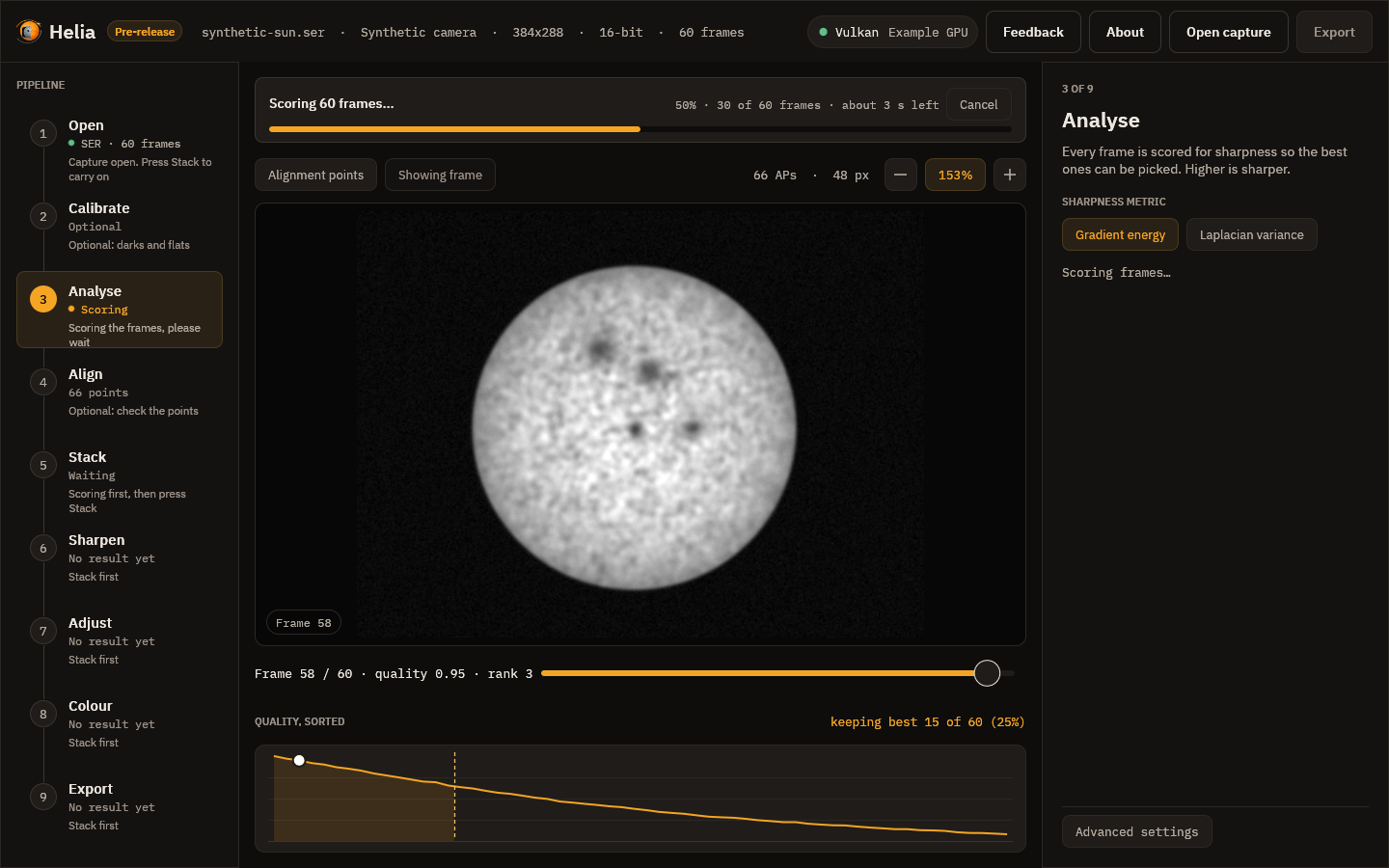
| Notice | Shown while |
|---|---|
| Opening the file and indexing its frames | a capture is opened (no bar: the length is not known) |
| Converting the video with ffmpeg | a video is converted to a capture, where that is offered |
| Decoding the frame | a frame is read for the viewer |
| Scoring N frames | every frame is scored; the bar counts frames and shows the time left |
| Building the reference image, Aligning the frames, Measuring the alignment points, Stacking the best frames, Finishing the image | the stages of a stack, one overall bar for the run |
| Colourising the image | a colour look is applied to the stack |
| Writing the file | the result is saved |
The time left appears once enough of the work is done to estimate it (after a second and a twentieth of the way through), and is rounded to whole seconds. Screen readers are given the same sentence: the stage, the percentage and the time left.
Messages when it is done. A short message appears at the bottom right when something finishes, such as Stacked 250 of 1,000 frames in 2.1 s or Saved /path/sun.tif. It fades after a few seconds, or press Close. A failure, such as Could not open file: not a SER file, stays until you press Dismiss. The same failure twice shows once.
1. Open
Choose Open capture in the top bar (or press Ctrl+O), or drop a file on the
window. A Recent menu appears next to it once you have opened something: it lists
the last eight captures, newest first, and opens one when you choose it (a file that
has gone is dropped with a message). You can also start Helia with a capture:
helia-gui capture.ser, or Open with > Helia in your file manager once Helia is
installed. Helia reads SER files and uncompressed AVI files, including the large
OpenDML files SharpCap writes. With the optional ffmpeg installed it also
opens MP4, MOV, M4V, MKV and WebM files and compressed AVI files (see
Installation).
A video is decoded once, by ffmpeg, before anything else happens, and the top
bar shows "Decoding video with ffmpeg" with a percentage while it runs; opening
another file cancels it. Afterwards scrubbing is as quick as for a SER file,
because the frames are on disk uncompressed. Changing the Channel chip
decodes the video again, because ffmpeg extracts the colour channel.
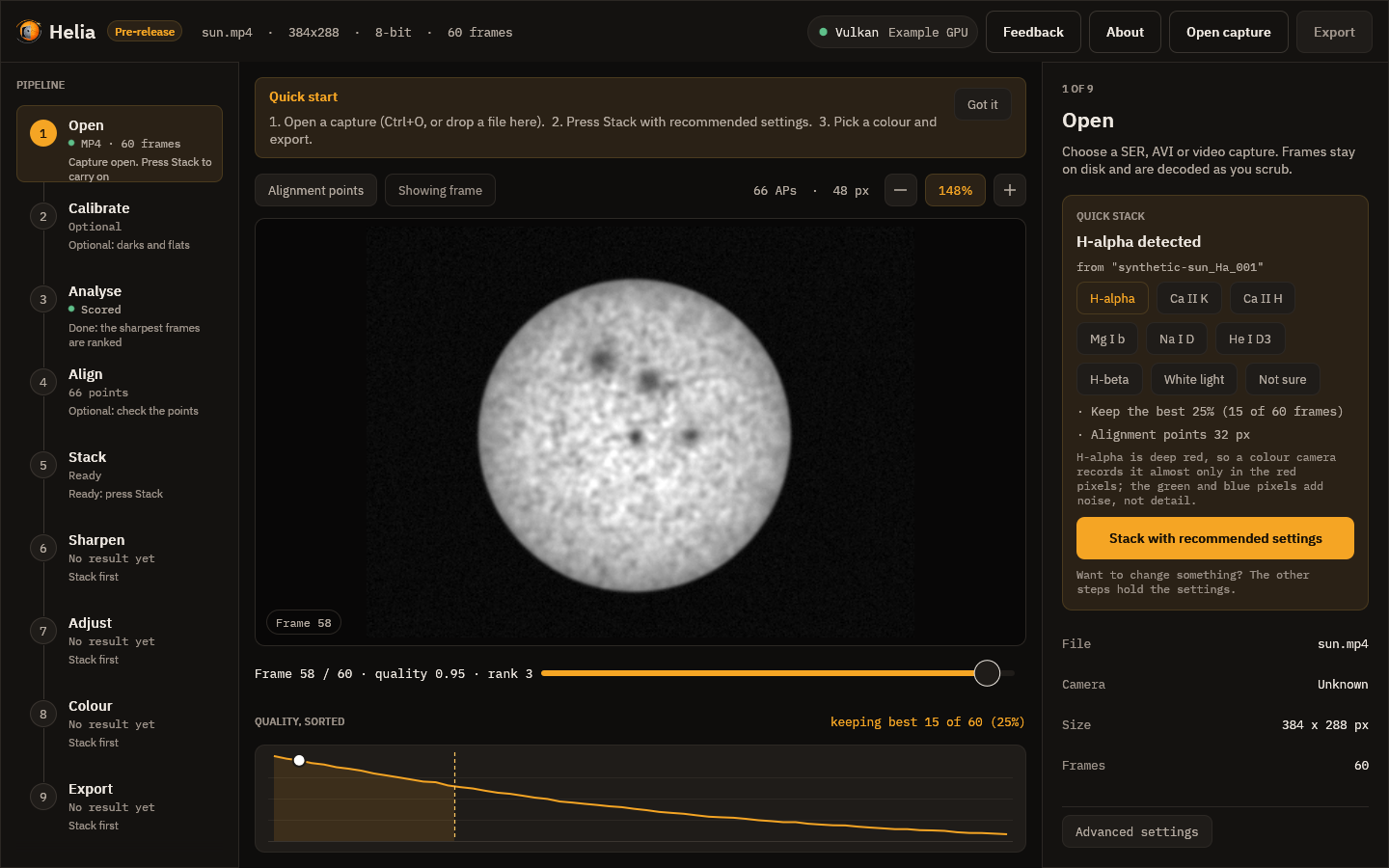
When the input is lossy video the Open inspector says so (here, "lossy 8-bit
4:2:0 video (h264): fine for quick results, SER/AVI raw captures keep more
detail"). See Capturing for Helia. If
ffmpeg is missing, an error strip above the viewer says how to install it.
Quick stack. Once a capture is open, the top of the inspector is a card that says which filter Helia found (from the file name, the folder, the SharpCap sidecar or the SER header; see Colourising) and lists the settings it will use: the colour channel (shown only for a raw colour camera), the share of frames to keep with the count, and the alignment point size. One primary button, Stack with recommended settings, applies those settings and runs the stack. Underneath, a row of filter buttons lets you correct the guess, and Not sure returns to plain defaults. The card keeps its advice short; the other steps hold the settings if you want to change them, and a change made there stays until you press the button again, which puts the recommended settings back.
First-run tips. The first time you use the app, a strip above the picture lists the three steps. Got it hides it for good; Helia remembers in its settings file (see Settings file).
The top bar then shows, in order: the file name, the camera model (taken from
the SharpCap CameraSettings.txt next to an AVI, when there is one), the frame
size, the bit depth with the Bayer pattern, and the number of frames.
The header, and what Helia will use
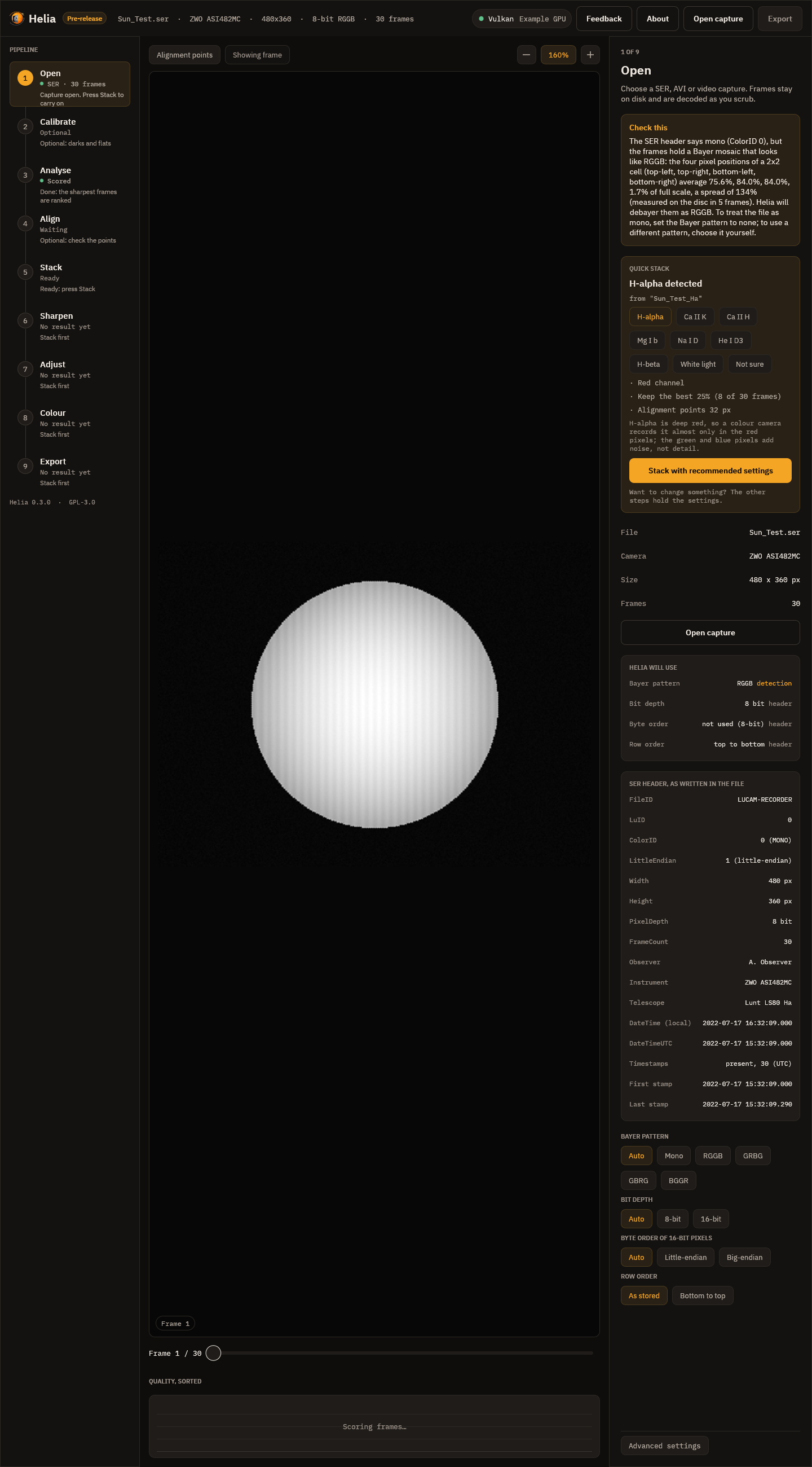
Under the file details the Open inspector shows two lists, so a header that is wrong cannot go unnoticed:
- Helia will use: the Bayer pattern, bit depth, byte order and row order the
capture is decoded with, each followed by where it came from:
header(the file's own),sidecar(SharpCap'sCameraSettings.txt),detection(measured from the pixels) oroverride(your choice, below). Anything that is not from the header is shown in the accent colour. - SER header, as written in the file: every field, decoded: FileID, LuID, ColorID with its meaning, the LittleEndian flag, width, height, pixel depth, frame count, observer, instrument, telescope, DateTime (local) and DateTimeUTC as dates (not set when the recorder left them at zero), and whether the per-frame timestamps are present with the first and the last. For an AVI it lists the codec, pixel format, row order and the sidecar's fields instead.
When the file disagrees with itself or with you, a Check this card above the
Quick stack card says so in words. The screenshot is the case it exists for: the
header says mono (ColorID 0), the pixels are an RGGB mosaic, and Helia debayers
as RGGB and tells you why. A brief message also appears at the bottom right when
the capture opens. helia info prints the same lists and notices (see
The command line).
Overrides. Below the lists, chips say what the file gets wrong. Each one reopens the capture, and the lists above update to show the override as the source:
- Bayer pattern: Auto trusts the header, but checks a SER file labelled mono for a hidden mosaic; Mono treats the frames as monochrome whatever the header or sidecar say; RGGB, GRBG, GBRG and BGGR force a pattern.
- Bit depth: Auto, 8-bit or 16-bit, instead of the header's.
- Byte order of 16-bit pixels: Auto, Little-endian or Big-endian, instead of the header flag.
- Row order: as stored, or bottom to top for a file stored upside down.
Bit depth, byte order and row order apply to SER files; their chips are greyed out for an AVI. The overrides belong to the file: opening a different capture starts again from Auto. They are written into the exported file (see What the files say).
2. Calibrate

Optional. Calibration takes out what belongs to the sensor and the optics in front of it and not to the Sun: dust shadows, vignetting, the fringes of an etalon, a fixed pattern, hot and dead pixels. It is applied to every frame as it is read, before the frame is demosaiced, scored or aligned, so everything after it (the quality curve, the alignment points, the stack, the sharpening) sees the calibrated frames. See Calibration for what to capture and why.
The inspector has a place for each file:
- Dark is a master dark (a FITS file from
helia calibrate, or any FITS or TIFF) or dark captures to make one from. File picks a file; Folder picks a folder of captures (SER, AVI or FITS stills). - Flat is the same for the flat. When it is captures, a Dark for the flat appears: darks at the exposure of the flats. Without them the flat keeps its offset and corrects too much in the dim parts.
- Bad pixels is a map (FITS) or a text list of
x ypairs. Leave it empty and Helia finds the hot pixels of the dark and the cold ones of the flat itself. - Fix hot and cold pixels turns that correction off.
- Scale the dark by exposure is for darks taken at another exposure from the Sun; the Sun's exposure is read from the SharpCap file beside the capture.
While the masters are prepared the rail shows Preparing; then it names what is
in force, and the inspector lists each master (frames used, how they were
combined, a fingerprint of its pixels) and any warning: a flat with rings, a dark
that could not be scaled, a flat built without a dark. Before / after in the
toolbar splits the picture, the frame as recorded on the left and calibrated on
the right; drag the line. Save the masters writes master-dark.fits,
master-flat.fits and bad-pixels.fits to a folder, so the next session can use
the files instead of the captures.
Changing a file scores the capture again, and a stack made before the change is out of date: press Stack again. The masters are checked against the capture when it opens (same size, same mosaic) and a mismatch is explained in the inspector. Nothing here changes the capture file.
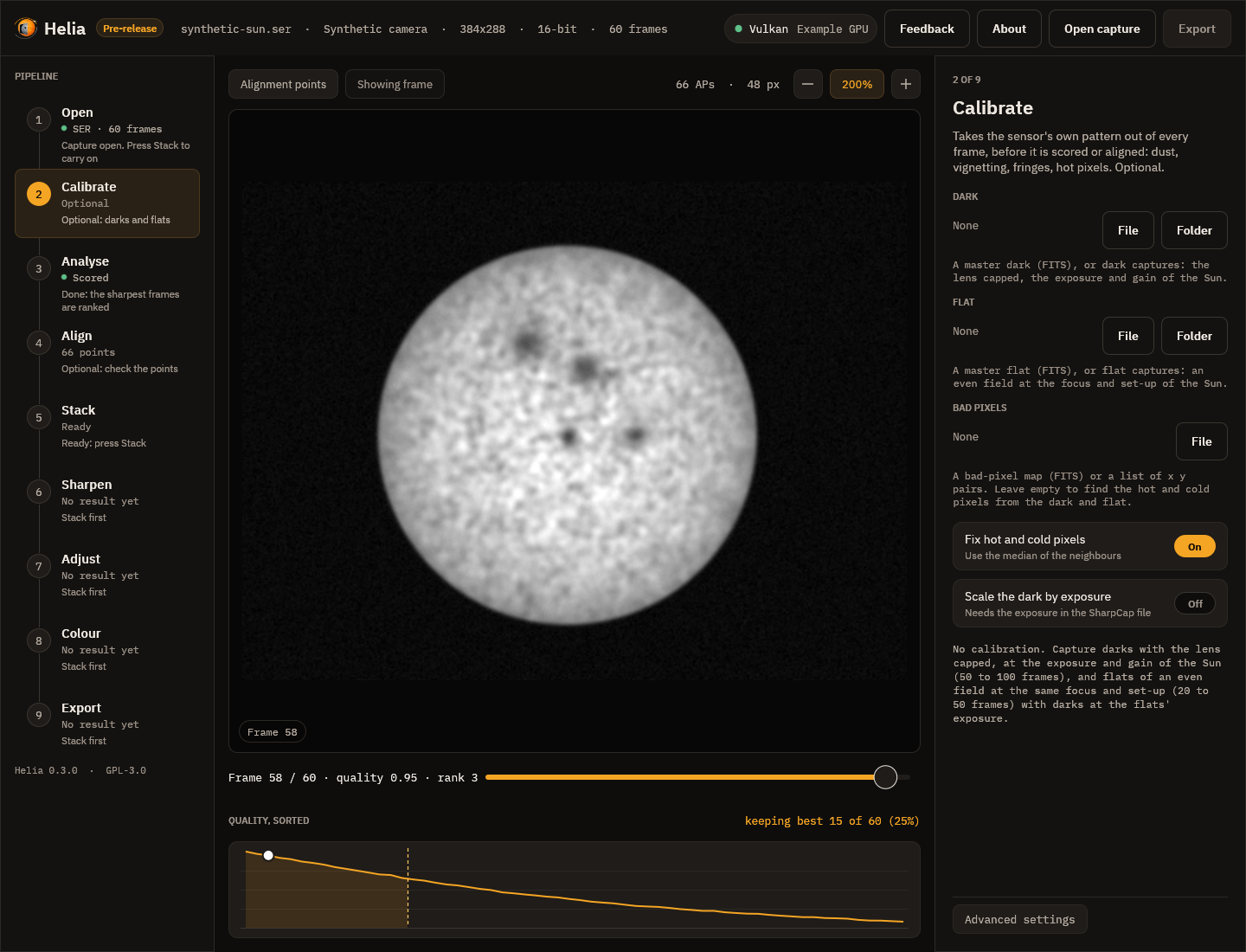
3. Analyse
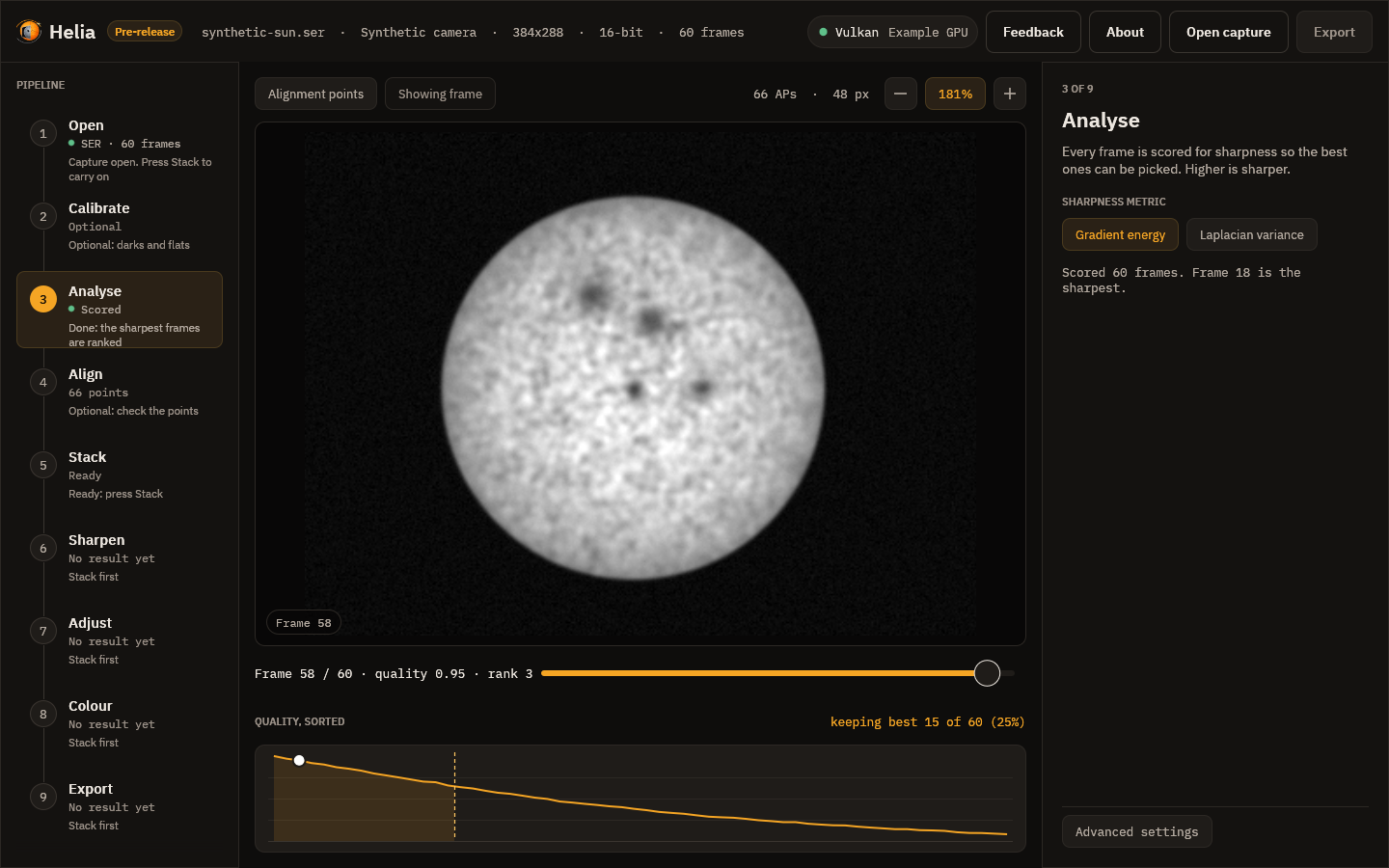
As soon as a capture opens, every frame is scored for sharpness in the background. The rail shows Scoring and then Scored. The inspector lets you choose the sharpness metric:
- Gradient energy, the default, is the mean squared gradient of the frame;
- Laplacian variance is the variance of the Laplacian.
Both ignore overall brightness and the sky pedestal, so a brighter frame does not look sharper. Changing the metric scores the capture again.
4. Align
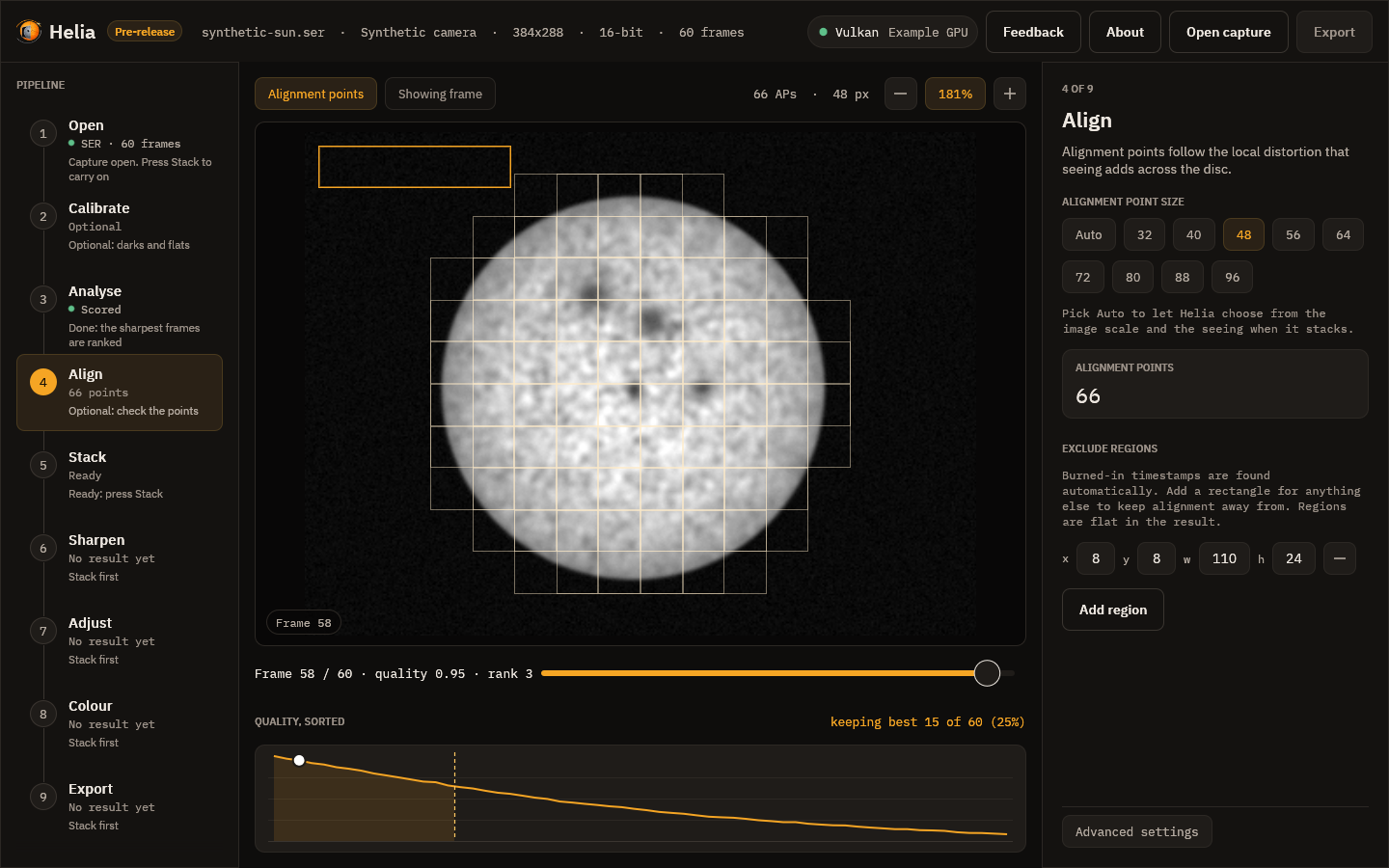
Seeing bends the image differently across the disc, so Helia aligns small windows called alignment points as well as the whole frame. The grid is drawn over the viewer as thin squares. The inspector offers the point size, from 32 to 96 pixels in steps of 8: small points follow finer detail but need more contrast to lock on. The size Helia recommends for your image is already selected.
The Auto chip beside the sizes lets Helia choose when it stacks: it fits the limb for the image scale, probes the seeing on a dozen frames, and picks the size, the spacing and how far to search. The note under the chips explains this before the stack and, afterwards, says what was chosen (for example alignment points 32 px every 16 px, search 4 px, 8.79 arcsec per pixel, local warp 0.35 px); the grid then shows the chosen size. Picking a size turns Auto off. See How stacking works.

The card shows how many points are active, that is, bright and detailed enough to be measured. After a stack, a second card shows the median drift of the frames from the reference, in pixels.
Points are drawn only where the stack will use them: the centre of the window must be inside the fitted limb of the sun, and no window may touch burned-in text (which Helia finds by itself) or a rectangle you exclude.
Exclude regions lists rectangles that alignment and quality scoring must
stay off, for a logo or a stray label that the automatic text detection does
not cover. Add region creates one at the top-left corner; set its x, y,
width (w) and height (h) in pixels with the boxes, and use the minus button
to remove it. Each rectangle is outlined in amber on the frame. Excluded areas
are flat in the stacked result. Changing the list scores the capture again,
because the scores depend on it.
5. Stack
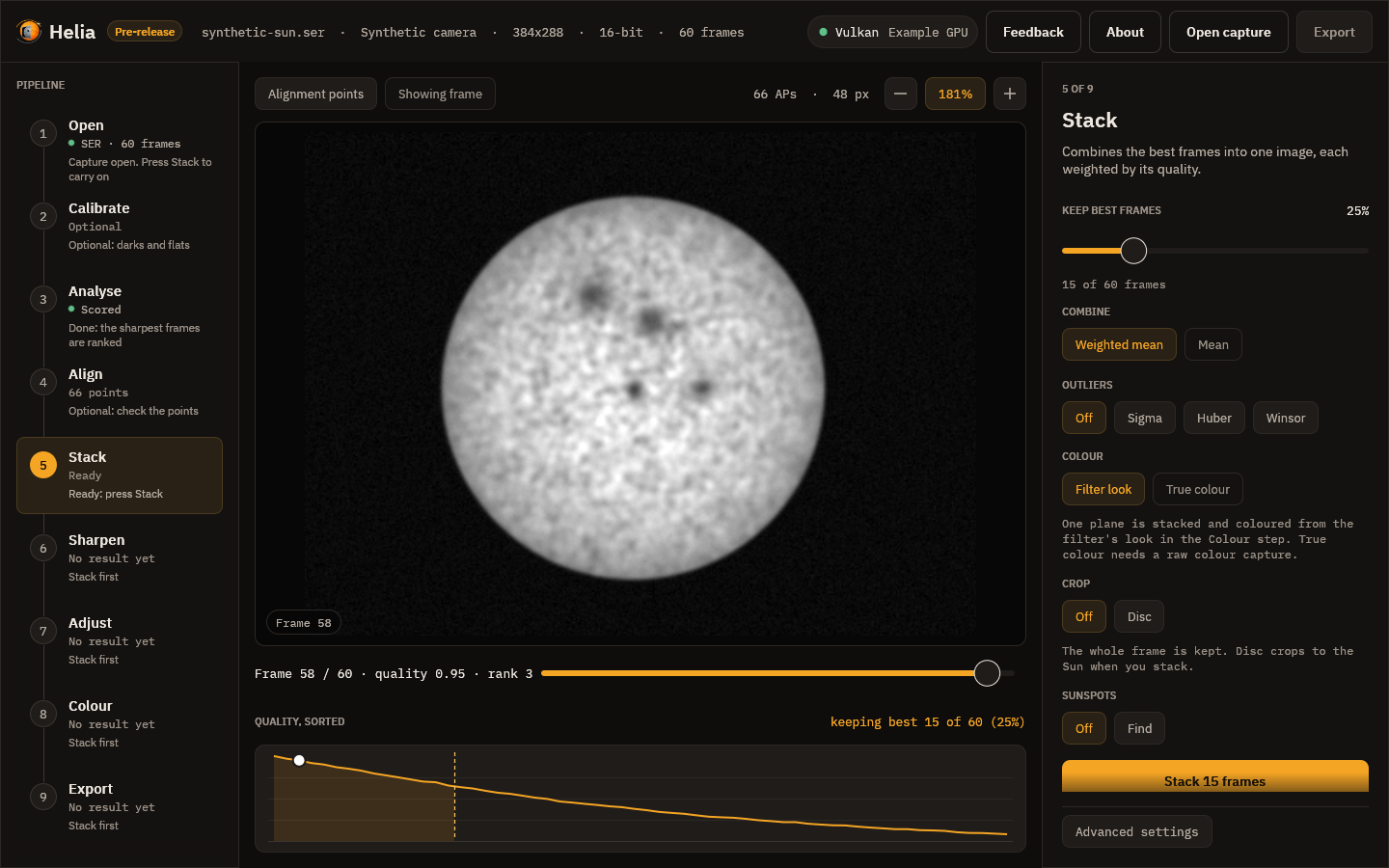
-
Keep best frames is the share of frames, ranked by quality, that go into the stack, from 5 to 100 per cent in steps of 5. The line underneath converts it to a frame count.
-
Combine is a weighted mean, which weights each frame by its quality. An unweighted mean is not available yet.
-
Outliers guards against samples that do not belong, such as a hot pixel, a satellite trail or a cloud dimming a few frames. Off is the plain weighted mean; Sigma drops samples beyond 2.5 standard deviations of the mean, Huber gives samples beyond 1.345 less weight the further they are, and Winsor clamps them to 2 standard deviations. It is off by default and makes the run slower, because the frames are read twice. See How stacking works for what each costs.
-
Colour chooses what is stacked. Filter look (the default) stacks one plane, coloured later from a filter's look in the Colour step. True colour, for white light with a raw colour camera, stacks red, green and blue on one alignment and gives a colour picture; Auto balance or No balance and Align channels (red and blue onto green) go with it. The chip is disabled for a capture that is not a Bayer mosaic. After a stack the note under it gives the gains and the channel shifts. See True colour.

-
Crop cuts the stack to the solar disc: Off keeps the whole frame, Disc crops to a square around the fitted limb with a margin you set with the slider (0 to 50 per cent of the radius, 10 to start). It applies to every export, FITS included. The note under it says what will happen and, after a stack, the size it was cropped to, or why it was not (no clear disc). See How stacking works.
-
Stack N frames starts the run.

When it has finished, a line under the button says how whole frames were aligned
and how confident that was, for example Aligned by limb fit, confidence 0.90;
hover it for the reason. Helia picks the method itself: the solar limb when the
full disc is in view, phase correlation for a cropped region. The app has no
switch for it; use --align on the command line or align in an API job to
force one.
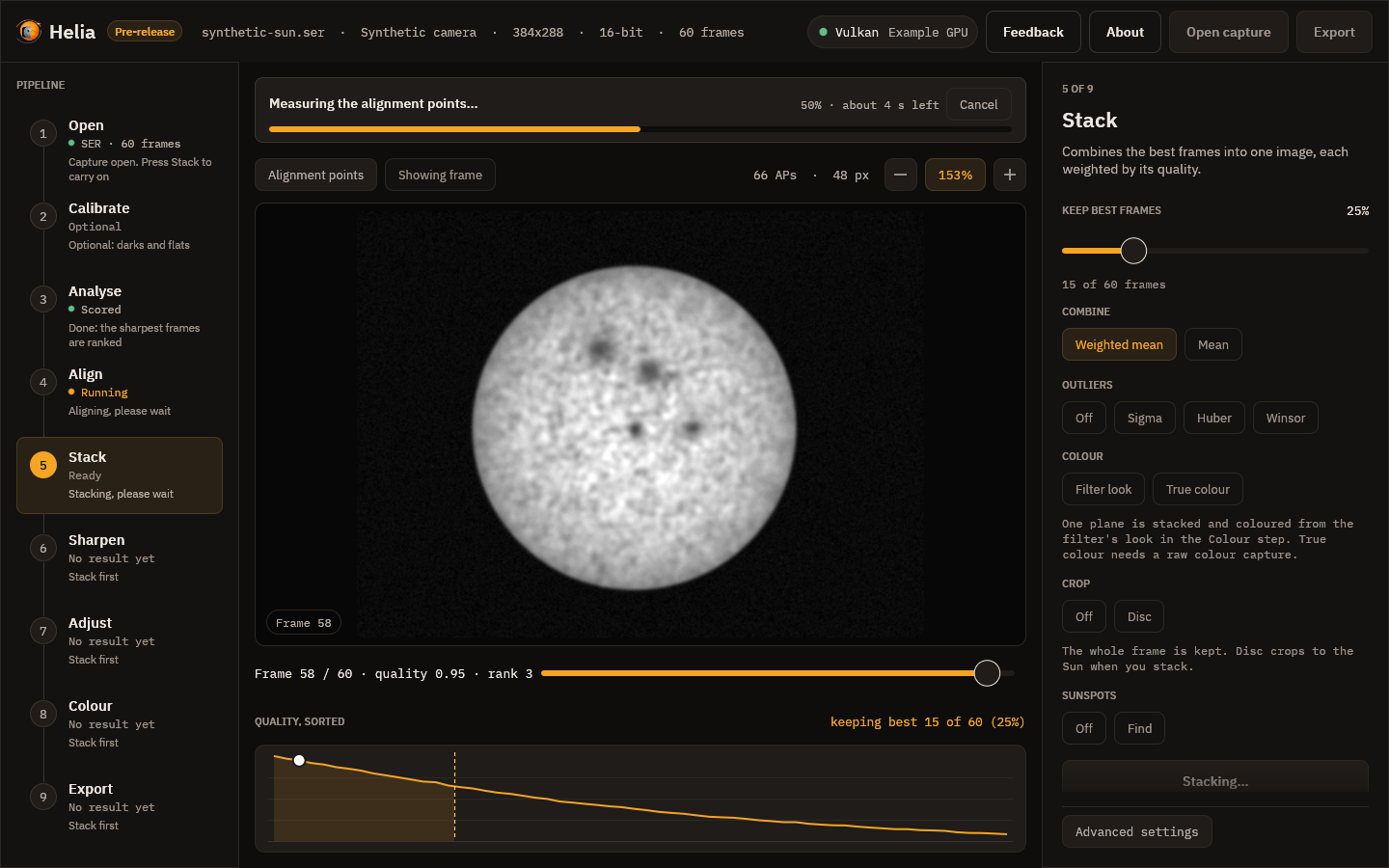
While it runs, a notice above the picture names the current stage and shows the percentage and the time left, and the thin bar in the inspector shows overall progress. Cancel, in either place, stops the run without losing the settings.
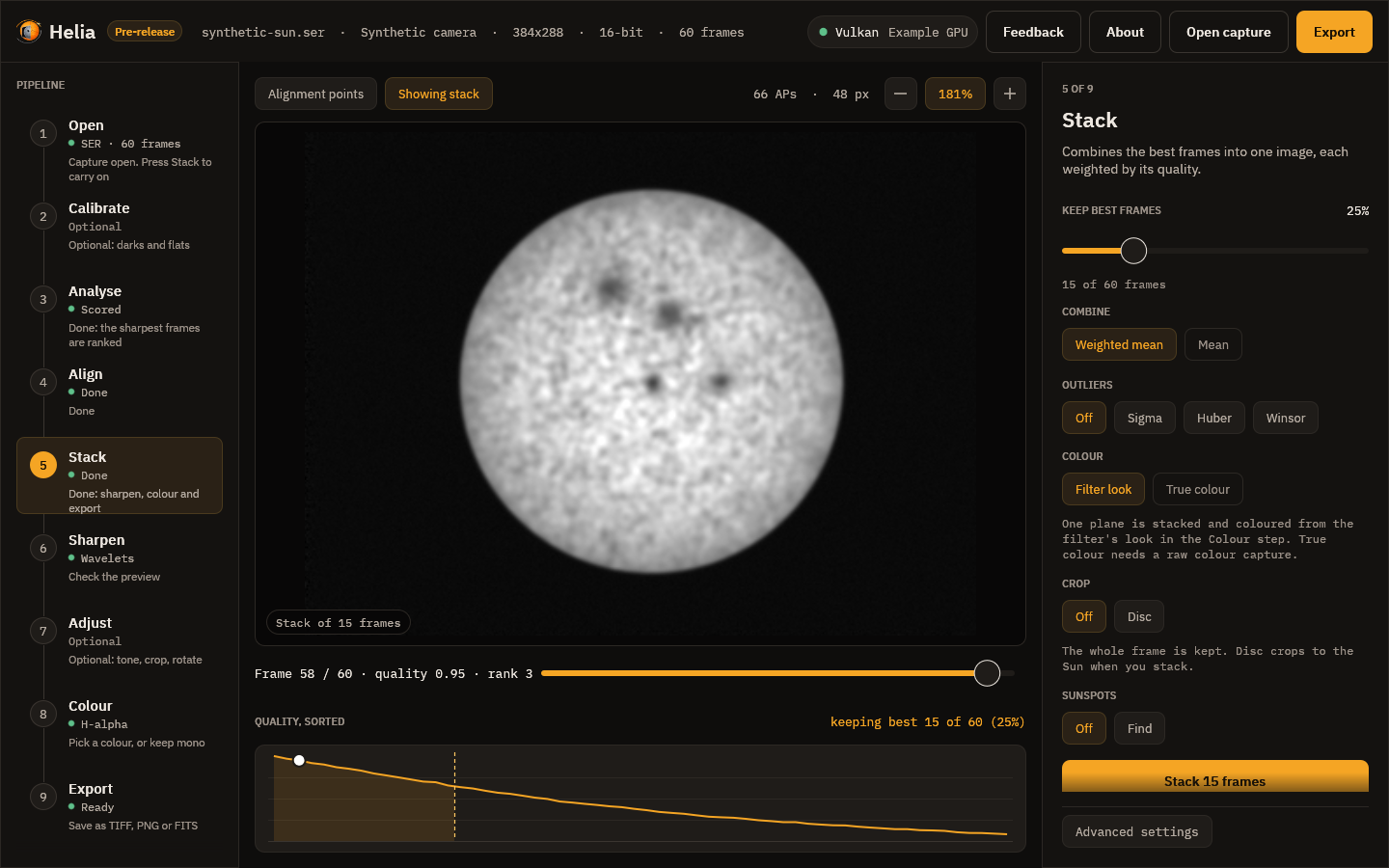
When it finishes, a message reports the frames used and the time taken, the viewer switches to the stacked image, the Export button lights up and Helia moves on to the Sharpen step.
6. Sharpen
The stack is sharpened on the mono image, before any colour. The recommended wavelets for your filter are already on, so the picture you see here is sharpened; press Off to see the plain stack. The method chips choose between Wavelets, Unsharp and Deconvolution, and each shows its own controls: a gain and a noise cut for each wavelet layer, the radius, amount and threshold of the unsharp mask, or the blur, iterations, noise control and limb guard of the deconvolution. Every slider updates the picture as you drag it. Reset to recommended puts the filter's values back. My presets keeps and recalls whole settings under a name.
At the top of the step, Limb darkening divides the disc by its brightness profile before the sharpening runs, so the sharpening sees flat contrast from the centre to the limb. Model divides by the fitted law (the chips under it choose Linear, Quadratic or Neckel), Profile by the measured radial profile, and Off, the default, leaves the disc alone. The line under the chips is the fit made on your stack: the coefficients, how bright the limb is next to the centre and how far the rings stray from the law. Only the disc changes; the gain eases to 1 at the limb. See Limb darkening.

The toolbar gains two chips here and on the next step: Before / after splits the picture at a line you can drag, the stack as it was on the left and with your edits on the right; Full size renders the preview at full size instead of shrunk. The inspector says how long the last preview took.
Sharpening can create artefacts; the step says so, and so does Sharpening and adjustments, which explains each method, when to use it and what the recommended values are. The file notes what you did, and a FITS file is the unsharpened stack unless you ask otherwise in Export.
7. Adjust
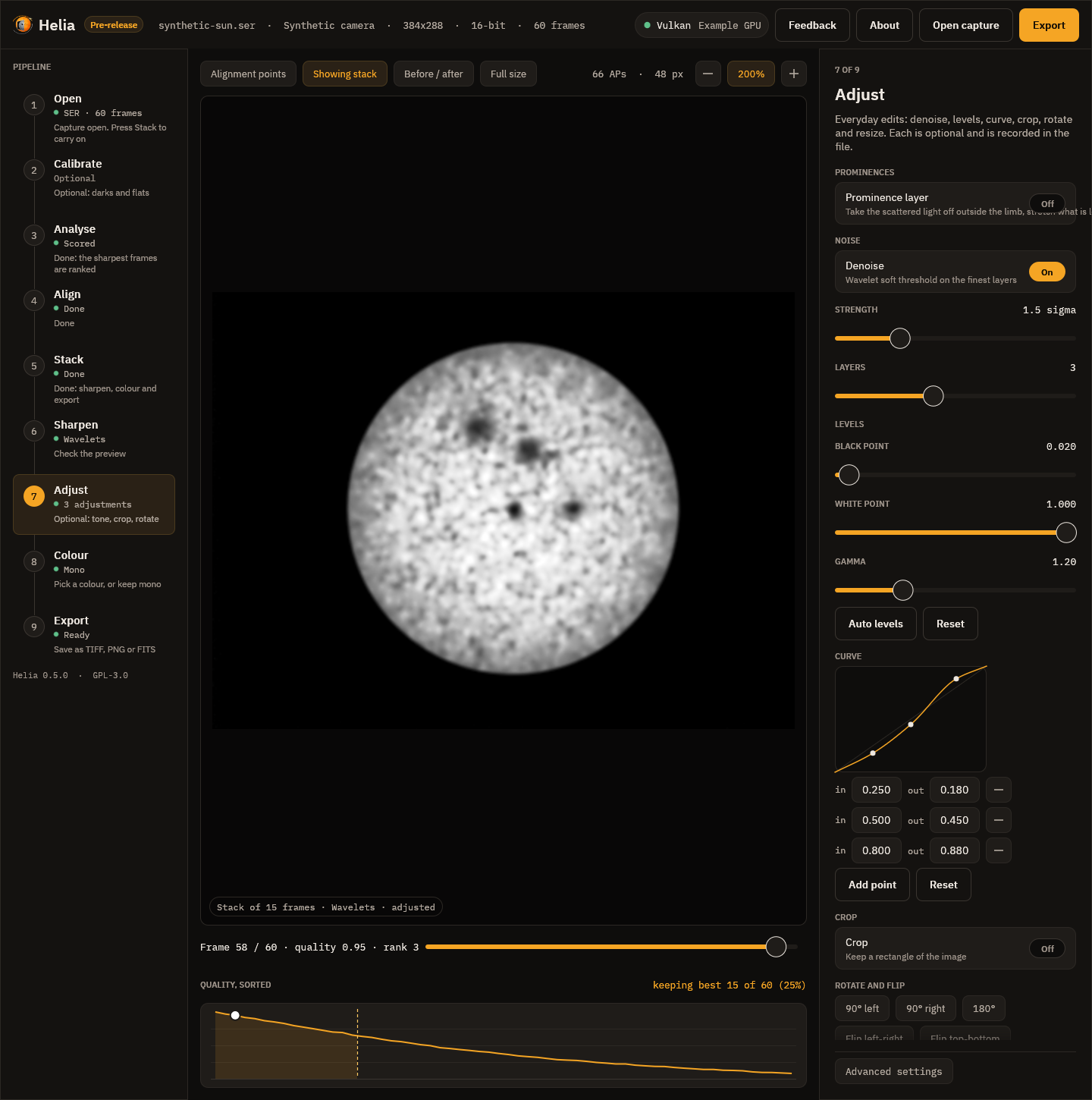
Everyday edits, each optional: Denoise, Levels (black point, white point, gamma and an Auto levels button), a tone Curve (click and drag its points, or type their input and output), Crop (a rectangle in pixels, or the whole image), Rotate and flip (quarter turns, a fine angle, mirrors) and Resize (10% to 400%), and, for lines with prominences, the Prominence layer (a stretched off-limb layer joined to the disc through a feathered edge; see Prominences and the disc together). The line under the controls gives the size of the picture that will be written, and Reset all adjustments switches everything off. The adjustments are applied after the sharpening, in a fixed order, and recorded in the file.
Editing the curve
The curve plot is a control you can drag, with the mouse or the keyboard:
- Click empty space in the plot to add a point there; keep the button down and drag to place it.
- Drag a point to move it. The pointer turns into a hand over a point.
- Double-click a point, or right-click it, to remove it. The end points at input 0 and 1 cannot be removed; they only move up and down.
- With the plot focused (click it, or Tab to it), [ and ] choose the previous or next point, the arrow keys nudge the chosen point by 0.005 (hold Shift for 0.05) and Delete removes it.
A point can never be dragged past its neighbours. It stays a little (0.005) to the right of the point on its left and to the left of the one on its right, and its output stays between theirs, so the curve never falls: a darker input is never made brighter than a lighter one. This is the same rule the program enforces for a curve typed into the boxes under the plot (a curve that breaks it is held back and the line under the plot says why), so a dragged curve is always valid. There are at most 16 points. Add point and Reset still work, and the boxes under the plot show and edit the exact numbers.
8. Colour
Colour is for sharing; a filter stack stays mono. (A true-colour stack is colour already: the step then shows its gains and channel shifts instead of the cards, because no look applies, and sharpening and adjustments run on each channel.)

Each card shows a look as a ramp from black to white, with its filter and wavelength: Mono, then H-alpha, Ca II K, Ca II H, Mg I b, Na I D, He I D3, H-beta and White light. Click one and the viewer shows the stack in those colours at once. Under the cards, a line says why the look is what it is.
- Invert makes a negative before colouring, which shows filaments and prominences well.
- Strength mixes between grey and the full colour.
- Continue to export goes on.
The app remembers the look you chose for each filter. The look you leave here is what Export writes, and the viewer, on this step and the next, shows exactly that. Colourising explains the presets and the maths.
9. Export
Choose TIFF 16-bit, PNG 8-bit or FITS (32-bit float) and press Save as, or press Ctrl+E from anywhere. The step says what will be written, for example 16-bit RGB TIFF, H-alpha colours. TIFF and PNG carry the sharpening, the adjustments and the colour look; FITS is always mono, and is the unsharpened stack unless you turn on Edit the FITS too (the step says which it will be). Every file notes the edits and the look used (see What the files say and Sharpening and adjustments). The edits run on the full-size stack, then the colour. The file is written in the background, with an Applying the edits and writing the file notice, and a message confirms where it went.
The viewer
The toolbar above the image has toggle chips:
- Alignment points shows or hides the grid;
- Showing frame or Showing stack switches between the current capture frame and the stacked result (Space does the same). On the Sharpen, Adjust, Colour and Export steps the stack is shown as it will be written, sharpened, adjusted and coloured, and the pill at the bottom of the picture names what has been done;
- Before / after and Full size, on the Sharpen and Adjust steps (see above).
On the right of the toolbar are the number of points and their size, and the zoom controls: minus, the zoom readout (press it to fit the image to the window) and plus. You can also scroll to zoom around the pointer, drag to pan and double-click to fit.
Under the viewer, the frame scrubber reads, for example, Frame 42 / 100 · quality 0.71 · rank 18. Quality runs from 0 for the worst frame to 1 for the
best, on the same scale as the curve below, so it falls steadily as the rank
number rises, and rank 1 is the sharpest. Drag the slider or use the arrow keys to move through the
capture.
Below that, Quality, sorted plots every frame's score from best to worst. The dashed line marks where the frames you keep end, the shaded area is the kept set, and the white dot is the frame on screen. Hover the curve to read a rank and click it to jump to that frame.
Advanced settings
The foot of the inspector has an Advanced settings button. It is closed by default, so the everyday path is not crowded; press it to show three groups of settings that apply to every step:
- Backend: Auto uses the best adapter wgpu finds and the CPU otherwise; CPU and GPU force the choice (see GPU acceleration). The chip in the top bar shows the graphics API and the adapter that is in use, or CPU. A long adapter name is shortened with an ellipsis; hover the chip for the whole name.
- Debayer: the demosaic method (Bilinear or MHC, Malvar, He and Cutler). This matters only for colour sensor captures.
- Channel: the channel that is analysed and stacked (R, G, B or Lum). The recommended one for your filter is selected when a colour capture opens.
Settings file
Helia keeps a small text file of choices it should not ask twice: whether the
first-run tips were dismissed, the colour look last chosen for each filter, the
backend, export format, outlier rejection and full-size preview you last chose, the
folders you last opened a capture from and exported to (the file dialogs start
there), the last eight captures you opened (the Recent menu), the size of the window
when you last closed it (not saved while it is maximised or full screen), and (only if you set it)
the address of the feedback service. The keep percentage, the alignment point size, Auto, the
crop and true colour are not remembered: the first two come from each capture's recommendation,
the others start off.
(Saved sharpening presets are separate files in their own folder; see
Sharpening and adjustments.)
It is $HELIA_GUI_CONFIG if that is set, otherwise %APPDATA%\helia\gui.conf
on Windows or $XDG_CONFIG_HOME/helia/gui.conf (~/.config/helia/gui.conf) on
Linux and macOS. The format is one key=value per line, for example:
tips_dismissed=true
colour.ha=ha,false,1.00
colour.cak=cak,true,0.80
backend=auto
export_format=tiff
robust=off
full_preview=false
last_open_dir=/home/me/captures
last_export_dir=/home/me/stacks
window=1500x920
recent=/home/me/captures/sun.ser
recent=/home/me/captures/limb.ser
feedback_url=https://feedback.example.org
recent lines are newest first. Bug reports leave the recent list out, like the folders. robust is off, sigma, huber or winsor; a file from before the robust modes may still hold
sigma_clip=true, which is read as sigma. Delete the file to start afresh. A missing or damaged file is not an error (an
unknown value is ignored and the default stays), and the app writes nothing until
you change something it remembers.
Log file and bug report
Helia (the app, the command line and helia serve) writes a small log so a
problem can be looked into afterwards. It is helia.log in
%LOCALAPPDATA%\helia\logs on Windows, or in $XDG_STATE_HOME/helia
(~/.local/state/helia) on Linux and macOS; $HELIA_LOG_DIR overrides the
folder. Each line is a UTC time, a level, the program and a message, for example
2026-10-19T12:00:00Z INFO helia-gui: opened sun.ser, 1920x1080, 8-bit RGGB, 631 frames. It records what was started, which capture file was opened (its name,
never its folder), what was exported and any error. It never holds image data, and
a path in an error message is cut down to the file name. At 512 KiB the log
rotates into helia.log.1 and helia.log.2 and the oldest is dropped, so it
stays under about 1.5 MiB. Nothing is sent anywhere.
Save bug report on the About page writes a .zip of four text files for you
to attach to an issue: summary.txt (the version block, operating system and GPU
adapter), capture.txt (the open capture's header in one line), settings.txt
(the settings file above, without folder names) and log-tail.txt (the last 300
log lines). It holds no images and no screenshot; open it and read it before you
send it. It is separate from Send feedback, which sends a
screenshot and a description to the relay when you press Send.
Small windows
Below about 1100 pixels wide the rail and the inspector collapse so the viewer keeps its space. Two buttons appear in the top bar to show either one; only one is open at a time.
About
The sun in the top bar, the About button next to it, or F1 opens the About
page, which replaces the viewer until you press Esc or Close. It leads with the
dedication, then gives the version and how this copy was built: git commit
(+dirty if the tree had uncommitted changes), build time in UTC, build profile,
target, Rust and wgpu versions, and the GPU adapter in use or CPU. Copy version
info puts those lines on the clipboard for a bug report. Below are the
copyright, the GPL notice with its no-warranty paragraph, links to the source,
the licence text and the releases page, and the third-party licences (from
THIRD-PARTY-LICENSES.txt beside the program in release archives). The page
makes no network connections; a link opens in your browser only when you click it.
While Helia is below version 1.0.0 the page, the top bar (a Pre-release badge
beside the name) and the window title (Helia 0.3.0 (pre-release)) all say that
this is a pre-release, and the version block has a release: pre-release line.
Send feedback on this page opens the feedback page, below.
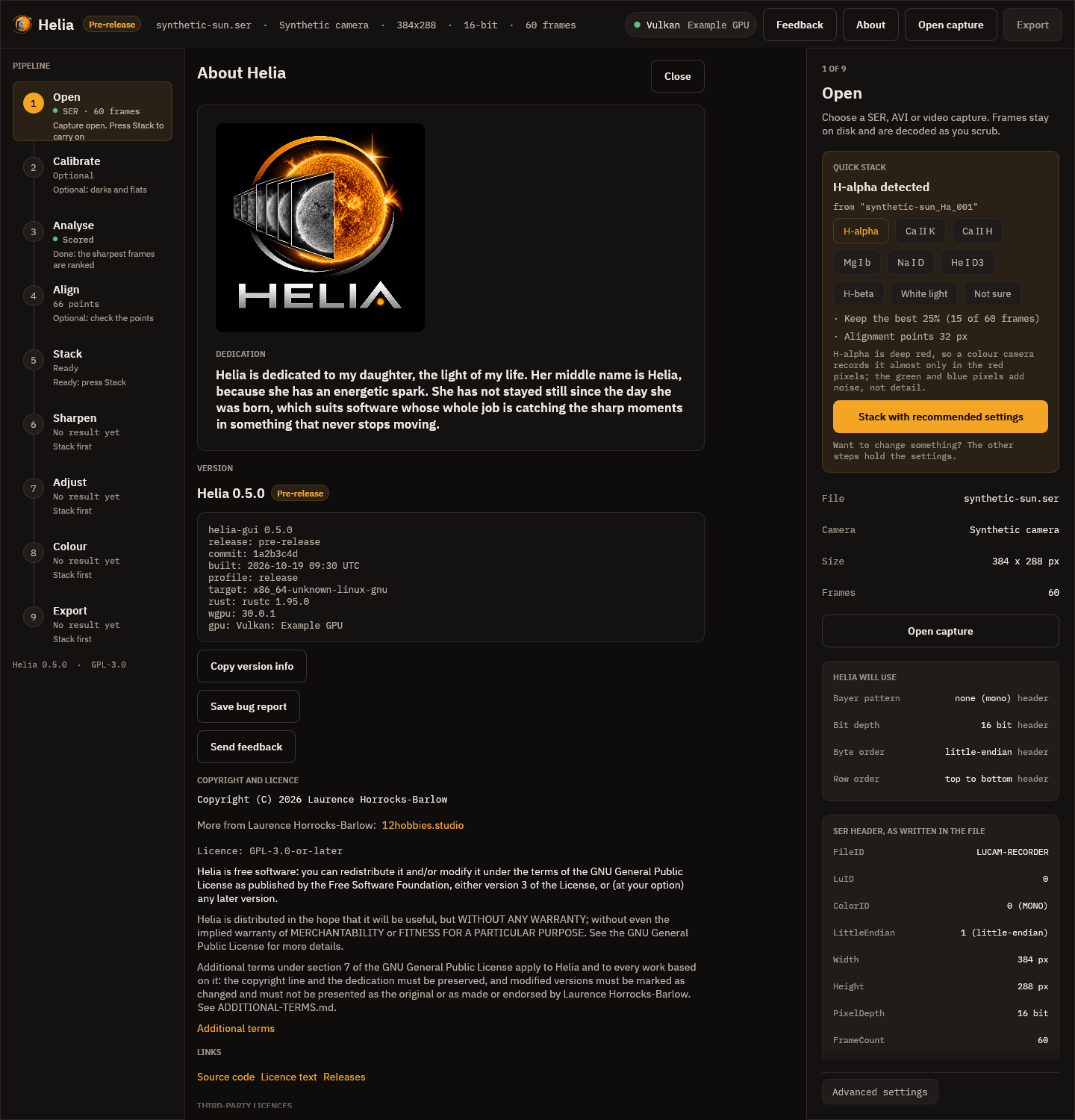
Feedback
The Feedback button in the top bar (or Ctrl+Shift+F), at any step, takes a picture of the Helia window and opens a page where you draw rectangles round the problem, say whether it is a bug, a feature request, a question or something else, and send it as an issue on the project's forge. Nothing is sent until you press Send, and Helia has no telemetry. Sending feedback has the whole walk-through, what is and is not included, and what happens when the feedback service cannot be reached.

Keyboard shortcuts
| Keys | Action |
|---|---|
| Ctrl+O | Open a capture |
| Ctrl+E | Export the result |
| Left, Right | Previous or next frame |
| Shift+Left, Shift+Right | Ten frames back or forward |
| Home, End | First or last frame |
| Space | Switch between the frame and the stacked result |
| F1 | Open or close the About page (Esc also closes it) |
| Ctrl+Shift+F | Send feedback (Esc closes the page) |
| Tab, Shift+Tab | Move between controls |
The arrow keys and Space act on the viewer when no control has keyboard focus. Every control has an accessible name and a tooltip, and the window works with screen readers through AccessKit.
Testing the screenshots
The images above are checked by cargo test -p helia-gui (see
Building and testing). The tests render the
window at 1440 by 900 pixels (the Open header view is taller, at 1440 by 2600, to
show the whole inspector) on a software GPU, from a synthetic capture with
injected state, and fail if the result differs from the committed image. They
run only when HELIA_GPU_TESTS=software is set, and otherwise print a note and
pass. To regenerate the images after an intended change:
UPDATE_SNAPSHOTS=1 HELIA_GPU_TESTS=software cargo test -p helia-gui snapshots
Sharpening and adjustments
A stack is cleaner and smoother than any single frame, but it is not as sharp as the telescope could be. Sharpening brings the fine detail back. Helia offers three methods, each with recommended values for your filter, and a set of everyday adjustments: denoise, levels, a curve, crop, rotate, flip and resize.
Everything here is non-destructive. The stack is never changed. Your choices are an ordered list of operations that Helia applies to the stacked image: on a shrunk copy for the live preview, and on the full-size stack when you export. The list is written into the output file, so a picture always says how it was made.
Sharpening runs on the mono stack, before colour. Detail and noise are measurements; colour is presentation, and is applied to the sharpened image afterwards (see Colourising).
Sharpening can create artefacts. Every method can draw halos beside bright edges, ring around the limb and round sunspots, turn noise into a texture that looks like detail, and make a soft image look processed. None of them can add detail the telescope and the seeing did not record. Use Before / after to compare, and ease off as soon as the picture starts to look different in kind rather than just crisper. If the recommended values look overdone for your capture, they are overdone: turn them down.
Which method
| Method | What it does | Reach for it when | Risk |
|---|---|---|---|
| Wavelets (the default) | Splits the image into layers by detail size (an a-trous transform), lifts or lowers each layer, and removes what is not clearly above the noise in each | Almost always: it sharpens fine and medium detail and keeps noise down at the same time | Low if the noise cuts are set; noise turns to grain if they are zero |
| Unsharp mask | Adds back a share of the difference between the image and a blur of it | You want a light, predictable touch, or one size of detail | Halos beside sharp edges at high amounts |
| Deconvolution (Richardson-Lucy) | Undoes a known blur, the point spread function (PSF), by repeated correction | The stack is good, the blur is about the same everywhere and you want the best the data can give | The most: ringing, speckle and over-sharpening. The limb guard (below) controls the worst of it |
Wavelets
The image is smoothed repeatedly with a small spline (the a-trous, or "with
holes", transform: 1 4 6 4 1 over 16, with the taps spread twice as far apart
at every step). The difference between two steps is a layer. Layer 1 holds
the finest detail and most of the noise; layer 2 fine detail such as granulation
and fibrils; each higher layer larger structure. This is the transform behind
Registax.
Each layer has two numbers:
- Gain. 1 leaves the layer alone, above 1 sharpens it, below 1 softens it.
- Noise cut. Detail weaker than this many noise sigmas is taken to be noise and removed. 0 keeps everything. The noise level of each layer is measured from the image itself, from the median absolute deviation of the layer (a few bright features do not move it), so the cut follows your capture rather than a fixed number.
A layer with gain 1 and noise cut 0 is left exactly as it is: with every layer at its neutral setting the result is the input, bit for bit.
Unsharp mask
The radius (a Gaussian sigma in pixels) is the size of the blur that is subtracted, so it picks the size of detail that is boosted. The amount is how much of the difference is added back: 0.6 is gentle, 2 strong. The threshold leaves detail weaker than it alone, so noise is not boosted.
Deconvolution
Richardson-Lucy deconvolution estimates the sharp image that, blurred by the PSF, gives the stack you have, by repeating a multiplicative correction. Helia adds total-variation (TV) regularisation (Dey et al., 2006), which keeps noise from being amplified into speckle.
- Blur to undo (PSF). Auto is a Gaussian sized from the image scale: Helia
measures the radius of the disc in pixels, from that works out the arc seconds
per pixel, and assumes a stack that is about 2 arc seconds across at half
maximum. It never goes below 0.7 pixel, because a smaller blur is below the
sampling and there is nothing to recover. Gaussian is the same shape with a
sigma you choose, for seeing and a slightly soft focus. Airy is the
diffraction pattern of a circular aperture, for a sharp, steady image through a
small telescope; give the radius of its first dark ring in pixels (on the
command line,
airy-scope:656,100,0.9works it out from the wavelength in nanometres, the aperture in millimetres and the pixel scale in arc seconds). - Iterations. More is sharper and noisier; stop when noise starts to look like texture.
- Noise control (TV). The weight of the regularisation, 0 to 0.05.
- Limb and sunspot guard. Deconvolving a bright edge leaves a bright halo inside it and a dark one outside; the solar limb and the edge of a sunspot are the worst cases. For every pixel the guard measures how large a step lies within reach of the blur, as a share of the image's range, and where that is large (the limb, an umbra) it holds the result inside the range of the original image around that pixel. A true sharpening of an edge has its values on the two sides of the edge, so the edge still steepens, but a halo beyond them cannot form. Granulation and filaments, which have little contrast, are untouched. The guard is on by default; its strength runs from 0 (off) to 1.
How well the guard works is measured, not asserted. On a synthetic limb (a flat disc on dark sky, blurred by a Gaussian of sigma 2 pixels, with noise, then deconvolved for 30 iterations) the largest excursion beyond either plateau within 12 pixels of the limb is 16.7% of the step without the guard and 1.1% with it. Round a synthetic sunspot of the same blur the figures are 10.9% and 1.9%. The test suite fails if the guarded figures reach 2%.
Recommended values for each filter
The values come with the filter presets and follow the same rule as the rest of the recommendations: a safe starting point, never the last word. Faint lines (Ca II K and H, He I D3, H-beta) are noisy, so they get higher noise cuts, gentler gains and a shorter deconvolution. White light has the most signal and the finest structure, so it takes the strongest settings. H-alpha sits between, with its fibrils on layers 2 and 3.
The two photospheric filters, white light and Na I D, are tuned for granulation.
It sits on layers 2 and 3 at a few per cent contrast, so those layers get the
largest gains and no noise cut (a cut there removes granulation with the noise,
which is how the 0.2.0 defaults lost it); the finest layer keeps its cut so pixel
noise is not boosted. See White-light granulation,
which also shows how to measure the result with helia measure.
| Filter | Wavelet gains, layers 1 to 6 | Noise cuts, layers 1 to 6 | Unsharp amount | Deconvolution iterations |
|---|---|---|---|---|
| H-alpha | 1.50, 1.45, 1.25, 1.05, 1, 1 | 1.8, 1.0, 0.5, 0, 0, 0 | 0.60 | 12 |
| Ca II K and H | 1.30, 1.40, 1.25, 1.05, 1, 1 | 2.5, 1.5, 0.8, 0.3, 0, 0 | 0.45 | 8 |
| Mg I b | 1.40, 1.40, 1.20, 1.05, 1, 1 | 2.2, 1.3, 0.6, 0, 0, 0 | 0.50 | 10 |
| Na I D | 1.20, 1.80, 1.50, 1.10, 1, 1 | 2.0, 0, 0, 0, 0, 0 | 0.50 | 10 |
| He I D3 | 1.30, 1.35, 1.20, 1.05, 1, 1 | 2.5, 1.5, 0.8, 0.2, 0, 0 | 0.40 | 8 |
| H-beta | 1.30, 1.40, 1.25, 1.05, 1, 1 | 2.5, 1.5, 0.8, 0.3, 0, 0 | 0.45 | 8 |
| White light | 1.50, 1.80, 1.50, 1.10, 1, 1 | 1.0, 0, 0, 0, 0, 0 | 0.80 | 20 |
| Not recognised | 1.50, 1.45, 1.25, 1.05, 1, 1 | 1.8, 1.0, 0.5, 0, 0, 0 | 0.60 | 12 |
The unsharp radius follows the image scale (1.4 times the default blur, between 1 and 3 pixels). The full table, with the thresholds, TV weights and denoise strengths, is generated from the code: see Colour presets.
Limb darkening
The disc is brighter at the centre than at the limb, because the line of sight
reaches a cooler, shallower layer there. With mu the cosine of the angle from
the local vertical (sqrt(1 - (r/R)^2) at radius r on a disc of radius R),
the brightness relative to the centre is a law L(mu):
Law (--limb-law) | L(mu) | Coefficients |
|---|---|---|
linear | 1 - u (1 - mu) | u |
quadratic (default) | 1 - u1 (1 - mu) - u2 (1 - mu)^2 | u1, u2 |
neckel | 1 - sum a_k (1 - mu^k), k = 1 to 5 | a1 to a5 |
The fit. Helia fits the law to the azimuthal median of the stack, in rings
one pixel wide about the fitted disc centre, out to 97% of the radius (the limb
itself is blurred by the seeing). A median ignores sunspots, granulation,
filaments and plage, which cover a minority of each ring. The sky level just
outside the limb is subtracted first. The fit is linear in the coefficients and
exact; the five-term form has a light ridge, because the powers of mu are
nearly collinear and the rings barely determine five numbers (compare the law,
not the terms). Every helia stack prints it and the API returns it:
limb: quadratic: u1 = 0.470, u2 = 0.046; limb at 48% of the centre; rings differ from the law by 0.67% rms
helia measure image.fits --limb fits all three laws to an existing image and
prints the measured profile beside them. The fit measures the image, not the
Sun: an uncorrected vignette, a radial gradient from an etalon, or a disc that
is cut by the frame all read as limb darkening. Flats
(Calibration) remove the first; the last is the reason for the
partial-disc row below.
Flatten. --flatten model (or the Model chip in the Sharpen step) divides
the disc by the fitted law; --flatten profile divides it by the measured
profile itself (smoothed over a few rings), which also removes any other radial
gradient. It runs first in the list, before denoise and sharpening, so the
wavelets and deconvolution see flat contrast and a gain set for the centre is
right at the limb too. It works on helia edit as well, and as an edit
{"op": "flatten", "source": "model", "law": "quadratic"} in a preset or an API
job. What it leaves alone:
- Everything outside the limb: prominences have their own brightness, which has nothing to do with the photosphere's darkening.
- The last 1.5% of the radius: the gain eases to 1 there. The limb is a blur of disc and sky, and a gain of two or three would turn it into a bright rim.
- The bright end of the disc: the gain is scaled so the 99.9th percentile of the disc is where it was. Dividing out the darkening brightens the limb side, and an image with a brighter side (the etalon sweet spot in these captures) would otherwise clip at white.
With no clear disc (a cropped region) the edit leaves the image alone, and the
limb: line says so. A flat disc is for looking and for sharpening and
compositing; the stack itself and the FITS file are not flattened unless you ask
(--sharpen-fits applies the edits to FITS too).
The picture is a synthetic capture; the fit under the chips is the one made on that stack.
What the real captures say
The four sodium captures (ASI482MC, Na D, 589.3 nm, stacked with the Na D
preset), fitted with helia measure --limb:
| Capture | Disc | Linear u | Quadratic u1, u2 | Limb level (linear, quadratic) | Rings off the law (quadratic) |
|---|---|---|---|---|---|
Sun_Test.ser | whole | 0.539 | 0.546, -0.012 | 46%, 47% | 0.71% |
15_20_57.ser | whole | 0.497 | 0.470, 0.046 | 50%, 48% | 0.67% |
15_32_09.avi | whole | 0.555 | 0.515, 0.070 | 44%, 41% | 0.79% |
14_42_57.avi | 63% of the limb | 0.720 | 0.710, 0.018 | 28%, 27% | 3.58% |
The five-term fit of the three whole discs gives a1 = 0.44 to 0.45, a2 = 0.04
to 0.14, a3 = 0.02 to 0.04, a4 = -0.001 to 0.07, a5 = -0.10 to -0.08, with
the limb at 47% to 52% of the centre.
Against the literature, as far as it could be checked from the sources available while writing this (the Neckel and Labs 1994 coefficient table itself was not available, so the five-term values are not compared):
- Allen's Astrophysical Quantities (Cox 2000), as quoted for the Sun at 550 nm:
quadratic
u1= 0.47,u2= 0.23, a limb at 30% of the centre. - The linear coefficient is 0.56 at 600 nm and 0.95 at 320 nm (Tatum, Stellar Atmospheres, chapter 6); darkening is weaker towards the red.
The Na D passband is between those two, and the fits sit where that puts them.
The linear coefficient of the three whole discs (0.50 to 0.56) brackets the 0.56
at 600 nm, and the quadratic u1 of 15_20_57.ser (0.470) is the 0.47 of the
550 nm table. The limb is brighter than at 550 nm (41% to 48% against 30%),
which is the direction a redder band predicts. Caveats on all of this: u2 is
poorly determined (it is -0.012 on one capture and 0.23 in the table) because
u1 and u2 trade against each other when the rings stop at mu = 0.24; a
narrow line image is not a continuum, and the D lines are formed higher than the
continuum, so line-core darkening differs from continuum darkening; the cameras
are not radiometrically calibrated and the captures are not flat-fielded; and
the green channel of a colour camera is a broad band. The partial disc
(14_42_57.avi) is outside what the method supports: the rings are not full
circles, the fitted radius is larger than the frame and the fit is a poor one
(3.6% rms), so its coefficients are not a measurement of anything.
Flattening 15_20_57.ser with either source takes the fitted linear
coefficient from 0.497 to -0.000 (model) and 0.000 (profile), with the rings
0.74% and 0.35% off a flat line (the profile removes the whole radial gradient,
the model only the law). The granulation does not move: the granulation band of
helia measure is 2.050% before, 2.052% with the model and 2.049% with the
profile, the fine band 1.573%, 1.572% and 1.571%. This capture also has a bright
patch on one side that is not radial (the filter's sweet spot); flattening leaves
it, as it should, and the bright-end scaling is what stops it clipping.
Adjustments
The Adjust step holds the everyday edits. Each is optional and each is recorded in the file.
- Denoise. A wavelet soft threshold on the finest layers: strength is the threshold of layer 1 in noise sigmas, and each coarser layer gets less. On flat sky it lowers the noise a good deal; across a sharp edge it leaves the contrast alone (see the tests, below). It runs before sharpening.
- Levels. A black point, a white point and a gamma. Above gamma 1 the mid-tones are brighter. Auto levels sets the points to the 0.1% and 99.9% points of the stack. Levels never lower a darker pixel below a lighter one, and between the two points they can be undone exactly.
- Curve. A tone curve through up to 16 points, drawn as a monotone cubic, so
it never overshoots between the points and never makes a darker input brighter
than a lighter one. In the app you click the plot to add a point, drag a point
to move it and double-click it to remove it; with the plot focused,
[and]choose a point and the arrow keys nudge it. A dragged point stops at its neighbours (0.005 apart in input, and between their outputs), which is what keeps the curve rising. See Editing the curve. - Crop. A rectangle, in pixels. Exact.
- Rotate and flip. Quarter turns and mirrors move whole pixels and are exact. Other angles are interpolated (Lanczos-3) and enlarge the canvas to hold the whole picture; the corners are filled with the level of the image border.
- Resize. A scale from 10% to 400%. Shrinking averages exactly the area each new pixel covers; enlarging interpolates with Lanczos-3.
The order is fixed: flatten (if asked), denoise, the sharpening method, levels, the curve, crop, rotate, flip, resize. For another order, write the list by hand (see saved presets below).
The live preview
In the app, every slider updates the picture as you drag it. The preview is made from the stack shrunk by a power of two until it is at most 1280 pixels on a side, the sizes in pixels (radii, crop) shrink with it, and the wavelet layers finer than the preview can show are left out. It is therefore a close look, not a proof: what is written is always made from the full-size stack. Press Full size in the toolbar when you want the preview at full size to judge fine detail at 100% zoom; it is slower and a notice says so.
The work runs on the GPU when there is one, and on the CPU otherwise, off the window's thread. One preview is made at a time: while you drag, the latest position is picked up when the last render ends, so the window never queues work it will throw away. The inspector shows how long the last preview took. Anything slower than about a seventh of a second gets a notice, as everything else does.
Before / after splits the picture: the stack as it was on the left, with your edits on the right, and a line to drag. Both halves have the same crop, rotation and size, so they line up.
Deconvolution has a blur, iterations, noise control and the guard:
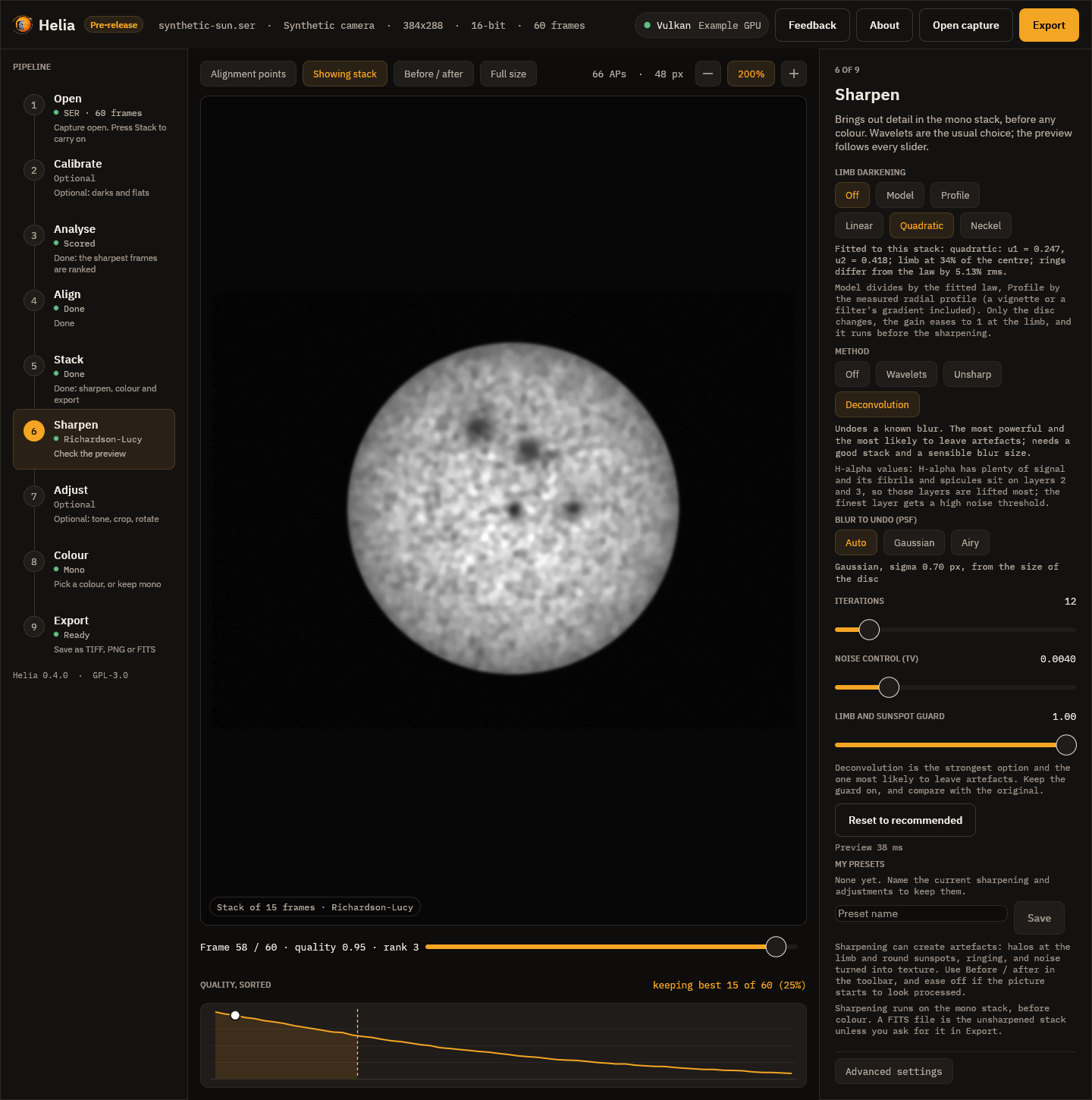
The Adjust step:
Saved presets
My presets, in the Sharpen step, keeps the whole list (sharpening and
adjustments) under a name. Type a name and press Save; press a preset to use
it, or the minus beside it to delete it. A preset is a small readable file in
the presets folder: $HELIA_EDIT_PRESETS if that is set, otherwise
%APPDATA%\helia\edit-presets on Windows or
$XDG_CONFIG_HOME/helia/edit-presets (~/.config/helia/edit-presets) elsewhere.
For example:
{
  "name": "H-alpha gentle",
  "filter": "ha",
  "edits": [
    {"op": "wavelet", "layers": [{"gain": 1.3, "threshold": 2.0}, {"gain": 1.3, "threshold": 1.0}]},
    {"op": "levels", "gamma": 1.1}
  ]
}
A file can also hold just the list, [ ... ]. Missing values take their defaults.
The app shows one operation of each kind in the fixed order; a preset with
repeats or another order is still run in full by the command line and the API.
The operations are objects with an op of unsharp (radius, amount,
threshold), wavelet (layers, each with gain and threshold),
deconvolve (psf, iterations, tv, protect; the psf is
{"kind": "auto"}, {"kind": "gaussian", "sigma": 1.6} or
{"kind": "airy", "radius": 2.2}), denoise (strength, layers), levels
(black, white, gamma, out_black, out_white), curve (points, each
[in, out]), crop (x, y, width, height), rotate (degrees), flip
(axis: horizontal or vertical) and resize (scale, or width and
height).
On the command line
helia stack sharpens with --sharpen wavelet, unsharp, rl or none (the
default), using the recommended values of the filter; every value has a flag that
overrides it:
helia stack sun_Ha.ser -o sun.tif --sharpen wavelet
helia stack sun_Ha.ser -o sun.tif --sharpen wavelet --wavelet-gains 2.0,1.5 --wavelet-noise 2.5
helia stack sun_Ha.ser -o sun.tif --sharpen unsharp --unsharp-radius 1.8 --unsharp-amount 0.9
helia stack sun_Ha.ser -o sun.tif --sharpen rl --rl-iterations 25 --rl-psf airy-scope:656,100,0.9
helia stack sun_Ha.ser -o sun.tif --sharpen wavelet --denoise --gamma 1.2 --crop 100,80,1600,900
helia stack sun_Na.ser -o sun.tif --flatten model --sharpen wavelet
helia edit stack.fits -o flat.tif --flatten profile --limb-law neckel
A flag for one method without that method is an error that says which method to
add. Lists such as --wavelet-gains 2.0,1.5 replace the first layers and leave
the others at their recommended values.
helia edit applies the same operations to an image that already exists, a
TIFF, PNG or FITS, mono or colour:
helia edit stack.fits -o sharp.tif --sharpen wavelet --preset ha
helia edit sun.tif -o sun-cropped.tif --crop 200,150,1200,900 --rotate 90 --resize 50%
helia edit stack.fits -o again.tif --edits "H-alpha gentle"
helia edit stack.fits -o x.tif --sharpen rl --save-edits "My deconvolution"
--edits takes the name of a saved preset or a path to a .json file, and the
other flags are added after it. --save-edits keeps the resulting list as a
preset. A colour image is edited channel by channel and stays colour. When the
image is mono, helia edit prints how much finer detail the edits gave it and
what they did to the noise (see below).
In the API
A job's config takes sharpen (wavelet, unsharp, rl or none, with the
filter's recommended values) and edits, a list of operations in the form above,
applied after sharpen. See The API.
What the files say
The edits are recorded, in words and as the list itself, so that a file says how it was made and the edit can be repeated:
| File | Where the note is |
|---|---|
| TIFF | the ImageDescription tag |
| PNG | the Description text chunk |
| FITS | HISTORY cards in the header |
The note reads, for example: Helia edits, applied in order to the stack (2 operations); sharpening runs on the mono stack before any colour, then 1. wavelet sharpen, 6 layers, gains 1.50,1.45,..., noise thresholds ..., and last Helia edit list (JSON): followed by the whole list as JSON.
FITS is the unsharpened stack by default. A FITS file is for further
processing and measurement, so Helia writes the stack as it is and says so in the
header; the edits go into TIFF and PNG. If you want the sharpening in the FITS
file too, ask for it: the Edit the FITS too switch in the Export step,
--sharpen-fits on the command line, or "sharpen_fits": true in a job. The
file then holds the edited mono image, and its header says so.
Does it work?
The tests check the claims on synthetic images where the truth is known:
- Deconvolution recovers detail. A synthetic sun with granulation and sunspots, blurred by a Gaussian of sigma 1.8 pixels with noise: after 25 iterations the root-mean-square error against the clean truth falls from 0.0349 to 0.0163 (the test requires below 80% of the start). The same with an Airy blur: from 0.0180 to 0.0044.
- The limb guard holds. See the figures above.
- Wavelet layers at gain 1 and noise cut 0 return the input exactly.
- Levels and curves rise monotonically for every valid setting, and levels undo exactly between their black and white points.
- Crop, rotate, flip and resize move the right pixels: a quarter turn clockwise sends the top-left corner to the top-right, four turns return the original, and halving averages 2 by 2 blocks.
- Denoise lowers the noise on flat regions from 0.0202 to 0.0048 (the test requires under 60% of the start) while the contrast of an edge goes from 0.401 to 0.390 (the test requires above 95%).
- The GPU agrees with the CPU on every operation, within 1e-4 for the filter operations and 2e-3 after 12 iterations of deconvolution (see The GPU parity rule).
On real captures
Four captures of the Sun from 2022-07-17 (a ZWO ASI482MC; the files are not in
the repository, and Helia could not tell their filter from the names, so the
generic recommended values apply) were stacked with the defaults, written as FITS
(the unsharpened stack), and then sharpened by each method with its recommended
values. The figures are from the helia edit summary. Detail is Helia's
existing sharpness metric, the gradient energy of the image after a 2 pixel
Gaussian smoothing, as a ratio to the stack; noise is the median-based sigma of
the finest wavelet layer, which is mostly noise, before and after.
| Capture | Wavelets: detail, noise | Unsharp mask: detail, noise | Deconvolution: detail, noise |
|---|---|---|---|
15_20_57.ser, 1920 x 1080, 16-bit, 100 frames | 1.25x, 0.00028 to 0.00001 | 1.03x, 0.00028 to 0.00028 | 1.03x, 0.00028 to 0.00028 |
15_32_09.avi, 720 x 540, 8-bit, 1000 frames | 1.25x, 0.00036 to 0.00010 | 1.03x, 0.00036 to 0.00036 | 1.03x, 0.00036 to 0.00039 |
14_42_57.avi, 1920 x 1080, 8-bit, 630 frames | 1.22x, 0.00031 to 0.00008 | 1.03x, 0.00031 to 0.00031 | 1.02x, 0.00031 to 0.00200 |
Sun_Test.ser, 1920 x 1080, 8-bit, 631 frames | 1.24x, 0.00679 to 0.00001 | 1.04x, 0.00679 to 0.00835 | 1.02x, 0.00679 to 0.00777 |
What it says:
- Wavelets raise the detail metric by about a quarter on all four and take most of the noise out of the finest layer at the same time. With the white-light values the gain is 1.29x to 1.32x. (After a noise cut the median-based noise figure is close to zero by construction: most of the layer is zero.)
- Unsharp mask and deconvolution barely move this metric. That is partly the
metric: it smooths by 2 pixels, and these two work below that scale (the
default unsharp radius is 1 pixel and the automatic blur is 0.7 pixel, the
smallest allowed). It is not only the metric, though. On
14_42_57.avithe deconvolution raises the finest-layer noise six-fold. This was first put down to a fixed pattern of the sensor (faint vertical stripes), and Calibration measures it: the sensor does have stripes, but they grow by 5% under deconvolution, while the share of the energy above 0.3 cycles per pixel goes from 2% to 70%. So the rise is broadband noise at the finest scale, which no dark or flat removes, and a calibration estimated from the capture itself did not change it. Look at the picture, not the number, and take the wavelets.
On these stacks the recommended wavelets are the method to start with, and deconvolution gains little and risks a lot. That is one capture session through one camera, not a general result.
How fast
The live preview renders at most 1280 pixels on a side. Best of five on an NVIDIA
A100 (Vulkan) and on the same machine's 24 CPU threads (not otherwise idle),
cargo test -p helia-gpu --test parity preview_latency -- --ignored --nocapture:
| Edit, 1280 x 960 | CPU | GPU |
|---|---|---|
| Wavelets, 6 layers (recommended) | 25 ms | 20 ms |
| Unsharp mask | 6 ms | 7 ms |
| Denoise and levels | 21 ms | 16 ms |
| Deconvolution, 20 iterations, Gaussian blur | 433 ms | 74 ms |
| Deconvolution, 20 iterations, Airy blur | 1549 ms | 112 ms |
On the GPU every preview is within the 150 ms the sliders aim for. On the CPU the
filters are too, but deconvolution is not, and the app says so with a notice
(Sharpening and colouring the preview) while it works. A one-off helia edit
of a 1920 x 1080 image, process start to file written, took 0.1 to 0.3 s for
wavelets on the CPU and about 1 s on the GPU (most of it opening the device),
and 0.3 to 1.4 s for deconvolution at its recommended iterations on either. The
app opens the device once and keeps it.
Limits
- Geometry (crop, rotate, flip, resize) always runs on the CPU; it costs next to nothing beside a filter.
- Deconvolution handles one PSF for the whole image. Seeing that changes across the disc is handled by the alignment points of the stack, not here.
- An Airy blur is limited to a first dark ring of 6 pixels; wavelet transforms to 8 layers; curves to 16 points; a list to 64 operations.
- The preview approximates the export (see above); it is not a bit-exact rehearsal of it.
Colourising
A solar capture through a narrow filter is a picture of one colour of light, so the stack is monochrome. The orange of H-alpha, the violet of calcium and the yellow of sodium are choices made when a picture is shared, not something the camera measured. Helia gives each common solar line a recommended look, and applies it only when you ask for colour.
Colour is presentation, not measurement. For a filter capture the stack stays mono. A FITS file is never coloured by a look and its pixels are never touched. (White light with a colour camera is the exception: see True colour.) Colour goes to a 16-bit RGB TIFF and an 8-bit PNG, and every file Helia writes records which look was used (see What the files say). If you need numbers, use the FITS file; if you want to share a picture, use the colour one.
True colour
The looks below are for narrow-band captures, where the camera records one colour
of light and the colours are a convention. White light taken with a colour camera
is different: the Sun really is several colours at once, and the camera records
all of them in its Bayer mosaic. --colour true (API colour: "true", the True
colour chip in the Stack step) stacks that.
- One alignment. The frames are scored, aligned globally and measured at the alignment points on the luminance (the mean of the three planes), once. The red, green and blue planes are then stacked with those same shifts, alignment point field and frame weights, so the three planes see the same sky. It costs three stacks (and three reads of the capture) rather than one.
- Channel alignment. The air disperses colours, so at a low Sun red and blue
sit a fraction of a pixel to either side of green. Each of the stacked red and
blue planes is registered to the green by phase correlation and moved by what
that finds (
--no-channel-alignskips it). A shift under 0.05 px is noise and one over 6 px or with a poor lock (confidence under 0.3) is not believed; the history andsummary.true_colour.channelssay what was applied. The shift is measured on the planes as demosaiced: the Malvar-He-Cutler method borrows green's edges into red and blue, so it hides about a quarter of a displacement (on the synthetic test, 0.45 of 0.6 px), and the planes then agree with each other, which is what the picture needs. - White balance (
--white-balance).auto, the default, makes the middle of the disc (inside 80% of the radius) neutral: gains for red and blue that bring their means to the green's.offkeeps the sensor's own balance, and1.9,1,1.5gives the three gains. A raw sensor does not weigh the colours as the eye does, sooffis rarely what you want for a picture. A channel that holds far less than the green (blue behind a sodium filter) is held at a gain of 4 with a warning, rather than amplified into noise: true colour is for white light. - Scale. All three channels share one scale, chosen so that the 99.99th percentile of the brightest channel of each pixel is 1. Nothing clips, and the balance of the colours is the white balance, not the scale.
- Edits. Sharpening, levels and the other edits run on each channel, as they do for any colour image, so a limb-darkening flatten also corrects the colour of the limb, which darkens differently in each channel. Areas that were flattened in every frame (burned-in text, exclusions) are made grey, so the balance does not tint them.
- Files. An RGB TIFF or PNG, or a FITS cube of three planes; see
Output formats. A look (
--presetcolours,--invert,--colour-strength) and--channeldo not apply, and asking for them is an error. The luminance is what the alignment, the limb fit, the crop and the summary use.
It needs a raw colour capture (a Bayer mosaic): a mono capture, or one that is already demosaiced, has no colours to stack and is refused before any work is done.
What the real captures say
The four captures available are all ASI482MC (RGGB), and three of them are
sodium, where the blue pixels are empty. helia stack --colour true --preset white --keep 12% on them (the gains include the common scale):
| Capture | Gains (red, green, blue) | Channel alignment |
|---|---|---|
Sun_Test.ser (sodium) | 0.96, 1.02, 4.10 (blue held at the cap) | red +0.89, +0.00 px; blue not moved |
15_20_57.ser (sodium) | 1.07, 1.00, 3.99 (blue held) | red +1.18, -0.09 px; blue +0.06, -0.01 px |
15_32_09.avi (sodium) | 0.82, 1.31, 5.23 (blue held) | red +1.83, -0.25 px; blue +0.40, 0.00 px |
14_42_57.avi (broad, low contrast) | 0.76, 1.09, 0.96 | red +0.11, +0.10 px; blue -0.17, -0.14 px |
The sodium captures show why the cap exists (an uncapped blue gain of 15 to 23
would be all noise) and that true colour is not for them: their red and green
planes show different things through a sodium filter, so the red shift of a pixel
or two is the planes disagreeing, not dispersion. 14_42_57.avi is the one
broad-band capture; its planes agree to under a fifth of a pixel, and the CPU and
the GPU (an A100) give the same gains and the same shifts to three decimals
(5.4 s and 4.0 s for 630 frames). There is no good white-light capture in the test
set, so the colour of a real white-light disc has not been checked. What is
checked, with known answers, is a synthetic colour disc: the balance, the
dispersion (and that planes of the same scene are found not to move), the crop
and the files; and the device against the CPU, with and without alignment points,
to 4e-7 in the samples.
The presets
Each preset is a filter, with a recommended way to process its captures and a look. The table is generated from the code that colours the pictures, so it is always what Helia does. The ramp runs from black to white through the colours of the look; the swatch after it is what a mid-grey becomes.
| Id | Filter | Wavelength | Hue | Ramp, black to white | Mid-grey becomes | Bayer channel | Frames kept |
|---|---|---|---|---|---|---|---|
ha | H-alpha | 656.3 nm | orange-red | #A95A21 | red (r) | 25% | |
cak | Ca II K | 393.4 nm | violet | #5D3D9B | blue (b) | 30% | |
cah | Ca II H | 396.8 nm | violet | #703096 | blue (b) | 30% | |
mg | Mg I b | 517.3 nm | green | #429B42 | green (g) | 30% | |
na | Na I D | 589.0 / 589.6 nm | yellow-orange | #A06212 | green (g) | 12% | |
he-d3 | He I D3 | 587.6 nm | yellow | #9B8617 | all combined (lum) | 25% | |
hbeta | H-beta | 486.1 nm | blue-cyan | #2474A0 | blue (b) | 30% | |
white | White light | continuum | warm neutral | #807A70 | all combined (lum) | 12% |
Why each preset recommends what it does:
- H-alpha (
ha): H-alpha is deep red, so a colour camera records it almost only in the red pixels; the green and blue pixels add noise, not detail. - Ca II K (
cak): Ca K is at the violet edge of vision and a sensor sees it in its blue pixels. The line is faint, so a few more frames (30%) are kept to average the noise down. - Ca II H (
cah): Ca H sits 3.4 nm from Ca K, so it takes the same channel and frame share. It is drawn a touch redder so the two can be told apart in a pair. - Mg I b (
mg): 517.3 nm is green, which is where the green pixels of a Bayer sensor respond. The line is dim, so 30% of the frames are kept. - Na I D (
na): 589 nm is yellow, which a Bayer sensor splits between its red and green pixels, and the sodium filter passes almost nothing to the blue ones. Averaging all three channels mixes those empty blue pixels into the stack and prints the mosaic as a fine diagonal hatch over the granulation, so the green channel (two pixels in four) is stacked: on the owner's captures it holds 1.4 to 2.1 times the granulation contrast of the luminance. It shows granulation, so only the best 12% of frames are kept and the alignment points are a few granules wide. - He I D3 (
he-d3): 587.6 nm is yellow-green, shared by the red and green pixels, so the luminance of all three is used. It is drawn yellower than sodium. - H-beta (
hbeta): 486.1 nm is blue-cyan and a sensor sees it in its blue pixels. It is faint, so 30% of the frames are kept. - White light (
white): A white-light capture already carries all three colours, so the luminance is stacked, and a slight warm tint stands in for the solar spectrum. It shows granulation, so only the best 12% of frames are kept and the alignment points are a few granules wide.
The numbers behind each colour, for anyone who wants to reproduce it:
| Id | Tone exponent | Gains (R, G, B) | Exponents (R, G, B) |
|---|---|---|---|
ha | 0.85 | 1.00, 0.85, 0.60 | 0.70, 1.50, 2.60 |
cak | 0.90 | 0.85, 0.78, 1.00 | 1.35, 1.90, 0.80 |
cah | 0.90 | 0.90, 0.70, 1.00 | 1.15, 2.10, 0.85 |
mg | 0.90 | 0.80, 1.00, 0.75 | 1.80, 0.80, 1.70 |
na | 0.90 | 1.00, 0.74, 0.40 | 0.75, 1.05, 2.80 |
he-d3 | 0.90 | 1.00, 0.92, 0.45 | 0.80, 0.90, 2.60 |
hbeta | 0.90 | 0.55, 0.85, 1.00 | 2.20, 1.00, 0.75 |
white | 1.00 | 1.00, 0.96, 0.88 | 1.00, 1.00, 1.00 |
The recommended sharpening of each filter (see Sharpening and adjustments). Wavelet gains and noise cuts are for layers 1 to 6, finest first; the unsharp radius comes from the image scale, and the deconvolution blur is measured from the disc.
| Id | Wavelet gains | Wavelet noise cuts | Unsharp amount | Unsharp threshold | Deconvolution iterations | TV weight | Denoise |
|---|---|---|---|---|---|---|---|
ha | 1.50, 1.45, 1.25, 1.05, 1.00, 1.00 | 1.80, 1.00, 0.50, 0.00, 0.00, 0.00 | 0.60 | 0.003 | 12 | 0.004 | 1.5 |
cak | 1.30, 1.40, 1.25, 1.05, 1.00, 1.00 | 2.50, 1.50, 0.80, 0.30, 0.00, 0.00 | 0.45 | 0.004 | 8 | 0.005 | 2.0 |
cah | 1.30, 1.40, 1.25, 1.05, 1.00, 1.00 | 2.50, 1.50, 0.80, 0.30, 0.00, 0.00 | 0.45 | 0.004 | 8 | 0.005 | 2.0 |
mg | 1.40, 1.40, 1.20, 1.05, 1.00, 1.00 | 2.20, 1.30, 0.60, 0.00, 0.00, 0.00 | 0.50 | 0.004 | 10 | 0.005 | 1.8 |
na | 1.20, 1.80, 1.50, 1.10, 1.00, 1.00 | 2.00, 0.00, 0.00, 0.00, 0.00, 0.00 | 0.50 | 0.003 | 10 | 0.005 | 1.5 |
he-d3 | 1.30, 1.35, 1.20, 1.05, 1.00, 1.00 | 2.50, 1.50, 0.80, 0.20, 0.00, 0.00 | 0.40 | 0.004 | 8 | 0.005 | 2.0 |
hbeta | 1.30, 1.40, 1.25, 1.05, 1.00, 1.00 | 2.50, 1.50, 0.80, 0.30, 0.00, 0.00 | 0.45 | 0.004 | 8 | 0.005 | 2.0 |
white | 1.50, 1.80, 1.50, 1.10, 1.00, 1.00 | 1.00, 0.00, 0.00, 0.00, 0.00, 0.00 | 0.80 | 0.002 | 20 | 0.003 | 1.0 |
Why each filter is sharpened the way it is:
- H-alpha (
ha): H-alpha has plenty of signal and its fibrils and spicules sit on layers 2 and 3, so those layers are lifted most; the finest layer gets a high noise threshold. - Ca II K (
cak): Ca K is faint and noisy, so the gains are gentler, the noise thresholds higher and the deconvolution short: sharpening noise only makes a prettier mess. - Ca II H (
cah): Ca H is as faint as Ca K and takes the same careful settings. - Mg I b (
mg): Mg b2 is dim, so the noise thresholds are a little higher than for H-alpha and the deconvolution shorter. - Na I D (
na): Sodium D is photospheric: granulation is its finest low-contrast detail. Layers 2 and 3 (granule size) are lifted most and carry no noise threshold, because a threshold there removes granulation with the noise; the finest layer keeps its threshold. - He I D3 (
he-d3): He D3 shows only in faint prominences and flares, so it is sharpened with the most restraint. - H-beta (
hbeta): H-beta is faint, like the calcium lines, and takes the same gentle settings. - White light (
white): White light has the most signal and the finest structure (granulation), so it takes the strongest gains and the longest deconvolution. Layers 2 and 3 (granule size) are lifted most and carry no noise threshold, because a threshold there removes granulation with the noise.
The processing recommendations apply to raw colour cameras and to the share of frames kept:
- Bayer channel. A colour sensor records each wavelength mostly in one kind
of pixel, so stacking that plane alone (
--channel rfor H-alpha) avoids the noise of the other two. A mono camera has no channels and ignores this. - Frames kept. Faint lines (calcium, magnesium, H-beta) are noise limited, so 30 per cent of the frames are kept instead of 25 to average more of it away.
- Alignment point size is not a property of the filter. Helia chooses it from the image size, about a sixteenth of the short side rounded to a multiple of 8 and kept between 32 and 96 pixels.
Every recommendation is only a default. --keep, --channel and --ap-size
(and the same controls in the app and the API) override it.
How the colours are made
Colourising is the classic amateur method: levels and gamma on the grey value,
then a gain and an exponent for each of red, green and blue. For a mono value
v from 0 to 1, a preset with tone exponent g, gains k and exponents e
gives, for each channel,
t   = v ^ g                      (after inversion: v becomes 1 - v)
rgb = mix(t, min(1, k * t ^ e), strength)
Each exponent is positive, so every channel rises steadily from black to its gain: a darker input never gets a brighter output. The result is sampled once into a table of 4096 colours, which the CPU and the GPU both look up with the same linear interpolation, so they agree to within a rounding error.
- Invert turns the picture negative before it is coloured. A disc-inverted
H-alpha image shows filaments and prominences clearly, and is common practice.
An inverted picture is exactly the normal look read backwards: a pixel of value
vgets the colour that the normal look gives to1 - v. - Strength mixes between grey (0 per cent) and the full colour (100 per cent). It is a way to keep a hint of colour, or none.
- Mono is the preset-free choice: the grey stack as it is, optionally inverted.
Where the conventions come from
There is no formal standard for solar false colour. The project's research notes (State of the art, October 2026, section 6.2) record that amateur practice is greyscale, pseudo-colour, partly inverted and inverted pseudo-colour variants per filter, that H-alpha is commonly rendered red-orange, and that no source for a Ca K false colour was found. Helia therefore follows the colour of the line's wavelength where the eye can see it (H-alpha red, magnesium green, sodium and helium yellow, H-beta blue-cyan), a conventional violet for the two calcium lines at the edge of vision, and a slightly redder violet for Ca H so a pair can be told apart. They are a starting point; change the look in the app if you prefer another.
In the desktop app
After a stack, Helia moves to the Colour step (between Sharpen and Export).
- The cards show each look as a ramp from black to white, with its name and wavelength. Click one and the stack in the viewer changes straight away; it is made on a background thread, so the window stays responsive.
- Invert and Strength change the preview as you move them.
- The text under the cards says why the preset recommends what it does.
- The app remembers the look you last chose for each filter, in its settings file, so the next H-alpha capture starts with the look you used last time.
A capture with the filter in its name starts with that filter's own look, so the usual path needs no choices at all. The Export step says what will be written, and the viewer shows the stack as it will be exported.
On the command line
helia stack ha.ser -o ha.tif --preset ha          # recommended settings and colour
helia stack ha.ser -o ha.png --preset ha --invert # a shareable inverted picture
helia stack Sun_CaK.ser -o cak.tif --colour auto  # colour from the detected filter
helia stack sun.ser -o sun.tif --colour mono      # plain grey, even if detected
helia stack ha.ser -o ha.tif --colour cak         # a different look for the same stack
helia stack ha.ser -o ha.tif --preset ha --colour-strength 0.6
helia presets
--preset <id>says which filter the capture was taken with. It applies the recommended channel and frame share and colours a.tifor.pngoutput.--colour <auto|mono|id>chooses only the colour.autouses the preset you gave or the filter Helia detected (and fails with a clear message if there is none).--invertand--colour-strengthadjust the look.- Without
--presetor--colour, the output is grey, and Helia prints a tip if it detected a filter. - For
.fits, colour options are noted in the header and the pixels stay unaltered mono.
See the CLI reference for every option.
Exporting a colour table
The look of a filter can be written as a colour table, to colour the same stack in another program so that the picture matches one made here (#23):
helia lut ha -o ha.cube                 # a 1D .cube LUT, 256 entries
helia lut ha -o ha.lut                  # an ImageJ / Fiji .lut
helia lut cak -o cak.csv --size 1024    # value,red,green,blue as text
helia lut ha -o ha-strip.png --invert --strength 0.8
| Format | File | Read by |
|---|---|---|
cube | a 1D .cube: a title, the domain and size rows of red, green, blue | DaVinci Resolve, Adobe tools and others |
csv | value,red,green,blue, one row per entry | spreadsheets and scripts |
imagej | a .lut of 768 raw bytes (256 red, 256 green, 256 blue) | ImageJ and Fiji |
png | a strip image size wide, 32 high | anything that loads an image |
--format says the format, or the extension of -o does; --size is 2 to 4096
entries (an ImageJ table is always 256); --invert and --strength are the colour
options of the stack. The table is the one Helia colours with, resampled by the
same linear interpolation, so a 4096-entry table reproduces it exactly and the
.cube of a filter applied to its mono stack gives the same picture up to the
rounding of the other program. In the app, the Colour step has the same four
formats under Colour table, and the API serves
GET /api/v1/presets/{id}/lut?format=cube&size=256&invert=false&strength=1.
Colour is presentation, not measurement: the table says nothing about the Sun.
In the API
GET /api/v1/presets lists the presets with their recommendations and colour
parameters, and POST /api/v1/captures/inspect reports the settings it would
use for a capture (recommended). A job takes preset, colour, invert and
colour_strength in its config. See The API.
How the filter is recognised
Helia looks for the filter in these places, most trusted first, and stops at the first match:
- the file name (without its extension);
- the name of the folder the file is in;
- the SharpCap
CameraSettings.txtnext to it: itsFilter,Filter Name,Filter Wheel,Target,DescriptionandNotesentries; - the instrument, telescope and observer strings of a SER header;
- the name of the folder above.
The text is split into words at punctuation, at a lower-case to upper-case change
(SunHa is Sun and Ha) and between letters and digits (cak3934). A word,
or two or three words run together (Ca II K is caiik), must then match
exactly, ignoring case:
| Filter | Words |
|---|---|
| H-alpha | ha, halpha, h-alpha, hydrogen alpha, 656 |
| Ca II K | cak, ca k, ca ii k, calcium k, 393 |
| Ca II H | cah, ca h, ca ii h, calcium h, 396 |
| Mg I b | mg, mgb, mgi, magnesium, 517 |
| Na I D | na, nad, sodium, 589 |
| He I D3 | d3, hed3, helium, 587 |
| H-beta | hb, hbeta, h-beta, 486 |
| White light | white, whitelight, wl, continuum, cont |
A number such as 656 counts only on its own, so a date like 2026-05-17 is not
mistaken for a wavelength. A word inside a longer word never counts: Hampshire
is not H-alpha and Sha_nal is nothing. If the filter is not recognised, the
app asks once with a chooser, and the command line uses plain defaults and says
filter not recognised.
What the files say
Every file records the look it was written with, in words, so a coloured picture cannot be mistaken for a measurement later:
| File | Where the note is |
|---|---|
| TIFF | the ImageDescription tag |
| PNG | the Description text chunk (and Software: Helia) |
| FITS | HISTORY cards in the header |
The note reads like Colour is presentation, not measurement: preset ha (H-alpha 656.3 nm, orange-red), invert off, strength 1.00. The FITS pixels are written
exactly as they would be without it; only the header differs.
The same places also record how the capture was read, whether or not a colour look was chosen, so a stack can be traced back later. These lines are always written:
Capture read as: Bayer RGGB (detection), 16-bit (header), little-endian (detection)
SER header: ColorID 0 (MONO), 16-bit, big-endian
Bayer detection: 2x2 position means 79.6% / 77.6% / 77.4% / 0.3% of full scale, spread 135%, 5 frames
Overrides: --bayer none, --bit-depth 16
The first says which Bayer pattern was used (or none (mono)), the bit depth and
(for 16-bit data) the byte order, each with its source (header, sidecar, detection or
override), and adds rows flipped when --flip-rows was given. The second is
the SER header's own claim, the third appears only when a mosaic was detected,
and the fourth only when you overrode something. When the stack was calibrated
there is one more line for each master (Calibration: dark subtracted (master dark of 64 frame(s), sigma-clip 3, exposure 0.6400 ms, from darks.ser, fp:...), the same
for the flat and for the bad pixels); see Calibration.
TIFF joins the lines with
; , PNG puts them in the text chunk, and FITS has one HISTORY card (or more,
when a line is long) for each.
What it does not do
- It colours the stacked image only. Prominence and disc compositing into one high-dynamic-range picture is separate work, tracked in issue #23; colourising here is the colour part of that issue.
- There are no user-defined palettes or exported lookup tables yet.
- Sharpening comes before colouring, and is its own step (Sharpening and adjustments): the colour is applied to the sharpened mono image, never the other way round.
Prominences and the disc together
A narrow-band stack holds two pictures at once. The disc is bright and the prominences above the limb are a few per cent of it, so one tone curve cannot show both: lift the prominences and the disc burns out (#23). The prominence layer makes the second exposure from the same stack and joins it to the disc. It is an edit like the others, for H-alpha and the other lines with prominences, and it runs after the sharpening and before levels and the curve.
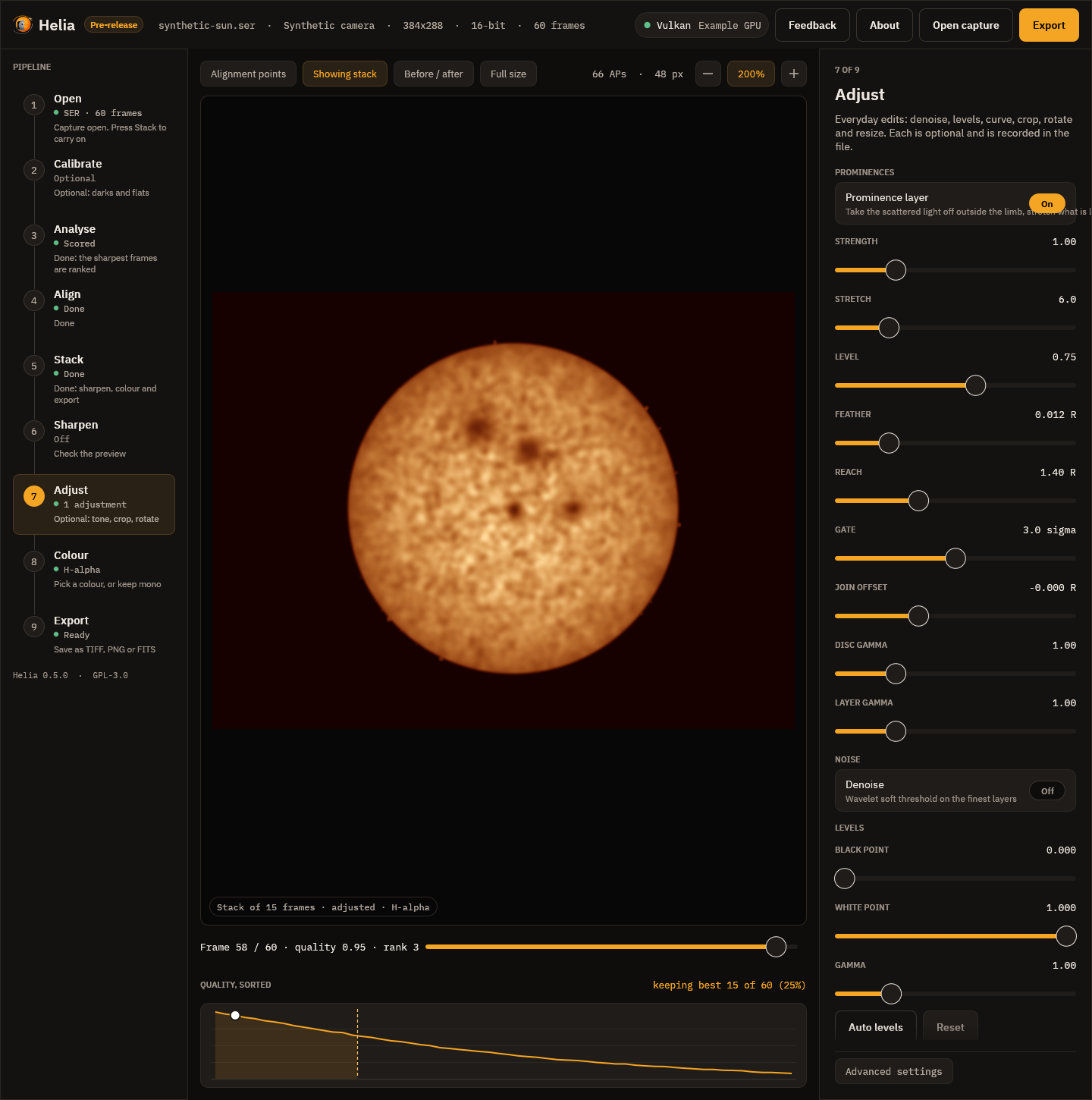
Using it
-
App: the Adjust step, under Prominences: Prominence layer on, then the sliders. The preview shows the composite as you move them.
-
Command line:
--prominence, inhelia stackandhelia edit, with--prominence-strength,--prominence-stretch,--prominence-level,--prominence-feather,--prominence-reachand--prominence-gate:helia stack sun_Ha.ser -o sun.tif --preset ha --sharpen wavelet --prominence --colour auto helia edit sun.fits -o sun.png --preset ha --sharpen wavelet --prominence -
API: an
editsentry,{"op": "prominence"}, with the same values as fields (strength,stretch,level,feather,reach,gate); see The API.
FITS output stays the unedited stack unless you ask for --sharpen-fits, as for
the other edits.
Adjusting it like a prominence processor
Programs such as IMPPG (GPL, by Michal Wisniewski; its README describes a tone curve applied last, brightness-adaptive unsharp masking whose amount differs for the disc and the dim prominences, and live preview of a selection) make the disc and the prominences separately adjustable. The same controls are here, as sliders with a live preview in the Adjust step, where the layer is the first thing in the panel:
- Strength, Stretch, Level and Gate: how bright and how far into the noise the off-limb layer is lifted (the boost).
- Join offset and Feather: where the join of layer and disc sits, in disc radii from the fitted limb, and how soft it is.
- Disc gamma and Layer gamma: a separate tone for the disc and for the layer
(
--prominence-disc-gamma,--prominence-layer-gamma,--prominence-offset). Both are 1 by default, which leaves the disc bit-identical.
Helia's own tone curve and levels follow in the same step and apply to the whole picture. No IMPPG code was used; only its public README was read to match what users expect.
How it works
- The limb. The disc is fitted as a circle (
fit_disc), the same fit the alignment and the crop use. Everything at the limb and a few pixels beyond it (the seeing blurs the edge) is still treated as disc. - The glow. Scattered light and sky fall away from the limb, and are often brighter on one side. The background at a radius and angle is the median of the pixels at that radius in a window of 45 degrees, found for 24 sectors and interpolated between them. A prominence fills a small part of such a window, so the median is the glow and not the prominence. Where a ring has too few pixels (the frame cuts it) the all-round median is used.
- The signal. The frame less that background, blurred by a Gaussian of 1.2
pixels, less a gate, floored at zero. The gate is
--prominence-gatenoise sigmas (3 by default; the noise is the median absolute deviation of the outer part of the field) and never less than 0.4% of the disc's brightness, below which the background model's own error is as big as the noise and stretching it would show the model. - The stretch. The signal as a share of its own 99.5th percentile just outside
the limb, through
asinh(k x) / asinh(k)(--prominence-stretch,k= 6; 0 is linear) and held at 1, scaled so the brightest prominences reach--prominence-level(0.75) of the disc's brightness. The reference is never less than 8 noise sigma, so a field with no prominences stays dark and is not stretched into noise.--prominence-strengthmultiplies the signal before the stretch. - The join. Inside the limb the disc is untouched. Across a feather of
--prominence-feather(1.2% of the radius) on each side of the limb the two are mixed by a smooth step. Outside, the layer replaces the picture, at the black level the stack had (the median beyond--prominence-reachradii, 1.4 by default, when the frame holds enough of it). The layer fades to black at the reach.
The colour table is applied afterwards, so the layer takes the look of the filter.
What was measured
Known answers. The unit tests render a limb-darkened disc with a glow that falls off from the limb, noise and three prominences, and check that the disc is identical well inside the limb, that the brightest prominence (11% of the disc with the glow, before) is lifted to above 40% and more than three times its brightness, that a faint one is lifted too and the order of brightness is kept, that the glow above the limb is taken off and the far sky is the black level, that the join across the limb has no rim, no overshoot and no step back, that a field with no prominences is not lifted into noise (under 0.5% of the pixels above 5% of the disc), and that a frame with no disc passes unchanged.
The H-alpha captures (15_32_09.avi and 15_37_19.avi, 720 by 540, 1000
frames, the best 25% stacked, wavelet sharpened): the brightness of the brightest
1% of the ring from 1.02 to 1.15 radii, as a share of the disc's, and the median of
that ring (the glow):
| Capture | Brightest 1% before | after | Ring median before | after |
|---|---|---|---|---|
15_32_09 | 0.33 | 0.69 | 0.087 | 0.000 |
15_37_19 | 0.25 | 0.71 | 0.020 | 0.000 |
The share of the ring above 5% of the disc falls from 97% to 10% for the first (the glow was above 5% nearly all round; what is left is the prominences) and stays 4% for the second (a clean sky), and the disc inside 0.9 of the radius is bit-identical. The brightness of the field beyond 1.35 radii varies by 1.4% of the disc before and 0.001% after for the first (it was glow and vignetting; it is the flat black level now), and by 9.8% before and 1.0% after for the second (that capture has a shifted band across the frame that the layer cannot remove completely). In the pictures the prominences on the left limb and the large one at the bottom of the first capture, which the plain stack shows as a smudge in the glow, stand out with their shape.
Limits
- One pass of one exposure. The faintest prominences are limited by the noise of the stack; a second, longer exposure for the prominences is not combined (yet), so a capture whose prominences are lost in the noise stays lost.
- The glow model assumes a prominence fills less than half of a 45 degree window. A prominence group wider than that raises the background under it and is dimmed.
- The limb is a circle. A disc cut by the frame, or out of round, leaves a ring of disc just outside the fitted limb that the feather has to hide.
- The stretch is a presentation choice, like colour: it makes prominences visible, not measurable. The FITS file, which keeps the unedited stack, is the measurement.
Reference: every option
| Setting | CLI (helia stack, helia edit) | API (edits entry {"op": "prominence"}) | App slider (Adjust step) | Range | Default |
|---|---|---|---|---|---|
| Prominence layer | --prominence | the entry itself | Prominence layer toggle | on or off | off |
| Strength | --prominence-strength | strength | Strength, 0.1 to 4 | 0 to 100 | 1 |
Stretch (asinh k) | --prominence-stretch | stretch | Stretch, 0 to 30 | 0 to 1000 | 6 |
| Level (share of the disc) | --prominence-level | level | Level, 0.1 to 1.2 | above 0 to 2 | 0.75 |
| Feather (radii) | --prominence-feather | feather | Feather, 0 to 0.06 | 0 to 0.2 | 0.012 |
| Reach (radii) | --prominence-reach | reach | Reach, 1.1 to 2 | 1.05 to 3 | 1.4 |
| Gate (noise sigma) | --prominence-gate | gate | Gate, 0 to 6 | 0 to 20 | 3 |
| Join offset (radii) | --prominence-offset | offset | Join offset, -0.05 to 0.1 | -0.1 to 0.2 | 0 |
| Disc gamma | --prominence-disc-gamma | disc_gamma | Disc gamma, 0.4 to 3 | 0.2 to 5 | 1 |
| Layer gamma | --prominence-layer-gamma | layer_gamma | Layer gamma, 0.4 to 3 | 0.2 to 5 | 1 |
The tuning flags need --prominence. The slider ranges are narrower than the accepted
ranges. A value outside the accepted range is 422 invalid_config in the API and an
error on the command line. The edit runs after the sharpening and before levels and the
curve, once per list.
Tutorial: bringing out prominences in H-alpha
A worked example on a real H-alpha capture: 15_32_09.avi (720 by 540, mono, 1000
frames, the disc 223 pixels in radius). It shows how to make the prominences above the
limb readable without burning out the disc, and how to adjust the result the way a
prominence processor such as IMPPG lets you. The method and measurements are in
Prominences and the disc together.
1. Stack, sharpen and colour as usual
helia stack 15_32_09.avi -o ha-plain.tif --preset ha --sharpen wavelet --colour auto
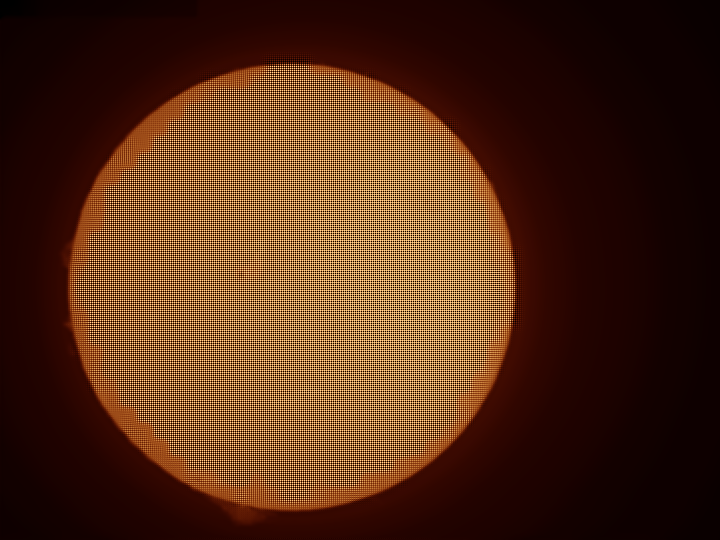
The disc is fine, but the prominences on the left limb and at the bottom are a faint smudge inside a halo of scattered light.
2. Turn on the prominence layer
In the app this is the Adjust step, and the Prominence layer is the first section. Switch it on and the preview shows the composite. On the command line:
helia stack 15_32_09.avi -o ha-prom.tif --preset ha --sharpen wavelet \
    --prominence --colour auto
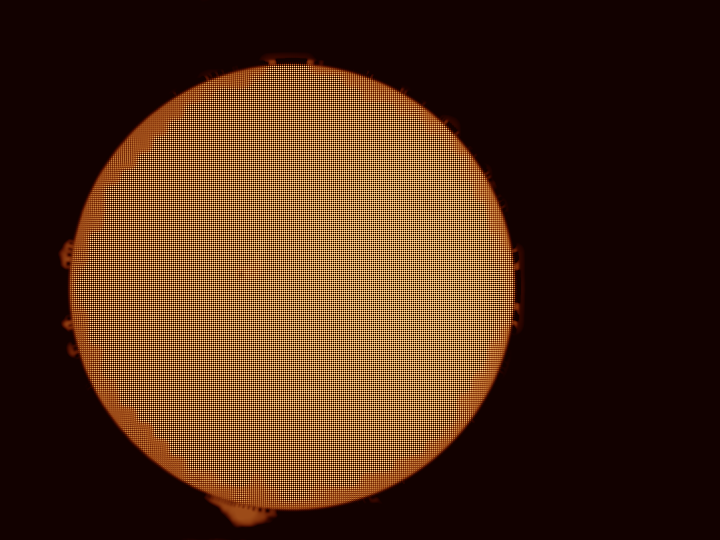
With the defaults the brightest 1% of the ring just outside the limb goes from 0.33 to 0.69 of the disc's brightness, the glow in that ring from 0.087 to 0, and the disc inside 0.9 of the radius is bit-identical.
3. Adjust it
Work through the sliders in this order (all have the live preview; defaults in brackets):
- Level (0.75): how bright the brightest prominence should be next to the disc. Raise it for a bolder picture.
- Strength (1) and Stretch (6): how hard the faint parts are lifted. Strength scales the signal before the stretch; Stretch bends the curve (0 is linear). Faint wisps appear as Stretch rises, until the noise does.
- Gate (3 sigma): how much noise is cut away. Raise it if the sky speckles, lower it to let the faintest structure through.
- Join offset (0) and Feather (0.012 of the radius): where the disc meets the layer and how soft the join is. If a thin dark or bright ring shows at the limb, widen the feather or move the join out by a few thousandths of a radius.
- Layer gamma (1) and Disc gamma (1): a separate tone for the layer and for the disc, like the separate adjustment of disc and prominences in IMPPG. Raise the layer gamma to darken faint haze; raise the disc gamma to bring out filaments on a bright disc. With both at 1 nothing but the layer changes.
- Reach (1.4 radii): how far out the layer goes before it fades to black. Lower it when the frame is cut off close to the limb.
Levels and the tone curve below the layer apply to the whole picture afterwards.
4. Export a colour table
To colour the same stack in another program: Colour step, Colour table, or
helia lut ha -o ha.cube.
What to expect and what can go wrong
| What you see | Why | What to do |
|---|---|---|
| Dark arcs next to the limb | The glow is much stronger on one side | Raise Gate a little; widen Feather |
| Speckle all round the disc | Stretch too high for the noise | Lower Stretch or Strength, raise Gate |
| No prominences appear | The capture has none, or they are below the noise | Check the sharpened stack; stack more frames |
| The layer looks flat near a frame edge | The ring is cut by the frame | Lower Reach |
| The picture is unchanged | The limb fit failed (no clear disc) | Frame the whole disc |
On the second capture of that day (15_37_19.avi) the same settings take the brightest
1% of the ring from 0.25 to 0.71 of the disc.
The command line
helia has these subcommands:
| Command | What it does |
|---|---|
helia stack | Stack a capture into one image. |
helia info | Print what a capture file contains, without stacking. |
helia measure | Measure the granulation contrast of a finished image. |
helia presets | List the filter presets and what each does. |
helia serve | Run the HTTP API. |
helia feedback | Send a bug report, feature request or question, to the Helia issue tracker. See Sending feedback. |
Every option is listed in the CLI reference, which is
generated from the program itself. This page explains how to use them.
helia --help and helia <command> --help print the same information.
helia info
helia info capture.ser
The output has up to four parts. This is Sun_Test.ser, an ASI482MC colour
camera behind an H-alpha filter, recorded by SharpCap as a file that says it is
mono:
file:               Sun_Test.ser
format:             SER

Header, as written in the file
  FileID:            LUCAM-RECORDER
  LuID:              0
  ColorID:           0 (MONO)
  LittleEndian:      0 (big-endian)
  Width:             1920 px
  Height:            1080 px
  PixelDepth:        8 bit
  FrameCount:        631
  Observer:          (empty)
  Instrument:        (empty)
  Telescope:         (empty)
  DateTime (local):  not set
  DateTimeUTC:       not set
  Timestamps:        absent

Helia will use
  Bayer pattern:     RGGB           (detection)
  Bit depth:         8 bit          (header)
  Byte order:        not used (8-bit) (header)
  Row order:         top to bottom  (header)

Mosaic check (2x2 pixel positions, share of full scale)
  means:             79.6%  77.6%  77.4%  0.3%
  spread:            135.0% over 5 frame(s)

warning:  The SER header says mono (ColorID 0), but the frames hold a Bayer mosaic ...
- Header, as written in the file. Every field of a SER header, decoded:
FileID, LuID, ColorID with its meaning, the LittleEndian flag, size, pixel
depth, frame count, observer, instrument, telescope, DateTime and DateTimeUTC
as dates (
not setwhen zero), and whether per-frame timestamps are present, with the first and the last. For an AVI it prints the codec, pixel format, size, row order and frame count, then what the SharpCapCameraSettings.txtnext to it says (its path, the camera, the colour space and the Debayer Preview). - Helia will use. The Bayer pattern, bit depth, byte order and row order the
capture will be decoded with, each with where it came from:
header,sidecar,detection(measured from the pixels) oroverride(an option you gave). - Mosaic check. Only for a SER file that says mono: the mean level of the four pixel positions of a 2 x 2 cell on the solar disc and their spread (see Troubleshooting).
- Notices.
warning:when the file disagrees with itself or with you and Helia has chosen,note:for anything else worth knowing.helia stackprints the same notices.
helia info accepts the same --bayer, --bit-depth, --endian and
--flip-rows as helia stack, to show what an override would change before you
stack.
For an MP4, MOV, M4V, MKV or WebM file, or an AVI with a compressed codec, it
asks ffprobe (part of the optional ffmpeg)
and prints the container, codec and profile, the frame size (after any rotation
the file asks for), the pixel format and bit depth, the frame count, frame rate
and duration, and, for lossy video, a note: line such as "lossy 8-bit 4:2:0
video (h264): fine for quick results, SER/AVI raw captures keep more detail".
Nothing is decoded, so it is quick even for a large file.
Run it first on a new kind of capture. Most problems with colour data show up
here. When the byte order under Helia will use differs from the
LittleEndian flag under the header, Helia has corrected a mislabelled file (see
Troubleshooting).
helia measure
helia measure sun.tif
Prints the band-pass contrast (standard deviation over mean) of a 240 pixel crop
at the centre of the disc, in three bands: fine (0 to 1 px), granulation (1 to
4 px) and meso (4 to 12 px). It reads a TIFF, PNG or FITS file; a colour image is
averaged to grey. --crop PX changes the crop. Use it to compare settings on one
capture; see White-light granulation.
helia measure sun.fits --limb fits the three limb-darkening laws (linear,
quadratic, Neckel and Labs) to the disc instead, and prints the coefficients, the
limb level and the measured profile beside each law. See
Limb darkening.
It then prints the granulation report of
the granulation and seeing report: RMS contrast, cell size
and the power spectrum's roll-off. --scale ARCSEC gives sizes in arcseconds;
--aperture MM (with --wavelength NM and --scale) adds the diffraction
cut-off. helia stack prints the same report for a white-light or sodium
stack, and --aperture-mm MM adds the cut-off.
helia calibrate
Builds master calibration files from calibration captures, for
helia stack --dark --flat --bad-pixels. Each input is a SER, AVI or video file, a
FITS still, or a folder of them. See Calibration for what to
capture and why.
helia calibrate --darks darks.ser --flats flats.ser --flat-darks flat-darks.ser \
                --preset ha -o masters/
# wrote:    masters/master-dark.fits  (master dark of 120 frame(s), sigma-clip 3, ...)
# wrote:    masters/master-flat.fits  (master flat of 40 frame(s), ...)
# wrote:    masters/bad-pixels.fits  (37 pixel(s) (31 hot, 6 cold), from the dark and flat)
# next:     helia stack <capture> -o out.tif --dark masters/master-dark.fits ...
--darks,--flats,--flat-darks,--bias: the inputs (each takes several paths).--flat-darksare darks at the exposure of the flats; without them, or--bias, the flat keeps its offset and the command warns.--output-dir DIR(-o): where the files go,calibrationby default:master-dark.fits,master-flat.fits,master-bias.fits,master-flat-dark.fitsandbad-pixels.fits, whichever were asked for.--combine median|sigma|sigma:K: how frames are combined, per pixel. The defaultsigmarejects values more than 3 standard deviations out and averages the rest.--max-frames Nlimits the frames used; by default as many as fit in 3 GiB.--lights CAPTURE: also look for stuck pixels in a light capture: pixels that read the same wrong value in every frame while the Sun moves. Useful when there are no darks.--no-bad-pixelsskips the search,--hot-sigma Kchanges how far from its neighbours a hot pixel of the dark must be (default 6).--displaced PATH...: captures of the Sun at many places on the sensor (the mount off tracking, or nudged), to solve the flat from instead of--flats(they conflict). Needs 6 frames or more and 30 pixels or more between the furthest; uses up to 60 spread over the input (--max-frames). The darks are taken off. By default only the structure finer than a quarter of the displacements is kept (dust, fringes, the column pattern);--displaced-keep-smoothkeeps every scale. Theselfcal:line gives the misfit, how much of the sensor the Sun covered and the scale above which the gain is not recovered well. See A flat from the Sun itself.--preset ha: adds the advice for that filter to the warnings.- The same
--bayer,--bit-depth,--endianand--flip-rowsashelia stack.
The flat is checked as it is made: the command prints how far the edge of the
field falls below the centre, the size of any rings and how much of the field
dust shadows, and warns about strong vignetting (an etalon's sweet spot), rings
(Newton rings and etalon fringes) and dust. It exits with 0 when it wrote the
files, whatever it warned about.
helia stack
The minimum is an input and an output:
helia stack capture.ser -o stack.tif
The output extension chooses the format: .tif or .tiff for a 16-bit TIFF,
.png for an 8-bit PNG, .fits or .fit for a 32-bit floating-point FITS.
Anything else is refused before any work starts. An existing output file is overwritten without asking.
See Output formats.
What Helia decides for you
With nothing but an input and an output, helia stack already does the right
thing for most captures. It reads the filter from the file name, the folder, the
SharpCap sidecar or the SER header (see
Colourising) and prints what it
chose on the settings: line:
- the colour channel of a raw colour camera (red for H-alpha, blue for calcium, green for magnesium, all three for sodium, helium and white light);
- the share of frames to keep (25 per cent, or 30 for the faint lines);
- the alignment point size, about a sixteenth of the short side of the image, in steps of 8 from 32 to 96 pixels.
Any option you give wins over the recommendation. If the filter is not recognised, the defaults are all channels combined and 25 per cent.
--preset ha|cak|cah|mg|na|he-d3|hbeta|white names the filter yourself: it
applies the same recommendations and also colours a .tif or .png output.
helia presets lists them. The colour options are in
Colourising.
Choosing the frames
--keep 25%(the default) keeps a share of the frames, ranked by quality. A bare number such as--keep 500is a count.--keep-frames 500is the same as a count and cannot be combined with--keep.--metric gradient(the default) or--metric laplacianchooses how sharpness is measured. Both ignore overall brightness.
Fewer frames give a sharper but noisier stack. Start at 25 per cent and look at the Quality, sorted curve in the desktop app to see where your capture drops off.
Alignment
--ap-size 64is the size, in pixels, of each alignment point. The default is chosen from the image size (see above). Smaller points follow finer detail but need more contrast to lock on; the smallest allowed size is 8 (the API also caps it at 1024).--ap-autochooses the alignment point size, spacing and search range instead of a fixed size (it excludes--ap-size). Helia fits the solar limb of the reference for the image scale, then registers a dozen of the frames it is about to stack and measures how far each point strays from its frame's median shift (the local warp of the seeing). The window follows the detail in arcseconds (2.5 granules for white light and sodium, 90 arcsec otherwise), clamped to 32 to 96 pixels, with the usual half-window spacing; the search radius covers three times the warp (4 to 12 pixels). With no limb the size is the one recommended for the frame. Anauto-ap:line says what was chosen:alignment points 32 px every 16 px, search 5 px (2.16 arcsec per pixel; local warp 0.88 px (1.89 arcsec)). Off by default, so existing runs do not change.--ap-passes 2stacks once and measures the alignment points again against that stack, which has less noise than the reference; the default 1 measures them once.--ap-smooth onreplaces shifts that disagree with their neighbours by the neighbours' median.--ap-residualmeasures the points a last time against the finished stack and prints how far the shifts used are from that (refine:line). All need multipoint and are off by default; see Refining the shifts.--seeingestimates the seeing from the capture after the stack: the Fried parameterr0from the spectral ratio of tiles of the disc (it needs--aperture-mm, and--wavelength-nmwhen the filter is not known) and a relative motion index from how much neighbouring alignment points move against each other, over 120 frames spread across the capture. See Seeing estimation.--sunspotsfinds the sunspots on the stack (white light, whole disc): groups, the Wolf number, areas corrected for foreshortening and positions. It prints the report after the stack, writesNAME-sunspots.csv,.jsonand.pngbeside the output and addsSPOT*cards to a FITS output.--sunspot-umbra,--sunspot-penumbra,--sunspot-min-area,--sunspot-max-area,--sunspot-group-gapand--wolf-ktune it;--north-angle,--celestial-north-upand--mirrorsay how the image sits on the Sun. The same works on any stacked image withhelia sunspots. See Sunspots.--align auto|phase|limbchooses how whole frames are aligned.auto, the default, fits the solar limb when the whole disc is in the frame and the fit is confident, and uses phase correlation otherwise (a cropped region, a disc cut by the frame, no disc).phaseandlimbforce one; withlimb, a frame whose limb cannot be fitted still falls back to phase correlation, and a capture with no disc at all is an error. The end of a run prints analign:line with the choice, the reason and the confidence. See How stacking works.--no-multipointaligns whole frames only. It is faster, and a useful check: if the multi-point result looks worse than the global one, the points are locking on the wrong thing.
Prominences
--prominence (with helia stack and helia edit) composites a stretched
off-limb layer with the disc after the sharpening: the glow outside the limb is
taken off, what is left is stretched and joined to the disc through a feathered
edge from the limb fit. --prominence-strength, --prominence-stretch,
--prominence-level, --prominence-feather, --prominence-reach and
--prominence-gate tune it. See Prominences and the disc
together.
Colour tables
helia lut <preset> -o FILE writes a filter's colour look as a .cube, .csv,
ImageJ .lut or PNG strip, for other programs; --format, --size, --invert
and --strength choose how. See Colourising.
Limb darkening
Every run fits the limb darkening of the stack and prints it, for example
limb: quadratic: u1 = 0.470, u2 = 0.046; limb at 48% of the centre; rings differ from the law by 0.67% rms. --limb-law linear|quadratic|neckel chooses the law
(default quadratic). --flatten model|profile also divides the disc by the fitted
law or by the measured profile, before the sharpening, in every output but FITS
(add --sharpen-fits). helia edit takes the same flags. See
Limb darkening.
Cropping to the disc
--autocropcuts the result to a square around the fitted solar disc, in every output format (a FITS file records the step and keeps the limb in its own pixels).--autocrop-margin 10is the room left beyond the limb as a percentage of the radius (default 10, 0 to 200); prominences seldom reach 5%. A disc near the frame edge moves the square inwards; a disc larger than the frame keeps the whole of that side. With no clear disc (a cropped region, a prominence frame) the image is left whole and acrop:line says why.
Keeping alignment off text and sky
Helia finds a burned-in timestamp by itself, and places alignment points only where the centre of the point is inside the fitted limb of the sun. These options adjust that; the background is in How stacking works.
--exclude x,y,w,hkeeps alignment and scoring off a rectangle, in pixels from the top-left corner. Repeat it for several. The area is flat in the result. Use it for anything the automatic detection does not cover.--prominence-band 20allows points up to 20 pixels outside the limb, so that they can follow prominences. The default is 0.--no-disc-maskand--no-overlay-detectswitch the limb fit and the text detection off. The summary printsmasked:anddisc:lines for what was found.
Calibration
--dark PATHsubtracts a master dark: a FITS file fromhelia calibrate(or any FITS or TIFF), or dark captures to build one from on the spot (a SER, AVI or FITS file, or a folder).--flat PATHdivides by a master flat, or builds one from flat captures. With captures,--flat-dark PATHgives the darks at the flats' exposure.--displaced PATHsolves the flat from captures of the Sun at many places on the sensor instead (it conflicts with--flat; up to 60 frames are used).--bad-pixels FILEreplaces the pixels of a map (bad-pixels.fits, or a text file with anx ypair per line, from 0 at the top left) with the median of their neighbours. Without it, when there is a dark or a flat, the hot pixels of the dark and the dead ones of the flat are found and replaced;--no-cosmeticstops that.--scale-darkscales the dark by the ratio of the exposures (the Sun's comes from the SharpCap file beside the capture).--bias PATHgives it a master bias to scale around.--calibration-combineis--combineofhelia calibrate, for masters built on the spot.
The masters are checked against the capture before any work starts: a master
from another camera or region (a different size or mosaic) is refused with a
message. The calibration is applied to every frame as it is read, before it is
demosaiced, scored or aligned, so the whole run sees calibrated frames. The
calibrate: lines at the start of the run name each master, and the output records
them (PRSTEP cards and HISTORY in FITS, the description in TIFF and PNG).
See Calibration.
Stacking
- The default is a quality-weighted mean.
--robust sigma|huber|winsorguards against outlier samples (hot pixels, satellite and plane trails, a cloud dimming a few frames):sigmadrops samples further than K standard deviations from the mean,hubergives them less weight the further they are,winsorclamps them to K standard deviations.--robust-k Ksets K (defaults 2.5, 1.345 and 2). All three read the capture twice and are off by default (--robust none). The measured behaviour is in How stacking works.--sigma-clip 2.5is the older spelling of--robust sigma --robust-k 2.5.
Video files
helia stack takes an MP4, MOV, M4V, MKV or WebM file, or a compressed AVI, in
place of a SER file, if the optional ffmpeg is installed:
helia stack sun.mp4 -o stack.tif
The video is decoded once into an uncompressed SER file in a cache directory,
and the stack runs from that, so it is as fast as a SER capture after the
decode. The file is deleted when the run ends. --cache-dir DIR (or the
HELIA_CACHE_DIR environment variable) picks the directory; the default is the
operating system's cache folder. Helia checks there is room first: a 4K clip
of 7,500 frames needs about 60 GB. --channel r|g|b makes ffmpeg extract that
colour plane while decoding (lum, the default, is the luminance). The summary
gains a note: line when the video is lossy. HELIA_FFMPEG and HELIA_FFPROBE
name the programs if they are not on your PATH.
Colour cameras
-
--bayer auto|none|rggb|bggr|grbg|gbrgsays how to treat raw colour data.auto(the default) trusts the file's header, or the SharpCap sidecar for an AVI; but for a SER file that says it is mono it also checks the pixels for a hidden Bayer mosaic and debayers when it finds one, saying so.noneforces mono whatever the header says; a pattern name forces that pattern. Both skip the check of the pixels. Forrggband the others, name the pattern of the picture as it will be stacked (after--flip-rows, if you give it). -
--colour truestacks the red, green and blue planes of a raw colour capture on one alignment and writes a colour picture (RGB TIFF or PNG, or a three-plane FITS cube): true colour for white light.--white-balance auto|off|R,G,B(defaultauto, the disc centre made neutral) and--no-channel-align(do not register red and blue to green) belong to it, and--channel,--invertand--colour-strengthdo not apply. It is refused for a capture that is not a Bayer mosaic. See True colour.
Reading a file whose header is wrong
For a SER file, to say what the header gets wrong (see Capturing for Helia):
--bit-depth Nuses N bits per sample instead of the header's. 1 to 8 read one byte per pixel, 9 to 16 two; samples are scaled to the range of their container, as for the header's own depth.--endian little|bigsets the byte order of 16-bit samples instead of the header flag and Helia's check of it.--flip-rowsreads the rows bottom to top.
An AVI describes its own samples, so these three are refused for an AVI.
Whatever you give is printed as a note: and recorded in the output file, as the
Overrides: line (see What the files say).
--debayer mhc(the default) orbilinearchooses the demosaicing method.--channel lum|r|g|bchooses which plane is analysed and stacked. The default is the preset's channel (see above), orlum, the mean of the three, when there is no preset. For H-alpha that isr, as explained in Troubleshooting.
Backend
--backend auto|cpu|gpu; see GPU acceleration.
Colour
--preset <filter>colours the output (see above).--colour auto|mono|<filter>chooses only the colour:autois the preset you gave or the filter Helia detected,monois grey.--invertmakes a negative before colouring;--colour-strength 0.6mixes 60 per cent colour with grey.
Colour goes to .tif (16-bit RGB) and .png (8-bit RGB). A .fits output is
never coloured. Every file notes the look used.
A .fits output carries the SOLARNET observation keywords: capture times,
exposure, telescope and observer from the SER header, the filter and its
wavelength, the processing steps, and a helioprojective coordinate system from
the limb fit. --site LAT,LON,ALT (or the HELIA_SITE environment variable)
adds the observing site as OBSGEO-X/Y/Z. Every keyword is listed in
Output formats.
Sharpening and adjustments
--sharpen wavelet|unsharp|rl|nonesharpens the stack with the recommended values of the filter. The default isnone. It runs on the mono stack, before any colour.--wavelet-gains,--wavelet-noise(lists, finest layer first),--unsharp-radius,--unsharp-amount,--unsharp-threshold,--rl-iterations,--rl-tv,--rl-psf(auto,gaussian:SIGMA,airy:RADIUSorairy-scope:NM,MM,ARCSEC_PER_PX) and--rl-guardoverride individual values; each needs its method.--denoise [STRENGTH],--denoise-layers,--black,--white,--gamma,--curve IN:OUT,...,--crop X,Y,W,H,--rotate DEG,--flip-h,--flip-vand--resize 50%(or1200x800) are the everyday adjustments.--edits NAME|FILEstarts from a saved preset;--save-edits NAMEkeeps the list as one.--sharpen-fitsapplies the edits to a FITS output too. By default a FITS file is the unsharpened stack.
The edits run in this order: those of --edits, denoise, the sharpening method,
levels, the curve, crop, rotate, flip, resize. The summary says how much finer
detail they gave the stack and what they did to the noise. See
Sharpening and adjustments for what each does and the risks.
Output and exit status
The result goes to the file named by -o (long form --output); the extension
chooses the format: .tif or .tiff, .png, or .fits or .fts.
While it works, helia stack prints the settings it chose, a line as each stage
starts with the time since the start ([ 0.3s] stacking), a progress bar
and a summary. All of it goes to standard error, so the output file is the only
thing on disk and you can redirect the messages. -q or --quiet hides all of
it.
The exit status is 0 on success; on any error helia prints helia: <message>
on standard error and exits with status 1.
helia edit
Sharpen and adjust an image that already exists: a TIFF, PNG or FITS, mono or colour.
helia edit stack.fits -o sharp.tif --sharpen wavelet --preset ha
helia edit sun.tif -o small.png --crop 200,150,1200,900 --resize 50%
helia edit sun.tif -o sun2.tif --edits "H-alpha gentle" --gamma 1.1
It takes the same sharpening and adjustment options as helia stack, plus
--preset <filter> for the recommended values (the filter is otherwise read
from the file name or folder). A colour image is edited channel by channel and
stays colour. The output records what was done, with where it came from. With
nothing to do it says so and exits with status 1.
helia serve
Starts the API server. The options are in the CLI reference
and the behaviour is in The API. The first line it prints is
listening on http://ADDRESS, which scripts can read to learn the port when
they ask for port 0.
helia feedback
Files a bug, a feature request or a question as an issue on the project's forge, through the feedback service, for people who work without the desktop app:
helia feedback --kind bug --title "Stack fails on my AVI" --description "..." \
    --screenshot problem.png --system-info
--dry-run prints what would be sent and sends nothing; if the service cannot be
reached, --save report.zip keeps the report and the command prints the
pre-filled new-issue address. Your report is filed in the Helia issue tracker, and Helia sends
nothing you did not ask it to. Sending feedback explains the
options and the privacy rules.
Batch processing
Stack every SER in a folder, with a different output name for each. In a POSIX shell:
for f in captures/*.ser; do
  helia stack "$f" -o "stacks/$(basename "$f" .ser).tif" --quiet || echo "failed: $f"
done
In PowerShell:
Get-ChildItem captures\*.ser | ForEach-Object {
  helia stack $_.FullName -o "stacks\$($_.BaseName).tif" --quiet
  if ($LASTEXITCODE -ne 0) { Write-Warning "failed: $($_.Name)" }
}
Both stop a failing capture from hiding the others. For more control, queue jobs through the API from a script.
The API
helia serve exposes the stacker as a JSON API, so scripts, notebooks and
other programs can drive Helia without touching the command line or the GUI.
It is the same pipeline as helia stack, with the same options.
The server is the helia-server crate. The CLI embeds it, and so can the GUI
or your own Rust program (Server::builder()).
This page is the guide: how to run the server, how to call it, and the security
model. The complete list of operations, parameters and types is the
API reference, generated from the server's own OpenAPI
document, so it always matches the code. A running server also serves that
document at /api/v1/openapi.json and a small browsable page at
/api/v1/docs.
Running it
helia serve --data-root ~/captures
# listening on http://127.0.0.1:7870
| Option | Default | Meaning |
|---|---|---|
--bind ADDR | 127.0.0.1:7870 | Listen address. A non-loopback address is refused unless a token is set. |
--data-root DIR | current directory | Every path a client sends must stay inside this directory. |
--token T | none | Bearer token. Visible in the process list; prefer the next two. |
--token-file FILE | none | Read the token from a file (whitespace trimmed). |
HELIA_TOKEN | none | Environment variable, used when neither option is given. |
--workers N | 1 | Jobs that run at once. The GPU is one device, so leave this at 1 unless you stack on the CPU. |
--max-queue N | 16 | Queued plus running jobs allowed; more get 429. |
--cors-origin ORIGIN | none | Allow a browser page on this origin (repeatable). |
--allow-host HOST | none | Accept this Host header on a loopback bind, for a reverse proxy (repeatable). |
Port 0 picks a free port; the first line printed is
listening on http://127.0.0.1:PORT. Stop with Ctrl-C: running jobs are
cancelled and open event streams are closed.
All routes are under /api/v1. Errors are always
{"error": {"code": "path_outside_root", "message": "path resolves outside the data root"}}
where code is stable and safe to match on. Request bodies are JSON
(Content-Type: application/json) and limited to 64 KiB.
Paths
Paths in requests are relative to the data root (absolute paths are accepted only if they point inside it). Responses show paths relative to the root with forward slashes. Outputs are written inside the root too; missing parent directories are created.
Authentication
With a token set, every request except GET /api/v1/health and the static
GET /api/v1/docs page needs
Authorization: Bearer <token>
and gets 401 unauthorized otherwise. The WebSocket endpoint takes the same
header; browsers cannot set it on a WebSocket, so use a non-browser client or
a proxy that adds it.
export H='Authorization: Bearer my-token'
Endpoints
GET /health
curl http://127.0.0.1:7870/api/v1/health
# {"status":"ok"}
GET /version
Server version, how it was built (commit, date, profile, target, Rust and wgpu versions), copyright and licence, backend availability (the GPU is probed once, on first use), limits and whether a token is required.
curl -H "$H" http://127.0.0.1:7870/api/v1/version
{"name":"helia-server","version":"0.5.0","api":"v1",
 "build":{"commit":"1a2b3c4d","dirty":false,"built":"2026-10-19 09:30 UTC","profile":"release",
          "target":"x86_64-unknown-linux-gnu","rust":"rustc 1.95.0 (...)","wgpu":"30.0.1"},
 "licence":{"copyright":"Copyright (C) 2026 Laurence Horrocks-Barlow",
            "licence":"GPL-3.0-or-later","source":"https://example.org/helia-source"},
 "backends":{"cpu":{"available":true},
             "gpu":{"available":true,"adapter":"NVIDIA ... (Vulkan, DiscreteGpu)","software":false}},
 "limits":{"workers":1,"max_queue":16,"max_body_bytes":65536,"active_jobs":0},
 "auth_required":true}
GET /presets
The filter presets: for each one its id, name, wavelength, the Bayer channel and share of frames it recommends, why, and the colour parameters. Colour is presentation, not measurement; see Colourising.
curl -H "$H" http://127.0.0.1:7870/api/v1/presets
{"presets":[{"id":"ha","name":"H-alpha","wavelength":"656.3 nm","hue":"orange-red",
  "summary":"...","reason":"...","channel":"r","keep_percent":25.0,
  "colour":{"gamma":0.85,"gains":[1.0,0.85,0.6],"exponents":[0.7,1.5,2.6],
            "mid_grey_rgb":[169,90,33]}}, "..."]}
The ids are ha, cak, cah, mg, na, he-d3, hbeta and white.
GET /presets/{id}/lut
A filter's colour table as a file for other programs: format (cube, the
default, csv, imagej or png), size (2 to 4096, default 256), invert and
strength. 404 for an unknown preset, 422 invalid_config for a bad value. See
Colourising.
curl -H "$H" -o ha.cube "http://127.0.0.1:7870/api/v1/presets/ha/lut?format=cube"
POST /captures/inspect
Header information for a .ser, .avi or video (.mp4, .mov, .mkv,
.webm, .m4v) capture: the header as written, what Helia will use and where
each value came from, and what to tell the user. Video needs the optional
ffmpeg on the server; only ffprobe runs for an inspect, so it is quick. For a
SER file that says it is mono, a few frames are read to check the pixels for a
Bayer mosaic. The body may also carry the overrides bayer, bit_depth,
endian and flip_rows (as in a job's config, below) to see what they would
change.
curl -H "$H" -H 'Content-Type: application/json' \
  -d '{"path":"2026-10-01/sun.ser"}' http://127.0.0.1:7870/api/v1/captures/inspect
{"path":"2026-10-01/sun.ser","format":"ser","width":1936,"height":1096,
 "bit_depth":16,"colour":"mono","bayer":null,"frames":4000,
 "observer":null,"instrument":"ZWO ASI174MM","telescope":null,"timestamps":true,
 "fourcc":null,"sidecar":null,
 "recommended":{"filter":"ha","filter_source":"2026-10-01_Ha","channel":"lum",
                "keep_percent":25.0,"ap_size":72},
 "header":{"file_id":"LUCAM-RECORDER","lu_id":0,"colour_id":0,
           "colour_meaning":"MONO","little_endian":true,"width":1936,
           "height":1096,"pixel_depth":16,"frame_count":4000,"observer":"",
           "instrument":"ZWO ASI174MM","telescope":"","date_time":null,
           "date_time_utc":"2026-10-01 09:12:03.250",
           "timestamps":{"count":4000,"first":"2026-10-01 09:12:03.250",
                         "last":"2026-10-01 09:12:35.240"}},
 "effective":{"bayer":{"value":"none","source":"header"},
              "bit_depth":{"value":16,"source":"header"},
              "byte_order":{"value":"little","source":"header"},
              "flip_rows":{"value":false,"source":"header"}},
 "detection":{"frames_used":5,"region":[724,420,488,256],
              "position_means":[0.51,0.51,0.51,0.51],"spread":0.003,
              "verdict":"mono","pattern":null,"red_blue_basis":null,"reason":null},
 "overrides":[],"notices":[]}
colour is mono, bayer, rgb, bgr or video, and bayer and bit_depth are the
values Helia will decode with, so for a SER file that says mono but holds a
mosaic colour is bayer and bayer is the detected pattern. The new fields
say how Helia got there:
header: a SER header exactly as written, decoded (nullfor an AVI).colour_meaningis the meaning ofcolour_id(MONO,BAYER_RGGB, ...),date_timeanddate_time_utcare decoded dates ornullwhen unset, andtimestampsgives the count and the first and last of the per-frame timestamps (UTC), ornullwhen the file has none.effective: thebayerpattern (or"none"),bit_depth,byte_order(littleorbig) andflip_rowsin force, each with asourceofheader,sidecar,detectionoroverride.detection: the mosaic check, present when it ran (a SER file that says mono, withbayernot overridden): the means of the four pixel positions of a 2 x 2 cell, theirspread, and averdictofmosaic,monoorinconclusive(with thepatternand thered_blue_basisfor a mosaic, or thereason).overrides: what the request overrode, as command-line flags.notices: what to tell the user, each with alevel(infoorwarning) and itstext. A SER file that says mono but holds a mosaic gives awarningthat names the pattern and the measurement.
For a video, format is its extension (mp4, mov, mkv, webm, m4v, or
avi for a compressed AVI), codec and frame_rate are set, width and
height are after any rotation, and quality_note carries the lossy-input
caveat when there is one, for example "lossy 8-bit 4:2:0 video (h264): fine for
quick results, SER/AVI raw captures keep more detail" (it is null for
everything else). For AVI files, sidecar carries what a SharpCap CameraSettings.txt next to the
capture says (colour space, Bayer hint, frame count, camera section names) and
fourcc the codec tag.
recommended is what a job would use if given no settings: the filter Helia
detected (filter, an id from GET /presets, or null) and the text it found
it in (filter_source), the Bayer channel it would stack (lum for a capture
that is not raw colour), the share of frames to keep and the alignment point size.
Videos
A job whose input is a video decodes it first (the stage is reported as
quality, at 0 per cent, until the stacking passes begin), into the directory
given by helia serve --cache-dir (or HELIA_CACHE_DIR), and removes the
decoded file when the job ends. Cancelling the job kills ffmpeg. A frame
preview of a video decodes only up to that frame. The job's channel setting
chooses the colour plane ffmpeg extracts. Video errors have their own codes:
ffmpeg_unavailable (503, not installed or too old), truncated_video (422),
insufficient_storage (507, not enough room to decode); other unreadable files
are invalid_capture (422). The path sandbox applies as for any file, and no
text from a request is ever passed to ffmpeg as an option.
GET /captures/frame
An 8-bit greyscale PNG of one frame, auto-stretched (0.1 to 99.9 percentiles).
| Query | Default | |
|---|---|---|
path | required | capture |
index | 0 | frame number |
channel | lum | r, g, b or lum, for Bayer captures and video |
max_width | none | downscale to at most this width, 16 to 8192 |
bayer, bit_depth, endian, flip_rows | as for a job | how to read the capture, as in a job's config |
curl -H "$H" -o frame.png \
  'http://127.0.0.1:7870/api/v1/captures/frame?path=sun.ser&index=120&max_width=800'
POST /jobs
Queue a stack. Returns 202 with the job.
curl -H "$H" -H 'Content-Type: application/json' -d '{
  "input": "sun.ser",
  "output": "stacks/sun.tif",
  "config": {"preset": "ha", "backend": "auto"}
}' http://127.0.0.1:7870/api/v1/jobs
config takes the same knobs as helia stack; every field is optional:
| Field | Default | Same as |
|---|---|---|
keep | "25%" | --keep ("25%" or a count such as "500") |
keep_frames | none | --keep-frames (excludes keep) |
ap_size | from the image size | --ap-size (8 to 1024) |
ap_auto | false | --ap-auto; excludes ap_size, needs multipoint; what it chose is in summary.auto_ap |
ap_passes | 1 | --ap-passes (1 or 2; needs multipoint) |
ap_smooth | false | --ap-smooth on; needs multipoint |
aperture_mm | none | --aperture-mm; adds the diffraction cut-off to summary.granulation |
sunspots | none | --sunspots; an object (empty for the defaults) with umbra, penumbra, min_area, max_area, group_gap_deg, wolf_k, north_angle_deg, celestial_north_up, mirror; the result is in summary.sunspots, GET /jobs/{id}/sunspots.csv and sunspots.png, and the SPOT* FITS cards; see Sunspots |
seeing | false | --seeing; the estimate is in summary.seeing, r0 needs aperture_mm |
autocrop | false | --autocrop; the region kept is in summary.crop |
autocrop_margin | 10 | --autocrop-margin (per cent of the radius, 0 to 200; needs autocrop) |
colour | none | --colour (auto, mono, a preset id or true); true is true colour, see below |
white_balance | "auto" | --white-balance (auto, off, "R,G,B"); only with colour: "true" |
align_channels | true | false is --no-channel-align; only with colour: "true" |
limb_law | "quadratic" | --limb-law (linear, quadratic, neckel); the fit is in summary.limb_darkening |
flatten | off | --flatten (model, profile); runs before sharpen and edits |
multipoint | true | false is --no-multipoint |
backend | "auto" | --backend (auto, cpu, gpu) |
sigma_clip | off | --sigma-clip |
robust | "none" | --robust (none, sigma, huber, winsor; excludes sigma_clip) |
robust_k | 2.5, 1.345 or 2 by kind | --robust-k (needs robust) |
bayer | "auto" | --bayer (auto, none, rggb, grbg, gbrg, bggr) |
bit_depth | the SER header's | --bit-depth (1 to 16; SER only) |
endian | the header flag, checked | --endian (little, big; SER only) |
flip_rows | false | --flip-rows (SER only) |
channel | the preset's, else "lum" | --channel (r, g, b, lum) |
debayer | "mhc" | --debayer (bilinear, mhc) |
metric | "gradient" | --metric (gradient, laplacian) |
exclude | [] | --exclude, as a list of {"x":0,"y":0,"w":200,"h":20} (pixels from the top-left corner; w and h at least 1) |
prominence_band | 0 | --prominence-band (pixels outside the limb where points are still allowed) |
disc_mask | true | false is --no-disc-mask |
detect_overlay | true | false is --no-overlay-detect |
preset | none | --preset (an id from GET /presets) |
colour | none | --colour ("auto", "mono" or an id) |
invert | false | --invert |
colour_strength | 1.0 | --colour-strength (0 to 1) |
sharpen | none | --sharpen (wavelet, unsharp, rl, none), with the filter's recommended values |
edits | [] | further operations, applied in order after sharpen (see below) |
sharpen_fits | false | --sharpen-fits: apply sharpen and edits to FITS output too |
calibration | none | --dark, --flat, --bad-pixels and friends, as an object (see below) |
Unknown fields are rejected. The output extension picks the format (.tif,
.tiff, .png, .fits, .fit, .fts). An existing output is refused
(409 output_exists) unless the request sets "overwrite": true; two active
jobs cannot share an output (409 output_in_use). The input is opened before
queueing, so an unreadable capture fails immediately with 422.
Calibration
config.calibration applies dark, flat and bad-pixel calibration to every frame
before it is demosaiced, scored or aligned. Every path is relative to the data root
and names a master file (FITS from helia calibrate) or raw calibration frames to
build one from (a SER, AVI or FITS file, or a folder of them); at least one of
dark, flat and bad_pixels is needed.
curl -H "$H" -H 'Content-Type: application/json' -d '{
  "input": "sun.ser", "output": "stacks/sun.fits",
  "config": {"calibration": {"dark": "cal/master-dark.fits",
                             "flat": "cal/master-flat.fits"}}
}' http://127.0.0.1:7870/api/v1/jobs
| Field | Default | Same as |
|---|---|---|
dark | none | --dark |
flat | none | --flat |
displaced | none | --displaced: captures of the Sun at many places on the sensor, to solve the flat from; excludes flat |
flat_dark | none | --flat-dark: darks at the exposure of the flats, when flat is captures |
bias | none | --bias |
bad_pixels | none | --bad-pixels (FITS map or x y text list) |
cosmetic | true | false is --no-cosmetic |
scale_dark | false | --scale-dark |
combine | "sigma" | --calibration-combine (median, sigma, sigma:K) |
A missing path is 404 not_found, a bad combine 422 invalid_config. A master of
the wrong size or mosaic fails the job with invalid_calibration or stack_failed
and a message that says why. The job's summary.calibration lists the masters
applied, one line each, and any warning about them (a flat with rings, a dark that
could not be scaled); it is empty for a job without calibration. The result's
header or description records them too.
Colour and presets
Settings left out of config come from the filter and the image: the filter is
preset if given, otherwise detected from the file name, folder, sidecar or
header (the same rules as the command line; see
Colourising). It supplies the
Bayer channel and the share of frames to keep, and the image size supplies
ap_size; a value you give always wins. POST /captures/inspect shows what
would be chosen.
A job colours its output when preset or colour says so. preset colours a
.tif (16-bit RGB) or .png (8-bit RGB) output with that filter's look.
colour chooses only the look: "auto" is the preset in force (a job fails with
no_filter if there is none), "mono" is plain grey and an id names a look.
invert and colour_strength adjust it. A .fits output stays mono and
unaltered, with the look noted in its header, along with SOLARNET metadata
(times, exposure, filter, processing, sky coordinates; see
Output formats). site ("lat,lon,alt")
adds the observing site as OBSGEO-X/Y/Z. When the job has finished,
summary.bayer and summary.bayer_source say which Bayer pattern the frames were
decoded with (null for mono) and where it came from, and summary.notices
carries the notices of the inspection (for example a Bayer mosaic found in a file
whose header says mono); how the capture was read is also written into the
output file. summary.filter and summary.filter_source say which filter was in force
("chosen" when preset gave it) and summary.colour describes the look
written, in the words the file carries. An unknown preset or colour is a
422 invalid_config that lists the valid ids.
align chooses how whole frames are aligned: "auto" (the default: fit the
solar limb when the whole disc is in the frame and the fit is confident, else
phase correlation), "phase" or "limb". A finished job's summary.alignment
says what happened: requested, method ("limb" or "phase"), reason, the
mean confidence and confidence_min of the frames (0 to 1; absent when not
measured), fallbacks (frames that wanted the limb but used phase correlation),
sampled (the confidence comes from a sample of frames, as after a GPU run) and
limb, the reference's fitted [x, y, radius] in pixels. See
How stacking works.
Sharpening and edits
sharpen picks a method with the recommended values of the filter in force, and
edits adds operations after it: a list of objects, each with an op of
unsharp, wavelet, deconvolve, denoise, prominence, levels, curve,
crop, rotate, flip or resize and that operation's parameters. Anything left out
takes its default. The operations are described in
Sharpening and adjustments.
curl -H "$H" -H 'Content-Type: application/json' -d '{
  "input": "sun_Ha.ser",
  "output": "stacks/sun.tif",
  "config": {
    "sharpen": "wavelet",
    "edits": [
      {"op": "levels", "gamma": 1.2},
      {"op": "crop", "x": 100, "y": 80, "width": 1600, "height": 900}
    ]
  }
}' http://127.0.0.1:7870/api/v1/jobs
{"op": "prominence"} composites a stretched off-limb prominence layer with the
disc (fields strength, stretch, level, feather, reach, gate; see
Prominences); put it after the sharpening and before levels.
The edits run on the mono stack in the order given, before any colour. A request
with an unknown operation or an out-of-range value is a 422 invalid_config; a
crop that does not fit this capture fails the job (failed, code
invalid_config) once the capture is open. The job reports an edit stage
between finish and colourise. summary.edits lists the lines recorded in
the file, summary.edited says whether they were applied to the pixels, and
summary.width and summary.height are the size of the written image. FITS
output is the unedited stack unless sharpen_fits is true, and its summary.edits
then says so. GET /presets includes each filter's recommended sharpening under
sharpen.
Jobs run on a bounded pool (--workers, default 1) in submission order.
When --max-queue jobs are queued or running, new ones get 429 queue_full.
GET /jobs, GET /jobs/{id}
{"id":3,"state":"running","stage":"stack","stage_progress":0.42,"progress":0.78,
 "queue_position":null,"input":"sun.ser","output":"stacks/sun.tif",
 "config":{"keep":"25%","...":"..."},
 "created_at":1790000000000,"started_at":1790000000100,"finished_at":null,
 "run_seconds":12.3,"timings":[],"backend":"GPU (...)","summary":null,"error":null}
state:queued,running,succeeded,failedorcancelled.stage:opening(the capture is being opened and indexed),quality,reference,global_align,local_align,stack,finish, thencolourise(only when the output is coloured) andwrite.stage_progressis 0 to 1 within the stage;progressis an approximate overall figure (stage weights are fixed, not measured). The stage names stream on the events WebSocket too.opening,colouriseandwritedo not moveprogress: it is 0 while the capture opens and already 1 when the pipeline ends, so the stage name is what tells you the job is still colouring or writing.queue_position: 0 is next to run.- Once finished:
timingsper stage, andsummarywith frame counts, alignment points and output size. On failureerroris{code, message}.
GET /jobs lists remembered jobs, oldest first. The newest 100 finished jobs
are kept.
DELETE /jobs/{id}
- Queued job: cancelled at once (
202, statecancelled). - Running job: the pipeline's cancel flag is set (
202); poll until the state iscancelled. No output is written. - Finished job: the record is forgotten (
204). The output file stays.
GET /jobs/{id}/result
The written TIFF, PNG or FITS file (image/tiff, image/png or
application/fits), streamed.
409 not_ready unless the job succeeded.
curl -H "$H" -o sun.tif http://127.0.0.1:7870/api/v1/jobs/3/result
GET /jobs/{id}/preview.png
An 8-bit PNG of the result (square-root stretch of the normalised stack), at
most 2048 pixels wide. ?max_width= shrinks it further. 409 not_ready
unless the job succeeded.
GET /jobs/{id}/sunspots.csv and sunspots.png
For a job that had sunspots in its config: the spot table as CSV, and the overlay
(the flattened disc with penumbra, umbra, limb and group numbers) as a PNG. 404 sunspots_missing when the job did not ask. The counts, the Wolf number, the areas,
P, B0, L0 and both tables are also in summary.sunspots. See
Sunspots.
curl -H "$H" -o spots.csv http://127.0.0.1:7870/api/v1/jobs/3/sunspots.csv
curl -H "$H" -o spots.png http://127.0.0.1:7870/api/v1/jobs/3/sunspots.png
GET /jobs/{id}/events (WebSocket)
Text frames, one JSON object each:
{"type":"snapshot","job":{"id":3,"state":"queued","...":"..."}}
{"type":"state","job":3,"state":"running","error":null}
{"type":"progress","job":3,"stage":"quality","stage_progress":0.5,"progress":0.1}
{"type":"state","job":3,"state":"succeeded","error":null}
The first message is always a snapshot. Progress messages are thinned to
about one per half a percent. The server closes the stream after the final
state message; a job that has already finished yields the snapshot and then
closes.
websocat -H "$H" ws://127.0.0.1:7870/api/v1/jobs/3/events
GET /openapi.json, GET /docs
openapi.json is generated from the code (utoipa) and always matches the
server. /docs is a small page of our own that lists the operations from that
document; it is static and public, and has a box for the token.
Python
import time
import requests

BASE = "http://127.0.0.1:7870/api/v1"
s = requests.Session()
s.headers["Authorization"] = "Bearer my-token"   # omit if the server has no token

def api(method, path, **kw):
    r = s.request(method, BASE + path, **kw)
    if not r.ok:
        raise RuntimeError(r.json()["error"])
    return r

print(api("GET", "/version").json()["backends"])

info = api("POST", "/captures/inspect", json={"path": "sun.ser"}).json()
print(info["frames"], "frames,", info["width"], "x", info["height"])

job = api("POST", "/jobs", json={
    "input": "sun.ser",
    "output": "stacks/sun.tif",
    "config": {"keep": "20%", "ap_size": 48},
    "overwrite": True,
}).json()

while job["state"] in ("queued", "running"):
    time.sleep(1)
    job = api("GET", f"/jobs/{job['id']}").json()
    print(f"{job['state']:9} {job.get('stage') or '':13} {job['progress']:.0%}")

if job["state"] != "succeeded":
    raise SystemExit(job["error"] or job["state"])

with open("sun.tif", "wb") as f:
    f.write(api("GET", f"/jobs/{job['id']}/result").content)
with open("sun.png", "wb") as f:
    f.write(api("GET", f"/jobs/{job['id']}/preview.png").content)
Polling is enough for scripts; use the WebSocket (for example with the
websockets package, passing the Authorization header) when you want live
progress without a delay.
Security model
The server reads and writes files on behalf of whoever can reach it, so it is conservative by default.
-
Loopback only. The default bind is
127.0.0.1. A non-loopback address (0.0.0.0, a LAN address) is refused at start-up unless a token is set. There is no TLS: put a reverse proxy in front for anything beyond a trusted network, and give it--allow-hostfor the public name. -
Bearer token. Compared in constant time. Only
/healthand the static/docspage are open. Use a long random token and keep it in a file (--token-file, mode 600) rather than on the command line. -
Data root confinement. Every input, output, capture and preview path is resolved against
--data-rootand refused with403when it:- contains a
..component (path_traversal), even if it would land inside; - is absolute and outside the root, or resolves outside it through a
symbolic link, junction or dangling link (
path_outside_root).
For outputs that do not exist yet, the nearest existing parent is resolved and checked, so a link in the parent chain cannot redirect a write. Checks happen when the request arrives; do not let untrusted local users write to the data root, since a link swapped in between check and use is not defended against. A SharpCap sidecar is only read when it also resolves inside the root.
- contains a
-
Host check. On a loopback bind, requests whose
Hostis notlocalhostor a loopback address are refused (403 bad_host). This stops a web page from reaching the server through DNS rebinding. -
No CORS by default. A browser page on another origin cannot read responses.
--cors-originopts one origin in; combine it with a token. -
Resource limits. 64 KiB request bodies, a bounded job queue (
429), at most 100 remembered finished jobs, previews capped at 2048 pixels (frame previews at 8192), existing files never overwritten withoutoverwrite. -
Path errors do not echo absolute server paths; job records show paths relative to the root.
Without a token any process on the machine (and any local user) can read captures under the data root and write image files there. The server prints a warning in that case; use a token on shared machines.
How stacking works
This page explains what Helia does between a capture and a finished image, in plain terms, and which setting changes which step. The precise maths and the module layout are in the Architecture page.
The problem
Between the Sun and your telescope is a few kilometres of moving air. In any one short exposure the image is shifted, stretched and blurred by it, and the pattern changes within milliseconds. Most frames are poor. Every now and then, for a moment, the air over your telescope is steady and a frame is sharp.
Lucky imaging records thousands of frames, keeps the lucky ones, lines them up and averages them. Averaging many aligned frames also cancels random noise.
0. Calibration (optional)
Before anything else, frames can be calibrated: a master dark is subtracted, the result is divided by a master flat and bad pixels are replaced by the median of their neighbours of the same colour. It happens as each frame is read, on the stored pixels before any demosaicing, so the ranking, the alignment and the stack all see calibrated frames. The reason it comes first is that the sensor's pattern does not move with the Sun: alignment warps the picture, and a pattern that stayed put turns into detail that moves. See Calibration.
1. Ranking the frames
Helia gives every frame a sharpness score. The default metric, gradient
energy, is the average squared difference between neighbouring pixels: a
sharp frame has strong edges and fine contrast, a blurred one does not. The
alternative, Laplacian variance, measures the spread of the second
derivative. Choose between them with --metric or the sharpness metric
in the app.
Two details make the score trustworthy on the Sun:
- A small amount of image noise would raise a gradient score, so Helia estimates the noise floor of each frame and subtracts it.
- Overall brightness and the pedestal of the sky do not change the score, so a frame that is merely brighter does not rank higher.
The frames are then sorted best first. You choose how many to keep with
--keep (a share such as 25%, the default; 12% for white light and Na D) or --keep-frames (a count). The
app draws the sorted scores as the Quality, sorted curve, with a dashed
line where the kept frames end.
The frames you keep are not all treated alike. Each gets a weight between 0.2 (the worst kept frame) and 1 (the best), following a smooth S-shaped curve, so sharp frames dominate the average but borderline frames still help with the noise. This is a smooth curve and not a cut-off.
2. A reference to line up against
To align frames you need something to align them to. Helia averages the best few frames (five by default), after aligning them to each other, into a reference image. Because they are the sharpest frames, the reference is already a decent picture, and the other frames are measured against it.
3. Aligning the whole frame
The air tilts the image, so every frame sits a little differently on the sensor. Helia finds each frame's shift relative to the reference by one of two methods. This is the global alignment. It removes the largest part of the blur, which is plain image motion.
- Phase correlation compares the frames in the frequency domain, which is fast and robust, and then refines the answer to a fraction of a pixel. It needs detail in the picture to lock onto, and it is the method for a cropped region of the Sun. With a GPU it runs on the device using Helia's own Fourier transform; the CPU fits the peak either way. See GPU acceleration.
- Limb fit finds the edge of the solar disc, fits a circle to it, and takes the shift from where the circle's centre moved. A full-disc frame has no small patch to correlate, but it has a sharp circular edge. Helia casts 720 rays out from the disc, finds the fall in brightness along each to a fraction of a pixel, and fits the circle with a robust fit that ignores prominences, flares and sunspot edges. It runs on the CPU.
Helia chooses for you. With --align auto (the default) it fits the limb of
the reference. If the whole disc is in the frame and the fit is confident
(0.8 or more, see below) it aligns by limb fit. If the frame cuts the limb off,
there is no disc, or the fit is shaky, it uses phase correlation. Force one with
--align phase or --align limb. The choice, the reason and the confidence are
shown at the end of a run on the command line (the align: line), in the app
(under the Stack button, with the reason on hover) and by the API
(summary.alignment).
Confidence is a number from 0 to 1 for each frame.
- For the limb fit it is high when the edge is located precisely and consistently, and the visible limb is spread widely enough to pin the centre down. It comes from the predicted error of the centre in pixels (from the scatter of the edge points, and from refitting without each eighth of the limb in turn): 0.5 is a predicted error of 0.15 pixel and 0.9 is about 0.05 pixel. It is reduced when some edge points disagree with the circle or many rays found no edge.
- For phase correlation it comes from the sharpness of the correlation peak against its surroundings: 0 for a peak-to-sidelobe ratio of 4 or less, 1 at 10 or more.
A frame whose limb fit is not confident (below 0.5) is aligned by phase correlation instead, and the summary counts those frames. When phase correlation runs on the GPU, which does not return a confidence, Helia re-measures eight frames spread over the candidates on the CPU and reports those, marked sampled.
When the limb is cut by the frame the radius is held at the reference's and only
the centre is fitted, because a short arc cannot tell a bigger circle from a
shifted one. That is why auto leaves such captures to phase correlation.
How accurate is it?
Measured, not promised. On synthetic discs with known shifts (the tests in
crates/helia-core/src/align/limb.rs and tests/limb_align.rs) the shift error
of the limb fit is:
| Case | Error |
|---|---|
| 12 discs at random sub-pixel positions, blur 2 px, noise 2% | worst 0.014 px |
| 40 frames shifted by up to 15 px, blur 1.5 to 4 px, noise 3% | mean 0.021 px, worst 0.066 px |
| Limb cut by the frame (about 40% of it outside), 20 frames | worst 0.020 px |
| A prominence and a bright flare near the limb | 0.023 px |
| Whole pipeline, textured synthetic capture of 40 frames | limb worst 0.026 px, phase correlation worst 0.048 px |
On real frames there is no ground truth, so the limb fit is compared with phase correlation on the same frames (the best 25% of the first 200 frames of each capture, aligned to the pipeline's reference, CPU run on a 24-thread server):
| Capture | Disc in frame | auto chooses | Reference limb confidence | Limb minus phase |
|---|---|---|---|---|
15_32_09.avi (720 x 540 after 2x binning) | whole | limb fit | 0.89 | median 0.09 px, worst 0.32 px |
15_20_57.ser (1920 x 1080, raw colour) | whole | phase correlation | 0.42 | 15 of 25 frames fell back; the rest differ by up to 0.9 px |
Sun_Test.ser (1920 x 1080, mono) | whole | phase correlation | 0.71 | 21 of 50 frames fell back; median 0.30 px, worst 1.5 px |
14_42_57.avi (1920 x 1080) | 63% of the limb | phase correlation | 0.01 | every frame fell back |
So the limb fit and phase correlation agree to about a tenth of a pixel when
the limb is clean, and auto uses the limb only then. In the other captures the
seeing deforms the limb enough that its centre wanders by several tenths of a
pixel against the content, the confidence is lower, and auto stays with phase
correlation. In a global-only stack of these captures the two methods gave the
same sharpness to within 0.5% (limb over phase correlation: 1.000 for
15_32_09.avi, 1.002 for 15_20_57.ser, 1.005 for Sun_Test.ser, 1.000 for
14_42_57.avi), which is a tie, not a win. Whether a better result is possible with the limb on the noisier
captures is not established; use --align limb to try it.
4. Aligning small patches: alignment points
Global alignment is not enough on the Sun. The air does not bend the image by the same amount everywhere: over a patch a few arcseconds across the distortion is roughly uniform, but the disc covers tens of thousands or more of such patches. After a global shift, one part of the disc may still be a pixel off while another is spot on, and the sharp moments differ from place to place too. So Helia aligns many small points as well as the whole frame.
Helia lays a grid of overlapping square windows, the alignment points,
over the reference. The default is 64 pixels across, overlapping by half; you
change the size with --ap-size or the point size in the app.
For each point and each frame Helia measures the local shift by correlating the window against the reference, searching a small distance around the global shift, and scores how sharp that window is in that frame. Then each point picks its own best frames: a frame that was sharp over the left of the disc and soft on the right contributes to the left only. To make this possible, Helia aligns twice as many frames as you keep, so each point has a choice.
Points are placed only where there is something to align: the centre of a point's window must be inside the solar disc (see Keeping alignment off text and sky). Some points cannot be measured: flat regions, flat regions, or a straight stretch of limb, where the pattern fixes the shift across the edge but not along it. Those points are not allowed to guess. They take the distance-weighted average of their neighbours' shifts instead (or the global shift when there are no neighbours). The app reports how many points are active, meaning bright and detailed enough to be measured.
Alignment points are correlated on a smoothed copy of the frame with the slow brightness gradient removed, because on low-contrast detail such as H-alpha the limb darkening would otherwise flatten the correlation peak.
Choosing the points automatically
--ap-auto (the Auto chip) chooses the point size, spacing and search range
from the capture instead of one size for everything.
- Scale. The reference's limb fit gives the radius in pixels; the Sun is 959.6 arcseconds in radius, so the scale is that over the radius. The window is the size of the detail in arcseconds over the scale: 3.75 arcseconds (2.5 granules) for white light and sodium, 90 arcseconds for the other filters (a starting point; no chromospheric capture has tuned it), rounded to a multiple of 8 and kept within 32 to 96 pixels. Without a limb the recommended size for the frame is used.
- Seeing. A dozen of the frames about to be stacked are registered globally and a coarse grid of 48 pixel points is measured in each. The local warp is the root mean square distance of a point's shift from the median shift of its frame, over the locked points of all the probe frames. The search radius covers three times that warp, between 4 and 12 pixels.
- Spacing is half a window, as before.
What the real captures said. All four are ASI482MC sodium captures, stacked with
the Na D preset on the CPU; the figure is the granulation band (1 to 4 px) of
helia measure at the disc centre, so higher is more granulation contrast:
| Capture | Scale | Warp | Auto chose | 32 px | 48 px | 64 px | 96 px |
|---|---|---|---|---|---|---|---|
Sun_Test.ser | 2.16 arcsec/px | 0.88 px | 32 px, search 5 | 1.847% | 1.814% | 1.792% | 1.779% |
15_20_57.ser | 2.16 arcsec/px | 0.23 px | 32 px, search 4 | 2.050% | 2.041% | 2.039% | 2.036% |
15_32_09.avi | 4.31 arcsec/px | 0.23 px | 32 px, search 4 | 0.971% | 0.962% | 0.957% | 0.952% |
14_42_57.avi | 1.44 arcsec/px | 1.59 px | 32 px, search 7 | 0.170% | 0.158% | 0.156% | 0.152% |
- At these scales a granule is under three pixels, so the rule lands on the
32 pixel floor on every capture. Helia's automatic size is the preset's, and
the auto run's granulation figure is the
--ap-size 32one to the last digit of the table. The window only grows on a scale finer than about 0.12 arcsec per pixel, or for a filter with larger detail. - Smaller windows read higher in the granulation band (at 24 px: 1.884% on
Sun_Test.ser, 2.064% on15_20_57.ser, 0.980% on15_32_09.avi, 0.210% on14_42_57.avi). On14_42_57.avi, where only 63% of the limb is in view and the contrast is low, the meso band (4 to 12 px) rises from 0.39% at 32 px to 0.54% at 24 px and 1.38% at 12 px. That is blocking from windows that lock on noise, not detail, so 32 pixels stays the floor. - Spacing, with auto's 32 pixel windows: a step of 8, 12 or 16 px (75% to 50%
overlap) gave the same granulation band on the first three captures (within
1%), while a step of 24 or 32 px (little or no overlap) lost 1% to 5% of it and
blocked
14_42_57.avi(meso 0.39% to 1.6%). Half a window is kept. - The search radius made no measurable difference here (
14_42_57.aviat 7 px against 4: 0.169% against 0.170%). It is there so a capture with large local motion does not lose its points at the edge of the search.
Refining the shifts
Two options, both off by default, work on the table of shifts the points produce (#4).
--ap-passes 2stacks once, then measures every point again against that stack instead of against the reference, which is only the best few frames averaged and so noisier and softer. The second table is what the final stack uses. The cost is one more measuring pass and one more stack: about 30% more time on the sodium captures (3.0 to 3.8 s on the GPU, 4.6 to 6.7 s on the CPU forSun_Test.ser).--ap-smooth onreplaces a shift that sits further from the median of its neighbours (the points within one and a half grid steps) than three times the neighbours' own robust spread, and further than 0.3 px. Such a point has usually locked on the next granule over. A real local distortion varies smoothly, so its neighbours spread out and nothing is replaced.--ap-smooth offis the default.
What the real captures said. The same four sodium captures, Na D preset, GPU.
The three granulation columns are the bands of helia measure (fine 0 to 1 px,
granulation 1 to 4 px, meso 4 to 12 px). The residual is what
--ap-residual prints: the shifts are measured once more against the finished
stack, and the figure is the RMS distance in pixels from the shifts that were
used (smaller means the stack agrees better with the frames it was made from).
| Capture | Setting | Fine | Granulation | Meso | Residual (px) | Shifts replaced |
|---|---|---|---|---|---|---|
15_20_57.ser | one pass | 1.573% | 2.050% | 1.720% | 0.042 | 0 |
| two passes | 1.575% | 2.050% | 1.719% | 0.017 | 0 | |
Sun_Test.ser | one pass | 1.074% | 1.847% | 1.634% | 0.368 | 0 |
| smoothing | 1.074% | 1.847% | 1.633% | 0.369 | 705 of 370120 | |
| two passes | 1.068% | 1.880% | 1.657% | 0.102 | 0 | |
| both | 1.068% | 1.880% | 1.657% | 0.107 | 1215 of 370120 | |
14_42_57.avi | one pass | 0.109% | 0.170% | 0.388% | 1.112 | 0 |
| smoothing | 0.110% | 0.170% | 0.388% | 1.092 | 11594 of 440791 | |
| two passes | 0.105% | 0.172% | 0.400% | 0.637 | 0 | |
| both | 0.107% | 0.172% | 0.399% | 0.666 | 24516 of 440791 | |
15_32_09.avi | one pass | 0.314% | 0.971% | 0.791% | 0.045 | 0 |
| two passes | 0.314% | 0.971% | 0.791% | 0.018 | 0 |
- The second pass cuts the residual by a factor of 1.7 to 3.6 on every capture, and
adds 1.8% to the granulation band on
Sun_Test.ser(1.847% to 1.880%) and 1.2% on14_42_57.avi, the two captures with the larger local warp (0.88 and 1.59 px). Where the warp is small (0.23 px on15_20_57.serand15_32_09.avi) the reference is already good and nothing moves. - Smoothing changed the granulation band by less than 0.1% everywhere. It
replaces 2.6% of the shifts on
14_42_57.avi, the low-contrast capture where mismatches are common, and lowers the residual there by 2%. Elsewhere it makes no measurable difference. - Synthetic data with a known truth (48 frames of a warped, noisy synthetic
sun, 32 px points, the test
refinement_does_not_hurt_on_noisy_warped_data) did not show the second pass as an accuracy gain: the RMS error against the clean sun was 0.0471 with one pass and 0.0528 with two at noise 0.02, and 0.0556 against 0.0606 at noise 0.2, with sharpness slightly higher (1% at both). That warp is much stronger than the seeing in the captures (2 px amplitude over 90 px, against windows of 32 px), so a window averages a distorted patch whichever reference it uses. Treat the second pass as a refinement for captures with real local motion, and confirm with--ap-residualandhelia measure.
Keeping alignment off text and sky
Capture programs such as SharpCap can draw the date and time into the picture. That text is bright, sharp and different in every frame, which makes it the worst possible thing to align on, and the empty sky around the disc has nothing to align on at all. Before it scores anything, Helia therefore:
- Finds burned-in text. It looks at about 16 frames spread over the capture
for pixels that flip between white and dark, in a small area at a frame edge.
The unchanging part of the same line (the date) is added to it. The area is
then replaced by one flat level, the median of the pixels around it, in every
frame, so that scoring, global alignment, alignment points and the stack all
agree. A timestamp therefore disappears from the result instead of being
smeared. Switch this off with
--no-overlay-detect. - Fits the limb. A circle is fitted to the steepest edge between sky and
disc on the reference image. The fit ignores points that disagree with the
circle (a prominence, a flare) and works when the frame cuts off part of the
disc. An alignment point is used only when the centre of its window is inside
the circle.
--prominence-band <px>allows points that far outside the limb, so that they can follow prominences; the default is 0. If no clear disc is found (a capture of something other than the Sun) nothing is masked this way. Switch it off with--no-disc-mask. - Honours your rectangles.
--exclude x,y,w,h(repeat it for several), theexcludelist of an API job, and the Exclude regions list in the app keep anything else out: a logo, a stray label, a hot pixel cluster. No alignment point window may overlap such a rectangle, and like detected text the area is flat in the result.
5. Stacking
Each point's chosen frames are moved by their measured shifts (sampled at sub-pixel positions) and combined as a weighted mean. That is the default, and for a seeing-selected stack it is the right answer: the weights already say how much each frame is worth.
Three optional guards deal with samples that do not belong, such as a hot pixel
a dark frame missed, a satellite or plane trail, a passing bird or a cloud
dimming a few frames. They are chosen with --robust (or robust in an API
job, or the Outliers chips in the app) and all work the same way: a first pass
over the frames finds the weighted mean and spread at every pixel, a second pass
decides what each sample is worth from those. Memory does not grow with the
number of frames, and the capture is read twice instead of once.
--robust | A sample beyond K standard deviations of the mean is... | Default K |
|---|---|---|
none | kept (the weighted mean) | |
sigma | dropped | 2.5 |
huber | down-weighted by K sigma over its distance (a Huber M-estimator step) | 1.345 |
winsor | clamped to K sigma from the mean (a winsorised mean) | 2 |
--sigma-clip K is the older spelling of --robust sigma --robust-k K. At a
pixel with fewer than three samples nothing is changed. All of them are off by
default, and none is a cure for bad alignment.
How they compare, measured on synthetic data with a known answer (200 frames of
a 48 by 48 scene, noise 0.02 on a signal of 0.2 to 0.8, quality weights 0.5 to
1.5, default K; cargo test -p helia-core --all-features --test robust_stack -- --nocapture, commit f7aa530). Errors are RMSE against the truth, times 1000:
| Damage | Share of samples | mean | sigma | huber | winsor |
|---|---|---|---|---|---|
| none (clean) | 0 | 1.52 | 1.58 | 1.55 | 1.52 |
| hot pixels (+1.2) | 0.1% | 3.42 | 1.53 | 1.56 | 1.61 |
| 1% | 15.10 | 1.49 | 3.28 | 4.71 | |
| 5% | 63.35 | 3.28 | 22.59 | 33.96 | |
| plane trails (+0.5, 2 px wide) | 0.1% | 2.06 | 1.54 | 1.52 | 1.52 |
| 1% | 5.74 | 1.49 | 1.78 | 2.10 | |
| 5% | 25.37 | 1.51 | 9.34 | 13.92 | |
| cloud (frames at 40%) | 0.5% | 2.17 | 1.50 | 1.51 | 1.51 |
| 1% | 3.82 | 1.49 | 1.60 | 1.71 | |
| 5% | 17.39 | 1.52 | 6.09 | 9.02 |
On clean data the cost is small: against the weighted mean, the mean level changes by at most 0.001% and the contrast of the fine texture by 0.04% (sigma), 0.13% (Huber) and 0.008% (winsor), well inside the 1% budget. A 16 by 16 patch that 5% of the frames sample 2.5 px away (a bad alignment point shift) has an RMSE of 1.86 for the mean and 1.70, 1.71 and 1.76 for sigma, Huber and winsor: a modest gain, not a repair.
Two things to know. The spread comes from the same samples, so a heavy
contamination inflates it and the soft forms then let part of an outlier
through; a hard clip is the best at removing gross outliers (a hot pixel, a
trail) and the soft forms pay for it only in the 5% case. In exchange the soft
forms are gentler on real, asymmetric spread: with one sample in five pulled down
by 0.05 the result moves from the weighted mean by 0.89 (sigma), 1.29 (Huber) and
0.39 (winsor), times 1000. Winsor is therefore the gentlest on real data and
sigma the strongest on gross outliers; Huber at its customary 1.345 sits
between them on outliers and moves the result most on real spread, so raise K
for it with --robust-k if that matters. With real lucky-imaging stacks,
where the spread between frames is partly signal, leave it off unless the
capture has an artefact to remove.
6. Blending and writing
The per-point stacks overlap, so Helia blends them with smooth raised-cosine weights that sum to one where windows overlap. This avoids visible seams. Where no point could be measured, the globally aligned stack fills in. The result is scaled so that its 99.99th percentile is 1 (full scale), and written as a 16-bit TIFF, an 8-bit PNG or a 32-bit FITS. See Output formats.
Cropping to the disc
--autocrop (the Crop chip) runs after the stack. The limb is fitted on the
stacked image, which is sharper and quieter than a single frame, and the result
is cut to a square around it with a margin, 10 per cent of the radius by
default. The pixels are the stack's own (cutting the uncropped image by the same
rectangle gives the same result), and the disc is reported in the cropped
image's pixels, so a FITS header's limb and plate scale stay right. A disc near
an edge moves the square inwards, a disc larger than the frame keeps the whole
of that side, and with no clear disc nothing is cropped. On the four captures
the crops were 979 x 979, 978 x 978, 490 x 490 and 1460 x 1080 pixels (the
last disc is larger than the frame, so its short side is whole).
7. Colour (optional)
Sharpening and the everyday adjustments are applied after the stack is finished, as a recorded list of operations on the mono stack (see Sharpening and adjustments). The stack itself is never changed.
Colour is applied after the sharpening, to the finished image, and only when you ask for it. The stack is a single channel; a preset for the filter (orange for H-alpha, violet for calcium and so on) maps its grey values to colours through a table, for a 16-bit RGB TIFF or an 8-bit PNG. FITS stays mono. The colour is a presentation choice, and the file records it. See Colourising.
True colour is the other way round: with --colour true the three planes of a raw
colour capture are stacked on the one alignment above (the frames are scored and
aligned once, on the luminance, and the planes use the same shifts, alignment point
field and weights), the red and blue stacks are registered to the green by phase
correlation to remove dispersion, and a white balance and one common scale make
the picture. See True colour.
What Helia does not do yet
- Two-pass refinement of the alignment points against a first stack (#4).
- Drizzle (#6).
See the Roadmap.
The granulation and seeing report
A stack of the Sun's surface is only as good as the detail it holds. For
white-light and sodium D captures (the photospheric filters, the ones that show
granulation) Helia turns the finished stack into a short report you can compare
between runs, settings, nights and equipment
(#56). It is printed by
helia stack after the stack, written into the FITS header, returned by the API
as summary.granulation, shown as one line in the Stack step of the app, and
available for any finished image with helia measure.
Hydrogen-alpha, calcium and the other chromospheric filters have no granulation to measure, so they get no report.
What it measures
The report is made on the central 240 x 240 pixel square of the disc, which keeps it away from the limb in most captures. Before anything is measured the square is flattened: it is divided by a copy of itself blurred by an eighth of its side, which removes limb darkening, vignetting and any slow gradient but not granules. Everything below is therefore independent of how bright the capture was.
- RMS contrast. The standard deviation of the flattened square. This is the number that matters scientifically: it falls with seeing and defocus and rises with sharpening, so report it on the unsharpened stack (the FITS file is that). It depends on bit depth and noise, so quote the conditions.
- Power spectrum. The azimuthally averaged power of the square, with its noise floor taken from the highest frequencies. Two landmarks are read from it: the roll-off, the frequency where the power above the noise has fallen to 10% of its peak (seeing and defocus move it down), and the resolved frequency, the highest one still above 1% of the peak (noise limits it). They are given in cycles per pixel, as a period in pixels, and in arcseconds when the image scale is known (the fitted limb gives it).
- Diffraction cut-off. With the aperture (
--aperture-mm, APIaperture_mm) Helia also givesD / lambdain cycles per pixel, taking 550 nm for white light and 589.3 nm for sodium, and how much of it the data reaches. No stack resolves all of it: the optics' transfer function falls to zero there. - Cell size. The square is band-passed at the scale where the contrast peaks, the bright cells are labelled and counted, and the report gives the mean spacing of granules (the square root of the area per cell) and the mean diameter of those that lie wholly inside. It is only meaningful when a granule covers at least three pixels; the report says when it does not.
$ helia stack Sun_Test.ser -o sun.fits --preset na --aperture-mm 80
...
granulation: region:         240 x 240 at (708, 416)
granulation: RMS contrast:   3.756%
granulation: cell size:      pitch 13.65 px (29.45 arcsec), diameter 7.69 px (16.59 arcsec) (309 cells)
granulation: power spectrum: roll-off 0.146 cycles/px (period 6.86 px, 14.79 arcsec), resolved to 0.292 (period 3.43 px, 7.39 arcsec)
granulation: telescope:      diffraction cut-off 1.419 cycles/px lies above the sampling limit (0.5): the pixel scale, not the telescope, limits the detail; resolved 58% of the sampling limit
granulation: noise floor:    3.091e-5
granulation: note:           a granule (1.5 arcsec) spans 0.7 px at this scale; below 3 px the cell size measures larger structure and noise, not granules. The contrast and the spectrum still compare runs of the same capture.
The Stack step of the app shows the RMS contrast in one line once a white-light or sodium stack has finished, with the whole report in the tooltip.
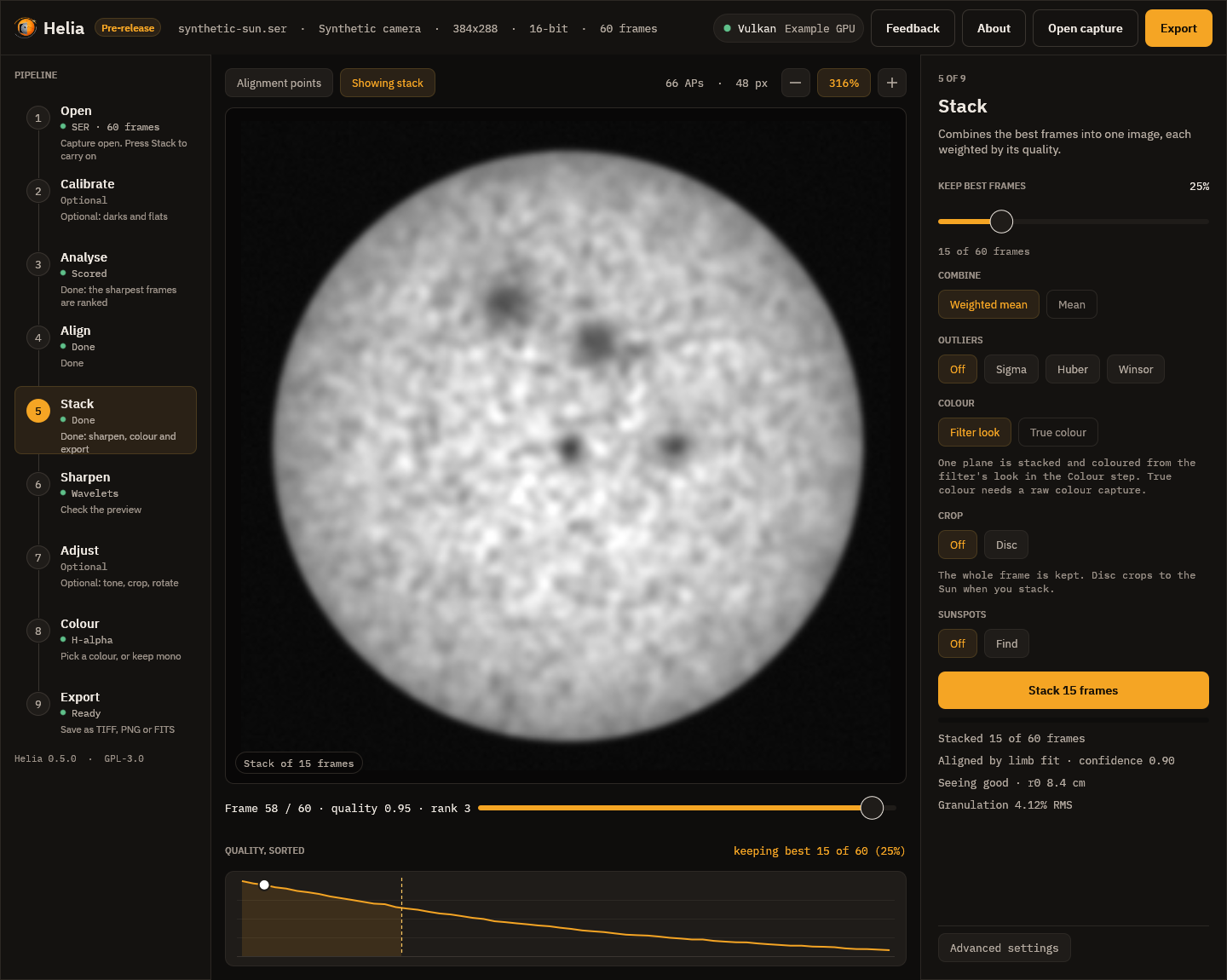
(The picture is the app's synthetic demo capture with fixed example figures in the report lines, not measurements of it; the seeing line is the one of Seeing estimation.)
The FITS header gets GRANRMS, GRANPITC, GRANDIAM, GRANPARC, GRANGPIX,
GRANROLL, GRANRESO and, with the aperture, GRANCUT.
On any image: helia measure
helia measure sun.fits --scale 2.16 --aperture 150 --wavelength 589.3
prints the three band-pass contrasts of helia measure and
the report above. --scale is arcseconds per pixel; --aperture needs
--wavelength and --scale.
How well it tells good from poor
Known-answer tests (cargo test -p helia-core granulation) on synthetic Voronoi
mosaics with a known cell size and contrast, blurred by known Gaussians and with
added noise:
| Test | Result |
|---|---|
| Mean cell size, 8, 12 and 16 px | recovered to 3.3%, 3.3% and 0.3% |
| RMS contrast against the truth, blur 0 to 3 px | within 3%, and falls with blur |
| Brightness x4 and a 25% gradient | contrast within 3%, cell size within 5% |
| Band-limited to 0.2 cycles per pixel | resolved frequency 0.200 |
| Roll-off against blur of 0.6, 1.0, 1.6, 2.4 px | 0.113, 0.108, 0.096, 0.071 cycles per pixel |
| More noise | the noise floor rises by over 20 times; the resolved frequency does not rise |
On the project's four sodium captures (ASI482MC; Na D preset, GPU; FITS output, so
unsharpened). Each is stacked three ways: the preset's best 12% of frames with
alignment points; all frames (--keep 100%); the best 12% with global alignment
only (--no-multipoint). The eye ranks the first above the others, and the report
agrees:
| Capture | Stack | RMS contrast | Roll-off (period, px) | Resolved (period, px) |
|---|---|---|---|---|
15_20_57.ser | best 12%, points | 4.17% | 6.7 | 3.0 |
| all frames | 3.99% | 7.1 | 3.1 | |
| best 12%, global | 4.14% | 6.7 | 3.0 | |
Sun_Test.ser | best 12%, points | 3.76% | 6.9 | 3.4 |
| all frames | 3.44% | 8.3 | 4.3 | |
| best 12%, global | 3.64% | 6.9 | 3.4 | |
15_32_09.avi | best 12%, points | 1.95% | 13.3 | 6.3 |
| all frames | 1.86% | 14.1 | 6.5 | |
| best 12%, global | 1.91% | 15.0 | 6.5 | |
14_42_57.avi | best 12%, points | 1.39% | 34.3 | 26.7 |
| all frames | 0.53% | 48.0 | 21.8 | |
| best 12%, global | 0.55% | 34.3 | 12.0 |
- The contrast ranks all four captures as expected: alignment points above global alignment, and a selected 12% above all the frames. The roll-off period agrees or ties on every pair (it cannot tell points from global alignment on the first two captures, whose seeing is good).
14_42_57.aviis the blocky capture with no visible granulation: its contrast is mostly compression blocks and its resolved frequency flips between stacks, so read nothing into it beyond "much worse".- The cell size is not in the table because it is not granulation on these
captures. At 2.16 arcsec per pixel (
Sun_Test.ser,15_20_57.ser), 4.31 (15_32_09.avi) and 1.44 (14_42_57.avi) a 1.5 arcsec granule is 0.3 to 1 pixel, so the cells found are 9 to 14 pixels across (20 to 30 arcsec): larger structure and noise texture. The report prints a note saying so. The cell size becomes meaningful at about 0.5 arcsec per pixel or finer. - The report is repeatable: it uses no random numbers.
Limits
- The region is the disc centre. A spot, a facula or a filament there raises the
contrast; check the crop, and use
helia measure --cropor crop the image first. - A sharpened image reads higher. Compare sharpened with sharpened, or use the FITS stack.
- Hydrogen-alpha has no granulation: no report is made for it.
Seeing estimation
Helia can estimate the seeing from the capture itself, with no reference star (#49). It gives two numbers that answer different questions:
r0, the Fried parameter, from the spectral ratio. An absolute figure: the diameter of the patch of atmosphere over which the wavefront is flat to about a radian, at the capture's wavelength and scaled to 500 nm.D / r0(the aperture overr0) says how many seeing cells the telescope looks through, and with it how rare a lucky frame is. It needs the telescope aperture.- A motion index from the alignment points. A relative figure: how much
neighbouring alignment points move against each other from frame to frame.
It needs nothing but the capture, and is not an absolute
r0.
Switch it on with --seeing (add --aperture-mm 150 for r0), seeing and
aperture_mm in an API job, or set the telescope aperture under Advanced
settings in the app (the Stack step then shows a seeing line). It reads about
120 more frames, spread evenly over the capture, after the stack: about two
seconds on the project's captures. The result is printed after the stack, written
into the FITS header (SEEMOTPX, SEEMOTAS, SEEDR0, SEER0500, SEEGRADE)
and returned by the API as summary.seeing.
$ helia stack Sun_Test.ser -o sun.fits --preset na --seeing --aperture-mm 80
...
seeing:  followed 16 tiles of 64 px through 120 frames spread over the capture
seeing:  motion index:   0.274 px (0.59 arcsec) RMS differential motion per axis between points 72 px (154 arcsec) apart (14 pairs); relative, not r0
seeing:  spectral ratio: D/r0 8.2, r0 1.0 cm at the capture's wavelength, 0.8 cm at 500 nm (18 rings, 16 tiles, tiles differ by 25%)
seeing:  note:           a 64 px tile spans 138 arcsec, more than one isoplanatic patch (a few arcseconds); the method is validated for one transfer function per tile, so r0 is indicative and no grade is given
seeing:  note:           the cut-off (1.42 cycles/px) is above the sampling limit, so fine detail is aliased and the r0 is indicative; a scale of 0.76 arcsec per pixel or finer avoids it
(The aperture here is a guess: the project's captures do not say what telescope they were taken with.)
The spectral ratio
For an object that does not change during the burst, the Fourier transform of a
tile of frame k is F_k = O S_k: the object's transform times the transfer
function of that frame's atmosphere and telescope. Average over the frames, once
aligned, and the ratio |<F>|^2 / <|F|^2> equals |<S>|^2 / <|S|^2>. The object
cancels (von der Luehe 1984), leaving a curve that depends only on D / r0 and on
the frequency in units of the telescope's cut-off D / lambda. Helia matches the
measured curve to the one a Kolmogorov atmosphere gives, which it holds as a
table made by Monte Carlo over phase screens (cargo run --release -p helia-core --example seeing_table; the structure of the screens is checked against Noll's
tilt-removed variance, 0.134 (D / r0)^(5/3), to within 1%).
In practice: up to 16 tiles of 64 x 64 pixels, the ones with the most detail and
wholly inside the disc, are followed through the sample by correlation. Each tile
is cut at its integer position, the sub-pixel remainder removed in Fourier space,
and the mean transform and the mean power accumulated. The noise is measured on the
tiles (Immerkaer's estimator) and its power taken out of the denominator; the
finite-sample bias of |<F>|^2 is taken out of the numerator. Rings of the
spectrum with a signal to noise above three, between 5% and 90% of the cut-off (and
below the sampling limit), are fitted by least squares.
The frames are a sample of all the frames, not the best ones: this is the seeing of the session, not of its lucky moments.
Validation on synthetic data
Kolmogorov phase screens, a granulation-like object, known D / r0 and noise
(cargo test -p helia-core seeing):
| Test | Result |
|---|---|
D / r0 3, 5, 8, 12, 160 frames, 4 tiles | recovered 2.84, 4.94, 7.25, 9.71 (-5%, -1%, -9%, -19%) |
Object: granulation, limb, pore, D / r0 6 | 5.85, 5.50, 5.76: within 10% of each other |
| Noise 0.02 and 0.05 (of a mean of 1), estimated or known | 6.03 and 5.67 for a truth of 6 |
| The same atmosphere at 656 nm and 393 nm | r0 at 500 nm 17.9 and 19.6 cm: within 10% |
| Cut-off at twice the sampling limit, aliased | 5.25 for a truth of 5 |
| Two independent patches in a tile | 3.92 for a truth of 4 (one patch: 3.86) |
It loses sensitivity as D / r0 grows (above about 12 only the lowest frequencies
carry any signal, and the estimate reads low); the report says so.
What limits it on real data
- The aperture must be right. It sets the cut-off, and
r0isDover the fittedD / r0. A wrong aperture gives a wrongr0in proportion. - Sampling. When the telescope's cut-off
D / lambdais above 0.5 cycles per pixel (for 80 mm at 589 nm, a scale coarser than 0.76 arcsec per pixel) detail aliases. The synthetic test above shows aliasing does not by itself spoil the estimate, but the report says so as a caution. - Tile size. The method assumes one transfer function per tile, that is a tile
within the isoplanatic patch, a few arcseconds in daytime. A 64 pixel tile is
that only at about 0.1 arcsec per pixel or finer. When a tile spans more than 15
arcseconds (a scale coarser than 0.23 arcsec per pixel) the report gives
r0as indicative and no grade, because it has not been validated there: the simulation above covers only the limiting case of independent patches, and real neighbouring patches are partly correlated. - Few frames. Under 40 frames the report makes no
r0. - The object must not change during the burst. Granulation evolves in minutes; a capture of a minute or two is fine.
The grade
From r0 at 500 nm: 10 cm or more is excellent, 7 to 10 good, 4 to 7 fair,
2.5 to 4 poor, under 2.5 bad. These are day-time solar thresholds, not a
standard.
The alignment point motion index
Tip and tilt of the whole frame (and tracking error and wind shake) move every patch of the Sun together, so they cancel when the shifts of two neighbouring alignment points are subtracted. What remains is the differential image motion, which turbulence causes (Scharmer and van Werkhoven 2010). Helia takes the tiles above, measures their shift in each of the sampled frames, subtracts neighbours (points up to one and a half grid spacings apart), removes each pair's mean difference (the static offset between the reference and the scene) and takes the RMS of what is left, per axis, in pixels and in arcseconds.
It is a relative index, for comparing captures taken through the same optics
at the same scale. The patches look through the atmosphere at different field angles,
so it depends on how high the turbulence is: for the same r0, turbulence at 5 km
gives more differential motion than turbulence at the ground. On synthetic phase
screens at D / r0 6, with tiles 16 pupil pixels apart at height:
| Where the turbulence is | Index |
|---|---|
| All at the ground | 0.0000 |
| Half at the ground, half at height | 0.0486 |
| All at height | 0.0667 |
and for turbulence at height it grows monotonically with D / r0 (3 to 12) with a
log-log slope of 0.83, the 5/6 the theory gives for the RMS of a differential
tilt.
On the real captures
The motion index of the whole of each capture (a sample of 120 frames; the fourth capture is too blocky to lock tiles):
| Capture | Index | Pairs | Autoap's warp |
|---|---|---|---|
15_20_57.ser (2.16 arcsec/px) | 0.19 px, 0.41 arcsec | 18 | 0.23 px |
Sun_Test.ser (2.16 arcsec/px) | 0.27 px, 0.59 arcsec | 14 | 0.88 px |
15_32_09.avi (4.31 arcsec/px) | 0.16 px, 0.69 arcsec | 26 | 0.23 px |
14_42_57.avi | not enough points locked | 1.59 px |
The ranking agrees with the warp --ap-auto measures on a different principle (the
spread of a point's shift about its frame's median).
The independent check on the real data: the quarter of the frames the stacker
ranks sharpest (a half for the 100-frame capture) should read as better seeing than
the quarter it ranks worst, in the same capture. cargo test -p helia-core --test seeing_real with HELIA_REAL_DATA set (Na D, green channel, 240 frames, the
aperture taken as 80 mm, so only the comparison means anything):
| Capture | Motion index, best / worst | D / r0, best / worst |
|---|---|---|
15_20_57.ser | 0.147 / 0.184 px | 3.63 / 4.37 |
Sun_Test.ser | 0.147 / 0.220 px | 5.01 / 7.36 |
15_32_09.avi | 0.133 / 0.138 px | 15.17 / 15.40 |
Both rank the best frames as the better seeing on all three captures. On
15_32_09.avi the difference is small (a few per cent): the capture is short and
steady.
The absolute values are not to be trusted on these captures: at 1.4 to 4.3 arcsec
per pixel a 64 pixel tile is 90 to 280 arcsec wide, far beyond an isoplanatic
patch, and Helia says so and gives no grade. The method is meant for scales near
0.1 arcsec per pixel; on a capture like that --seeing --aperture-mm is the one to
use. There is no such capture in the test set yet, so the absolute r0 is
validated on synthetic data only.
Using it
- To compare nights or settings with the motion index: same telescope, same scale, same filter.
- For
r0andD / r0: give the aperture, use a scale of 0.1 to 0.3 arcsec per pixel, and expect a grade. - To choose how many frames to keep: the lower
D / r0is, the larger the share of good frames (Fried 1978).D / r0under 4 makes a high keep share (25% or more) reasonable; above 10, keep fewer. Automatic keep share from this number is future work (#21, #25).
Sources
- von der Luehe, O. (1984), JOSA A 1(5), 510-519: estimating Fried's parameter from a time series of an arbitrary resolved object imaged through atmospheric turbulence.
- Scharmer, G. B. and van Werkhoven, T. I. M. (2010), A&A 513, A25: S-DIMM+ height characterisation of day-time seeing using solar granulation.
- Noll, R. J. (1976), JOSA 66, 207: Zernike polynomials and atmospheric turbulence.
- Immerkaer, J. (1996), Computer Vision and Image Understanding 64, 300: fast noise variance estimation.
- Lane, R. G., Glindemann, A. and Dainty, J. C. (1992), Waves in Random Media 2, 209: simulation of a Kolmogorov phase screen.
Sunspots, groups and the Wolf number
Helia can find the sunspots on a white-light stack, group them, count them and measure their areas (#57). It gives:
- the number of groups
gand of individual spotss; - the relative Wolf number
R = k (10 g + s), with the observer factorkyou set (1 is the raw count); - each spot's area in millionths of the solar hemisphere (MSH), as seen and corrected for foreshortening, and its umbra alone;
- each spot's and group's position on the Sun: latitude, central meridian distance and, when the capture has a time, Carrington longitude;
- an overlay picture: the flattened disc with the penumbra (yellow) and umbra (red) outlined, the limb (cyan), the group numbers (green) and an arrow to solar north.
It is for white light, with the whole disc in the frame. In H-alpha or calcium the contrast of a spot is different and the filaments and plage give false spots; the thresholds below mean nothing there.
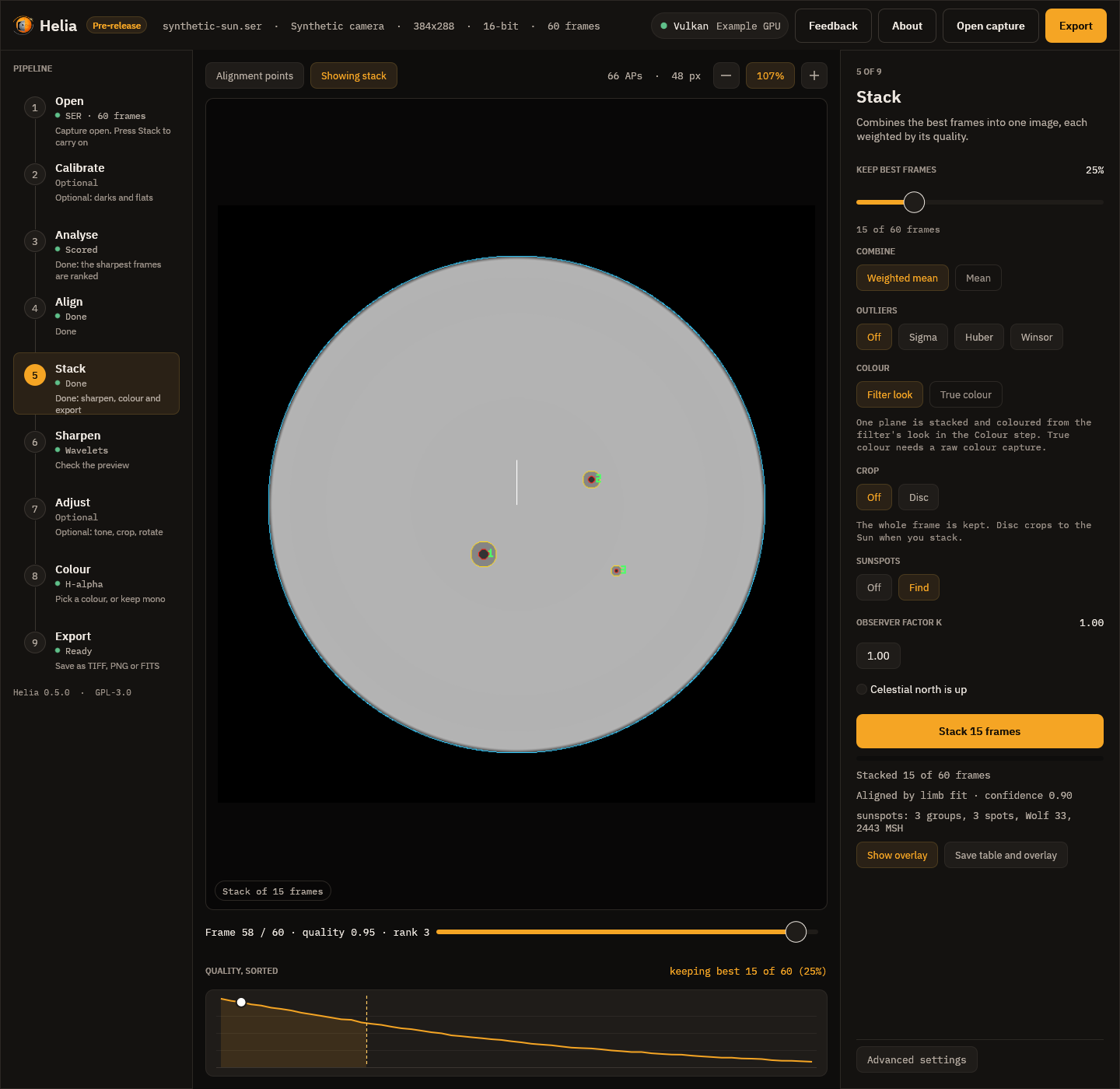
Using it
$ helia sunspots stack.tif --date 2025-09-17T16:14:00 --csv spots.csv --json spots.json --overlay spots.png
file:        stack.tif
image:       1080 x 1920
disc:        centre (554.5, 980.8), radius 401.7 px
time:        2025-09-17T16:14:00.000 UTC
7 groups, 14 spots; Wolf number 84.0 (k = 1)
area 1218 millionths of the hemisphere corrected (795 as seen), umbra 380
P 24.49, B0 7.16, L0 247.82 degrees
group 1: 1 spot, 1 umbra, lat +33, L 174, 326 MSH (98 as seen)
...
spot group    x     y    lat   cmd   lon    mu umbrae  as seen corrected umbra (MSH)
   1     1   229   778 +32.5 -73.8 174.0  0.30      1       98       326         114
- On a stack as it is made:
helia stack capture.ser -o sun.fits --sunspots(white-light captures; the time comes from the capture). The table, JSON and overlay are saved beside the output assun-sunspots.csv,.jsonand.png, the summary is printed, and a FITS output carries it in its header. - On any stacked image:
helia sunspots image.tif. The time comes from--date(UTC,2025-09-17T16:14:00), from the frame stamps of the capture the image was made from (--capture file.ser), or from theDATE-AVGorDATE-OBScard of a FITS file. - In the API:
"sunspots": {}in a job'sconfig; see The API. - In the app: the Sunspots chips in the Stack step. After the stack the step shows the count, Show overlay puts the overlay in the viewer, and Save table and overlay writes the CSV, JSON and PNG.
How it works
- Flatten. The limb darkening is fitted and divided out (Sharpening), so one threshold means the same thing at the centre and near the limb. The disc centre and radius come from the same fit.
- Quiet level. The image is smoothed a little (a Gaussian of about a pixel per 400 px of disc radius). The quiet-Sun level at each pixel is the mean of the surrounding disc (a box 40% of the radius across) with the dark and the bright pixels left out, found in four passes that tighten from 60% to 93%. A gradient the flattening cannot remove (a vignette, a thin cloud, a one-sided filter) is then not read as spot. "Dark" below means a share of this local level, above the sky.
- Penumbra and umbra. A pixel darker than the penumbra threshold (0.88 by
default) is spot; a spot's pixels darker than the umbra threshold (0.55) are its
umbra. 0.88 and 0.55 are the middle of a typical penumbra (0.75 of the
photosphere) against the photosphere and of an umbra (0.3) against the penumbra,
because a blurred edge sits half way. They are the options
--sunspot-penumbraand--sunspot-umbra. - Spots. Connected regions (eight-neighbour) of at least 4 pixels and 2 MSH are spots. Each umbra of 2 pixels or more counts as one individual spot for the Wolf number, and a region with no umbra (a pore) counts as one.
- Groups. Two spots whose edges are closer than 3 degrees on the Sun
(
--sunspot-group-gap) are in one group, and the grouping is transitive. The edge of a spot is taken as a circle of the spot's own corrected area about its centroid. This is not the Zurich classification, and the Wolf number depends on how groups are drawn: it is a relative figure. - Foreshortening. A pixel at a distance
ufrom the disc centre, in radii, is1 / muof its picture area on the Sun, withmu = sqrt(1 - u^2). Helia sums1 / muover every pixel of the spot, so a spot that spans a lot of the disc is treated correctly. The hemisphere is2 pi R^2pixels, so one MSH isR^2 pi / 500000pixels (1.6 pixels at a radius of 500). The corrected area is what the spot really covers; "as seen" is what it covers in the picture. - Position. The pixel position, the disc centre and radius and the orientation
give a point on the disc; with
B0(the tilt of the Sun's axis towards us) that is a heliographic latitude and a longitude from the central meridian. With the capture timeL0makes it a Carrington longitude.
Spots nearer the limb than 97% of the radius are not measured: the limb fit and the
flattening are least certain there, and a pixel is foreshortened by more than four
to one. A dark region larger than 6000 MSH (the largest groups ever recorded are
about that size, --sunspot-max-area) is left out with a note: it is a cloud, a
vignette or an uneven flat, not a spot.
Time, orientation and the Sun's axis
P (position angle of the Sun's axis), B0 and L0 come from the Sun's position at
the capture time, from the low-precision series of Meeus, Astronomical Algorithms,
chapters 25 and 29 (good to about 0.01 degree; checked against the book's worked
example). The time is the mean of the frame stamps of the frames that were stacked
(SER files have them), else the header's start time. Without a time B0 is taken as
0 and longitudes are measured from the central meridian only; the report says so.
Helia does not know how your camera sits on the sky. By default solar north is taken to be up. If it is not:
--north-angle DEGturns solar north counter-clockwise from the top of the image (APInorth_angle_deg);--celestial-north-upis for an equatorial mount without a flip: solar north is thenPdegrees counter-clockwise from the top (the Sun's axis isPeast of celestial north), andPis taken from the capture time;--mirroris for a mirror image (a diagonal without a flip, an odd number of reflections).
A wrong orientation does not change the counts or the areas, only latitude and longitude, and so the foreshortening is unaffected too.
The output
The CSV has one row per spot:
| Column | Meaning |
|---|---|
spot, group | Numbers from 1; groups are numbered largest first |
x_px, y_px | Centroid, pixels, top row 0 |
lat_deg | Heliographic latitude, degrees north |
cmd_deg | Central meridian distance, degrees, west positive |
lon_deg | Carrington longitude; empty without a capture time |
mu | Cosine of the angle from the disc centre at the centroid |
umbrae | Individual spots in the region (at least 1) |
umbra_px, penumbra_px | Pixels of umbra, and of penumbra without it |
projected_msh | Whole spot as seen, MSH |
area_msh | Whole spot, corrected for foreshortening, MSH |
umbra_msh | Umbra, corrected, MSH |
darkest | Darkest smoothed intensity inside, a share of the quiet disc |
The JSON adds the groups, the disc, the time, P, B0, L0, the thresholds and the
notes. The FITS header gets SPOTNGRP, SPOTNSPT, SPOTWOLF, SPOTK, SPOTAREA
(corrected), SPOTPROJ, SPOTUMBR, SPOTTHRU, SPOTTHRP, SPOTP, and the
SOLARNET observer coordinates CRLT_OBS (B0) and CRLN_OBS (L0).
What was measured
Known answers. The unit tests render a limb-darkened disc with spots of known
size and heliographic position (including ones near the limb), blurred and noisy,
and check what Helia recovers: the counts are exact for isolated spots, a
spot's corrected area is within 5% of the truth and its umbra within 15% (the umbra
of the smallest, 8 pixels across, is the least sure), the latitude and central
meridian distance within 0.5 degree, a near-limb spot is seen at under 0.6 of its
corrected area, groups form and split at the separation asked for, two umbrae in
one penumbra count as two spots, and a clean disc has none. The ephemeris matches
Meeus's worked example for 1992 October 13 (P 26.27, B0 5.99, L0 238.63).
A real white-light disc. A phone video of the Sun on 2025-09-17
(2025-09-17-161400-Solar.mp4, 1080 by 1920, disc radius 402 px) stacked at 6, 12,
25 and 50% of the frames gives 7 groups and 14, 14, 13 and 13 spots: Wolf number 84,
84, 83 and 83. It has a dark region at the bottom of the disc (a gradient across the
frame, 37 600 MSH) which is left out by the size limit and which would otherwise
have been the biggest "group". The spot areas are 17 to 326 MSH, and a group at
central meridian distance +1.7 degrees is seen at the same size as it is corrected.
There is no reference count for that day among the captures, so the Wolf number is
not compared with the official series, which needs a calibrated k for each
observer and instrument.
Limits
- The count depends on resolution and seeing: small spots and pores are missed, and
kfor your telescope is something to calibrate against the published series. - White light only.
- The group definition is a distance, not the Zurich classification.
- The positions assume the image is orientated as you say (see above) and the limb fit is a circle, so a clipped or out-of-round disc gives a worse position.
- The Sun's ephemeris is a series good to about 0.01 degree, ignoring the minute between UT and terrestrial time.
Reference: every option
| Setting | CLI | API (config.sunspots) | App | Range | Default |
|---|---|---|---|---|---|
| Find sunspots | helia stack --sunspots; helia sunspots IMAGE | sunspots (an object; {} for the defaults) | Stack step, Sunspots: Off / Find | on or off | off |
| Umbra threshold | --sunspot-umbra | umbra | not offered | above 0 and below the penumbra | 0.55 |
| Penumbra threshold | --sunspot-penumbra | penumbra | not offered | above the umbra, below 1 | 0.88 |
| Smallest spot (MSH) | --sunspot-min-area | min_area | not offered | 0 to max_area | 2 |
| Largest spot (MSH) | --sunspot-max-area | max_area | not offered | above min_area | 6000 |
| Group gap (degrees) | --sunspot-group-gap | group_gap_deg | not offered | 0 to 90 | 3 |
| Observer factor k | --wolf-k | wolf_k | Observer factor k (0.1 to 5) | above 0 | 1 |
| North angle (degrees, counter-clockwise from the top) | --north-angle | north_angle_deg | not offered | any | 0 |
| Celestial north is up | --celestial-north-up | celestial_north_up | Celestial north is up | on or off | off |
| Mirror image | --mirror | mirror | not offered | on or off | off |
| Time of the image (UTC) | helia sunspots --date TIME or --capture FILE.ser (a FITS file's DATE-AVG or DATE-OBS otherwise); in stack the capture's | the capture's | the capture's | YYYY-MM-DDThh:mm:ss | none |
| Outputs | --csv FILE, --json FILE, --overlay FILE; stack writes NAME-sunspots.csv, .json, .png | summary.sunspots, GET /jobs/{id}/sunspots.csv, GET /jobs/{id}/sunspots.png | Show overlay, Save table and overlay |
Thresholds are shares of the quiet disc's brightness above the sky after the limb
darkening is flattened. A value outside its range is 422 invalid_config in the API and
an error on the command line.
Tutorial: counting sunspots on a white-light stack
This walks through a real capture from start to finished table: a white-light video
of the Sun taken on 2025-09-17 (2025-09-17-161400-Solar.mp4, a phone through a
solar filter, 1080 by 1920 pixels, the disc 402 pixels in radius). You need Helia 0.5
or later and one white-light capture with the whole disc in the frame. The method is
described in Sunspots, groups and the Wolf number.
1. Stack the capture
In the app, open the file, choose the White light filter in the Open step, keep the defaults (the best 25%), and press Stack. On the command line:
helia stack 2025-09-17-161400-Solar.mp4 -o solar.tif --preset white --channel g
White light stacks the green channel: it is the sharpest and the least affected by atmospheric dispersion. Do not sharpen yet: the detection works on the flattened disc, and sharpening adds ringing at the limb and around spots. (A FITS output also carries the capture time.)
2. Find the spots
On the command line, with the capture time (UTC) so that the Sun's tilt is known:
helia sunspots solar.tif --date 2025-09-17T16:14:00 \
    --csv spots.csv --json spots.json --overlay spots.png
In the app, set Sunspots to Find in the Stack step before pressing Stack (the time comes from the capture if it has timestamps; without one there is no Carrington longitude), then use Show overlay and Save table and overlay. Leave the observer factor k at 1 for the raw count.
What you should see:
disc:        centre (554.5, 980.8), radius 401.7 px
7 groups, 14 spots; Wolf number 84.0 (k = 1)
area 1218 millionths of the hemisphere corrected (795 as seen), umbra 380
P 24.49, B0 7.16, L0 247.82 degrees
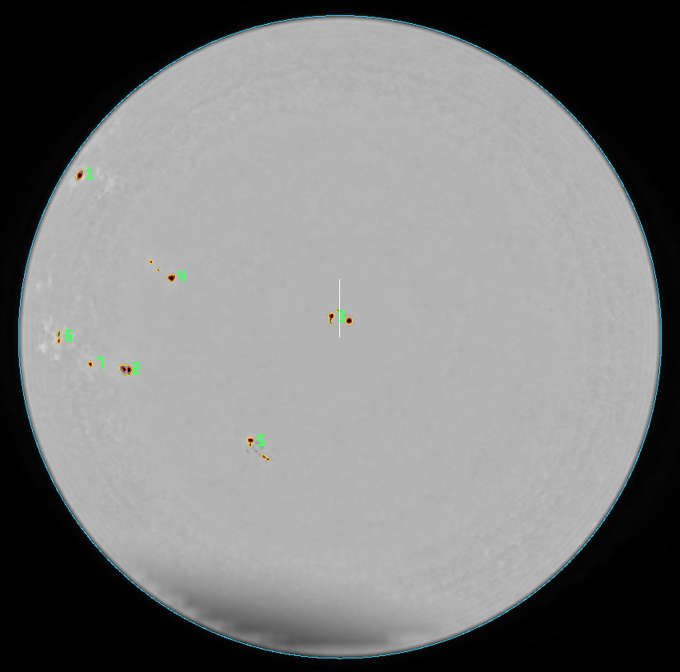
The overlay of this capture, cropped to the disc. Penumbrae are outlined yellow, umbrae red, the limb cyan and each group is numbered in green; the white line is solar north.
Check the overlay against the picture before you trust the numbers: every outlined region should be a spot you can see, and every visible spot should be outlined.
3. Read the table
spots.csv has a row per spot: area_msh is its corrected area in millionths of the
visible hemisphere, projected_msh the area as seen, lat_deg and lon_deg its
heliographic position (Carrington longitude, from the time you gave). The spot at
central meridian distance -73.8 degrees is seen at 98 MSH but is 326 MSH on the Sun:
that is the foreshortening correction at work. A spot near the middle of the disc
(mu near 1) has the two areas equal. The full column list is in the user guide.
4. If the north is not up
By default solar north is taken to be at the top of the image. If your camera is
elsewhere, latitude and longitude will be wrong (counts and areas are not): add
--north-angle DEG (counter-clockwise from the top), or --celestial-north-up for an
equatorial mount with the image north up, or --mirror for a mirror image. The app
offers only Celestial north is up; use the command line for other angles.
What to expect and what can go wrong
| What you see | Why | What to do |
|---|---|---|
| Hundreds of tiny "spots" over the whole disc | Not white light (H-alpha and calcium have dark filaments and plage), or a very noisy stack | Use a white-light stack; raise --sunspot-min-area |
| A big false group along one side of the disc | A cloud, vignette or uneven flat: dark regions over 6000 MSH are dropped with a note, smaller ones are not | Re-stack on a clear frame range, or lower --sunspot-penumbra |
| A visible pore is missing | Pores under 4 pixels or 2 MSH are not counted | Lower --sunspot-min-area |
| Two groups that are really one | The groups are further apart than 3 degrees | Raise --sunspot-group-gap |
| "no clear solar disc" | The whole disc is not in frame, or the contrast is too low | Frame the whole disc |
| Wolf number differs from the official one | k is 1 and groups are drawn by distance, not Zurich class | Calibrate k against the published series for your instrument |
The result is stable across the stack: keeping 6, 12, 25 or 50% of the frames of this capture gave 7 groups and 14, 14, 13 and 13 spots (Wolf 84, 84, 83, 83).
GPU acceleration
Helia does its heavy maths on the GPU when there is one, through wgpu, a Rust library that speaks Vulkan, DX12, Metal and OpenGL. There is nothing to install beyond your normal graphics driver, and no vendor-specific toolkit: the same code runs on AMD, NVIDIA, Intel, Apple and Raspberry Pi graphics.
Backends
| Platform | APIs wgpu uses | Notes |
|---|---|---|
| Linux | Vulkan, then GLES | Needs a Vulkan driver for your GPU (Mesa for AMD, Intel and Raspberry Pi; NVIDIA's own driver). |
| Windows | DX12, Vulkan | Provided by the graphics driver. |
| macOS | Metal | Built in. |
Choosing between GPU and CPU
The --backend option of helia stack (and the Backend setting in the
desktop app, and backend in an API job) takes three values:
| Value | Behaviour |
|---|---|
auto (default) | Ask wgpu for the best hardware adapter. If it finds none, or only a software adapter, use the CPU path. |
cpu | Always use the CPU. |
gpu | Use a GPU. If there is no real GPU, fall back to wgpu's software adapter; if there is no adapter at all, fail with an error. |
Helia prints which one it chose. On the command line it is the backend: line
of the summary, for example backend: GPU (<adapter> (Vulkan, DiscreteGpu)) or
backend: CPU (16 threads). The desktop app shows it in a chip in the top bar,
and the API reports it under backends in GET /api/v1/version.
The CPU path
The CPU path is not a poor relation. It is the specification: the GPU kernels are tested to give the same results as the CPU code (see The GPU parity rule). It is multi-threaded and vectorised, so a machine without a usable GPU still stacks, only more slowly, and the output is equivalent either way.
What runs on the GPU today
- Colouring the finished stack through a colour preset: a table lookup with linear interpolation, one thread per pixel. It matches the CPU reference to within 1e-5 per sample.
- Sharpening and the everyday edits (levels, curves, unsharp mask, a-trous wavelets and denoise, Richardson-Lucy deconvolution): separable convolution passes, element-wise kernels and, for an Airy blur, a direct 2-D convolution. The image stays on the device across a run of these operations. The noise level of a wavelet layer is estimated from a few thousand sampled pixels, which are the only values that come back to the host in between. They match the CPU reference to within 1e-4 (about 1e-6 observed); the live preview in the app uses them. Crop, rotate, flip and resize run on the CPU.
- Scoring every frame, straight from the stored bytes: decode, debayer, blur and the sharpness reduction all run on the device.
- Global registration by phase correlation, with Helia's own mixed-radix FFT (lengths up to 2048) written in WGSL.
- Alignment point correlation.
- Stacking.
Frames are sent in batches with two in flight, so uploading the next batch overlaps work on the current one.
The robust stacking modes (--robust sigma|huber|winsor) run on the GPU for
the whole-frame stack, in two passes; with alignment points their per-point
tiles still combine on the CPU. Still on the CPU: registration of captures whose transform length would exceed 2048,
and, by design, fitting the correlation peaks and interpolating the shifts. The GPU returns the correlation surfaces, and the same CPU code
makes the decision on either path, so the CPU and GPU paths give the same
answer (registration agrees to about 1e-5 px).
Measured speed
Wall-clock seconds for helia stack with --keep 25%, end to end. Measured
2026-10-18 on a laptop: 16-thread CPU and an NVIDIA RTX 3050 Ti Laptop GPU
(4 GB, Vulkan), commit ae49ddc. The laptop GPU throttles when hot, so expect
run-to-run variation of 10% or so.
| Capture | Frames | CPU, before | CPU, now | GPU, before | GPU, now |
|---|---|---|---|---|---|
| 1920x1080 16-bit Bayer SER | 100 | 8.3 | 2.9 | 13.2 | 1.6 |
| 1920x1080 8-bit mono SER | 631 | 31.1 | 15.0 | 40.8 | 5.8 |
| 720x540 8-bit Bayer AVI | 1000 | 15.5 | 5.4 | 20.5 | 2.9 |
| 1920x1080 8-bit Bayer AVI | 630 | 70.5 | 19.2 | 73.1 | 10.7 |
"Before" is the first release of the stacker, where only scoring and
accumulation ran on the GPU. Use helia stack --timings to see where the time
goes on your own machine.
On a data-centre GPU (NVIDIA A100) these small captures were slower than on the same machine's CPU, which points at start-up and batch size rather than compute; that is being looked at (#10).
Software adapters
A software adapter is a GPU implemented on the CPU: WARP on Windows, lavapipe (Mesa) on Linux. They exist so that programs run on machines with no GPU, and so that Helia's automated tests can exercise the GPU code on ordinary build servers. They are slower than Helia's own multi-threaded CPU path.
How wgpu ranks adapters matters here. Helia asks for the high-performance
choice, and wgpu orders what it finds as discrete GPU, integrated GPU, other,
virtual GPU and, last, a CPU-hosted adapter. auto skips a CPU-hosted adapter
altogether, so a Linux machine with no GPU but with Mesa's lavapipe installed
uses Helia's faster CPU path (backend: CPU (...) in the summary).
--backend gpu still accepts a software adapter when there is no real GPU,
which is mainly useful for testing. Helia's own tests ask for the software
adapter explicitly (see
Building and testing).
Troubleshooting
The summary says backend: CPU and you expected a GPU.
- Linux: install the Vulkan loader and your driver
(
sudo apt-get install libvulkan1 mesa-vulkan-drivers, or NVIDIA's driver), then check thatvulkaninfo --summary(from thevulkan-toolspackage) lists your GPU. If it does not, Helia cannot see it either. - Windows: update your graphics driver from the manufacturer. Remote desktop sessions and some virtual machines hide the GPU; run Helia on the local console.
- macOS: nothing to install; Metal is built in.
- A laptop with two GPUs: Helia asks for the high-performance one. If the system gives it the integrated GPU, use your system's graphics settings to run Helia on the discrete GPU.
- Run
helia stack ... --backend gpu. Unlikeauto, it reports an error when no adapter can be opened, and the message says why.
"no suitable GPU adapter found" or "could not open GPU device". These come
from --backend gpu. The first means no adapter of the requested kind exists;
the second means an adapter exists but refused to open (a driver problem).
Updating the driver is the usual fix.
The GPU is used but the result differs very slightly from the CPU. That is expected. Floating-point sums are not bit-for-bit identical across devices; the tests bound the difference (see the parity page).
A bug that only happens on the GPU. Re-run with --backend cpu. If the CPU
result is right, report it with your operating system, GPU, driver version and
helia --version (see Contributing).
Sending feedback
Helia is a pre-release, and the quickest way to make it better is to tell us what is wrong or missing. There is a Feedback button in the top bar, at every step, and a matching command for people without a display.

Privacy first
- Nothing is sent until you press Send. Opening the page, drawing on the screenshot and typing send nothing, and nothing you type is saved to disk.
- Helia has no telemetry. It never sends usage, crash or error reports of its
own accord. The only network request Helia ever makes about feedback is the one
you start with Send (or with
helia feedback). - It goes to the Helia developers. Your feedback is sent to them and filed in the Helia issue tracker, which may be visible to more people than the developers, now or later. Look at the screenshot before you send it: it is a picture of the Helia window, and the window can show the file name of your capture, your GPU and anything else on the screen inside it. Untick Include the screenshot if in doubt.
- You see exactly what will be sent. Preview what will be sent shows the report as text and the screenshot with your rectangles on it.
- System details are optional and limited. If you tick Include system details, the report carries the Helia version, commit, build date and target, the Rust and wgpu versions, your GPU adapter, your operating system, and the open capture's file name and header summary (size, bit depth, frame count). It never carries image data, a folder path, your name, a host name or an address.
In the app
Press Feedback in the top bar, or Ctrl+Shift+F. (The About page has a Send feedback button too. F1 still opens the About page.) Helia takes a picture of its own window and then shows the feedback page in place of the viewer.
- Highlight the problem. Drag on the screenshot to draw a rectangle round it. Draw as many as you need; Undo removes the last, Clear removes them all. If the screenshot would show something private, untick Include the screenshot.
- Choose the kind: Bug, Feature request, Question or Other.
- Write a title (one line, up to 120 characters) and a description (up to 6500 characters; the rest of the 8000 is kept for the system details).
- Decide about system details and look at Preview what will be sent.
- Press Send.
Sending runs in the background and the window stays usable. A notice says Preparing your feedback (Helia asks the service for a small puzzle and solves it, which takes well under a second; it keeps casual spam out) and then Sending your feedback, with a Cancel button. When the service has filed the issue the page shows its number as a link, and a notice confirms it.
Press Esc or Close to leave the page; what you typed is kept until you send it or quit.
When the service cannot be reached
If the feedback service is down, busy or unreachable, or you are offline, nothing is lost. The page says what happened and offers:
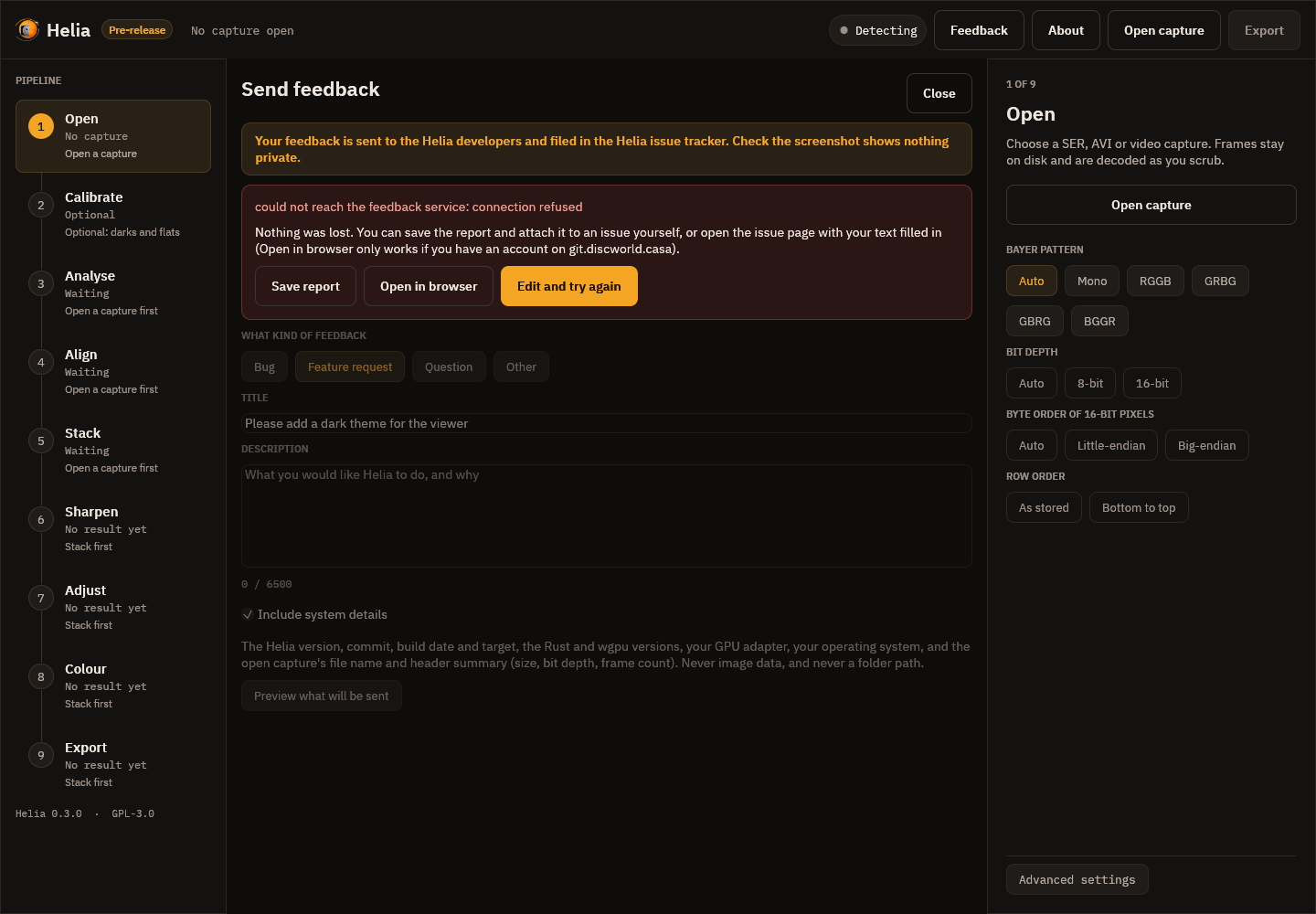
- Save report writes a
.zipwithreport.json(including your highlights as numbers),screenshot.png(the screenshot with your rectangles drawn on) andscreenshot-clean.png. Attach it to an issue yourself, or send it to the author. - Open in browser opens the project's new-issue page with the title and text
already filled in. It only works if you have an account on the project's issue tracker, and the screenshot
cannot be attached from here, so attach
screenshot.pngfrom the saved report. - Edit and try again returns to the form.
A bug report for an issue
If you would rather open an issue yourself, Save bug report on the About page
writes a .zip of text only (version, GPU, the open capture's header, settings and
the end of the log) to attach to it. See
Log file and bug report.
From the command line
helia feedback --kind bug --title "Stack fails on my AVI" \
    --description "Fails at the alignment stage with ..." \
    --screenshot problem.png --highlight 40,60,200,120 --system-info
--kind is bug (the default), feature, question or other. --description -
reads the text from standard input. --screenshot takes a PNG (check it first: it is
filed in the issue tracker) and --highlight x,y,w,h draws a rectangle on it, in the
screenshot's pixels; give it more than once for more rectangles. --system-info
adds the version, commit, target and operating system. --dry-run prints exactly
what would be sent and sends nothing. If the service cannot be reached,
--save report.zip keeps the report, and the command prints the pre-filled
new-issue address. See the CLI reference.
Changing the service address
Normally you do not need to. For a private or test service, set the environment
variable HELIA_FEEDBACK_URL, or put feedback_url=https://... in the app's
settings file, or use --url on the command line. The
variable wins over the file, and --url wins over the variable. The address must be HTTPS (plain HTTP only for
localhost).
For developers
The wire format, the proof of work and the answers are in the feedback protocol.
Troubleshooting and FAQ
When something looks wrong, run helia info on the capture first. It prints
every field of the file's header, what Helia will use instead where the two
differ, and why. It reads the header and, for a SER file that says it is mono, a
few frames to check the pixels. Most of the problems below show up there.
Opening captures
"file truncated: header needs N bytes, stream has M"
A SER file records its frame count in the header. If the recording stopped badly (a crash, a full disk, a copy that did not finish), the file holds fewer frames than the header promises, and Helia refuses it rather than guess. Copy the file again. If it is genuinely cut short, this version of Helia cannot read it.
"ffmpeg was not found"
You opened an MP4, MOV, M4V, MKV or WebM file, or a compressed AVI, and Helia
could not find ffmpeg. Those formats are read through the optional ffmpeg
program. Install it (the message lists the command for each system, and
Installation has
them too), open a new terminal so PATH is refreshed, and try again. If it is
installed somewhere unusual, set HELIA_FFMPEG and HELIA_FFPROBE to the full
paths of ffmpeg and ffprobe.
"ffmpeg is too old"
Helia needs ffmpeg 4.4 or newer. Update it with your package manager, or use a
static build from ffmpeg.org and point
HELIA_FFMPEG and HELIA_FFPROBE at it.
"the video is truncated or damaged"
A recording that stopped badly often has no index (an MP4's moov box is
written at the end) or ends mid-frame. Helia reports it rather than stacking a
partial video without telling you. Try recovering the file with
ffmpeg -i broken.mp4 -c copy fixed.mp4, or record to SER. A few frames missing
at the very end of a video (up to 1 per cent) are tolerated.
"decoding needs about N MiB of free space"
Compressed video is decoded once into an uncompressed file in a cache
directory, and that needs room for every frame at full size. Free some space,
point --cache-dir (or the HELIA_CACHE_DIR environment variable) at a bigger
disk, or open a shorter clip. The file is removed when Helia is done; if Helia
was killed, a leftover helia-video-*.ser file older than a day is deleted the
next time a video is decoded.
"unsupported AVI video format"
Helia reads uncompressed AVI itself (BI_RGB, Y800/GREY, Y16, 24-bit
BGR). An AVI with another codec, for example MJPG, goes to ffmpeg like an MP4.
If you still see this message, the file is not a plain AVI at all: run
helia info on it. See Capturing for Helia.
My AVI is huge, or reported as having the wrong number of frames
Files over 1 GB are written as a chain of OpenDML sections. Helia supports
them: it finds the frames by walking the file's own chunks, not by trusting the
index at the end, because capture programs often write that index wrongly or
leave it out. Run helia info and compare the frame count with what your
capture program said. If helia info is wrong for a file that plays elsewhere,
please report it with the file's first few hundred megabytes if you can.
SharpCap SER files and the byte-order flag
A 16-bit SER file has a header flag that says whether the pixel bytes are
little-endian or big-endian. SharpCap files have been seen with the flag
cleared (big-endian) while the data is really little-endian, which makes the
image look like harsh noise. Helia checks: when the flag says big-endian it
looks at the first frame, and decodes it the way that gives a smooth image.
helia info shows both sides, the flag as written under the header and the order
used under Helia will use:
  LittleEndian:      0 (big-endian)
  Byte order:        little-endian  (detection)
If the two differ, Helia has corrected a mislabelled file and nothing needs
doing. Data that really is big-endian is left alone. If Helia gets it wrong
(the picture is harsh noise), say which with --endian little or --endian big.
The header gets the bit depth wrong, or the picture is upside down
A recorder can also write the wrong bit depth into the header. The usual sign is
that helia info or the app refuses the file as truncated, or that the picture
is striped or looks like noise. Use --bit-depth 8 or --bit-depth 16 to say
what the pixels really are (any value from 1 to 8 reads one byte per pixel, 9 to
16 two). A file stored with the bottom row first (rare in SER) is read the right
way up with --flip-rows. All of these apply to SER files, and the same choices
are in the Open step of the app and in the API (bit_depth, endian,
flip_rows). See Capturing for Helia.
A grid or chessboard in the stack (a Bayer mosaic that was not removed)
A raw colour camera records one colour per pixel in a repeating 2 x 2 pattern. The picture has to be demosaiced (debayered) before it is stacked. If it is not, the stack carries the pattern: a fine grid or chessboard, with neighbouring pixels alternating between bright and dark. Behind a narrow-band filter such as H-alpha it is stark, because the blue pixels receive almost no light.
The usual cause is a SER file whose header says mono (ColorID 0) although
the frames are raw Bayer data. SharpCap does this for some colour cameras (a
ZWO ASI482MC, for example). Helia no longer trusts such a header blindly. For a
SER file that says mono it measures the four pixel positions of a 2 x 2 cell on
the solar disc in a few frames; if they differ by 5 per cent or more in a way a
colour-filter array would produce, it reports a mosaic, names the pattern and
debayers it. It says so:
warning:  The SER header says mono (ColorID 0), but the frames hold a Bayer mosaic
that looks like RGGB: the four pixel positions of a 2x2 cell ... Helia will
debayer them as RGGB. ...
The desktop app shows the same message above the Quick stack card in the Open
step, and the API returns it in notices (see The API). Nothing is
changed silently: helia info and the app's Helia will use list give the
Bayer pattern with its source (detection), and the choice is recorded in the
output file.
If a stack made before this check shows the grid, stack it again.
If the check is wrong, tell Helia what you know:
helia stack capture.ser -o out.tif --bayer none     # it really is mono
helia stack capture.ser -o out.tif --bayer bggr     # a different pattern
Two cases need your eye:
- Red and blue swapped. The geometry of the mosaic says which diagonal is
green but not which of the other two pixels is red. Helia settles it from the
layout a SharpCap sidecar states, the colour the filter passes (red for
H-alpha, blue for calcium K), the usual layout of the camera model, and
finally by taking the dimmer of the two as blue. The message says which. For
a stack of a single channel (the Ha preset takes the red one) a wrong pick
matters; if the result looks like noise, try the other pattern of the same
family (
rggborbggr,grbgorgbrg). - A mosaic too faint to see. If the colours are balanced so that all four
pixel positions are within 2 per cent of each other, the data is called mono;
between 2 and 5 per cent Helia cannot tell, and uses the sidecar's colour
space if there is one. Give
--bayeryourself.
Colours are wrong, or a colour camera looks like a grey mosaic
Raw colour cameras store a Bayer mosaic. In a SER file the pattern is normally in
the header (and see the previous section when the header says mono). An AVI
cannot say whether 8-bit data is raw colour or plain mono, so for SharpCap AVI
files Helia reads the CameraSettings.txt beside the video (same name,
.CameraSettings.txt in place of .avi). helia info shows the sidecar it
found, its colour space and its Debayer Preview, or no sidecar rows.
If there is no sidecar or the guess is wrong, say what you have:
helia stack capture.avi -o out.tif --bayer rggb
The patterns are rggb, grbg, gbrg and bggr; none forces mono. For a
bottom-up AVI the pattern means the picture the right way up. If the picture
looks like a fine chessboard, or the colour planes are swapped, try the other
patterns. Many ZWO colour sensors are RGGB, and Helia assumes RGGB for a raw
colour sidecar. The pixel check described above runs for SER files only; an AVI
has no header field to doubt, so its sidecar and --bayer decide.
H-alpha with a colour camera
The H-alpha line is red (656 nm). On a colour camera it reaches mainly the red
pixels of the sensor, so the green and blue pixels carry little more than noise.
Averaging the three planes mixes that noise in and softens the result. Helia
uses the red plane for H-alpha by itself when it knows the filter: put Ha in
the file name, or give --preset ha:
helia stack ha.ser -o ha.tif --preset ha
If Helia did not recognise the filter (the settings: line says filter not recognised), the default is all three planes; name the plane yourself with
--channel r. In the app, the Quick stack card picks the filter and the channel
with it; Advanced settings at the foot of the inspector has the channel
buttons. For a white-light colour capture, lum or g is usually the better
choice. Mono cameras are unaffected by these options.
Helia picked the wrong filter, or none
Helia reads the filter from the file name, then the folder, then the SharpCap
sidecar and the SER header (see
Colourising). A whole word has to
match, so rename the file to include Ha, CaK, Mg, Na or similar, or name
the filter yourself: --preset on the command line, the filter buttons in the
Quick stack card. A filter you choose always wins over the one detected.
The result
The stack looks soft
Answer these in order. Each is cheaper to fix than the next, and the first two decide how sharp the stack can be at all.
- How good were the best frames? A stack cannot be sharper than the sharp
moments it is built from. Look at the Quality, sorted curve in the Analyse
step. If the best frames are only a little better than the middle of the
capture, the air was the limit.
helia stack --seeing --aperture-mm 100(give your aperture) prints the Fried parameterr0andD / r0, and a grade: 10 cm or more is excellent, 7 to 10 good, 4 to 7 fair, 2.5 to 4 poor, under 2.5 bad. See Seeing estimation. Nothing later in the chain makes up for bad seeing. - How many frames did you keep? Keep fewer:
--keep 10%. If the sorted curve falls steeply, a smaller share helps; if it is flat, it will not. A lowerD / r0allows a larger share. - Are the alignment points doing their job? Open the Align step and check how
many points are active. Photospheric targets (white light, Na D) need small
points, a few granules across:
--ap-autopicks the size, spacing and search range from the image scale and the seeing, and--ap-passes 2measures the shifts a second time against the first stack. Compare with--no-multipointand try a different--ap-size. See How stacking works. - Is it only the stack that is soft? A stack is smoother and cleaner than any
single frame, but not as sharp as the telescope can be. Sharpen it: the Sharpen
step, or
--sharpen waveleton the command line. Judge with Before / after and Full size, because the preview is a shrunk copy. The method, the sliders and the recommended values for each filter are in Sharpening and adjustments and the step-by-step Sharpen.
About the wavelets. Wavelet sharpening in Helia is an a-trous transform with a gain and a noise cut for each of six layers. Users coming from RegiStax have reported that they cannot reach the same sharpness with it, and suspect that the gains Helia allows on the fine layers are much smaller than the 10 to 100 times they use there. Making the wavelet controls behave like RegiStax 6, with comparable ranges, is in progress under issue #131 and is not finished. Until it lands, do not expect the same look from the same numbers, and do not read this page as a promise of how the result will look.
Sharpening left halos, ringing or grain
- Sharpening can create artefacts. Use Before / after and ease off: lower the gains of the wavelet layers (layer 1 and 2 first), raise their noise cuts, lower the unsharp amount, or use fewer deconvolution iterations.
- Ringing at the limb or round sunspots after deconvolution: keep the limb and sunspot guard at 1, and check that the blur (PSF) is not larger than the real one: too big a blur over-corrects.
- Grain or speckle that looks like texture is noise that was boosted. Raise the noise cut of the finest layers, turn on Denoise in the Adjust step, or stop the deconvolution sooner.
- The preview is a shrunk copy; press Full size to judge fine detail.
The red channel is clipped, or the disc is a flat white plate
This is issue
#119, found on the
H-alpha captures of 2022-07-17 and 2026-10-20 (a ZWO ASI482MC, AVI and SER
files). Behind a narrow-band filter one colour plane of the sensor carries nearly
all the light. H-alpha is red, so the red pixels do. An exposure long enough to
show the faint leak of the line, or the prominences, pushes those pixels to the top
of the sensor's range, and almost every lit pixel of the disc then sits at one
value: 96 to 100% of them, 255 in the AVIs and 203 in the SER files. A plane that
is flat holds no detail, so a stack of it is a white disc with prominences round it
and no filaments, plage or fibrils. The green plane, which carries the leak of the
line at 40 to 60% of full scale, has all of that. Measured on 15_37_19.avi, the
granulation-band contrast of the stack is 0.14% from the red plane and 1.39% from
the green. A white-light capture exposed too long does the same, to a lesser degree
(14_42_57.avi: red 50% and blue 21% clipped).
What Helia does about it (the fix, pull request
#125, is on main and comes
in the release after 0.5.0): before stacking, helia stack and API jobs read six
frames, find the planes that are mostly flat at their own ceiling and stack the
brightest plane that is not. Empty planes (blue behind a red filter) are never
chosen. A note in the settings says what happened:
the red plane is clipped (red 98% of its lit pixels sit at the sensor limit, so
the disc is flat there); stacking the green plane instead. ...
- A channel you name is never changed.
--channel rstacks red, clipped or not. Leave--channeloff to let the fallback work. - The desktop app does not do it yet. Its Advanced settings keep explicit channel buttons: choose G yourself when the red result is a flat plate.
- If every usable plane is clipped, the note says so and nothing is replaced: the exposure is too long for any of them.
- The cure is at the telescope: a shorter exposure or a lower gain, so the histogram of the bright plane stays clear of the right-hand edge. See Exposure, gain and bit depth.
A burned-in timestamp, or a label, shows in the result
Helia finds a burned-in timestamp (the date and time that SharpCap and other
programs draw into the picture) by itself, keeps alignment and quality scoring
off it, and replaces it with a flat patch of sky in the result. The command
line summary lists what it masked (masked:), and the points off the disc and
off the text are simply not used. See
Keeping alignment off text and sky.
If some other text or a mark is still in the way, give its rectangle with
--exclude x,y,w,h (pixels from the top-left corner; repeat for several), or
add it under Exclude regions in the Align step of the app. If Helia masks
something it should not (it only looks for small, bright, changing areas at
the edge of the frame), switch the automatic detection off with
--no-overlay-detect. If the disc fit goes wrong and alignment points are
missing on a real disc, use --no-disc-mask, or --prominence-band to let
points sit a little outside the limb.
Nothing improves, or the alignment points are all inactive
The point count in the app (and points: in the command line summary) says how
many points were bright and detailed enough to measure. Very low-contrast
frames, or too small a point size, leave few active points. Try a larger
--ap-size. If almost none are active, check the capture: an exposure so short
that the frame is nearly black, or a sensor region with no disc, leaves nothing
to lock on.
GPU
Helia says backend: CPU, or cannot find my GPU
See the troubleshooting section of GPU acceleration. The short
version is: check your driver, then try --backend gpu to get an error message
that says why.
Reporting a problem
Open About and choose Save bug report, then send the .zip to the author (via 12hobbies.studio). It has the version, your GPU, the open
capture's header and the end of Helia's log, all as text you can read first. The
log itself is helia.log; where it lives, and what it does and does not record,
is in Log file and bug report.
Questions
Does Helia need a GPU? No. It uses one when it finds one and otherwise runs on the CPU with the same results.
Does Helia use the network? Only when you send feedback. The stacker and the
desktop app otherwise contain no code that makes network connections; the feedback
client connects to the feedback service when you press Send (or run
helia feedback) and at no other time. helia serve listens on the address you give it,
on the loopback interface unless you say otherwise; see
The API for its security model.
Does it modify my captures? No. It only reads them. Output files are written where you say, and the command line overwrites an existing output file without asking.
Can it stack colour? A colour camera capture is stacked as one plane
(--channel, which Helia chooses from the filter), because narrow-band solar
data is one colour of light. The stack is mono. Helia can then colour it for
sharing with a look for each filter (orange for H-alpha, violet for calcium and
so on), into a 16-bit RGB TIFF or an 8-bit PNG; FITS stays mono. See
Colourising. A true three-colour stack of a white-light
capture is not built.
Can I calibrate with darks and flats? Yes: see Calibration
and Capturing for Helia. Build masters with helia calibrate, or
name the captures in the Calibrate step of the app.
Where do I report a bug? Press Feedback in the desktop app (Ctrl+Shift+F),
or run helia feedback: it files it in the issue tracker for you, with a screenshot you can
draw on, even if you have no account on the forge. See
Sending feedback. Or use the project's issue tracker
directly, with your operating system, GPU and driver, the output of helia --version, and if you
can a short capture (a few hundred frames) that shows the problem.
Frequently asked questions
Short answers, with a link to the page that has the whole story. Problems with a particular message or picture are in Troubleshooting.
Getting it
Where do I download it? Releases are not public yet: Helia is in early access, so contact 12hobbies.studio. See Download and verify.
Is it free? Yes: GNU General Public Licence version 3 or later, with additional terms under section 7 that keep the copyright line and the dedication. See About.
Which systems? Windows 10 and 11 (x86_64), Linux x86_64 and aarch64 (including Raspberry Pi 4 and 5 on a 64-bit system) are published. macOS and Windows on ARM are built from source. See Installation.
Why does it say pre-release? It is below version 1.0. The features in this manual work and are tested; some planned ones (derotation, drizzle) are not built yet. See the roadmap.
Using it
Do I need a GPU? No. It uses one when it finds one and otherwise runs on the CPU with the same results. See GPU acceleration.
What do I record? SER, 16-bit if possible, short exposures, many frames. See Capturing for Helia.
Can I use a phone video? Yes, with ffmpeg installed. See MP4 from a phone.
How many frames should I keep? The recommended share for the filter (25 or 30 per cent) is a good start. Fewer is sharper and noisier. See Stack.
Which channel, or band, should I use for my filter? Let Helia choose: it reads the filter from the file name, folder or sidecar and applies the preset below. The choice follows which pixels of a colour sensor the light reaches. On a mono camera none of this applies.
| Filter | Colour plane stacked | Frames kept | Why |
|---|---|---|---|
| H-alpha | red | 25% | 656 nm is deep red; green and blue pixels add noise, not detail |
| Ca II K, Ca II H | blue | 30% | violet light reaches the blue pixels; the line is faint |
| Mg I b | green | 30% | 517 nm is green; the line is dim |
| Na I D | green | 12% | the filter leaves the blue pixels empty, and averaging them in prints the mosaic over the granulation; green is two pixels in four |
| He I D3 | all three combined | 25% | 587.6 nm is shared between red and green |
| H-beta | blue | 30% | 486 nm reaches the blue pixels; faint |
| White light | all three combined | 12% | the continuum carries all three colours; shows granulation |
Name another plane with --channel r|g|b|lum. A plane that turns out to be clipped
is replaced by the next one (see
The red channel is clipped),
unless you named it. The reasons, with the numbers, are in
Colour presets. One caution: the 2022 captures that
were first taken for sodium were later identified, from their plane statistics, as
H-alpha (red clipped, blue empty, prominences in red; pull request #128, which corrects
those labels). The sodium choice of green therefore rests on those captures, not on a real
Na D filter, and no true sodium capture is in the test set yet. If your Na D result
looks wrong, try --channel lum and --channel r and compare.
My image looks soft. Check the seeing, then the share of frames kept, then the alignment points, then sharpen. See The stack looks soft. Wavelets that behave like RegiStax's are in progress under issue #131; Helia does not promise the same look yet.
The red channel is clipped, or the disc is a flat white plate. The exposure was long enough to push the red pixels to the sensor limit. Helia stacks the next plane by itself unless you named one. See The red channel is clipped.
Which sharpening method? Wavelets, at the recommended values, almost always. See Sharpen.
Does it change my captures? No. It only reads them.
Can I get the picture without colour? Yes: pick Mono in the Colour step, or export FITS, which is mono for a filter stack (and a red, green, blue cube for a true-colour one).
What is the colour, really? A convention. Narrow-band solar data is one colour of light; orange for H-alpha, violet for calcium and so on are for sharing. See Colourising.
Why is the FITS not sharpened? It is for measurement and further processing. Turn
on Edit the FITS too (or --sharpen-fits) if you want it sharpened.
Privacy and network
Does Helia use the network? Only when you send feedback. The stacker and the
desktop app otherwise make no network connections of their own; links open in your
browser only when you click them. The feedback client, in the app and as
helia feedback, connects to the feedback service when you press Send (or run the
command) and at no other time. helia serve listens where you tell it, on the
loopback interface unless you say otherwise. See Send feedback.
Does it send usage data? No. There is no telemetry.
Problems
A grid across the picture. Fixing a Bayer grid.
It picked the wrong filter. Press the right one on the Quick stack card, or add
--preset. See Troubleshooting.
The sharpening looks overdone. Turn it down: it is. See Troubleshooting.
Where do I report a bug? See Send feedback.
Command line reference
Every subcommand also accepts -h and --help; helia itself also accepts -V and --version. Exit status is 0 on success and 1 on any error, with the message on standard error.
helia
Solar lucky-imaging stacker
helia <COMMAND>
Subcommands:
stack: Stack a capture into a single sharp imagecalibrate: Build master dark, flat and bad-pixel files from calibration captures, forhelia stack --dark --flat --bad-pixelsedit: Sharpen and adjust an existing TIFF, PNG or FITS imageinfo: Print what a capture file contains: every header field as written, what Helia will use instead where it differs, and whymeasure: Measure how much granulation an image holds: the band-pass contrast (standard deviation over mean) of a disc-centre crop in three bands, for comparing settings on the same capturesunspots: Find the sunspots on a stacked white-light image: groups, the relative Wolf number and areas corrected for foreshortening, as a table, JSON and an overlay pictureserve: Run the HTTP/JSON API serverpresets: List the filter presets (helia stack --preset ...)lut: Write a filter's colour table as a file other programs read (.cube, .csv,ImageJ.lut or a PNG strip), so a picture coloured elsewhere matches one coloured by Heliafeedback: Send feedback (a bug, a feature request or a question). It is sent to the Helia developers and filed in the Helia issue tracker, through the feedback service
helia stack
Stack a capture into a single sharp image
helia stack [OPTIONS] --output <OUTPUT> <INPUT>
Arguments:
<INPUT>: Capture file: .ser or .avi, or a compressed video (.mp4, .mov, .mkv, .webm, .m4v) read through the optional ffmpeg program (required)
Options:
-o, --output <OUTPUT>: Output image; the extension picks the format (.tif/.tiff, .png or .fits/.fit/.fts) (required)--keep <KEEP>: Share of frames to keep, e.g. 25%--keep-frames <N>: Number of frames to keep--ap-size <AP_SIZE>: Alignment point size in pixels. Default: chosen from the image size--ap-auto: Choose the alignment point size, spacing and search range from the image scale (the fitted limb) and the seeing (a probe of a dozen frames), instead of one size for every capture. What was chosen is printed--ap-passes <N>: Alignment point passes: 1 measures the points against the reference built from the best few frames, 2 stacks once and measures them again against that stack (less noise, more detail to lock on). Needs multipoint. Default: 1--ap-smooth <on|off>: Replace alignment point shifts that disagree with their neighbours (a mismatch on a neighbouring granule) by the neighbours' median. Needs multipoint. Default: offon: Enabledoff: Disabled
--ap-residual: Measure the alignment points once more against the finished stack and print how far the shifts that were used are from that (px RMS): a check of the registration, at the cost of one more measuring pass--autocrop: Crop the result to the solar disc plus a margin (FITS too). A capture without a clear disc is left as it is, with a note--seeing: Estimate the seeing from the capture: the Fried parameter r0 from the spectral ratio of tiles of the disc over a sample of all the frames (needs --aperture-mm), and a relative index from how much neighbouring alignment points move against each other. Printed after the stack and written into the FITS header. Reads about 120 more frames--sunspots: Find the sunspots on the stack: groups, the relative Wolf number, areas corrected for foreshortening. Printed after the stack, written into the FITS header, and saved beside the output as NAME-sunspots.csv, .json and .png. For a white-light capture with the whole disc in view; the time is the capture's--sunspot-umbra <SHARE>: Umbra threshold: pixels darker than this share of the quiet disc (after the limb darkening is flattened out) are umbra (default0.55)--sunspot-penumbra <SHARE>: Penumbra threshold: pixels darker than this share of the quiet disc are spot. Raise it to take in fainter penumbrae and pores (default0.88)--sunspot-min-area <MSH>: Smallest spot to keep, in millionths of the visible hemisphere (default2)--sunspot-max-area <MSH>: Largest spot, in millionths of the hemisphere; a dark region bigger than this (a cloud, a vignette) is left out (default6000)--sunspot-group-gap <DEG>: Spots whose edges are closer than this on the Sun, in degrees, form one group (default3)--wolf-k <K>: Observer factor k of the Wolf number R = k (10 g + s) (default1)--north-angle <DEG>: How far solar north is turned counter-clockwise from the top of the image, in degrees. Default 0: solar north up (default0)--celestial-north-up: The image has celestial north up (an equatorial mount): solar north is then turned by the position angle P of the Sun at the capture time, added to --north-angle--mirror: The image is a mirror image (west is on the left)--wavelength-nm <NM>: Wavelength in nanometres for --seeing when the filter is not known (the filter's own wavelength is used otherwise)--aperture-mm <MM>: Telescope aperture in millimetres. With it, the granulation report of a white-light or sodium stack also gives the diffraction cut-off and how much of it the data resolves, and --seeing gives r0 and a grade--autocrop-margin <PERCENT>: Margin of--autocropas a percentage of the disc radius (default10)--preset <FILTER>: The filter the capture was taken with (ha, cak, cah, mg, na, he-d3, hbeta, white): applies its recommended channel and frame share and colours a .tif or .png output. Without it the filter is read from the file name, folder or sidecar when possible; seehelia presets--colour <COLOUR>: Colour of the output: auto (the preset), mono, a preset id, or true (true colour from a raw colour camera: red, green and blue stacked on one alignment, channels aligned and white balanced, written as an RGB TIFF or PNG or a three-plane FITS). The other looks colour a .tif or .png from the mono stack; FITS output is mono for them--invert: Invert the picture before colouring (shows filaments and prominences)--white-balance <BALANCE>: White balance of--colour true: auto (make the disc centre neutral), off (the sensor's own balance) or three gains R,G,B such as 1.9,1,1.5 (defaultauto)--no-channel-align: With--colour true, do not register red and blue to green (atmospheric dispersion). On by default--colour-strength <S>: Mix of colour and grey from 0 to 1 (default1)--site <LAT,LON,ALT>: Observing site as LAT,LON,ALT (degrees north, degrees east, metres), for a FITS output's OBSGEO-X/Y/Z. Without it theHELIA_SITEenvironment variable is used, else the keywords are left out--align <ALIGN>: How whole frames are aligned: auto (fit the solar limb when the full disc is in view and the fit is confident, else phase correlation), phase (phase correlation, best for a cropped region) or limb (fit the limb; frames without a usable limb still use phase correlation) (defaultauto)--sharpen-fits: Apply the sharpening and other edits to FITS output too. By default a FITS file is the unsharpened stack, for further processing elsewhere--sharpen <METHOD>: Sharpening: wavelet (Registax-style layers, the usual choice), unsharp, rl (Richardson-Lucy deconvolution) or none. The default is none--unsharp-radius <PX>: Unsharp mask: Gaussian radius (sigma) in pixels--unsharp-amount <A>: Unsharp mask: how much detail is added back (0.6 is gentle, 2 is strong)--unsharp-threshold <T>: Unsharp mask: detail weaker than this (0 to 1) is left alone, so noise is not boosted--wavelet-gains <G1,G2,...>: Wavelets: gain of layers 1, 2, 3 ... (comma separated; 1 leaves a layer alone, above 1 sharpens it). Layers not listed keep the recommended gain--wavelet-noise <T1,T2,...>: Wavelets: noise threshold of layers 1, 2, 3 ... in noise sigmas (0 keeps all detail; 2 removes what is not clearly above the noise)--rl-iterations <N>: Richardson-Lucy: iterations (more is sharper and noisier)--rl-tv <L>: Richardson-Lucy: total-variation weight, 0 to 0.05 (keeps noise from becoming speckle)--rl-psf <PSF>: Richardson-Lucy: the blur to undo. auto (from the image scale), gaussian:SIGMA, airy:RADIUS (first dark ring, pixels) or airy-scope:NM,MM,ARCSEC_PER_PX--rl-guard <S>: Richardson-Lucy: strength of the limb and sunspot ringing guard, 0 (off) to 1--flatten <SOURCE>: Divide the disc by its limb-darkening profile before anything else, so sharpening sees flat contrast:model(the fitted law) orprofile(the measured azimuthal median). Outside the limb nothing changes--limb-law <LAW>: The limb-darkening law to fit: linear, quadratic (the default) or neckel (Neckel and Labs, five terms).helia stackprints the fit--prominence: Composite a stretched prominence layer with the disc: outside the fitted limb the scattered light is taken off and what is left is stretched to read like the disc, joined to it by a feathered edge. For H-alpha and the other lines with prominences. Runs after the sharpening--prominence-strength <S>: How hard the prominence layer is lifted: 1 refers it to the brightest prominence found--prominence-stretch <K>: The k of the asinh stretch of the layer; 0 is linear, larger lifts the faint parts more (default 6)--prominence-level <SHARE>: Brightness of the brightest prominence as a share of the disc's (default 0.75)--prominence-feather <SHARE>: Half-width of the feathered join at the limb, as a share of the disc radius (default 0.012)--prominence-reach <RADII>: How far out the layer reaches, in disc radii (default 1.4)--prominence-gate <SIGMA>: Noise sigmas taken off the layer before the stretch (default 3)--prominence-offset <SHARE>: Move the join of layer and disc, as a share of the disc radius added to the fitted limb (negative inside the limb, default 0)--prominence-disc-gamma <G>: Gamma of the disc's tone above the sky while the layer is on (default 1: the disc is left alone)--prominence-layer-gamma <G>: Gamma of the stretched layer's tone (default 1; above 1 darkens its faint parts)--denoise <STRENGTH>: Wavelet denoise; the strength is in noise sigmas for the finest layer (default: the filter's recommended value)--denoise-layers <N>: Layers the denoise treats, from the finest--black <V>: Levels: input value (0 to 1) that becomes black--white <V>: Levels: input value (0 to 1) that becomes white--gamma <G>: Levels: mid-tone gamma (above 1 brightens)--curve <IN:OUT,...>: A tone curve through IN:OUT points, for example 0.25:0.15,0.75:0.85--crop <X,Y,W,H>: Crop to X,Y,W,H in pixels (top-left origin)--rotate <DEG>: Rotate clockwise by this many degrees (multiples of 90 are exact)--flip-h: Mirror left to right--flip-v: Mirror top to bottom--resize <SIZE>: Resize: 50% or 0.5, 1200x800, 1200x (width) or x800 (height)--edits <NAME|FILE>: Start from a saved edit preset (a name from the presets folder, or a .json file); the options above are added after it--save-edits <NAME>: Save the resulting edit list as a preset under this name, for --edits--no-multipoint: Skip multi-point alignment (global alignment only)--exclude <X,Y,W,H>: Keep alignment and quality scoring off this rectangle, given as x,y,w,h in pixels (top-left origin); repeat for several. The area is flattened in every frame, so it is flat in the result too. Burned-in timestamps are found automatically; use this for anything else (a logo, a hot pixel cluster) (repeatable)--prominence-band <PX>: Place alignment points up to this many pixels outside the fitted limb, so they can follow prominences (0 keeps them on the disc) (default0)--no-disc-mask: Do not fit the limb; alignment points may sit anywhere there is contrast--no-overlay-detect: Do not look for burned-in text (a capture timestamp) to mask--backend <BACKEND>: Compute backend (defaultauto)--dark <PATH>: Master dark (FITS fromhelia calibrate, or any FITS or TIFF), or dark captures to build one from (a SER, AVI or FITS file, or a folder). Subtracted from every frame before it is demosaiced or aligned--flat <PATH>: Master flat, or flat captures to build one from. Divided out of every frame after the dark--displaced <PATH>: Captures of the Sun at many places on the sensor, to solve a flat from (seehelia calibrate --displaced); used when no--flatis given. The dark is taken off first--displaced-keep-smooth: With--displaced, keep every scale of the solution (seehelia calibrate --displaced-keep-smooth)--flat-dark <PATH>: Dark captures at the exposure of the flats, when--flatis captures--bias <PATH>: Master bias (or captures). Only used with--scale-dark--bad-pixels <FILE>: Bad-pixel map:bad-pixels.fitsfromhelia calibrate, or a text file with anx ypair (from 0, top-left) per line. Without it, hot pixels of the dark and dead pixels of the flat are found and corrected--no-cosmetic: Do not look for hot and cold pixels in the dark and the flat--scale-dark: Scale the dark by the ratio of the exposures (the Sun's exposure comes from theSharpCapsidecar). Best with--bias--calibration-combine <CALIBRATION_COMBINE>: How frames are combined into a master: median, sigma or sigma:K (defaultsigma)--sigma-clip <K>: Enable sigma clipping at this many standard deviations (off by default). Same as--robust sigma --robust-k K--robust <ROBUST>: Outlier-robust combination of the frames at each pixel:sigmadrops outliers,huberdown-weights them,winsorclamps them. Two passes over the frames. Defaultnone, the weighted meannone: Weighted mean of every sample (the default)sigma: Drop samples further than K sigma from the mean (default K 2.5)huber: Huber M-estimator: down-weight samples beyond K sigma in proportion to their distance (default K 1.345)winsor: Winsorised mean: clamp samples to K sigma from the mean (default K 2)
--robust-k <K>: Threshold of--robustin standard deviations. Default: 2.5 forsigma, 1.345 forhuber, 2 forwinsor--bayer <BAYER>: Bayer handling: auto, none, rggb, bggr, grbg or gbrg. auto trusts the header, but for a SER file labelled mono it also checks the pixels for a hidden Bayer mosaic (some recorders label raw colour data as mono) and debayers when it finds one. none treats the frames as mono whatever the header or sidecar say; a pattern forces it. For AVI the pattern otherwise comes from theSharpCapsidecar (defaultauto)--bit-depth <BITS>: Bits per sample, instead of the SER header's: 1 to 8 read one byte per pixel, 9 to 16 two bytes. For a header that gets the depth wrong. SER only--endian <ORDER>: Byte order of 16-bit samples, instead of the SER header flag (little or big). SER only--flip-rows: Read the rows bottom to top, for a file stored upside down. Patterns given to --bayer describe the picture after the flip. SER only--channel <CHANNEL>: Colour channel to stack from a Bayer capture. Default: the preset's channel, else lumr: Red plane only (usual for H-alpha)g: Green plane onlyb: Blue plane onlylum: Mean of the three planes
--debayer <DEBAYER>: Demosaicing method (defaultmhc)bilinear: Plain bilinear interpolationmhc: Malvar-He-Cutler, edge aware
--metric <METRIC>: Sharpness metric used to rank frames (defaultgradient)gradient: Gradient energylaplacian: Laplacian variance
--cache-dir <DIR>: Directory for compressed video (.mp4, .mov, .mkv, .webm, compressed .avi) decoded by ffmpeg. The decoded frames are uncompressed, so this needs room for the whole video (checked first) and is cleaned up afterwards. Default: the operating system's cache directory, or theHELIA_CACHE_DIRenvironment variable-q, --quiet: Hide the progress bar and the summary--timings: Print where the time went: wall time per stage and busy time per kind of work
helia calibrate
Build master dark, flat and bad-pixel files from calibration captures, for helia stack --dark --flat --bad-pixels
helia calibrate [OPTIONS]
Options:
--darks <PATH>: Dark captures (lens capped, same exposure and gain as the Sun) (repeatable)--flats <PATH>: Flat captures (an even field, at the focus and set-up of the Sun) (repeatable)--displaced <PATH>: Captures of the Sun at many places on the sensor (the mount off tracking, or nudged between frames), to solve the flat from instead of from--flats: it then holds the dust and fringes of the observing moment, without a diffuser. The darks (same exposure as the Sun) are taken off first. Needs at least six frames with the limb clear (repeatable)--displaced-keep-smooth: With--displaced, keep every scale of the solution, not only the structure finer than a quarter of the displacements (the smooth scales cannot be told from the Sun's own limb darkening unless it moved far)--flat-darks <PATH>: Dark captures at the exposure of the flats. Without them the flats keep their offset (or lose the bias, if--biasis given) (repeatable)--bias <PATH>: Bias captures (the shortest exposure). Only needed to scale a dark to another exposure (repeatable)--lights <CAPTURE>: A light capture: pixels that read the same wrong value in every frame while the Sun moves (stuck pixels) are added to the bad-pixel map. Useful when there are no darks-o, --output-dir <DIR>: Folder formaster-dark.fits,master-flat.fits,master-bias.fitsandbad-pixels.fits(created if needed) (defaultcalibration)--combine <COMBINE>: How frames are combined: median, sigma (clip at 3 standard deviations) or sigma:K (defaultsigma)--max-frames <N>: Use at most this many frames per master, spread over the input (default: as many as fit in 3 GiB)--no-bad-pixels: Do not look for hot, cold and stuck pixels--hot-sigma <K>: A pixel this many robust standard deviations off its neighbours in the dark is hot (default6)--preset <FILTER>: The filter the flats were taken through (ha, cak, ...): adds the advice that goes with it, such as the etalon's sweet spot and Newton rings for H-alpha--bayer <BAYER>: Bayer handling: auto, none, rggb, bggr, grbg or gbrg. auto trusts the header, but for a SER file labelled mono it also checks the pixels for a hidden Bayer mosaic (some recorders label raw colour data as mono) and debayers when it finds one. none treats the frames as mono whatever the header or sidecar say; a pattern forces it. For AVI the pattern otherwise comes from theSharpCapsidecar (defaultauto)--bit-depth <BITS>: Bits per sample, instead of the SER header's: 1 to 8 read one byte per pixel, 9 to 16 two bytes. For a header that gets the depth wrong. SER only--endian <ORDER>: Byte order of 16-bit samples, instead of the SER header flag (little or big). SER only--flip-rows: Read the rows bottom to top, for a file stored upside down. Patterns given to --bayer describe the picture after the flip. SER only-q, --quiet: Hide the progress messages
helia edit
Sharpen and adjust an existing TIFF, PNG or FITS image
helia edit [OPTIONS] --output <OUTPUT> <INPUT>
Arguments:
<INPUT>: Image to edit: .tif, .tiff, .png or .fits (mono or RGB) (required)
Options:
-o, --output <OUTPUT>: Output image; the extension picks the format. A colour image stays colour (TIFF or PNG) (required)--preset <FILTER>: The filter the image was taken with, for the recommended sharpening values (ha, cak, ...). Without it the filter is read from the file name or folder when possible--sharpen <METHOD>: Sharpening: wavelet (Registax-style layers, the usual choice), unsharp, rl (Richardson-Lucy deconvolution) or none. The default is none--unsharp-radius <PX>: Unsharp mask: Gaussian radius (sigma) in pixels--unsharp-amount <A>: Unsharp mask: how much detail is added back (0.6 is gentle, 2 is strong)--unsharp-threshold <T>: Unsharp mask: detail weaker than this (0 to 1) is left alone, so noise is not boosted--wavelet-gains <G1,G2,...>: Wavelets: gain of layers 1, 2, 3 ... (comma separated; 1 leaves a layer alone, above 1 sharpens it). Layers not listed keep the recommended gain--wavelet-noise <T1,T2,...>: Wavelets: noise threshold of layers 1, 2, 3 ... in noise sigmas (0 keeps all detail; 2 removes what is not clearly above the noise)--rl-iterations <N>: Richardson-Lucy: iterations (more is sharper and noisier)--rl-tv <L>: Richardson-Lucy: total-variation weight, 0 to 0.05 (keeps noise from becoming speckle)--rl-psf <PSF>: Richardson-Lucy: the blur to undo. auto (from the image scale), gaussian:SIGMA, airy:RADIUS (first dark ring, pixels) or airy-scope:NM,MM,ARCSEC_PER_PX--rl-guard <S>: Richardson-Lucy: strength of the limb and sunspot ringing guard, 0 (off) to 1--flatten <SOURCE>: Divide the disc by its limb-darkening profile before anything else, so sharpening sees flat contrast:model(the fitted law) orprofile(the measured azimuthal median). Outside the limb nothing changes--limb-law <LAW>: The limb-darkening law to fit: linear, quadratic (the default) or neckel (Neckel and Labs, five terms).helia stackprints the fit--prominence: Composite a stretched prominence layer with the disc: outside the fitted limb the scattered light is taken off and what is left is stretched to read like the disc, joined to it by a feathered edge. For H-alpha and the other lines with prominences. Runs after the sharpening--prominence-strength <S>: How hard the prominence layer is lifted: 1 refers it to the brightest prominence found--prominence-stretch <K>: The k of the asinh stretch of the layer; 0 is linear, larger lifts the faint parts more (default 6)--prominence-level <SHARE>: Brightness of the brightest prominence as a share of the disc's (default 0.75)--prominence-feather <SHARE>: Half-width of the feathered join at the limb, as a share of the disc radius (default 0.012)--prominence-reach <RADII>: How far out the layer reaches, in disc radii (default 1.4)--prominence-gate <SIGMA>: Noise sigmas taken off the layer before the stretch (default 3)--prominence-offset <SHARE>: Move the join of layer and disc, as a share of the disc radius added to the fitted limb (negative inside the limb, default 0)--prominence-disc-gamma <G>: Gamma of the disc's tone above the sky while the layer is on (default 1: the disc is left alone)--prominence-layer-gamma <G>: Gamma of the stretched layer's tone (default 1; above 1 darkens its faint parts)--denoise <STRENGTH>: Wavelet denoise; the strength is in noise sigmas for the finest layer (default: the filter's recommended value)--denoise-layers <N>: Layers the denoise treats, from the finest--black <V>: Levels: input value (0 to 1) that becomes black--white <V>: Levels: input value (0 to 1) that becomes white--gamma <G>: Levels: mid-tone gamma (above 1 brightens)--curve <IN:OUT,...>: A tone curve through IN:OUT points, for example 0.25:0.15,0.75:0.85--crop <X,Y,W,H>: Crop to X,Y,W,H in pixels (top-left origin)--rotate <DEG>: Rotate clockwise by this many degrees (multiples of 90 are exact)--flip-h: Mirror left to right--flip-v: Mirror top to bottom--resize <SIZE>: Resize: 50% or 0.5, 1200x800, 1200x (width) or x800 (height)--edits <NAME|FILE>: Start from a saved edit preset (a name from the presets folder, or a .json file); the options above are added after it--save-edits <NAME>: Save the resulting edit list as a preset under this name, for --edits--backend <BACKEND>: Compute backend (defaultauto)-q, --quiet: Hide the summary
helia info
Print what a capture file contains: every header field as written, what Helia will use instead where it differs, and why
helia info [OPTIONS] <INPUT>
Arguments:
<INPUT>: Capture file: .ser or .avi, or a video (.mp4, .mov, .mkv, .webm, .m4v) read through the optional ffmpeg program (required)
Options:
--bayer <BAYER>: Bayer handling: auto, none, rggb, bggr, grbg or gbrg. auto trusts the header, but for a SER file labelled mono it also checks the pixels for a hidden Bayer mosaic (some recorders label raw colour data as mono) and debayers when it finds one. none treats the frames as mono whatever the header or sidecar say; a pattern forces it. For AVI the pattern otherwise comes from theSharpCapsidecar (defaultauto)--bit-depth <BITS>: Bits per sample, instead of the SER header's: 1 to 8 read one byte per pixel, 9 to 16 two bytes. For a header that gets the depth wrong. SER only--endian <ORDER>: Byte order of 16-bit samples, instead of the SER header flag (little or big). SER only--flip-rows: Read the rows bottom to top, for a file stored upside down. Patterns given to --bayer describe the picture after the flip. SER only
helia measure
Measure how much granulation an image holds: the band-pass contrast (standard deviation over mean) of a disc-centre crop in three bands, for comparing settings on the same capture
helia measure [OPTIONS] <INPUT>
Arguments:
<INPUT>: Image: .tif, .tiff, .png or .fits (mono or RGB; RGB is averaged to grey) (required)
Options:
--crop <PX>: Side of the disc-centre crop in pixels (default240)--limb: Instead of the granulation bands, fit the limb-darkening laws (linear, quadratic, Neckel and Labs) to the disc and print the coefficients and the measured profile--scale <ARCSEC>: Image scale in arcseconds per pixel, to give sizes in arcseconds--aperture <MM>: Telescope aperture in millimetres; with --wavelength and --scale it gives the diffraction cut-off of the power spectrum--wavelength <NM>: Wavelength in nanometres (for --aperture)
helia sunspots
Find the sunspots on a stacked white-light image: groups, the relative Wolf number and areas corrected for foreshortening, as a table, JSON and an overlay picture
helia sunspots [OPTIONS] <INPUT>
Arguments:
<INPUT>: Stacked image: .tif, .tiff, .png or .fits (mono or RGB; RGB is averaged to grey), white light, with the whole disc in view (required)
Options:
--date <TIME>: When the image was taken, UTC, such as 2026-10-20T11:30:00. Gives P, B0 and L0 for the Carrington longitude. Without it, a FITS file's DATE-AVG or DATE-OBS is used, else B0 is taken as 0--capture <FILE>: The capture (a .ser) the image was stacked from: its frame timestamps give the time--csv <FILE>: Write the spot table as CSV--json <FILE>: Write the whole report as JSON--overlay <FILE>: Write the overlay picture (spots outlined on the flattened disc) as PNG--sunspot-umbra <SHARE>: Umbra threshold: pixels darker than this share of the quiet disc (after the limb darkening is flattened out) are umbra (default0.55)--sunspot-penumbra <SHARE>: Penumbra threshold: pixels darker than this share of the quiet disc are spot. Raise it to take in fainter penumbrae and pores (default0.88)--sunspot-min-area <MSH>: Smallest spot to keep, in millionths of the visible hemisphere (default2)--sunspot-max-area <MSH>: Largest spot, in millionths of the hemisphere; a dark region bigger than this (a cloud, a vignette) is left out (default6000)--sunspot-group-gap <DEG>: Spots whose edges are closer than this on the Sun, in degrees, form one group (default3)--wolf-k <K>: Observer factor k of the Wolf number R = k (10 g + s) (default1)--north-angle <DEG>: How far solar north is turned counter-clockwise from the top of the image, in degrees. Default 0: solar north up (default0)--celestial-north-up: The image has celestial north up (an equatorial mount): solar north is then turned by the position angle P of the Sun at the capture time, added to --north-angle--mirror: The image is a mirror image (west is on the left)
helia serve
Run the HTTP/JSON API server
helia serve [OPTIONS]
Options:
--bind <BIND>: Address to listen on; a non-loopback address needs a token (default127.0.0.1:7870)--data-root <DIR>: Directory all request paths must stay inside (default: the current directory)--token <TOKEN>: Bearer token. Visible in the process list; prefer --token-file or theHELIA_TOKENenvironment variable--token-file <FILE>: File holding the bearer token--workers <WORKERS>: Jobs that run at once (default1)--max-queue <MAX_QUEUE>: Queued plus running jobs allowed before answering 429 (default16)--cors-origin <ORIGIN>: Allow browser access from this origin (repeatable). Off by default--cache-dir <DIR>: Directory for compressed video decoded by ffmpeg (default: the operating system's cache directory, orHELIA_CACHE_DIR)--allow-host <HOST>: Accept this Host header on a loopback bind (repeatable), e.g. behind a proxy
helia presets
List the filter presets (helia stack --preset ...)
helia presets
helia lut
Write a filter's colour table as a file other programs read (.cube, .csv, ImageJ .lut or a PNG strip), so a picture coloured elsewhere matches one coloured by Helia
helia lut [OPTIONS] --output <OUTPUT> <PRESET>
Arguments:
<PRESET>: The filter whose colour look to write (ha, cak, cah, mg, na, he-d3, hbeta, white); seehelia presets(required)
Options:
-o, --output <OUTPUT>: Output file. The extension picks the format: .cube, .csv, .lut (ImageJ) or .png, unless --format says (required)--format <FORMAT>: File format: cube, csv, imagej or png--size <N>: Entries in the table, 2 to 4096 (anImageJtable always has 256) (default256)--invert: Invert the picture before colouring (the table runs from white to black)--strength <S>: Mix of colour and grey from 0 to 1 (default1)
helia feedback
Send feedback (a bug, a feature request or a question). It is sent to the Helia developers and filed in the Helia issue tracker, through the feedback service
helia feedback [OPTIONS] --title <TITLE>
Options:
--kind <KIND>: What kind of feedback this is (defaultbug)bug: Something is broken or wrongfeature: A request for something newquestion: A question about using Heliaother: Anything else
--title <TITLE>: One line that says what it is (at most 120 characters) (required)--description <DESCRIPTION>: The details (at most 8000 characters).-reads standard input (default ``)--screenshot <FILE.png>: A PNG screenshot to attach (at most 5 MiB; larger ones are shrunk). Check it shows nothing private: it is filed in the issue tracker--highlight <X,Y,W,H>: A rectangle to highlight on the screenshot, asx,y,w,hin its pixels (repeatable)--system-info: Include system details: Helia version, commit and target, and your operating system. Never a host name, user name or path--url <URL>: Feedback service address (default:HELIA_FEEDBACK_URL, else the built-in public Helia feedback service)--dry-run: Show the report that would be sent, and send nothing--save <FILE.zip>: If the service cannot be reached, also save the report to this.zip
API reference
Solar lucky-imaging stacker. All paths are relative to the server's data root. Version 0.5.0 of the document; licence GPL-3.0-or-later.
The narrative guide, with examples and the security model, is in The API. The machine-readable document is openapi.json, and a running server serves it at /api/v1/openapi.json.
All paths below are relative to /api/v1.
Operations
GET /captures/frame
One frame of a capture as an auto-stretched 8-bit greyscale PNG.
| Parameter | In | Type | Required | Description |
|---|---|---|---|---|
path | query | string | yes | Capture path relative to the data root. |
index | query | integer | no | Frame index (default 0). |
channel | query | ChannelArg | no | r, g, b or lum (default) for Bayer captures. |
max_width | query | integer | no | Downscale to at most this width (16 to 8192). |
bayer | query | string | no | Bayer handling, as for jobs: auto (default), none or a pattern. |
bit_depth | query | integer (int32) | no | Bits per sample instead of the SER header's. |
endian | query | string | no | little or big. |
flip_rows | query | boolean | no | Read the rows bottom to top. |
| Status | Meaning | Body |
|---|---|---|
| 200 | 8-bit greyscale PNG | image/png |
POST /captures/inspect
Header information for a .ser, .avi or video capture, without reading frames.
Request body:
application/json: InspectRequest
| Status | Meaning | Body |
|---|---|---|
| 200 | OK | application/json: CaptureInfo |
GET /docs
A small HTML page that lists the operations of the OpenAPI document; needs no token.
Needs no token.
| Status | Meaning | Body |
|---|---|---|
| 200 | OK | text/html |
GET /health
Liveness probe. Always answers {"status":"ok"}; needs no token.
Needs no token.
| Status | Meaning | Body |
|---|---|---|
| 200 | OK | application/json: Health |
GET /jobs
Remembered jobs, oldest first. The newest 100 finished jobs are kept.
| Status | Meaning | Body |
|---|---|---|
| 200 | OK | application/json: array of JobView |
POST /jobs
Queue a stack. Answers 202 with the job; poll it or follow its events.
Request body:
application/json: JobRequest
| Status | Meaning | Body |
|---|---|---|
| 202 | Accepted | application/json: JobView |
| 429 | queue full (queue_full) | application/json: ErrorEnvelope |
GET /jobs/{id}
One job: state, stage, progress, timings and summary.
| Parameter | In | Type | Required | Description |
|---|---|---|---|---|
id | path | integer (int64) | yes | job id |
| Status | Meaning | Body |
|---|---|---|
| 200 | OK | application/json: JobView |
| 404 | unknown job id | application/json: ErrorEnvelope |
DELETE /jobs/{id}
Cancel a queued or running job, or forget a finished one.
A finished job's output file stays on disk.
| Parameter | In | Type | Required | Description |
|---|---|---|---|---|
id | path | integer (int64) | yes | job id |
| Status | Meaning | Body |
|---|---|---|
| 202 | cancellation requested | application/json: JobView |
| 204 | finished job forgotten | |
| 404 | unknown job id | application/json: ErrorEnvelope |
GET /jobs/{id}/events
WebSocket stream of job events: a snapshot, then state and progress messages.
The server closes the stream after the final state message.
| Parameter | In | Type | Required | Description |
|---|---|---|---|---|
id | path | integer (int64) | yes | job id |
| Status | Meaning | Body |
|---|---|---|
| 101 | WebSocket; text frames are JobEvent JSON |
GET /jobs/{id}/preview.png
An 8-bit PNG of the result (square-root stretch). Only once the job has succeeded.
| Parameter | In | Type | Required | Description |
|---|---|---|---|---|
id | path | integer (int64) | yes | job id |
max_width | query | integer | no | Downscale to at most this width (16 to 8192; stored previews are at most 2048 wide). |
| Status | Meaning | Body |
|---|---|---|
| 200 | PNG preview | image/png |
| 409 | the job has not succeeded (not_ready) | application/json: ErrorEnvelope |
GET /jobs/{id}/result
The written TIFF or FITS file, streamed. Only once the job has succeeded.
| Parameter | In | Type | Required | Description |
|---|---|---|---|---|
id | path | integer (int64) | yes | job id |
| Status | Meaning | Body |
|---|---|---|
| 200 | the stacked TIFF, PNG or FITS file | |
| 409 | the job has not succeeded (not_ready) | application/json: ErrorEnvelope |
GET /jobs/{id}/sunspots.csv
The sunspot table of a finished job that asked for sunspots, as CSV.
| Parameter | In | Type | Required | Description |
|---|---|---|---|---|
id | path | integer (int64) | yes | job id |
| Status | Meaning | Body |
|---|---|---|
| 200 | one row per spot | text/csv |
| 404 | the job did not ask for sunspots (sunspots_missing) | application/json: ErrorEnvelope |
| 409 | the job has not succeeded (not_ready) | application/json: ErrorEnvelope |
GET /jobs/{id}/sunspots.png
The sunspot overlay of a finished job that asked for sunspots: the flattened
disc with penumbra, umbra and group numbers drawn on it.
| Parameter | In | Type | Required | Description |
|---|---|---|---|---|
id | path | integer (int64) | yes | job id |
| Status | Meaning | Body |
|---|---|---|
| 200 | overlay PNG | image/png |
| 404 | the job did not ask for sunspots (sunspots_missing) | application/json: ErrorEnvelope |
| 409 | the job has not succeeded (not_ready) | application/json: ErrorEnvelope |
GET /openapi.json
This API as an OpenAPI document.
| Status | Meaning | Body |
|---|---|---|
| 200 | OpenAPI 3 document |
GET /presets
GET /presets: the filter presets, their recommended settings and colours.
| Status | Meaning | Body |
|---|---|---|
| 200 | OK | application/json: PresetList |
GET /presets/{id}/lut
A preset's colour table as a file other programs read.
| Parameter | In | Type | Required | Description |
|---|---|---|---|---|
id | path | string | yes | preset id, see GET /presets |
format | query | string | no | cube (default), csv, imagej or png. |
size | query | integer | no | Entries, 2 to 4096 (default 256; an imagej table always has 256). |
invert | query | boolean | no | Invert before colouring. |
strength | query | number (float) | no | Mix of colour and grey, 0 to 1 (default 1). |
| Status | Meaning | Body |
|---|---|---|
| 200 | the table: a .cube, .csv, ImageJ .lut or a PNG strip | |
| 404 | no such preset | application/json: ErrorEnvelope |
| 422 | a bad format, size or strength | application/json: ErrorEnvelope |
GET /version
Server version, backend availability, limits and whether a token is required.
The GPU is probed once, on first use.
| Status | Meaning | Body |
|---|---|---|
| 200 | OK | application/json: VersionInfo |
Schemas
AlignmentSummary
Global alignment: the method that ran, why, and its confidence.
| Field | Type | Required | Description |
|---|---|---|---|
confidence | number (float), may be null | no | Mean confidence of the frames, 0 to 1. Absent when it was not measured. |
confidence_min | number (float), may be null | no | Least confidence of any frame, 0 to 1. |
fallbacks | integer | yes | Frames that wanted the limb fit but were aligned by phase correlation. |
limb | array of number (float), may be null | no | Fitted limb of the reference: centre x, centre y and radius, pixels. |
method | string | yes | What ran: limb or phase. |
reason | string | yes | Why, in a sentence (for auto, whether the full disc was in view). |
requested | string | yes | What config.align asked for: auto, phase or limb. |
sampled | boolean | yes | The confidence comes from a sample of the frames (a GPU run). |
AutoApSummary
What automatic alignment points chose and what they were based on.
| Field | Type | Required | Description |
|---|---|---|---|
arcsec_per_pixel | number (float), may be null | no | Image scale from the fitted limb, arcseconds per pixel. Absent when there was no limb. |
search_radius | integer | yes | Search radius around the global shift, pixels. |
size | integer | yes | Window edge, pixels. |
step | integer | yes | Distance between window centres, pixels. |
text | string | yes | The choice in a sentence. |
warp_px | number (float), may be null | no | Local warp of the seeing, pixels (root mean square distance of an alignment point's shift from its frame's median). Absent when too few points locked. |
BackendArg
Compute backend request.
One of auto, cpu, gpu.
Backends
Backend availability.
BuildDetails
How the server binary was built.
| Field | Type | Required | Description |
|---|---|---|---|
built | string | yes | Build time, UTC. |
commit | string | yes | Short git commit hash (unknown outside a git checkout). |
dirty | boolean | yes | Built from a tree with uncommitted changes. |
profile | string | yes | Cargo profile. |
rust | string | yes | Compiler version. |
target | string | yes | Target triple. |
wgpu | string | yes | wgpu version. |
CalibrationConfig
Calibration masters for a job. Each path is relative to the data root and
names a master file (FITS, from helia calibrate) or raw calibration
frames to build one from (a SER, AVI or FITS file, or a folder of them).
| Field | Type | Required | Description |
|---|---|---|---|
bad_pixels | string, may be null | no | Bad-pixel map: a FITS map from helia calibrate, or a text file with an x y pair (from 0, top-left) on each line. |
bias | string, may be null | no | Master bias, or bias captures. Only used with scale_dark. |
combine | string | no | How frames are combined into a master: median, sigma or sigma:K. Default sigma. Default "sigma". |
cosmetic | boolean | no | Without bad_pixels, find the hot pixels of the dark and the cold ones of the flat and correct them. Default true. Default true. |
dark | string, may be null | no | Master dark, or dark captures. |
displaced | string, may be null | no | Captures of the Sun at many places on the sensor, to solve a flat from when there is no flat (self-calibration: dust and fringes included). The dark is taken off first. Excludes flat. |
flat | string, may be null | no | Master flat, or flat captures. |
flat_dark | string, may be null | no | Dark captures at the exposure of the flats, when flat is captures. |
scale_dark | boolean | no | Scale the dark by the ratio of the exposures (read from the SharpCap sidecar of the capture). Default false. |
CaptureInfo
Header information for a capture.
| Field | Type | Required | Description |
|---|---|---|---|
bayer | string, may be null | no | Bayer pattern (rggb ...) when raw colour. |
bit_depth | integer (int32) | yes | Bits per sample. |
codec | string, may be null | no | Video codec (h264, ...), for video read through ffmpeg. |
colour | string | yes | Pixel layout: mono, bayer, rgb, bgr, or video for compressed video, which ffmpeg converts to luminance or one colour channel. |
detection | DetectionInfo or null | no | |
effective | EffectiveInfo | yes | What Helia decodes the capture with, and where each value came from. |
format | string | yes | ser, avi, or the extension of a video read through ffmpeg (mp4, mov, mkv, webm, m4v; also avi for a compressed AVI). |
fourcc | string, may be null | no | AVI FourCC. |
frame_rate | number (double), may be null | no | Frames per second, for video. |
frames | integer | yes | Number of frames. |
header | SerHeaderInfo or null | no | |
height | integer (int32) | yes | Height in pixels. |
instrument | string, may be null | no | SER instrument string. |
notices | array of NoticeInfo | yes | What to tell the user about how the file was read. |
observer | string, may be null | no | SER observer string. |
overrides | array of string | yes | The overrides in force, as command-line flags. |
path | string | yes | Capture path relative to the data root. |
quality_note | string, may be null | no | Quality caveat when the input is lossy video, for example "lossy 8-bit 4:2:0 video (h264): fine for quick results, SER/AVI raw captures keep more detail". |
recommended | Recommended | yes | The settings a job would use if none were given. |
sidecar | SidecarInfo or null | no | |
telescope | string, may be null | no | SER telescope string. |
timestamps | boolean, may be null | no | SER per-frame timestamps present. |
width | integer (int32) | yes | Width in pixels. |
ChannelArg
Colour plane taken from a Bayer capture.
One of r, g, b, lum.
ChannelSummary
How red and blue were registered to green in a true-colour stack.
| Field | Type | Required | Description |
|---|---|---|---|
applied | boolean | yes | The plane was moved. False when the shift was too small, too large or not trustworthy. |
channel | string | yes | red or blue. |
confidence | number (float) | yes | Confidence of the correlation, 0 to 1. |
shift | array of number (float) | yes | Shift measured, pixels: [dx, dy]. |
CpuInfo
CPU availability (always true).
| Field | Type | Required | Description |
|---|---|---|---|
available | boolean | yes | Always true. |
DebayerArg
Demosaicing method.
One of bilinear, mhc.
DetectionInfo
The test for a hidden Bayer mosaic.
| Field | Type | Required | Description |
|---|---|---|---|
frames_used | integer | yes | Frames measured. |
pattern | string, may be null | no | Pattern found, for mosaic. |
position_means | array of number (double) | yes | Mean level (0 to 1) of the pixels at even x/even y, odd x/even y, even x/odd y and odd x/odd y. |
reason | string, may be null | no | Why it could not tell, for inconclusive. |
red_blue_basis | string, may be null | no | How red was told from blue, for mosaic. |
region | array of integer | yes | Area measured: x, y, width, height. |
spread | number (double) | yes | (largest - smallest) / average of the four means. |
verdict | string | yes | mosaic, mono or inconclusive. |
EffectiveInfo
What Helia decodes the capture with.
| Field | Type | Required | Description |
|---|---|---|---|
bayer | SourcedText | yes | Bayer pattern (rggb ...), or none for mono. |
bit_depth | SourcedNumber | yes | Bits per sample. |
byte_order | SourcedText | yes | Byte order of 16-bit samples: little or big. |
flip_rows | SourcedFlag | yes | Rows are read bottom to top. |
ErrorBody
Machine-readable error body.
| Field | Type | Required | Description |
|---|---|---|---|
code | string | yes | Stable snake_case identifier, safe to match on. |
message | string | yes | Human-readable explanation. |
ErrorEnvelope
Envelope returned for every non-2xx response.
| Field | Type | Required | Description |
|---|---|---|---|
error | ErrorBody | yes | The error. |
GpuInfo
GPU availability.
| Field | Type | Required | Description |
|---|---|---|---|
adapter | string, may be null | no | Adapter description. |
available | boolean | yes | A GPU backend can be created (a software adapter counts). |
software | boolean | yes | The adapter is a software rasteriser. |
GranulationSummary
Granulation statistics of the stack (helia measure, the quality report).
| Field | Type | Required | Description |
|---|---|---|---|
arcsec_per_pixel | number (float), may be null | no | Image scale, arcseconds per pixel (absent without a fitted limb). |
cell_diameter_px | number (float) | yes | Mean diameter of whole granules, pixels. |
cell_pitch_px | number (float) | yes | Mean spacing of granules, pixels. |
cutoff_freq | number (float), may be null | no | Diffraction cut-off D / lambda in cycles per pixel; needs aperture_mm and a fitted limb. |
lines | array of string | yes | The report in lines, as the command line prints it. |
resolved_freq | number (float) | yes | Highest frequency (cycles per pixel) above 1% of the peak power. |
rms_contrast | number (float) | yes | Standard deviation over mean of the flattened disc-centre region (a fraction, 0.04 is 4%). |
rolloff_freq | number (float) | yes | Spatial frequency (cycles per pixel) where the noise-subtracted power spectrum has fallen to 10% of its peak. |
Health
Liveness probe.
| Field | Type | Required | Description |
|---|---|---|---|
status | string | yes | Always ok. |
InspectRequest
POST /captures/inspect body.
| Field | Type | Required | Description |
|---|---|---|---|
bayer | string, may be null | no | auto (default), none, rggb, grbg, gbrg or bggr: see what an override would change. |
bit_depth | integer (int32), may be null | no | Bits per sample instead of the SER header's (1 to 16). |
endian | string, may be null | no | little or big, instead of the SER header flag. |
flip_rows | boolean | no | Read the rows bottom to top. |
path | string | yes | Capture path relative to the data root. |
JobConfig
The same knobs as helia stack.
| Field | Type | Required | Description |
|---|---|---|---|
align | string | no | How whole frames are aligned: auto (fit the solar limb when the full disc is in view and the fit is confident, else phase correlation), phase, or limb. The choice and its confidence come back in summary.alignment. Default "auto". |
align_channels | boolean | no | With colour: "true", register red and blue to green (atmospheric dispersion). Default true. Default true. |
ap_auto | boolean | no | Choose the alignment point size, spacing and search range from the image scale (the fitted limb) and the seeing (a probe of a dozen frames). Excludes ap_size; needs multipoint. What was chosen comes back in summary.auto_ap. Default false. |
ap_passes | integer (int32), may be null | no | Alignment point passes, 1 or 2. 2 stacks once and measures the points again against that stack. Default 1; needs multipoint. |
ap_size | integer, may be null | no | Alignment point size in pixels (8 to 1024). Absent: chosen from the image size. |
ap_smooth | boolean | no | Replace alignment point shifts that disagree with their neighbours by the neighbours' median. Needs multipoint. Default false. |
aperture_mm | number (float), may be null | no | Telescope aperture in millimetres, for the diffraction cut-off in summary.granulation and for r0 in summary.seeing. |
autocrop | boolean | no | Crop the result to the solar disc plus autocrop_margin, FITS too. A capture without a clear disc is left uncropped; summary.crop is then absent. Default false. |
autocrop_margin | number (float), may be null | no | Margin of autocrop as a percentage of the disc radius, 0 to 200. Default 10. |
backend | BackendArg | no | Compute backend. Default "auto". |
bayer | string | no | auto, none, rggb, grbg, gbrg or bggr. auto trusts the file's header, but checks a SER file labelled mono for a hidden Bayer mosaic and debayers when it finds one. none treats the frames as mono whatever the header says; a pattern forces it. Default "auto". |
bit_depth | integer (int32), may be null | no | Bits per sample instead of the SER header's (1 to 8 read one byte per pixel, 9 to 16 two). SER only. |
calibration | CalibrationConfig or null | no | |
channel | ChannelArg or null | no | |
colour | string, may be null | no | Colour of the output: auto (the preset in force), mono, a preset id, or true. true is true colour from a raw colour camera: red, green and blue stacked on one alignment, channels aligned, white balanced, written as an RGB TIFF or PNG or a three-plane FITS cube; it needs a Bayer capture and excludes channel, invert and colour_strength. The other looks colour a .tif or .png from the mono stack, and FITS output is mono and unaltered for them. Absent: the preset's colours if one was given, else mono. |
colour_strength | number (float) | no | Mix of colour and grey, 0 to 1. Default 1.0. |
debayer | DebayerArg | no | Demosaicing method. Default "mhc". |
detect_overlay | boolean | no | Look for burned-in text (a SharpCap timestamp) and mask it. Default true. |
disc_mask | boolean | no | Fit the limb and place alignment points on the disc only. Default true. |
edits | array of object | no | Further edits, applied in order after sharpen: objects with an op of unsharp, wavelet, deconvolve, denoise, levels, curve, crop, rotate, flip or resize and that operation's parameters (see the sharpening and adjustments page of the user guide). Unset parameters take their defaults. Default []. |
endian | string, may be null | no | Byte order of 16-bit samples instead of the SER header flag: little or big. SER only. |
exclude | array of Region | no | Rectangles to keep alignment and scoring off. They are flattened in every frame and so are flat in the result. Burned-in timestamps are found automatically (see detect_overlay). Default []. |
flatten | string, may be null | no | Flatten the disc's limb darkening before anything else: model (divide by the fitted law) or profile (divide by the measured azimuthal median). Outside the limb nothing changes. It runs first, so sharpen and edits see flat contrast. A capture with no clear disc is left as it is and summary.limb_darkening is absent. |
flip_rows | boolean | no | Read the rows bottom to top. SER only. Default false. |
invert | boolean | no | Invert before colouring (shows filaments and prominences). Default false. |
keep | string, may be null | no | Share ("25%") or count ("500") of frames to keep. Default 25%. |
keep_frames | integer, may be null | no | Number of frames to keep; excludes keep. |
limb_law | string, may be null | no | The limb-darkening law fitted to the stack and used by flatten: linear, quadratic (the default) or neckel (five terms). The fit comes back in summary.limb_darkening whether or not flatten is set. |
metric | MetricArg | no | Frame ranking metric. Default "gradient". |
multipoint | boolean | no | Multi-point alignment; false is global alignment only. Default true. |
preset | string, may be null | no | Filter preset (ha, cak, cah, mg, na, he-d3, hbeta, white; see GET /presets): its channel and frame share apply wherever channel and keep are absent, and a .tif or .png output is coloured with it. Absent: the filter is detected from the file name, folder, sidecar or header, for the settings only. |
prominence_band | integer | no | Pixels outside the fitted limb where alignment points are still allowed; 0 keeps them on the disc. Default 0. |
robust | RobustArg or null | no | |
robust_k | number (float), may be null | no | Threshold of robust in standard deviations. Default 2.5 for sigma, 1.345 for huber, 2 for winsor. |
seeing | boolean | no | Estimate the seeing from the capture (summary.seeing): the Fried parameter from the spectral ratio, which needs aperture_mm, and a relative alignment point motion index. Default false. |
sharpen | string, may be null | no | Sharpening of the stack: wavelet (Registax-style layers, the usual choice), unsharp, rl (Richardson-Lucy) or none, with the recommended values of the filter in force. Absent: none. It runs first, on the mono image, before edits and before any colour. |
sharpen_fits | boolean | no | Apply sharpen and edits to FITS output too. By default a FITS file is the unsharpened stack. Default false. |
sigma_clip | number (float), may be null | no | Sigma clipping threshold in standard deviations; off when absent. Same as robust: "sigma" with robust_k. |
site | string, may be null | no | Observing site as "lat,lon,alt" (degrees north, degrees east, metres), written to a FITS output as OBSGEO-X/Y/Z. Absent: the server's HELIA_SITE environment variable, else the keywords are left out. |
sunspots | SunspotsConfig or null | no | |
white_balance | string, may be null | no | White balance of colour: "true": auto (make the disc centre neutral), off (the sensor's own balance) or "R,G,B" gains such as "1.9,1,1.5". Default auto. Only with colour: "true". |
JobEvent
Message on the /events WebSocket.
One of:
- Full job view, sent once on connect. Fields:
job(JobView),type=snapshot. - State change. Fields:
error(ErrorBody or null),job(integer (int64)),state(JobState),type=state. - Progress tick. Fields:
job(integer (int64)),progress(number (float)),stage_progress(number (float)),stage(string),type=progress.
JobRequest
POST /jobs body.
| Field | Type | Required | Description |
|---|---|---|---|
config | JobConfig | no | Stacking settings. |
input | string | yes | Capture path (.ser or .avi), relative to the data root. |
output | string | yes | Output path; .tif/.tiff or .fits/.fit/.fts. |
overwrite | boolean | no | Replace an existing output file. |
JobState
Lifecycle state.
One of queued, running, succeeded, failed, cancelled.
JobSummary
What a finished stack contains.
| Field | Type | Required | Description |
|---|---|---|---|
alignment | AlignmentSummary | yes | How whole frames were aligned, and how confident that was. |
alignment_points_active | integer, may be null | no | Active alignment points (multi-point only). |
alignment_points_total | integer, may be null | no | Alignment points in the grid (multi-point only). |
auto_ap | AutoApSummary or null | no | |
bayer | string, may be null | no | Bayer pattern the frames were decoded with (rggb ...); absent for mono. |
bayer_source | string | yes | Where that came from: header, sidecar, detection or override. |
calibration | array of string | yes | The calibration masters applied, one line each, and any warning about them (a flat with rings, a dark that could not be scaled). Empty when the job had no calibration. |
colour | string, may be null | no | How the output was coloured, in words; absent for a mono output. |
crop | Region or null | no | |
edited | boolean | yes | The edits were applied to the pixels of the output. |
edits | array of string | yes | The edits recorded in the output file, one line each. For FITS output without sharpen_fits this is the note that the file is unedited. |
filter | string, may be null | no | Preset id in force (chosen or detected), if any. |
filter_source | string, may be null | no | Where the filter was read from (chosen, or the text it was found in). |
frames | integer | yes | Frames in the capture. |
granulation | GranulationSummary or null | no | |
height | integer | yes | Output height. |
kept | integer | yes | Frames in the kept set. |
limb_darkening | LimbSummary or null | no | |
notices | array of string | yes | Things worth knowing about how the capture was read, such as a Bayer mosaic found in a file whose header says mono. |
registered | integer | yes | Frames registered. |
seeing | SeeingSummary or null | no | |
sunspots | SunspotsSummary or null | no | |
true_colour | TrueColourSummary or null | no | |
width | integer | yes | Output width. |
JobView
Public view of a job.
| Field | Type | Required | Description |
|---|---|---|---|
backend | string, may be null | no | Backend used. |
config | JobConfig | yes | The settings in force. |
created_at | integer (int64) | yes | Creation time, Unix milliseconds. |
error | ErrorBody or null | no | |
finished_at | integer (int64), may be null | no | End time, Unix milliseconds. |
id | integer (int64) | yes | Job id. |
input | string | yes | Input path relative to the data root. |
output | string | yes | Output path relative to the data root. |
progress | number (float) | yes | Approximate overall progress, 0 to 1. |
queue_position | integer, may be null | no | Position among queued jobs (0 is next), while queued. |
run_seconds | number (float), may be null | no | Seconds spent running so far or in total. |
stage | string, may be null | no | Current stage name, once running. |
stage_progress | number (float) | yes | Progress within the current stage, 0 to 1. |
started_at | integer (int64), may be null | no | Start time, Unix milliseconds. |
state | JobState | yes | State. |
summary | JobSummary or null | no | |
timings | array of StageTiming | yes | Per-stage wall times of a finished run. |
LicenceDetails
Licensing of the software.
| Field | Type | Required | Description |
|---|---|---|---|
copyright | string | yes | Copyright line. |
licence | string | yes | SPDX licence identifier. |
source | string | yes | Source code location. |
LimbSummary
A limb-darkening law fitted to the stack's azimuthal median profile.
| Field | Type | Required | Description |
|---|---|---|---|
coefficients | array of number (float) | yes | The coefficients, I(mu) / I(1) = 1 - sum c_k (1 - mu^k) for neckel, 1 - u (1 - mu) - u2 (1 - mu)^2 for the others. |
law | string | yes | linear, quadratic or neckel. |
limb_level | number (float) | yes | The law at the limb as a share of the disc centre. |
names | array of string | yes | Names of the coefficients, in order (u1, u2, or a1 to a5). |
radius_px | number (float) | yes | Fitted disc radius, pixels. |
rms | number (float) | yes | Root mean square departure of the profile from the law, as a share of the centre intensity. |
text | string | yes | The fit in a sentence. |
Limits
Server limits.
| Field | Type | Required | Description |
|---|---|---|---|
active_jobs | integer | yes | Jobs queued or running now. |
max_body_bytes | integer | yes | Request body limit in bytes. |
max_queue | integer | yes | Queued plus running jobs allowed. |
workers | integer | yes | Concurrent jobs. |
MetricArg
Sharpness metric.
One of gradient, laplacian.
NoticeInfo
A message about how the capture was understood.
| Field | Type | Required | Description |
|---|---|---|---|
level | string | yes | info or warning. |
text | string | yes | The message. |
PresetColour
The colour parameters of a preset.
| Field | Type | Required | Description |
|---|---|---|---|
exponents | array of number (float) | yes | Per-channel exponent (red, green, blue). |
gains | array of number (float) | yes | Per-channel gain (red, green, blue). |
gamma | number (float) | yes | Tone exponent applied before colouring (below 1 brightens). |
mid_grey_rgb | array of integer (int32) | yes | What a mid-grey (0.5) becomes, 8-bit red, green, blue. |
PresetList
GET /presets body.
| Field | Type | Required | Description |
|---|---|---|---|
presets | array of PresetView | yes | Every preset. |
PresetSharpen
The recommended sharpening values of a preset (what sharpen in a job
uses for this filter).
| Field | Type | Required | Description |
|---|---|---|---|
denoise | number (float) | yes | Wavelet denoise strength. |
reason | string | yes | Why they are what they are. |
rl_iterations | integer (int32) | yes | Richardson-Lucy iterations. |
rl_tv | number (float) | yes | Richardson-Lucy total-variation weight. |
unsharp_amount | number (float) | yes | Unsharp mask amount. |
unsharp_threshold | number (float) | yes | Unsharp mask threshold (image units, 0 to 1). |
wavelet_gains | array of number (float) | yes | Wavelet gain of layers 1 to 6. |
wavelet_noise | array of number (float) | yes | Wavelet noise threshold of layers 1 to 6, in noise sigmas. |
PresetView
One filter preset.
| Field | Type | Required | Description |
|---|---|---|---|
channel | string | yes | Bayer channel stacked (r, g, b or lum). |
colour | PresetColour | yes | Colour parameters. Colour is presentation, not measurement. |
hue | string | yes | Hue in words. |
id | string | yes | Id to give as preset or colour in a job: ha, cak, ... |
keep_percent | number (float) | yes | Share of frames kept, percent. |
name | string | yes | Plain name. |
reason | string | yes | Why the recommendations are what they are. |
sharpen | PresetSharpen | yes | Recommended sharpening values. |
summary | string | yes | One line on what it is for. |
wavelength | string | yes | Wavelength as printed in the docs. |
Recommended
What Helia would do with a capture if given no settings.
| Field | Type | Required | Description |
|---|---|---|---|
ap_size | integer | yes | Alignment point size in pixels. |
channel | string | yes | Bayer channel it would stack (r, g, b, lum). |
filter | string, may be null | no | Preset id detected from the file name, folder, sidecar or SER header. |
filter_source | string, may be null | no | The text the filter was read from. |
keep_percent | number (float) | yes | Share of frames it would keep, percent. |
Region
A rectangle of the frame, in pixels from the top-left corner.
| Field | Type | Required | Description |
|---|---|---|---|
h | integer | yes | Height; at least 1. |
w | integer | yes | Width; at least 1. |
x | integer | yes | Left edge. |
y | integer | yes | Top edge. |
RobustArg
Outlier-robust combination of the frames at each pixel.
One of none, sigma, huber, winsor.
SeeingSummary
Seeing estimated from the capture.
| Field | Type | Required | Description |
|---|---|---|---|
d_over_r0 | number (float), may be null | no | D / r0 from the spectral ratio; needs aperture_mm. |
frames | integer | yes | Frames followed (spread over the whole capture). |
grade | string, may be null | no | excellent, good, fair, poor or bad, from r0_500nm_cm. |
lines | array of string | yes | The report in lines, as the command line prints it. |
motion_arcsec | number (float), may be null | no | The same in arcseconds, with a fitted limb. |
motion_px | number (float), may be null | no | RMS differential motion between neighbouring alignment points, per axis, pixels. A relative index, not r0. |
r0_500nm_cm | number (float), may be null | no | Fried parameter at 500 nm, centimetres. |
r0_cm | number (float), may be null | no | Fried parameter at the capture's wavelength, centimetres. |
tiles | integer | yes | Tiles of the disc followed. |
SerHeaderInfo
A SER header exactly as written in the file, decoded.
| Field | Type | Required | Description |
|---|---|---|---|
colour_id | integer (int32) | yes | ColorID as stored. |
colour_meaning | string | yes | Its meaning (MONO, BAYER_RGGB ...). |
date_time | string, may be null | no | DateTime (local) decoded; absent when unset. |
date_time_utc | string, may be null | no | DateTimeUTC decoded; absent when unset. |
file_id | string | yes | FileID. |
frame_count | integer (int32) | yes | Frame count. |
height | integer (int32) | yes | Height in pixels. |
instrument | string | yes | Instrument. |
little_endian | boolean | yes | LittleEndian flag as stored. |
lu_id | integer (int32) | yes | LuID. |
observer | string | yes | Observer. |
pixel_depth | integer (int32) | yes | Bits per sample. |
telescope | string | yes | Telescope. |
timestamps | TimestampInfo or null | no | |
width | integer (int32) | yes | Width in pixels. |
SidecarInfo
SharpCap sidecar contents that Helia uses.
| Field | Type | Required | Description |
|---|---|---|---|
bayer_hint | string, may be null | no | Bayer pattern implied by the sidecar. |
colour_space | string, may be null | no | Colour Space value. |
frame_count | integer, may be null | no | Frame count from the sidecar. |
path | string | yes | Sidecar path relative to the data root. |
raw_colour | boolean, may be null | no | Whether the sidecar says the data is raw colour. |
sections | array of string | yes | Section headings (camera model). |
SourcedFlag
A switch and where its setting came from.
| Field | Type | Required | Description |
|---|---|---|---|
source | string | yes | header, sidecar, detection or override. |
value | boolean | yes | The value. |
SourcedNumber
A number Helia uses and where it came from.
| Field | Type | Required | Description |
|---|---|---|---|
source | string | yes | header, sidecar, detection or override. |
value | integer (int32) | yes | The value. |
SourcedText
A value Helia uses and where it came from.
| Field | Type | Required | Description |
|---|---|---|---|
source | string | yes | header, sidecar, detection or override. |
value | string | yes | The value. |
StageTiming
Wall time of one stage.
| Field | Type | Required | Description |
|---|---|---|---|
seconds | number (float) | yes | Seconds. |
stage | string | yes | Stage name. |
SunspotGroupRow
One group of sunspots.
| Field | Type | Required | Description |
|---|---|---|---|
area_msh | number (float) | yes | Corrected, millionths of the hemisphere. |
cmd_deg | number (float) | yes | Area-weighted central meridian distance, degrees. |
id | integer | yes | Number from 1, largest first. |
lat_deg | number (float) | yes | Area-weighted latitude, degrees north. |
lon_deg | number (float), may be null | no | Area-weighted Carrington longitude, degrees (needs time). |
projected_msh | number (float) | yes | As seen, millionths of the visible hemisphere. |
spots | integer | yes | Spots in it. |
umbra_msh | number (float) | yes | Umbrae corrected, millionths of the hemisphere. |
umbrae | integer | yes | Umbrae in it. |
SunspotRow
One sunspot.
| Field | Type | Required | Description |
|---|---|---|---|
area_msh | number (float) | yes | Corrected for foreshortening, millionths of the hemisphere. |
cmd_deg | number (float) | yes | Central meridian distance, degrees, west positive. |
group | integer | yes | Its group. |
id | integer | yes | Number from 1. |
lat_deg | number (float) | yes | Heliographic latitude, degrees north. |
lon_deg | number (float), may be null | no | Carrington longitude, degrees (needs time). |
mu | number (float) | yes | Cosine of the angle from disc centre. |
penumbra_px | integer | yes | Penumbra pixels. |
projected_msh | number (float) | yes | As seen, millionths of the visible hemisphere. |
umbra_msh | number (float) | yes | Umbra corrected, millionths of the hemisphere. |
umbra_px | integer | yes | Umbra pixels. |
umbrae | integer | yes | Umbrae in it. |
x | number (float) | yes | Centroid, pixels. |
y | number (float) | yes | Centroid, pixels, top row 0. |
SunspotsConfig
Tuning of the sunspot detection; every field is optional.
| Field | Type | Required | Description |
|---|---|---|---|
celestial_north_up | boolean | no | The image has celestial north up: add the position angle P of the Sun at the capture time to north_angle_deg. Default false. |
group_gap_deg | number (float), may be null | no | Spots closer than this on the Sun, degrees, form one group. Default 3. |
max_area | number (float), may be null | no | Largest spot, millionths of the hemisphere; bigger dark regions are left out as a cloud or vignette. Default 6000. |
min_area | number (float), may be null | no | Smallest spot, millionths of the hemisphere. Default 2. |
mirror | boolean | no | The image is a mirror image. Default false. |
north_angle_deg | number (float), may be null | no | Counter-clockwise angle from the top of the image to solar north, degrees. Default 0. |
penumbra | number (float), may be null | no | Penumbra threshold, a share of the quiet disc (0 to 1). Default 0.88. |
umbra | number (float), may be null | no | Umbra threshold, a share of the quiet disc (0 to 1). Default 0.55. |
wolf_k | number (float), may be null | no | Observer factor k of the Wolf number. Default 1. |
SunspotsSummary
Sunspots on the stack: counts, areas and the table.
| Field | Type | Required | Description |
|---|---|---|---|
area_msh | number (float) | yes | Everything corrected for foreshortening, millionths of the hemisphere. |
b0_deg | number (float), may be null | no | Heliographic latitude of the disc centre, degrees (needs time). |
disc | array of number (float) | yes | Disc centre x, centre y and radius the positions are measured on, pixels. |
group_table | array of SunspotGroupRow | yes | One row per group. |
groups | integer | yes | Sunspot groups, g. |
k | number (float) | yes | The observer factor used. |
l0_deg | number (float), may be null | no | Carrington longitude of the disc centre, degrees (needs time). |
lines | array of string | yes | The report in lines, as the command line prints it. |
notes | array of string | yes | Things to be careful about. |
p_deg | number (float), may be null | no | Position angle of the solar axis, degrees (needs time). |
projected_msh | number (float) | yes | Everything as seen, millionths of the visible hemisphere. |
spot_table | array of SunspotRow | yes | One row per spot. |
spots | integer | yes | Individual spots, s (umbrae and pores). |
time | string, may be null | no | Capture time used, ISO 8601 UTC; absent when the capture had none. |
umbra_msh | number (float) | yes | Umbrae corrected, millionths of the hemisphere. |
wolf | number (float) | yes | Relative Wolf number k (10 g + s). |
TimestampInfo
SER trailer timestamps.
| Field | Type | Required | Description |
|---|---|---|---|
count | integer | yes | How many. |
first | string, may be null | no | First, UTC. |
last | string, may be null | no | Last, UTC. |
TrueColourSummary
What a true-colour job did.
| Field | Type | Required | Description |
|---|---|---|---|
channels | array of ChannelSummary, may be null | no | Red and blue against green; absent when align_channels was off. |
gains | array of number (float) | yes | Gains applied to red, green and blue, including the common scale that keeps the picture inside white. |
notes | array of string | yes | The notes written into the file's history, including warnings (a channel held at the largest automatic gain, a shift not applied). |
VersionInfo
/version response.
| Field | Type | Required | Description |
|---|---|---|---|
api | string | yes | API version in the URL prefix. |
auth_required | boolean | yes | Whether a token is required. |
backends | Backends | yes | Backends. |
build | BuildDetails | yes | Build record. |
licence | LicenceDetails | yes | Copyright and licence. |
limits | Limits | yes | Limits. |
name | string | yes | Package name. |
version | string | yes | Package version. |
Output formats
Helia reads captures and writes one stacked image. This page says exactly what goes into and out of those files today.
What Helia reads
| Format | Extensions | Notes |
|---|---|---|
| SER (version 3) | .ser | Mono, raw Bayer (RGGB, GRBG, GBRG, BGGR), RGB and BGR; 8 and 16 bit; per-frame timestamps are read when present. |
| AVI, uncompressed | .avi | BI_RGB, Y800/GREY, Y16, and 24-bit BGR; AVI 1.0 and OpenDML (over 1 GB); top-down and bottom-up. |
A SER header is read, not believed blindly: Helia checks a file that says it is
mono for a hidden Bayer mosaic and the byte-order flag against the data, and
--bayer, --bit-depth, --endian and --flip-rows override it (see
Troubleshooting). What was decided is
recorded in every output file (below).
Samples are scaled to the range 0 to 1 by the size of their container (255 for
one byte, 65535 for two), not by the bit depth in the header, because cameras
differ on whether 12-bit data is stored at the low or high end of 16 bits.
Colour captures are reduced to one plane for stacking; see --channel and
--debayer in the CLI reference.
Helia also contains a reader for FITS images (BITPIX 8, 16 and -32, with
BZERO and BSCALE, and a BAYERPAT keyword). helia stack does not accept
FITS as input, but helia edit reads a TIFF (8, 16 or 32-bit float grey, 8 or
16-bit RGB), a PNG (8 or 16-bit grey or RGB) or a FITS file as the image to edit.
What Helia writes
The output extension chooses the format, in the command line, the app and the API alike.
| Extension | Format |
|---|---|
.tif, .tiff | 16-bit TIFF, greyscale or RGB |
.png | 8-bit PNG, greyscale or RGB |
.fits, .fit, .fts | 32-bit floating-point FITS: mono, or a three-plane cube (red, green, blue) for a true-colour stack |
Any other extension is rejected before stacking starts. The case of the extension does not matter.
The stacked image is normalised so that its 99.99th percentile is 1. Sharpening and the other edits (see Sharpening and adjustments) are applied to it next, and colour last; the result is then written.
A colour look is applied only to TIFF and PNG, and only when one is chosen
(--preset or --colour, preset or colour in an API job, or the Colour step
of the app). See Colourising. A FITS file is
never coloured by a look and its pixels are never changed by one.
True colour (--colour true, colour: "true") is different: the stack itself
is colour, made from the red, green and blue planes of a raw colour capture. It
goes to a 16-bit RGB TIFF, an 8-bit RGB PNG or a FITS cube of three planes (see
True colour).
FITS cube
A true-colour FITS file has NAXIS 3 and NAXIS3 3: plane 1 is red, plane 2
green and plane 3 blue, each 32-bit float, with CTYPE3 = 'RGB' and a comment
saying so. The header carries the same SOLARNET keywords as a mono file (the
limb is in the pixels of the cube) and a PRSTEP card each for the white
balance and the channel alignment. helia edit reads such a file as colour.
TIFF
- One uncompressed image, 16 bits per sample: greyscale, or three samples per pixel (RGB) when coloured.
- Samples are clamped to 0 to 1 and scaled to 0 to 65535. Values that are not finite are written as 0.
- The
ImageDescriptiontag always says how the capture was read: the Bayer pattern, bit depth and byte order with their sources, the SER header's own claim, the mosaic measurement when one was detected, and any overrides, in lines joined with;(see What the files say). When edits were applied it then lists them (a heading, one line per operation, then the list as JSON), and when a preset or colour was chosen it ends with that (for exampleColour is presentation, not measurement: preset ha (H-alpha 656.3 nm, orange-red), invert off, strength 1.00). The other tags are the structural ones that describe the image.
PNG
- One 8-bit image: greyscale, or RGB when coloured. Samples are clamped to 0 to 1 and scaled to 0 to 255, so it is for sharing; use TIFF to keep 16 bits.
- A
Descriptiontext chunk carries the same lines as the TIFFImageDescription(how the capture was read, the edits when applied, and the colour look when one was chosen), and aSoftwarechunk saysHelia.
FITS
- A single image HDU,
BITPIX = -32(IEEE single precision), two axes. - Values are written as computed, without clamping, so a pixel can exceed 1.0 if the brightest few hundredths of a per cent of the stack do.
- Rows are written bottom row first, as the FITS convention requires, so the image appears the right way up in FITS viewers.
- The header carries the SOLARNET observation keywords described below, so
that
astropy,sunpyand other solar tools can read the time, place, exposure, filter, processing and sky coordinates.
Structure keywords
| Keyword | Value |
|---|---|
SIMPLE | T |
BITPIX | -32 |
NAXIS | 2 |
NAXIS1 | width in pixels |
NAXIS2 | height in pixels |
CREATOR | 'Helia' |
HISTORY | one or more cards of up to 72 characters: how the capture was read, the edits (when they were applied to the pixels, or a note that the file is the unedited stack), then the colour look, in words |
END |
The FITS pixels are the unsharpened stack by default; sharpening and the other
edits are applied to them only when asked for (--sharpen-fits, sharpen_fits
in a job, or Edit the FITS too in the app), and the header then says so.
SOLARNET keywords
Helia follows the
SOLARNET Metadata Recommendations
(Haugan and Fredvik, arXiv:2011.12139). A keyword whose value Helia cannot
know is left out, never guessed, and a COMMENT card in the header says which
ones are missing and why.
| Keyword | Value | Written when |
|---|---|---|
EXTNAME | 'STACKED-IMAGE' | always |
SOLARNET | 0.5: partially compliant. Helia does not claim full compliance, which needs more keywords than a stacker can know. | always |
OBS_HDU | 1 | always |
DATE | UTC time the file was written | always |
DATE-BEG | UTC time the first contributing frame began | the capture is a SER file with timestamps (else the SER header start time if it is set) |
DATE-OBS | the same as DATE-BEG, for readers that only know the older keyword | with DATE-BEG |
DATE-AVG | mean UTC time of the frames that were kept | with DATE-BEG |
DATE-END | UTC time the last kept frame ended (its start plus its exposure) | per-frame SER timestamps |
TIMESYS | 'UTC' | with DATE-BEG |
TELESCOP | telescope name | the SER header has one |
INSTRUME | instrument name from the SER header, else the camera model in the SharpCap sidecar | either has one |
OBSERVER | observer name | the SER header has one |
FILTER | the filter preset's name (for example H-alpha) | a preset was chosen or detected |
WAVELNTH | line centre in nanometres, in air (H-alpha 656.28, Ca II K 393.37, Ca II H 396.85, Mg I b2 517.27, Na I D 589.3 as the mean of D1 and D2, He I D3 587.56, H-beta 486.13) | a line preset, not white light |
WAVEUNIT | -9: WAVELNTH is in units of 10^-9 m | with WAVELNTH |
WAVEREF | 'air' | with WAVELNTH |
TEXPOSUR | exposure of one frame, seconds | the SharpCap sidecar (Exposure=) is present |
XPOSURE | accumulated exposure: TEXPOSUR times NSUMEXP | with TEXPOSUR |
NSUMEXP | number of frames that were kept and summed | always |
OBSGEO-X, OBSGEO-Y, OBSGEO-Z | observer position in metres, ITRS (WGS 84), from the site | a site was given (see below) |
The processing is recorded as one numbered group per step, in the order they
ran: PRSTEPn (the kind of step), PRPROCn (what did it), PRPVERn (the Helia
version, for example 'helia 0.5.0') and PRPARAn (the settings, shortened to
fit a card). The steps Helia writes are
PRSTEPn | Written when | PRPARAn says |
|---|---|---|
DARK-SUBTRACTION | a master dark was applied (first of the steps, before FRAME-SELECTION) | the master: frames, how they were combined, exposure, source and a fingerprint of its pixels |
FLAT-FIELDING | a master flat was applied | the same, for the flat |
BAD-PIXEL-CORRECTION | bad pixels were replaced | how many, and how many of them hot, cold or stuck |
FRAME-SELECTION | always | the sharpness metric and how many of how many frames were kept |
DEBAYER | the capture is raw colour | demosaicing method and colour channel |
MASKING | text or exclusions were flattened, or the limb was fitted | how many regions, and whether the limb fit ran |
GLOBAL-ALIGNMENT | always | how many frames built the reference and the mean confidence of the frames' alignment; PRPROCn names the method that ran (limb fit or phase correlation, see How stacking works) |
LOCAL-ALIGNMENT | multi-point alignment ran | the alignment point size |
STACKING | always | the combining mode and resampling kernel |
NORMALISATION | the stack was normalised (the default) | 99.99th percentile scaled to 1 |
The three calibration steps are Helia's own words for them: the SOLARNET
recommendation lists PRSTEPn values only as examples, and these have not been
checked against a reader that insists on a fixed vocabulary.
A HISTORY card also names the Helia version, and carries how the capture was
read (Bayer pattern, bit depth and byte order with their sources, the SER
header's own claim, the mosaic measurement and any overrides) and the colour
look when one was chosen (see Colourising).
World coordinates
When a limb was fitted (see How stacking works)
the header carries a helioprojective coordinate system in the TAN projection
(Thompson 2006), so that sunpy.map.Map builds a helioprojective map from the
file:
| Keyword | Value |
|---|---|
WCSNAME | 'Helioprojective (limb fit, approximate)' |
CTYPE1, CTYPE2 | 'HPLN-TAN', 'HPLT-TAN' |
CUNIT1, CUNIT2 | 'arcsec' |
CRPIX1, CRPIX2 | disc centre from the limb fit, in FITS pixels (counted from 1, the second axis from the bottom row) |
CRVAL1, CRVAL2 | 0, 0: the disc centre is taken as the Sun's centre |
CDELT1, CDELT2 | arcseconds per pixel: the apparent solar radius divided by the fitted limb radius in pixels |
CROTA2 | 0. The orientation of the picture on the sky is not known, so this does not mean that solar north is up. |
LONPOLE | 180 |
RSUN_REF | 695700000.0: the nominal solar radius in metres |
RSUN_ARC, RSUN_OBS | the apparent solar radius in arcseconds that CDELT was computed from (RSUN_OBS is the same value, for sunpy) |
The coordinate system is approximate. The apparent solar radius comes from
the date (the mean frame time) and a low-precision formula for the Earth to Sun
distance, which agrees with the sunpy ephemeris to a few hundredths of an
arcsecond; with no date it assumes 1 AU, which can be wrong by up to 1.7 per
cent, and the header says so. No observer position (DSUN_OBS, HGLN_OBS,
HGLT_OBS) is written, so a reader derives it from the date and assumes an
Earth-based observer. If no limb is found there
is no world coordinate system and no RSUN_* keywords.
Giving the observing site
OBSGEO-X, OBSGEO-Y and OBSGEO-Z need the telescope's position, which no
capture file holds. Give it as LAT,LON,ALT: degrees north, degrees east, and
metres above the WGS 84 ellipsoid (ALT may be left out for 0).
| Front end | How |
|---|---|
| Command line | --site 51.5,-0.1,30 |
| API | "site": "51.5,-0.1,30" in the job's config |
| Desktop app | the HELIA_SITE environment variable |
| Any of them | HELIA_SITE=51.5,-0.1,30 is used when nothing more specific is given |
Without a site the three keywords are left out, a COMMENT card says so, and
the command line prints a note.
Reading the file
import sunpy.map
m = sunpy.map.Map("sun.fits")      # a helioprojective GenericMap
print(m.scale, m.rsun_obs, m.reference_date, m.exposure_time)
The test suite does exactly this on a stack of a synthetic capture and asserts
the header values: crates/helia-core/tests/solarnet_fits.rs and
solarnet_check.py. The solarnet CI job installs astropy and sunpy for it.
Commentary
The HISTORY cards are text of up to 72 characters each (longer lines are
split, and anything that is not printable ASCII is written as ?). They record
how the capture was read, and the look that a coloured copy of the same stack
would use, so the data and the colour file can be matched later; the pixels are
exactly those written without them.
The FITS writer in helia-core can also write unsigned 16-bit data
(BITPIX = 16 with BZERO = 32768 and BSCALE = 1), but nothing in the
command line, the app or the API selects it today.
Not written yet: BUNIT (the stack is normalised, not calibrated),
WAVEMIN/WAVEMAX (the filter bandwidth is not known), DSUN_OBS and the
heliographic observer keywords, and any rotation of the picture on the sky.
| Id | Filter | Wavelength | Hue | Ramp, black to white | Mid-grey becomes | Bayer channel | Frames kept |
|---|---|---|---|---|---|---|---|
ha | H-alpha | 656.3 nm | orange-red | #A95A21 | red (r) | 25% | |
cak | Ca II K | 393.4 nm | violet | #5D3D9B | blue (b) | 30% | |
cah | Ca II H | 396.8 nm | violet | #703096 | blue (b) | 30% | |
mg | Mg I b | 517.3 nm | green | #429B42 | green (g) | 30% | |
na | Na I D | 589.0 / 589.6 nm | yellow-orange | #A06212 | green (g) | 12% | |
he-d3 | He I D3 | 587.6 nm | yellow | #9B8617 | all combined (lum) | 25% | |
hbeta | H-beta | 486.1 nm | blue-cyan | #2474A0 | blue (b) | 30% | |
white | White light | continuum | warm neutral | #807A70 | all combined (lum) | 12% |
Why each preset recommends what it does:
- H-alpha (
ha): H-alpha is deep red, so a colour camera records it almost only in the red pixels; the green and blue pixels add noise, not detail. - Ca II K (
cak): Ca K is at the violet edge of vision and a sensor sees it in its blue pixels. The line is faint, so a few more frames (30%) are kept to average the noise down. - Ca II H (
cah): Ca H sits 3.4 nm from Ca K, so it takes the same channel and frame share. It is drawn a touch redder so the two can be told apart in a pair. - Mg I b (
mg): 517.3 nm is green, which is where the green pixels of a Bayer sensor respond. The line is dim, so 30% of the frames are kept. - Na I D (
na): 589 nm is yellow, which a Bayer sensor splits between its red and green pixels, and the sodium filter passes almost nothing to the blue ones. Averaging all three channels mixes those empty blue pixels into the stack and prints the mosaic as a fine diagonal hatch over the granulation, so the green channel (two pixels in four) is stacked: on the owner's captures it holds 1.4 to 2.1 times the granulation contrast of the luminance. It shows granulation, so only the best 12% of frames are kept and the alignment points are a few granules wide. - He I D3 (
he-d3): 587.6 nm is yellow-green, shared by the red and green pixels, so the luminance of all three is used. It is drawn yellower than sodium. - H-beta (
hbeta): 486.1 nm is blue-cyan and a sensor sees it in its blue pixels. It is faint, so 30% of the frames are kept. - White light (
white): A white-light capture already carries all three colours, so the luminance is stacked, and a slight warm tint stands in for the solar spectrum. It shows granulation, so only the best 12% of frames are kept and the alignment points are a few granules wide.
The numbers behind each colour, for anyone who wants to reproduce it:
| Id | Tone exponent | Gains (R, G, B) | Exponents (R, G, B) |
|---|---|---|---|
ha | 0.85 | 1.00, 0.85, 0.60 | 0.70, 1.50, 2.60 |
cak | 0.90 | 0.85, 0.78, 1.00 | 1.35, 1.90, 0.80 |
cah | 0.90 | 0.90, 0.70, 1.00 | 1.15, 2.10, 0.85 |
mg | 0.90 | 0.80, 1.00, 0.75 | 1.80, 0.80, 1.70 |
na | 0.90 | 1.00, 0.74, 0.40 | 0.75, 1.05, 2.80 |
he-d3 | 0.90 | 1.00, 0.92, 0.45 | 0.80, 0.90, 2.60 |
hbeta | 0.90 | 0.55, 0.85, 1.00 | 2.20, 1.00, 0.75 |
white | 1.00 | 1.00, 0.96, 0.88 | 1.00, 1.00, 1.00 |
The recommended sharpening of each filter (see Sharpening and adjustments). Wavelet gains and noise cuts are for layers 1 to 6, finest first; the unsharp radius comes from the image scale, and the deconvolution blur is measured from the disc.
| Id | Wavelet gains | Wavelet noise cuts | Unsharp amount | Unsharp threshold | Deconvolution iterations | TV weight | Denoise |
|---|---|---|---|---|---|---|---|
ha | 1.50, 1.45, 1.25, 1.05, 1.00, 1.00 | 1.80, 1.00, 0.50, 0.00, 0.00, 0.00 | 0.60 | 0.003 | 12 | 0.004 | 1.5 |
cak | 1.30, 1.40, 1.25, 1.05, 1.00, 1.00 | 2.50, 1.50, 0.80, 0.30, 0.00, 0.00 | 0.45 | 0.004 | 8 | 0.005 | 2.0 |
cah | 1.30, 1.40, 1.25, 1.05, 1.00, 1.00 | 2.50, 1.50, 0.80, 0.30, 0.00, 0.00 | 0.45 | 0.004 | 8 | 0.005 | 2.0 |
mg | 1.40, 1.40, 1.20, 1.05, 1.00, 1.00 | 2.20, 1.30, 0.60, 0.00, 0.00, 0.00 | 0.50 | 0.004 | 10 | 0.005 | 1.8 |
na | 1.20, 1.80, 1.50, 1.10, 1.00, 1.00 | 2.00, 0.00, 0.00, 0.00, 0.00, 0.00 | 0.50 | 0.003 | 10 | 0.005 | 1.5 |
he-d3 | 1.30, 1.35, 1.20, 1.05, 1.00, 1.00 | 2.50, 1.50, 0.80, 0.20, 0.00, 0.00 | 0.40 | 0.004 | 8 | 0.005 | 2.0 |
hbeta | 1.30, 1.40, 1.25, 1.05, 1.00, 1.00 | 2.50, 1.50, 0.80, 0.30, 0.00, 0.00 | 0.45 | 0.004 | 8 | 0.005 | 2.0 |
white | 1.50, 1.80, 1.50, 1.10, 1.00, 1.00 | 1.00, 0.00, 0.00, 0.00, 0.00, 0.00 | 0.80 | 0.002 | 20 | 0.003 | 1.0 |
Why each filter is sharpened the way it is:
- H-alpha (
ha): H-alpha has plenty of signal and its fibrils and spicules sit on layers 2 and 3, so those layers are lifted most; the finest layer gets a high noise threshold. - Ca II K (
cak): Ca K is faint and noisy, so the gains are gentler, the noise thresholds higher and the deconvolution short: sharpening noise only makes a prettier mess. - Ca II H (
cah): Ca H is as faint as Ca K and takes the same careful settings. - Mg I b (
mg): Mg b2 is dim, so the noise thresholds are a little higher than for H-alpha and the deconvolution shorter. - Na I D (
na): Sodium D is photospheric: granulation is its finest low-contrast detail. Layers 2 and 3 (granule size) are lifted most and carry no noise threshold, because a threshold there removes granulation with the noise; the finest layer keeps its threshold. - He I D3 (
he-d3): He D3 shows only in faint prominences and flares, so it is sharpened with the most restraint. - H-beta (
hbeta): H-beta is faint, like the calcium lines, and takes the same gentle settings. - White light (
white): White light has the most signal and the finest structure (granulation), so it takes the strongest gains and the longest deconvolution. Layers 2 and 3 (granule size) are lifted most and carry no noise threshold, because a threshold there removes granulation with the noise.
Configuration options
Helia has no configuration file for stacking. Every setting is chosen per run, in
the same way in all three front ends. (The desktop app keeps a small settings
file of its own for things it should not ask twice; see
Using the desktop app.) This table shows each setting under its name in the
command line, the API job config object, and the desktop app.
| Setting | Command line | API config field | Desktop app | Default |
|---|---|---|---|---|
| Share of frames to keep | --keep 25% | keep ("25%" or "500") | Keep best frames, 5 to 100 per cent in steps of 5 | the preset's (25% or 30%), else 25% |
| Number of frames to keep | --keep-frames N | keep_frames | not available (use the share) | none |
| Sharpness metric | --metric gradient or laplacian | metric | Sharpness metric | gradient |
| Alignment point size (pixels) | --ap-size N | ap_size (8 to 1024) | Point size: 32 to 96 in steps of 8 | chosen from the image size |
| Automatic alignment points | --ap-auto | ap_auto (excludes ap_size) | Align step: Auto chip | off |
| Alignment point passes | --ap-passes 1 or 2 | ap_passes | not available | 1 |
| Smooth outlier alignment point shifts | --ap-smooth on or off | ap_smooth | not available | off |
| Telescope aperture (mm) | --aperture-mm MM | aperture_mm | not available | none |
| Find sunspots | --sunspots (and helia sunspots IMAGE); --sunspot-umbra, --sunspot-penumbra, --sunspot-min-area, --sunspot-max-area, --sunspot-group-gap, --wolf-k, --north-angle, --celestial-north-up, --mirror | sunspots (an object with umbra, penumbra, min_area, max_area, group_gap_deg, wolf_k, north_angle_deg, celestial_north_up, mirror) | Stack step: Sunspots chips, observer factor, celestial north | off |
| Estimate the seeing | --seeing | seeing | Stack step: the seeing line (always on; aperture under Advanced settings) | off |
| Crop to the disc | --autocrop | autocrop | Stack step: Crop, Disc chip | off |
| Crop margin (per cent of the radius) | --autocrop-margin P | autocrop_margin (0 to 200) | Stack step: Margin slider, 0 to 50 | 10 |
| Prominence layer | --prominence, --prominence-strength, --prominence-stretch, --prominence-level, --prominence-feather, --prominence-reach, --prominence-gate | an edits entry {"op": "prominence", ...} | Adjust step: Prominence layer and its sliders | off |
| Colour table export | helia lut PRESET -o FILE (--format, --size, --invert, --strength) | GET /presets/{id}/lut | Colour step: Colour table | not applicable |
| Limb-darkening law fitted | --limb-law linear, quadratic or neckel | limb_law | Sharpen step: law chips under Limb darkening | quadratic |
| Flatten the limb darkening | --flatten model or profile | flatten (or a flatten edit) | Sharpen step: Limb darkening Off, Model, Profile | off |
| Global alignment method | --align auto, phase or limb | align | chosen automatically; shown after a stack | auto |
| Multi-point alignment | --no-multipoint turns it off | multipoint (true or false) | always on | on |
| Sigma clipping | --sigma-clip K | sigma_clip (a number) | Outliers: Sigma chip (fixed at 2.5) | off |
| Robust combination | --robust none, sigma, huber or winsor | robust | Outliers: Off, Sigma, Huber, Winsor | none (weighted mean) |
| Robust threshold (standard deviations) | --robust-k K | robust_k | not available (the default for the kind) | 2.5 sigma, 1.345 huber, 2 winsor |
| Compute backend | --backend auto, cpu or gpu | backend | Backend: Auto, CPU, GPU | auto |
| Bayer pattern | --bayer auto, none, rggb, grbg, gbrg or bggr | bayer | Bayer pattern in the Open inspector | auto (the header, with a pixel check of a SER file that says mono) |
| Bit depth of a SER file | --bit-depth N (1 to 16) | bit_depth | Bit depth in the Open inspector: Auto, 8-bit, 16-bit | the SER header's |
| Byte order of a SER file | --endian little or big | endian | Byte order in the Open inspector | the header flag, checked against the data |
| Row order of a SER file | --flip-rows | flip_rows | Row order in the Open inspector | top to bottom |
| Colour channel | --channel r, g, b or lum | channel | Advanced settings: Channel | the preset's, else lum |
| Demosaicing method | --debayer bilinear or mhc | debayer | Debayer: method | mhc |
| Filter preset | --preset ha (see helia presets) | preset | Quick stack card: the filter buttons | detected from the file name, folder, sidecar or header |
| Colour | --colour auto, mono or a preset id | colour | Colour step: the look cards | none (mono); the preset's look in the app |
| Invert before colouring | --invert | invert | Colour step: Invert | off |
| Colour strength | --colour-strength S (0 to 1) | colour_strength | Colour step: Strength | 1 |
| Output format | extension of -o | extension of output | Export: TIFF 16-bit, PNG 8-bit or FITS | TIFF in the app; by extension elsewhere |
Observing site (FITS OBSGEO-X/Y/Z) | --site LAT,LON,ALT | site ("lat,lon,alt") | the HELIA_SITE environment variable | none; HELIA_SITE if set |
| Hide progress and summary | -q, --quiet | not applicable | not applicable | shown |
The settings that are not exposed (the search radius, correlation thresholds,
smoothing and similar internals of the alignment) are fixed to the defaults in
MultipointConfig and PhaseOptions in helia-core. They can be changed from
Rust code through the library, but not from the programs.
Server settings
These apply to helia serve only. See The API.
| Setting | Option | Default |
|---|---|---|
| Listen address | --bind | 127.0.0.1:7870 |
| Directory requests must stay inside | --data-root | current directory |
| Bearer token | --token, --token-file, or the HELIA_TOKEN environment variable | none |
| Concurrent jobs | --workers | 1 |
| Queued plus running jobs allowed | --max-queue | 16 |
| Browser origins allowed | --cors-origin (repeatable) | none |
Extra accepted Host headers | --allow-host (repeatable) | none |
Environment variables
| Variable | Used by | Effect |
|---|---|---|
HELIA_TOKEN | helia serve | Bearer token, used when neither --token nor --token-file is given. |
HELIA_SITE | helia stack, helia serve, helia-gui | Observing site LAT,LON,ALT for a FITS output, used when --site or the job's site is not given. |
HELIA_GPU_TESTS | test suites | software, hardware or none; see Building and testing. |
HELIA_FEEDBACK_URL | helia feedback, helia-gui | Address of the feedback service, instead of the built-in public Helia feedback service. HTTPS only (HTTP for localhost). Overrides feedback_url in the app's settings file; helia feedback --url overrides this. See Sending feedback. |
HELIA_REAL_DATA | test suites | Directory of real captures for the integration tests. |
UPDATE_SNAPSHOTS | GUI snapshot tests | Set to 1 to regenerate the screenshots. |
HELIA_LOG_DIR | helia, helia serve, helia-gui | Folder for the log file helia.log, instead of the OS default. See Log file and bug report. |
HELIA_GUI_CONFIG | helia-gui | Path of the app's settings file; see Using the desktop app. |
Feedback protocol
This page specifies how Helia sends feedback to the feedback relay, so that the
relay and any other client can be written against it. The Rust types are in the
helia-feedback crate (protocol and pow modules); the relay can depend on
that crate with default-features = false and use them directly, so the code and
this page cannot drift apart.
Why there is a relay
Registration on the project's forge is closed, so people without an account
cannot open an issue there. The relay accepts a report from the app, checks it,
and files the issue as a bot account. The app and helia feedback use it unless
told otherwise (see Configuration).
The relay is only ever contacted when a person presses Send in the app or
runs helia feedback. Helia has no telemetry and never contacts the relay on its
own.
Overview
GET /api/v1/challengereturns a challenge.- The client finds a nonce that solves it (proof of work).
POST /api/v1/feedbacksends the report, with the proof, and optionally a screenshot.- The relay answers with the new issue's number and address.
All requests are over HTTPS. A client accepts plain http:// only for a loopback
address (tests and local development).
GET /api/v1/challenge
Answer 200:
{
  "challenge": "000102030405060708090a0b0c0d0e0f101112131415161718191a1b1c1d1e1f",
  "difficulty": 20,
  "expires": "2026-10-19T20:15:00Z"
}
| Field | Meaning |
|---|---|
challenge | 32 random bytes as 64 hexadecimal characters. |
difficulty | The number of leading zero bits the hash must have. 20 takes a client about a million hashes, well under a second. |
expires | An RFC 3339 time after which the relay refuses this challenge. |
A client refuses a difficulty above 28 rather than work for minutes.
Proof of work
A nonce, an unsigned 64-bit integer, solves a challenge when
SHA-256( challenge_bytes || nonce as 8 little-endian bytes )
has at least difficulty leading zero bits. challenge_bytes are the 32 bytes the
hexadecimal challenge decodes to, not the text. The client searches nonces from 0
upwards and sends the first that works.
The relay recomputes the hash, checks the difficulty it issued, checks that the challenge was issued by it and has not expired, and accepts each challenge once.
Test vector. Challenge 000102030405060708090a0b0c0d0e0f101112131415161718191a1b1c1d1e1f
(the bytes 0 to 31):
| Difficulty | Smallest solving nonce | Digest |
|---|---|---|
| 12 | 1048 | 0008085f99feb36603e7f084fc76b5d4e781c672ec1b097e39b730fee1066e72 |
| 16 | 14417 | 000011acd5d18fd8abb6021f278532519f3226a075b84d2cbbcf9281dc06f13f |
The same vector is a unit test in helia-feedback (pow::tests).
POST /api/v1/feedback
Content-Type: multipart/form-data, with these parts:
| Part | Type | Required | Content |
|---|---|---|---|
report | application/json | yes | The report, below. |
screenshot | image/png | no | The clean screenshot, at most 5 MiB (5 242 880 bytes). The highlights are not drawn on it; the relay draws them from the JSON. |
The report
{
  "kind": "bug",
  "title": "The sharpening preview is blurry at 100%",
  "description": "I zoomed to 100% on the Sharpen step...",
  "app": {
    "name": "helia",
    "version": "0.3.0",
    "commit": "1a2b3c4d",
    "target": "x86_64-unknown-linux-gnu",
    "gpu": "Vulkan: Example GPU"
  },
  "os": "Debian GNU/Linux 13 (trixie) (x86_64)",
  "highlights": [{ "x": 1010, "y": 90, "w": 400, "h": 150 }],
  "pow": { "challenge": "0001...1e1f", "nonce": 14417 }
}
| Field | Type | Rules |
|---|---|---|
kind | string | bug, feature, question or other. |
title | string | 1 to 120 characters after trimming. |
description | string | 0 to 8000 characters. When the sender chose to include system details this ends with a line Open capture: <file name>, <width>x<height>, <bit depth>, <frames> frames; never a folder path. |
app | object or null | Present only when the sender chose to include system details. gpu may be null. commit ends in +dirty for a modified source tree. |
os | string or null | As app. Never a host name or user name. |
highlights | array | At most 32 rectangles, each with w and h above zero, in the pixels of the screenshot that is sent (the client rescales them if it had to shrink the image to fit 5 MiB). Empty when there is no screenshot. |
pow | object | The challenge exactly as issued and the nonce found. Required by the relay today (see Authentication). |
Unknown members are ignored. Every limit above is enforced by the relay as well as
by the client: the types and Report::validate in helia-feedback are the single
definition.
The relay is expected to file the issue with the title [<Kind label>] <title>
(Bug, Feature request, Question, Other), the description, a block of the
system details, the screenshot with the highlights drawn on it, and the label for
the kind. It should treat every field as untrusted text.
Answers
| Status | Meaning | Body |
|---|---|---|
201 | Filed. | {"issue_number": 81, "issue_url": "https://tracker.example/helia/issues/81"} |
400 | The report breaks a rule, or the proof of work is wrong, expired or used. | {"error": {"code": "...", "message": "..."}} |
413 | The request or the screenshot is too large. | the same error object |
415 | A part has the wrong media type (the screenshot is not a PNG). | the same error object |
429 | Too many reports. A Retry-After header gives the wait in seconds. | any |
503 | The relay is degraded (for example, it cannot reach the forge). | any |
code is a short machine-readable word such as title_too_long, bad_pow or
screenshot_too_large; message is for people and is shown to the sender.
What the client does when this fails
The same 429, 503, connection failures and anything unexpected all lead to the
same place: the app tells the sender what happened and offers Save report (a
.zip with report.json, screenshot.png with the highlights drawn on, and
screenshot-clean.png) and Open in browser (the forge's new-issue page with
the title and text filled in, for people who have an account). helia feedback
prints the same address and, with --save, writes the zip. See
Sending feedback.
Authentication
How a submission proves it is not a flood is deliberately separate from the report
format. In the client it sits behind one small interface, RelayAuth in
helia_feedback::client: it supplies the HTTP agent and prepares an AuthProof
that goes into the report.
| Method | State | How |
|---|---|---|
| Proof of work | Implemented | The challenge and nonce above, in the pow member. |
| Mutual TLS | Planned | The project will eventually have an API that accepts it with a TLS client certificate. A client presents the certificate when it connects; no proof of work is needed, so pow is absent from the report. |
Adding the planned method means adding another RelayAuth implementation; the
feedback page, the command and the report format do not change. It is not
implemented yet, and a relay should keep requiring pow until it is.
Versioning
The path carries the version (/api/v1/). A change that is not backwards
compatible gets a new path; adding an optional member to the report is
compatible.
Keyboard shortcuts
The desktop app's shortcuts, in one place.
| Keys | Action |
|---|---|
| Ctrl+O | Open a capture |
| Ctrl+E | Export the result |
| Left, Right | Previous or next frame |
| Shift+Left, Shift+Right | Ten frames back or forward |
| Home, End | First or last frame |
| Space | Switch between the frame and the stacked result |
| F1 | Open or close the About page (Esc also closes it) |
| Tab, Shift+Tab | Move between controls |
The arrow keys and Space act on the viewer when no control has keyboard focus.
In the tone curve plot (Adjust step)
Click the plot, or Tab to it, then:
| Keys | Action |
|---|---|
| [ and ] | Choose the previous or next point |
| Arrow keys | Nudge the chosen point by 0.005 |
| Shift+arrow keys | Nudge it by 0.05 |
| Delete, Backspace | Remove the chosen point (not the end points) |
With the mouse
| Action | Effect |
|---|---|
| Scroll over the picture | Zoom around the pointer |
| Drag the picture | Pan |
| Double-click the picture | Fit it to the window |
| Click the zoom readout | Fit it to the window |
| Click the quality curve | Jump to that frame |
| Drag the frame scrubber | Move through the capture |
| Click empty space in the tone curve plot | Add a curve point |
| Drag a curve point | Move it (it stops at its neighbours) |
| Double-click or right-click a curve point | Remove it |
| Drag a file onto the window | Open it |
Accessibility
Every control has an accessible name and a tooltip, and the window works with screen readers through AccessKit. Progress notices announce the stage, the percentage and the time left in words.
Glossary
Alignment point (AP). A small square window on the disc. Helia measures how each frame has drifted at each point and shifts that part of the frame back, so the distortion the atmosphere adds across the Sun is corrected locally. See Align.
Artefact. A feature in a picture that is not in the Sun: a halo beside a sharp edge, ringing round a sunspot, noise turned into texture, a grid from a mosaic.
Bayer pattern. The repeating 2 x 2 arrangement of red, green and blue filters on a colour camera's sensor (RGGB, GRBG, GBRG or BGGR). Raw captures hold one colour per pixel until they are debayered. See Fixing a Bayer grid.
Bit depth. Bits per pixel in the capture, 8 or 16. More bits keep fainter contrast.
Channel. One colour plane of a colour camera: red, green, blue, or the combined
luminance (lum). Narrow-band solar data is one colour of light, so Helia stacks one
channel; the recommended one depends on the filter.
Point spread function (PSF). The blur that the telescope, the air and the camera put on a point of light. Deconvolution tries to undo it.
Debayer, demosaic. Turning a one-colour-per-pixel mosaic into a full-colour picture. Helia offers bilinear and Malvar-He-Cutler (the default).
Deconvolution. Sharpening by undoing a known blur. Helia uses Richardson-Lucy with a limb and sunspot guard.
FITS. The astronomy image format. Helia writes 32-bit floating-point mono FITS with solar metadata (SOLARNET keywords) in the header.
Frame. One picture in the capture video.
Gain (sensor). The camera's amplification. In Helia's sharpening, the gain of a wavelet layer is its multiplier.
Granulation. The fine cell pattern of the Sun's visible surface, a few per cent in contrast, seen in white light.
Limb. The edge of the solar disc. Helia can fit it to align whole frames.
Lucky imaging. Recording many short frames, keeping the sharpest and averaging them, so the best moments of the seeing win. What Helia does.
Noise cut. In wavelet sharpening, detail weaker than this many noise sigmas in a layer is treated as noise and removed.
Phase correlation. A way of finding the shift between two pictures by comparing their frequency content. Helia uses it to align whole frames when the limb fit is not confident.
Pre-release. A version before 1.0.
Quality. A frame's sharpness score, scaled so that the best frame in a capture is 1 and the worst is 0. Rank is the position when the frames are sorted by it; rank 1 is the sharpest.
SER. A simple uncompressed video format made for astronomy, which stores the colour layout and optional timestamps. Preferred over AVI and MP4.
Seeing. The blurring and shifting of the image by turbulence in the atmosphere. It changes many times a second, which is why frames differ.
SharpCap sidecar. The CameraSettings.txt file SharpCap writes beside an AVI,
which Helia reads to learn the camera, the Bayer pattern and sometimes the filter.
Sigma clipping. Throwing out pixels that are far from the average of the frames before averaging them.
SOLARNET. The metadata recommendations for solar image files, which Helia follows (partially) in FITS output.
Stack. The single picture made by combining the best frames. Also the verb.
TIFF, PNG. The picture formats Helia writes: 16-bit TIFF and 8-bit PNG, greyscale or colour.
Unsharp mask. Sharpening by adding back a share of the difference between the picture and a blurred copy.
Wavelet layers. A way of splitting a picture by the size of detail. Layer 1 is the finest detail (and most of the noise); higher layers are larger structure. Each layer has a gain and a noise cut.
Weighted mean. An average in which each frame counts in proportion to its quality.
Architecture
Helia turns a capture of the Sun (thousands of seeing-blurred frames) into one sharp image. This page is the map: which crate does what, how data flows, and the rules that keep the CPU and GPU paths honest.
Crate map
| Crate | Kind | Role |
|---|---|---|
helia-core | library | All image maths and file formats. No GPU code, #![forbid(unsafe_code)]. |
helia-gpu | library | wgpu compute implementation of the Backend trait that lives in helia-core. |
helia-server | library | axum HTTP/JSON API over the pipeline (inspect, previews, jobs, WebSocket events, OpenAPI). Embedded by the CLI; the GUI can embed it too. See the API chapter of the book. |
helia-feedback | library | The feedback relay protocol (wire types, proof of work), screenshot highlights and burn-in, the relay client with its authentication interface, and the save and browser fallbacks. The relay reuses the protocol types with default-features = false. |
helia-cli | binary helia | helia stack, helia calibrate, helia info, helia presets and helia serve, with stage lines and a progress bar. |
helia-gui | binary helia-gui | egui front end: pipeline rail, viewer, quality curve, inspector, activity notices and toasts, Quick stack and Colour steps. |
fuzz | cargo-fuzz crate, not a workspace member | Feeds arbitrary bytes to the SER, FITS and AVI readers, and the ffprobe JSON and sidecar parsers of the video path. |
helia-core modules:
io:ser(SER v3 reader and writer),avi(uncompressed AVI, including OpenDML),fits(reader and writer, withHISTORYcards),tiff(16-bit grey and RGB writer),png(8-bit grey and RGB writer),sidecar(SharpCapCameraSettings.txthints),solarnet(the SOLARNET FITS keywords: capture times, exposure, site, filter wavelength, processing steps and the helioprojective coordinate system from the limb fit),ffmpeg(compressed video through an optional externalffmpeg, below),source(theFrameSourcetrait that hides which container a capture came from, andOpenOptions, the user's overrides),detect(finds a Bayer mosaic in frames a SER header calls mono, from the 2 x 2 pixel-position means on the disc) andcapture(opens a capture with the overrides and returns aCaptureReport: the header as written, the values used with their source, the detection and the notices, whichhelia info, the app's Open step and the API all print).calibrate: dark, flat and bad-pixel calibration.masterbuilds a master dark, bias or flat from calibration captures (SER, AVI, video, FITS stills or a folder of them) by median or sigma-clipped mean, scaling and normalising a flat per colour of the mosaic;badpixfinds hot, cold and stuck pixels and replaces them with the median of their same-colour neighbours;diagreads a flat for Newton rings, etalon fringes, vignetting and dust;specturns "this dark, this flat, this map" (master files or the captures to make them from) into aCalibration, whichCalibration::planchecks against the frames and compiles to per-pixel tables;source::CalibratedSourcewraps a capture so that every frame it serves is calibrated, inreadand in the raw bytes the CPU and GPU decoders share (asf32, before debayering, scoring or alignment).debayer: bilinear and Malvar-He-Cutler demosaicing to a mono image, with a choice of red, green, blue or mean channel.quality: sharpness metrics, ranking,Keep(a percentage or a count) and the soft weighting curve.align:global(FFT phase correlation),limb(global shift from a robust circle fit to the solar limb, with a confidence),method(the choice between the two, per-frame confidence and the report shown to users) andmultipoint(alignment point grid, local shifts, blending).resample,stack: sub-pixel interpolation and the accumulators.backend: theBackendandAccumulatortraits and the CPU implementation.mask: what the alignment must not look at.detect_overlayfinds burned-in text,fit_discfits the limb, andMaskedSourcewraps a capture so that masked rectangles read as one flat level, inreadand in the raw bytes the GPU decodes.pipeline: the end-to-end driver.about: the author, copyright and licence notices, and the build record (commit, date, profile, target, compiler) thatbuild.rscaptures. Shared by--version, the About page andGET /api/v1/version.colour: the solar filter presets (a look, a recommended Bayer channel and frame share each), the colour mapping sampled into a 4096-entryColourLut, and the CPU referenceapply_lut; also detection of the filter from text and the alignment point size for an image scale.Backend::colourisedefaults to the CPU reference and the GPU backend overrides it with a kernel.recommend: the "just press Stack" settings for a capture, from the filter (chosen, or read from the file name, folder, sidecar and SER header) and the image size, including the default sharpening of the filter.edit: sharpening and everyday edits as an ordered, recordedEditListofOps (serde, so JSON in presets, the API and file metadata):wavelet(the a-trous transform, unsharp mask, denoise),deconv(Richardson-Lucy with total variation, the PSFs and the limb and sunspot ringing guard),tone(levels and a monotone curve),geometry(crop, rotate, flip, resize),defaults(the per-filter values, which live beside the colour presets incolour),options(named options such as the command line's to a list),parse,store(saved presets) andconv(the convolutions).Backend::apply_editsdefaults to the CPU reference,edit::apply_cpu, and the GPU backend overrides it.output: the last step, shared by the command line, the app and the API: edits, then colour, then the file with the edits recorded in it; FITS is the unedited stack unless asked.io::anyreads TIFF, PNG and FITS back forhelia edit.testutil(featuretestutil): synthetic suns with known ground truth.
Compressed video
MP4, MOV, M4V, MKV, WebM and AVI files with a compressed codec go through the
ffmpeg and ffprobe programs, found on the PATH or in HELIA_FFMPEG and
HELIA_FFPROBE. Helia never links or bundles them; they are an optional external
tool, run as child processes from an argument vector (never a shell), with the
input as an absolute path after -i, -protocol_whitelist file, and no user
text as an option.
The pipeline reads a capture more than once and out of order, and the GUI
scrubs it, but video codecs only seek to key frames. So io::ffmpeg decodes a
video once into an uncompressed SER file in a cache directory (the OS cache
folder, --cache-dir or HELIA_CACHE_DIR), with a free-space check first, and
the capture is then an ordinary SER source: random access, the concurrent
decoder, GPU decode. 8-bit video stays 8-bit (gray) and anything deeper is
gray16le; a colour channel chosen with --channel is extracted by ffmpeg
(extractplanes), so the cache holds one plane. ffmpeg applies the file's
rotation. The file is deleted when the last handle to it drops (a VideoSource
or the keep_alive handle the GUI holds), cancelling kills the child, and an
older leftover is swept on the next decode.
Streaming each pass straight from ffmpeg was the alternative, and measured
slower. On a 3840 by 2160 8-bit H.264 clip (898 frames, 25 fps, 96 Mbit/s), on
an AMD EPYC 7543 with 24 threads and an A100 (the project's GPU build machine), at
this change: decoding into the cache took 12.7 s (about 70 frames per second,
including writing 7.5 GB), and the rest of the stack, from the cache, 16.3 s.
ffmpeg alone decodes about 100 to 125 frames per second there, so a streamed
pass over the same 898 frames costs 7 to 9 s, and the pipeline makes at least
four (score, global alignment, alignment points, stacking), plus the GUI's
random access. The cache costs disk space instead: a frame is width * height
bytes (8.3 MB at 4K), which is why the free-space check exists. Numbers for other
hardware will differ; the ratio is what carries over.
Data flow
capture file --FrameSource--> raw frame --debayer--> mono Frame (f32, 0..1)
  0a. calibrate (optional): (raw - dark) / flat, bad pixels replaced, applied to
      the stored plane of every frame as it is read, before the debayer
  0. mask burned-in text and user exclusions (flat in every frame read below)
  1. score every frame            (quality, noise floor subtracted)
  2. rank; keep best N            (--keep 25% or --keep-frames N)
  3. reference = aligned mean of the best few frames
  4. register candidates globally: limb fit when the full disc is in view and
     the fit is confident, else phase correlation (sub-pixel), each with a
     confidence
  5. multipoint: per alignment point and frame, measure the local shift
     by correlation, score the window, and let each point pick its own
     best frames
  6. stack: weighted mean of each point's frames (optionally sigma clip, Huber
     or winsorised: two passes, the second using the first's mean and spread)
  7. blend the points with raised-cosine weights; the global stack fills
     featureless areas
  8. normalise and write 16-bit TIFF or FITS (the FITS header carries SOLARNET
     metadata built from the capture, the limb fit and the list of steps run)
  9. optionally sharpen and adjust the mono stack (`edit`), then colour it
     through a preset's table and write an RGB TIFF or PNG (FITS stays mono and
     is the unedited stack unless asked; the edits and the look are recorded in
     the file)
Frames are streamed in batches of about two per thread and are never all held
in memory. The capture is read once to score, once to register, once to
measure alignment points and once or twice to stack (twice only with a
robust mode: sigma clip, Huber or winsorised mean). Progress and cancellation are reported through a callback and an
AtomicBool.
Where the time goes
helia stack --timings prints wall time per stage and busy time per kind of
work summed over threads (helia_core::profile). Wall time says what to wait
for; busy time says what to optimise, because stages overlap decoding with
maths on every thread.
How the hot paths are built:
- Decode.
io::raw::RowLayoutturns stored bytes into normalised rows;FileFramesreads with positional I/O (safestd, no memory map, sohelia-corestays free ofunsafe) and implementsSharedFrames, which the pipeline calls from many threads at once. For a Bayer capture the rows go straight intoDebayer::apply_rows, a fixed 5x5 stencil per Bayer phase, so no rawf32frame is ever materialised. Sources that cannot be read concurrently use the sequentialFrameSource::readpath. - Quality. Row-based 3x3 blur and gradient with no per-pixel closures;
WindowScorerreuses one blurred frame for every alignment-point window. - Limb fit. 720 rays from the reference disc sample the lightly blurred frame every half pixel; the edge on a ray is the centroid of the fall in brightness where it exceeds a quarter of its peak, which averages noise over the whole edge and is unbiased for a symmetric blur. A Tukey-weighted Gauss-Newton fit gives the circle; a second pass uses a window sized from the first pass's edge width. The centre error is the larger of the model estimate and a delete-one-eighth jackknife, which is honest about noise shared by neighbouring rays. A limb cut by the frame holds the reference radius. The fit always runs on the CPU, in parallel over frames; frames below the confidence floor fall back to the phase correlator.
- Global alignment. Phase correlation works on the half spectrum of the real
frame (
realfftalong rows, complex transforms down the columns, stored transposed). Plans, filters, the reference spectrum and the working buffers live in thePhaseCorrelatorand are shared by all threads. - Alignment points. Correlation sums are running sums plus one vectorised dot product per offset.
- Stacking.
resample_regionfilters each source row horizontally once and combines rows vertically.
Conventions worth knowing:
- A shift
smeansframe(x) = reference(x - s); aligning samples the frame atx + s. - Selection is global and per point. The best
keepframes by global quality form the kept set. With multipoint on,keep * 2frames are registered and each alignment point stacks its own bestkeepof them by local sharpness. - Weights are a smooth function of quality over the selected frames, not a cutoff, so marginal frames still contribute a little.
- Masking happens at the source.
Pipelinesamples about 16 frames, flags pixels that flip between white and dark (a timestamp), adds the user's rectangles and wraps the capture inMaskedSource, so scoring, registration, alignment points and the stack all see the same flat patch on the CPU and the GPU. The limb is fitted on the reference (a robust circle through the steepest edge of each scan line) and an alignment point is placed only when its centre is inside it, plus an optional prominence band, and its window overlaps no masked rectangle. - Alignment points are correlated on a smoothed, background-subtracted copy of the frame (a Gaussian band-pass), because on low-contrast H-alpha detail the slow limb-darkening gradient otherwise flattens the correlation peak.
- A point with a weak or ridge-like correlation (a straight stretch of limb constrains the shift across the edge only) takes the inverse-distance average of its neighbours' shifts instead of its own noisy estimate.
- Everything that deposits a frame onto the output goes through the
Accumulatorinterface (orTileStackfor tiles). Drizzle will be anotherDepositvariant; today it returnsUnsupported. - The robust modes (
StackMode::SigmaClip,Huber,Winsor) add a second streaming pass: pass one gathers the weighted mean and spread per pixel, pass two sums with weights fromRobustKind::apply. For whole frames this is theRobustAccumulatorinterface (CPU inbackend.rs, GPU inrobust_accumulate.rs); for alignment point tiles it isTileStack. Memory stays O(pixels).
API server
helia-server is a thin layer over Pipeline; it adds no image maths.
Server::builder()validates settings (a non-loopback bind needs a token) and canonicalises the data root.Server::router()gives an in-processaxum::Router(used by the tests);Server::bind()takes the socket.paths::Sandboxis the only way a client string becomes aPathBuf:..is rejected, then the path is canonicalised through its deepest existing ancestor (so symlinks are followed) and must stay under the root.jobs::JobManagerholds the registry and a FIFO worker pool (a tokio semaphore sized by--workers; the GPU is one device, so the default is 1). Each job runsPipeline::runinspawn_blockingwith its ownAtomicBool; the progress callback updates the job record and feeds a broadcast channel that the WebSocket handler forwards. Lock order: registry, then job state.- A middleware does the loopback
Hostcheck (DNS-rebinding defence) and bearer authentication; CORS is a separate outer layer, off by default. - The OpenAPI document is generated from
#[utoipa::path]annotations, so it cannot drift from the handlers' signatures. - A job that was not given
channel,keeporap_sizetakes them fromhelia_core::recommendonce the capture is open, then reports the stagesopening, the pipeline's, and (when the output is coloured)colouriseandwrite.GET /presetsis rendered fromhelia_core::colour. ap_autoandautocropsetStackConfig::auto_apandautocrop. The choice of alignment points (helia_core::autoap) happens inPipeline::runafter the reference exists: a limb fit gives the scale, a probe of twelve candidates measures the local warp,autoap::choosereturns the size, spacing and search radius, and the provenance records what ran, not what was asked for. The crop (helia_core::autocrop) runs last, after normalisation, so levels do not depend on it;StackOutput::discis in the cropped image's pixels whilegrid,maskedandreferencestay in the capture's. The jobs report both insummary.auto_apandsummary.crop.helia_core::limbdarkfits a law to the azimuthal median profile of the stack (LimbFit, linear in the coefficients, solved by Gaussian elimination) and builds aFlattenPlan: a gain table of 513 nodes over the radius. Theflattenedit (Op::Flatten) must be first in a list, because it measures the stack itself;EditList::resolvefits it (State::ReadyorState::NoDisc) and the CPU (FlattenPlan::apply) and the GPU (edit_flatten.wgsl) read the same table the same way, so parity is by construction. The pipeline fits the configured law on every stack (StackOutput::limb) without changing it.- The prominence layer (
Op::Prominence,helia_core::edit::prominence) is a CPU-only edit, run on the host like the geometry edits (the device path hands it toapply_op). It fits the disc on the frame it is given, models the glow as a table of ring medians in 24 angular sectors (windows of three, interpolated), blurs and gates the excess, stretches it withasinhand joins it to the disc with a feathered smoothstep. Inside the limb the output is the input, bit for bit.helia_core::lut_exportturns aColourLutinto.cube, CSV, ImageJ.lutor PNG; the CLI (helia lut), the API (/presets/{id}/lut) and the Colour step all call it. - True colour (
helia_core::truecolour,StackConfig::true_colour):runruns the usual stages on the luminance (runswitches the channel before it callsrun_impl), thenstack_planethree times withwith_channelred, green and blue over the oneStackStage(candidates, shifts, scores, reference, point set and table), the stack stage's progress scaled to thirds.composeregisters red and blue to green, balances and scales,StackOutput::colourholds the picture andimageits luminance. The backend stacks each plane as it would a mono stack, so GPU parity is the existing stack parity plus thetrue_colour_stack_matches_the_cpu_referencetest.OutputPlan::rgbcarries the picture toprepare(edits per channel byedit_rgb) andfinish(save_rgb: TIFF, PNG or a FITS cube fromwrite_fits_planes). JobConfigmirrorshelia stack's options. The CLI keeps its own clap types; a change to one needs the same change in the other.
The CPU is the specification
CpuBackend defines the correct result. Every GPU kernel has a CPU reference
and a parity test (crates/helia-gpu/tests/parity.rs) that compares the two:
- accumulated sums within 1e-4 per unit weight, validity maps exactly equal;
- two-pass robust stacks (sigma, Huber, winsor) within 2e-4 per pixel;
- sharpness within 2e-3 relative;
- colouring within 1e-5 per sample (the same table, the same interpolation);
- every edit operation within 1e-4 (the filters) or 2e-3 (iterated deconvolution), observed about 1e-6 or better.
Observed differences are several orders tighter (about 1e-6 and 1e-7) because
the GPU kernels use the CPU's tap weights and the same operation order. The
trait lives in helia-core, so the core builds and tests without any GPU
dependency, and tolerances are stated next to the tests rather than hidden.
GPU backend selection
helia-gpu asks wgpu for a high-performance adapter across Vulkan, DX12,
Metal and GL.
--backend auto(default): take the adapter wgpu ranks best (discrete, integrated, other, virtual), otherwise the CPU path. A CPU-hosted software adapter (WARP, lavapipe, llvmpipe) is never chosen, because it is slower than the multi-threaded CPU path (GpuBackend::is_software, #28).--backend cpu: always the CPU.--backend gpu: a real GPU, falling back to wgpu's software adapter (WARP on Windows, lavapipe on Linux); an error if neither exists.
A process has one device per adapter request: GpuBackend::shared hands every
caller the same Arc, and the device is torn down when the last holder drops
it. Creating and destroying devices is serialised process-wide (several at once
hung the NVIDIA Vulkan driver), and a device waits for its queue to go idle
before it is released. The wgpu instance is created once per backend set and
never dropped: destroying the last instance makes the Vulkan loader unload the
driver libraries, and any thread that has called into a driver then jumps into
unmapped memory when it exits, because its thread-local destructors point into
the unloaded library (#31). A static device that is never dropped had the
mirror-image problem at process exit.
A backend takes over whole pipeline stages (Backend::score_frames,
register_frames, measure_points, stack_frames). Each receives the
capture as SharedFrames (stored bytes, read by the backend itself) and
returns Ok(None) to decline, in which case the pipeline runs the CPU code for
that stage. The GPU backend uploads the stored bytes of a batch of frames,
converts and demosaics them in a compute shader, and keeps them on the device
for the stage; only small results (sums, sample arrays, correlation surfaces)
come back. A helper thread reads the next batch from the file while the
device works on the current one, and the scoring and alignment point stages
keep two batches in flight (two sets of device buffers) so the host's finishing
work overlaps the device's.
What runs where today: frame scoring (gradient energy and Laplacian variance),
global registration, alignment point measurement and mean stacking (tiles and
whole frame) all run on the GPU from the stored bytes. Sigma-clipped stacking
stays on the CPU (it needs two passes), as does registration of frames whose
transform lengths exceed 2048. Backend::supports tells the pipeline which
stages a backend implements, so the CPU keeps its single pass over the frames
for registration and alignment points while a device that takes the points
gets the global shifts first.
Registration on the device follows the CPU correlator step for step: windowed rows transform to the non-negative half spectrum (stored transposed), columns follow, the cross-power spectrum with the reference is whitened and band-passed, and two inverse transforms give the correlation surface. The transforms are in-place decimation-in-time FFTs of one line in workgroup memory (radices 2, 3, 4 and 5, so the same 5-smooth lengths as the CPU, up to 2048). The peak and the refinement iterations are further kernels; only the shifts are read back.
The alignment point stage returns correlation surfaces and window sums; the
peak fit (fit_peak), the sharpness formula (combine_sums) and the
interpolation of unreliable points (plan_fill) are the CPU's own functions,
so the two sides cannot disagree on decisions, only on float rounding. Device
kernels follow three rules learned from the WARP adapter: every thread of a
workgroup reaches each barrier (no early return before one), per-batch
parameters live in buffers rewritten before the submission that reads them,
and workgroup memory is not zero-filled (every kernel writes it before it
reads it; the zero-fill made large arrays compile for tens of seconds).
HELIA_GPU_TRACE=1 prints wall time and per-kernel GPU time per stage.
Tests choose their adapter with HELIA_GPU_TESTS: software requests the
fallback adapter, hardware the normal one, unset or none skips GPU tests
with a printed note. With software or hardware set, a missing adapter is a
failure so CI cannot skip silently.
The desktop app
helia-gui is a thin shell: all image work stays in helia-core and
helia-gpu. Its modules:
theme: colour tokens (Palette), the embedded IBM Plex fonts (SIL OFL 1.1) and the egui style. A light palette would be a secondPaletteconstant.model: the view model, with no egui widgets and no I/O. Step statuses, overall progress, the sorted quality curve and its geometry, keep and threshold maths, zoom and pan, alignment point rectangles, label formatting. This is where the unit tests are.worker: every slow operation on a background thread. One long-lived thread decodes preview frames (the newest request wins, so scrubbing never queues) and uploads textures; other threads open captures, score, run the pipeline with progress and a cancel flag, probe GPU adapters and run file dialogs. They talk to the UI through oneEventchannel and callrequest_repaint; the UI thread never blocks.app: state, event handling, shortcuts and the responsive rule (panels collapse below 1100 px). Decoded frames are cached as textures, at most 40, evicting the frame furthest from the current one.capture_view: the Open step's notices, header and "Helia will use" lists and override chips, drawn from theCaptureReportthe worker returns.edits: the Sharpen and Adjust settings and how they become an edit list, the preview size (a power of two within 1280 pixels) and the geometry-only list for the "before" half of a split view. Unit tested.topbar,centre,inspector,editors,curve,widgets: drawing. Custom widgets report AccessKit labels and roles. A preview is one background job at a time (Workers::render): the edits on a shrunk copy of the stack, then the colour, uploaded as a texture; a change while one runs is folded into the next. The backend is kept between previews so a GPU device is opened once.demo:--open <capture> --shots <dir>runs a scripted stack and saves screenshots, for checking real captures by eye.
The window is snapshot tested with egui_kittest (snapshots module): a
synthetic capture from helia_core::testutil, injected state at each step, and
a software wgpu adapter. The PNGs live in docs/book/src/images/ui/ and are
embedded in the user guide. The test runs only when HELIA_GPU_TESTS=software
and fails on more than 8 pixels differing at the default per-pixel tolerance;
UPDATE_SNAPSHOTS=1 regenerates the images.
Real captures
crates/helia-core/tests/real_data.rs runs against real SharpCap and SER
captures when HELIA_REAL_DATA points at them. The files are large and are
never stored in the repository (*.ser and *.avi are ignored). They run every
night on the GPU runner (real-data-nightly), where the four captures are staged
and hash-checked.
Research
Helia's design rests on two research reviews. They are working documents for designers rather than user documentation, and they say how far each claim was checked.
- Imaging methods: models, methods and recommendations for solar lucky imaging. It covers the atmosphere, capture, quality metrics, registration, stacking, professional restoration methods, post-processing, solar-specific workflow, machine learning, a comparison of existing tools, the recommended pipeline and how to test it.
- State of the art, October 2026: a refresh of the first review, with a method matrix, proposed milestones and a checklist for keeping it current at each release. It also lists corrections to the first document.
Both mark claims [V] when the source was read during the review and [M]
when stated from background knowledge and not re-checked. Treat [M] as
probably right, and confirm before relying on it.
The milestones in the Roadmap come from the second review.
Solar lucky imaging: models, methods and recommendations for Helia
Status: research review, 2026-10-17. Audience: Helia designers (open-source, Rust, wgpu solar stacker).
0. How to read this document
Every non-obvious claim carries a citation. Two tags show how far each claim was checked:
- [V] the source page, abstract or code was read (or its relevant text appeared in a search result) during this review.
- [M] stated from background knowledge of the literature and not re-checked here. Treat as "probably right, confirm before relying on it". Bibliographic details marked [M] (volume, page) are the most likely to contain slips.
Where I looked and found nothing, the text says so. Notably, I found no peer-reviewed head-to-head comparison of frame-quality metrics on solar data beyond Denker et al. (2018), and no documented amateur use of speckle masking or MFBD on solar video. Both gaps are stated again where they matter.
The section order follows the brief (1 to 10), then the recommended pipeline and test plan.
1. Atmospheric model
1.1 Kolmogorov turbulence and the Fried parameter
Refractive-index fluctuations in the turbulent atmosphere follow Kolmogorov statistics (inertial-range structure function proportional to r^(2/3)), which gives a phase power spectrum proportional to |k|^(-11/3) [M]. Fried (1966, JOSA 56, 1372, "Optical resolution through a randomly inhomogeneous medium for very long and very short exposures") [M] defined the coherence diameter r0: the aperture over which the rms phase error is about one radian. Two consequences matter for design:
- r0 scales as lambda^(6/5), so seeing is better in the red than the blue. A lecture-level statement of the scaling and of a typical night-time r0 of about 10 cm at 500 nm is in Sheffield PHY217 L10 [V, secondary]. Daytime solar r0 is generally smaller and varies from a few centimetres in poor conditions to roughly 10 cm or more at good sites; I could not retrieve a primary table of daytime values (Rimmele & Marino 2011 is the right reference, see below) so numbers here are order-of-magnitude [M].
- Seeing-limited FWHM is about 0.98 lambda/r0. For r0 = 5 cm at 550 nm that is about 2.2 arcsec, whereas a 100 mm aperture has a diffraction FWHM near 1.4 arcsec at 550 nm (about 1.65 arcsec at H-alpha, using the 1.22 lambda/D Rayleigh radius). Hence a small amateur aperture is often within a factor of two of its diffraction limit even in moderate seeing, which is why simple lucky imaging works well for amateur solar apertures and why large apertures (D much greater than r0) benefit most from speckle or MFBD.
The key reference for the physical regime of daytime solar turbulence and its correction is Rimmele & Marino (2011), "Solar Adaptive Optics", Living Reviews in Solar Physics 8, 2 [V for existence and scope, numbers not retrieved].
1.2 Tip-tilt dominates, high orders are what lucky imaging selects
Noll (1976, JOSA 66, 207, "Zernike polynomials and atmospheric turbulence") [M] gives the Kolmogorov Zernike variances: about 87 per cent of the uncorrected phase variance is in global tip and tilt. This explains the two-part structure of every lucky-imaging pipeline: first remove image motion (registration), then select or weight frames by how little high-order aberration they contain. It also explains why a pure shift-and-add (registration without selection) already helps: motion blur is the largest single term.
1.3 Probability of a good frame
Fried (1978), "Probability of getting a lucky short-exposure image through turbulence", JOSA 68, 1651 [V for citation]. A secondary source quotes the approximation P ≈ 5.6 exp(-0.1557 (D/r0)^2) for the chance of a near-diffraction-limited short exposure (arXiv:1603.00729, secondary, check constants against Fried before use). The exponential in (D/r0)^2 is the design-relevant fact: the useful fraction collapses fast as D/r0 grows. For a 100 mm refractor with r0 of 5 cm (D/r0 = 2) the exponent is small and most frames are usable; for a 300 mm aperture (D/r0 = 6) good frames are rare and local, not global, selection becomes essential.
Law, Mackay & Baldwin (2006), "Lucky imaging: high angular resolution imaging in the visible from the ground", A&A 446, 739 [V], demonstrated the method experimentally on a 2.56 m telescope: near-diffraction-limited images in good seeing and a resolution gain of roughly 2.5 to 4 in poorer seeing, with selection fractions chosen by the guide-star measure. That work is nocturnal and uses a bright-star Strehl proxy; the Sun supplies no such star, which is the central difficulty for Section 3.
1.4 Isoplanatic patch: why the Sun forces local processing
The isoplanatic angle is the field over which the PSF can be treated as constant. For turbulence concentrated near the ground (the daytime case, driven by solar heating) the patch is small. Evidence:
- A 1990s Dutch Open Telescope (DOT) speckle proposal states a daytime isoplanatic patch of about 5 arcsec (Rutten, DOT speckle proposal 1992) [V, via search snippet].
- A Big Bear Solar Observatory proposal puts the patch at roughly 10 arcsec in visible light in good seeing, and notes that flares and CMEs span fields about ten times larger (BBSO, ATI 2013) [V, snippet]; Rimmele's DST adaptive-optics paper calls the patch "a severe limitation" for extended solar fields (ao4elt proceedings) [V, snippet].
- MFBD practice uses sub-fields of about 4 to 5 arcsec square because space-invariance of the PSF holds only inside an isoplanatic patch (arXiv:2205.13650) [V, snippet].
- A 2017 A&A study states that reaching the diffraction limit both inside and outside the isoplanatic patch requires post-facto reconstruction (A&A 2017, 10.1051/0004-6361/201731275) [V, snippet; title not retrieved].
Arithmetic for the full disc (mine): the disc subtends about 1920 arcsec across, area about 2.9 million square arcsec. A 5 arcsec patch tiles it about 116,000 times, a 10 arcsec patch about 29,000 times. The PSF (and the image displacement) is therefore different over tens of thousands of independent regions in every frame, and a global registration shift is only the mean of a smoothly varying displacement field. This is the physical justification for multi-point (alignment-point, AP) processing: AP size should be tied to the isoplanatic scale, not chosen as a pixel count. In plate-scale terms, an AP box of about 5 to 10 arcsec is 17 to 33 px at 0.3 arcsec/px.
Practical corollaries:
- The largest anisoplanatic term is differential image motion (local tilt). That is exactly what a local-shift AP grid removes (Section 4).
- Higher-order anisoplanatic blur varies on the same scale but cannot be removed by shifting; only per-patch frame selection (local lucky imaging) and per-patch restoration (speckle, MFBD) address it.
- A solar disc has structure of strongly varying contrast (limb, granulation, pores, plage, filaments); APs on flat or dark regions yield unreliable shifts and must be rejected or filled from a smooth interpolation (PSS and Siril both do this, Section 4).
1.5 Time scales and frame rate
Denker et al. (2018), "Image Quality in High-resolution and High-cadence Solar Imaging", Solar Physics [V abstract], analysed 160 Hz G-band and blue-continuum HiFI sequences at the 1.5 m GREGOR telescope and concluded that fast cadence and millisecond exposures are not enough to match the coherence time of daytime seeing, and that acquisition rates above about 50 Hz are needed to capture a substantial fraction of the best-seeing moments. Their standard HiFI mode selects 2 x 100 frames out of a 10 second burst. Short-exposure frame selection for solar work goes back to Scharmer (1989) and Scharmer & Löfdahl (1991), cited in that paper [V, secondary].
Design consequences: (a) exposure should be at or below the seeing coherence time (a few milliseconds; I did not retrieve a primary value so this is [M]); (b) the 50 Hz floor is a pertinent target for the capture guidance Helia gives users; (c) because the frozen-turbulence lifetime is short, consecutive frames are strongly correlated only at the highest rates, which affects how many independent samples a capture contains.
2. Capture
Helia is mostly a processing tool, but its design must state what input it expects, because capture decisions set the information ceiling.
2.1 Exposure, gain, bit depth, ROI, frame rate
- Exposure: short enough to freeze the seeing (Section 1.5); in white light this is easy (sub-millisecond to a few ms with a safe-filtered refractor), in H-alpha through a narrowband etalon it is photon-limited and the trade-off between exposure and noise becomes the main constraint [M].
- Gain: raise gain until the histogram sits at roughly 50 to 70 per cent of full scale but never clip. Lucky imaging favours more frames at higher gain over longer exposures, because stacking averages read noise down and selection removes motion-blurred frames. Quantitative gain advice is camera-specific [M].
- Bit depth: 12-bit sensors stored as 16-bit, or 8-bit from USB-limited modes. Granulation contrast is only a few per cent in white light at the native resolution, so 8-bit quantisation (about 0.4 per cent per step) is a real limit on a single frame, though stacking dithers it. Helia should read 8 and 16-bit natively and accumulate in f32.
- ROI and frame rate: frame rate scales almost inversely with ROI area on USB cameras. Capturing a region of interest at 100 to 300 fps is the standard route to the 50 Hz+ regime of Section 1.5. A full-disc capture at 32 arcmin needs very short focal length and gives coarse sampling; high-resolution work is therefore ROI-based and full-disc work is mosaic-based (Section 8).
- Duration: because the Sun evolves, granulation changes on a time scale of minutes; derotation matters for long captures or mosaics (Section 8.5).
2.2 Sampling: f-ratio versus pixel size
An imaging system with circular aperture D has an optical cutoff frequency D/lambda (cycles per radian). Nyquist sampling of that cutoff needs a pixel pitch p <= lambda F / 2 where F is the focal ratio, i.e. F >= 2p/lambda (standard sampling theory, e.g. Goodman, Introduction to Fourier Optics) [M]. Worked values:
| lambda | pixel p | Nyquist F-number |
|---|---|---|
| 550 nm (white light) | 3.76 um | 13.7 |
| 550 nm | 2.4 um | 8.7 |
| 656.3 nm (H-alpha) | 3.76 um | 11.5 |
| 393.4 nm (Ca II K) | 3.76 um | 19.1 |
Seeing-limited data are blurred below the diffraction limit, so for poor seeing slight undersampling loses little; for good seeing and best results slightly oversampling (F up to about 1.5x Nyquist) lets sub-pixel registration and sharpening work well. Amateur community rules of thumb (F ratio about 3 to 5 times pixel size in microns for planets) are consistent with this; I did not find a primary solar-specific source. Helia should (a) compute and display the sampling ratio q = lambda F / (2 p) from user-entered optics, (b) warn when q < 1 (undersampled, drizzle becomes relevant, Section 5.3), and (c) set AP sizes and wavelet scales in arcseconds or in units of the diffraction FWHM, not in pixels.
2.3 Calibration frames: darks, flats, and the H-alpha etalon
- Darks / bias: matter little for bright white-light frames at short exposure, but a master dark removes hot pixels and fixed-pattern noise that otherwise stack coherently when the image shifts less than the noise. Needed for H-alpha, where signal is low.
- Flats: essential for solar work because dust shadows on the sensor window and filter are conspicuous on a smooth disc and, after local de-warping, can be misread as granulation. Because the Sun shifts relative to the sensor during a capture, dust stays fixed while the image moves, so a good flat removes it, and a poor flat leaves a fixed pattern that the multi-frame process sharpens.
- Newton's rings and etalon fringes: in etalon-based H-alpha systems the interference between flat surfaces (etalon, camera window) produces fringes (dehilster.info on removing Newton rings [V, snippet]). A British Astronomical Association overview of narrowband solar equipment discusses the same (BAA) [V, listing only]. One amateur observation notes that flats made by defocusing do not reproduce the ring pattern because the rings shift with focus; flats should be taken at the same focus and tilt as the science data, e.g. by moving the telescope across the disc (a "flat from the sun's own image" using a large random displacement, then median-combined) [M].
- Etalon sweet spot: a Fabry-Perot etalon's pass-band shifts with the angle of incidence of the light, so uniform filtering across the field requires an almost telecentric beam. One source: "The etalon will only give reasonably consistent filtration across an image if the light is almost parallel" (scopetrader/H-alpha build discussion) [V, snippet]. Practical effect for software: the disc has a brightness gradient and bandpass-driven contrast changes across the field (the "sweet spot"), so Helia needs (a) a flat/gradient normalisation prior to quality ranking, and (b) an option to compute quality only inside a user mask.
2.4 File formats: SER versus AVI versus FITS
| Format | Pros | Cons | Helia stance |
|---|---|---|---|
| SER | Designed for astro video; raw 8 to 16-bit; Bayer codes; per-frame UTC timestamps in an optional trailer; no compression (Hahn, SER format [V]; 178-byte header per Siril docs [V, snippet]) | No formal version tag: ColorID values 0 to 19 are version 2, 100 to 101 version 3 (FFmpeg ticket [V, snippet]); endianness flag is historically inconsistent across capture programs [M] | MVP primary input |
| AVI | Ubiquitous | Compressed or demosaiced in many cameras, lossy codecs destroy fine detail and add blocking that shifts quality metrics, hard to get frame timestamps | Later, via an optional ffmpeg path only; warn user about lossy codecs |
| FITS | Scientific standard, header metadata, 16/32-bit float, cubes | Rarely produced by capture software as video; large | MVP for stacked outputs and cubes; frame-cube input as secondary |
| TIFF / PNG sequences | Simple | Many files, timestamps lost | Optional |
The SER trailer timestamps are valuable for solar work: they allow derotation and seeing-versus-time plots. Helia should read the header defensively (check file length against frame_count * frame_size), honour the endianness flag but also sanity-check it against pixel histograms, and fall back to file modification time if the trailer is absent.
3. Frame and region quality metrics
3.1 Candidate metrics
For a frame or an AP patch I:
| Metric | Formula (sketch) | Notes |
|---|---|---|
| Gradient energy / Tenengrad | sum of (Gx^2 + Gy^2) with Sobel, optionally thresholded | Responds to edges; noise adds a positive bias, so noise floor subtraction is needed. |
| Laplacian variance | var(Laplace(I)) | Used by PSS ("local_contrast_laplace") and Siril; strongly noise-sensitive because the Laplacian amplifies high frequencies. |
| Normalised variance | var(I)/mean(I) | Cheap; sensitive to illumination and to low-frequency structure, less to seeing. |
| Fourier band power | integral of | I(k) |
| RMS contrast of granulation | std(I)/mean(I) on a flattened region | The scientifically meaningful quantity in white light; compared to simulation in speckle work. Contrast of granulation saturates at the true (instrument-smoothed) value, so it tracks seeing only monotonically. |
| Median-filter gradient similarity (MFGS) | similarity between gradient images of the frame and its median-filtered version | Used for GREGOR HiFI quality assessment (Denker et al. 2018 [V]); original definition and authorship not verified here. |
What the implementations actually do:
- AutoStakkert!3 offers gradient-based and Laplace-based estimators with a "noise robust" parameter; default 4, raise it for noisy data, lower it for excellent data to concentrate on small features; a local (AP) estimator ranks frames at each AP and keeps (by default) the best 50 per cent per AP (community guides summarised via search, autostakkert.com) [V, snippets; no official manual retrieved].
- PlanetarySystemStacker provides three: "xy gradient" (mean finite-difference gradient magnitude after striding), "Laplace" (standard deviation of the Laplacian of the downsampled frame; the docstring says variance but the code returns the standard deviation) and "Sobel"; qualities can be divided by the frame's average brightness (
alignment_points.py,miscellaneous.py) [V, code read through a fetch]. - Siril uses a Laplacian measure with brightness normalisation on by default and ranks per AP as well as globally (Siril multipoint docs) [V].
- Solar professional: Denker et al. (2018) recommend MFGS for a priori quality assessment of large HiFI archives, and show that a modified MFGS reveals field and structure dependence of the metric (arXiv:1802.00760) [V abstract].
3.2 Which correlates best with true seeing?
Honest answer: I could not find a peer-reviewed study that compares these metrics against a known-truth seeing measure on solar data. The nearest items:
- Denker et al. (2018) compare metrics on HiFI data and recommend MFGS, but the abstract does not name the alternatives or give rank correlations [V abstract; full text not read].
- The hybrid lucky-imaging paper arXiv:2012.05480 scores output images with seven measures including Tenengrad and Laplacian, which tests output sharpness metrics, not frame-selection metrics [V, snippet].
- General focus-measure comparisons (e.g. Groen et al. 1985, Cytometry; Pech-Pacheco et al. 2000, ICPR) [M] show that gradient and Laplacian measures behave well on high-SNR data but diverge under noise.
- The review of digital lucky imaging, arXiv:2411.00338, lists intensity-variance, Strehl and related measures but gives no ranking [V, snippet].
Theory gives clear guidance:
- The measure must respond to power at spatial frequencies the seeing removes: frequencies between roughly r0/lambda and D/lambda, i.e. the mid-to-high band. Very low frequencies (brightness gradients, limb) are irrelevant; frequencies above the diffraction cutoff are pure noise.
- Photon and read noise add a positive, frame-independent, but brightness-dependent bias to any energy-type metric. Without correction, a bright noisy frame outranks a dim sharp one. Both Siril (brightness normalisation) and AutoStakkert (noise-robust parameter) address this partly.
- A band-limited Fourier power metric with an estimated noise floor subtracted is the most defensible: it is the sum over the band of (|F(k)|^2 minus the noise power), and the noise power can be estimated per frame from the power above the diffraction cutoff, where there is no signal. This reduces the bias directly. It is a recommendation from first principles rather than a published comparison: mark as hypothesis; test in Helia's synthetic harness (Section 12).
- Global versus local: the isoplanatic argument (Section 1.4) says that a single global score hides the fact that, within a frame, some patches are sharp and others not. All three open implementations compute both a global rank (for choosing a reference and a coarse cut) and an AP-local rank (for the actual selection). Siril and PSS blend patches and fade frames near the cutoff rather than cut hard (Siril: "frames near the cutoff fade in smoothly") [V].
3.3 Recommendation for Helia
| Item | Verdict |
|---|---|
| Gradient energy (Sobel/Tenengrad) with noise-floor subtraction and brightness normalisation | MVP: cheap, GPU-trivial, matches AS!3/PSS behaviour. |
| Laplacian std/variance | MVP as a second selectable metric for compatibility and comparison. |
| Band-limited Fourier power with per-frame noise floor | MVP+ / early later: needs an FFT on GPU anyway; evaluate against gradient on synthetic data first. |
| MFGS | Later: implement for parity with professional archives; cheap (median filter + gradient). |
| Granulation RMS contrast | Report as a diagnostic (frame statistic), not the ranking driver. |
| Global-only selection | Not enough on the Sun; use only for reference-frame choice. |
| Local per-AP selection with soft cutoff | MVP (this is the core of multipoint lucky imaging). |
Implementation note: compute all patch metrics from one shared pass over the frame stored as f32 in a GPU buffer; the metric can be reduced per AP by workgroup reduction, no readback needed other than the ranks.
4. Registration
4.1 Models
- Global translation: remove whole-frame motion (dominated by tip/tilt, mount flexure, wind). Needed before any local step so the local search window can be small.
- Local translation per AP: estimate the shift (dx, dy) of each patch relative to a reference; this is a piecewise approximation of the local-tilt field.
- Dense warp: interpolate AP shifts to a smooth displacement field, resample each frame once (destretching).
4.2 Estimators
- Normalised cross-correlation (NCC): peak of the correlation of a template with the search window; robust to additive brightness offsets when zero-mean; direct implementation costs O(W^2 S^2) per AP for template size W and search range S, which is small for AP work (W = 32 to 64, S = ±8) and parallelises naturally on a GPU (one workgroup per AP and frame).
- Phase correlation (Kuglin & Hines 1975, ICCS) [M]: inverse FFT of the normalised cross-power spectrum; delta-like peak, contrast-independent, but requires windowing to avoid edge leakage and is dominated by high-frequency noise unless band-limited. The PSS
translationroutine is a plain phase correlation returning whole-pixel shifts [V code]; ImPPG's alignment uses phase correlation on high-contrast features or limb stabilisation with optional sub-pixel accuracy (ImPPG README) [V]. - Sub-pixel peak refinement: (a) biquadratic/paraboloid fit on the 3 x 3 neighbourhood (November & Simon 1988 found a biquadratic surface best in their numerical tests, per arXiv:0707.1994 snippet [V, secondary]; PSS
sub_pixel_solvedoes exactly this with a precomputed normal-equation matrix and accepts a correction only if within about one pixel [V code]); (b) matrix-multiply DFT upsampling around the coarse peak, Guizar-Sicairos, Thurman & Fienup (2008), "Efficient subpixel image registration algorithms", Opt. Lett. 33, 156 [V], which reaches the accuracy of full FFT upsampling at a small fraction of the cost and memory (their example: 1/20 pixel on 1024 x 1024 would need a 20,480 x 20,480 inverse FFT by brute force). PSS also calls scikit-imagephase_cross_correlationwithupsample_factor=10(the "Subpixel" method) [V code]. - Optical flow (Lucas-Kanade, Horn-Schunck, or modern dense flow): dense by construction, so it needs no AP grid, but granulation is low-contrast and evolves, which violates brightness constancy; flow is also expensive for thousands of frames. It is a plausible refinement after AP-based registration but not an MVP candidate [M]. Local correlation tracking (LCT) used in solar physics (November & Simon 1988; also FLCT, a fast LCT implementation) [V, snippets] is conceptually an AP grid at every pixel, so the two approaches are the same family.
4.3 What the existing tools do
| Tool | Global alignment | Local method | Notes |
|---|---|---|---|
| AutoStakkert!3 | Disc centroid or surface correlation [M] | AP grid, per-AP correlation; local (AP) quality; sub-pixel; drizzle 1.5x and 3x [M] | Closed source, freeware [M]; no official algorithm doc retrieved. |
| Registax | Alignment on a chosen reference region; "optimise" stage [M] | Limited local alignment | Largely superseded for alignment; still used for wavelets [M]. |
| PlanetarySystemStacker | Rank all frames by global quality, then align globally on a high-structure patch using the chosen method (README) [V] | AP mesh with brightness/contrast/structure rejection; per-AP ranking; multi-level correlation: phase 1 on a half-resolution box with a wide search, phase 2 on full resolution with a small search around the phase-1 result, optional sub-pixel quadratic fit; alternates: "Subpixel", "CrossCorrelation", "RadialSearch", "SteepestDescent" [V code] | Python 3, OpenCV, numpy, Qt5; GPLv3 per the source header [V]. Patch accumulation is in a separate module (not read). |
| Siril (multipoint) | Planet mode: brightness centroid; Surface mode: cross-correlation on an auto-picked patch; reference built from best 5 per cent of frames [V] | AP spacing default 2.25 x the correlation half-width (54 px at the default half-width of 24); search width 14 px; zero-mean option; two-pass refinement against a sharper local reference; robust local smoothing across neighbouring APs (default radius 2.5 grid steps); patch engine with raised-cosine blending and brightness matching, and an experimental warp engine that interpolates AP shifts to a single smooth field and resamples each frame once [V] | GPLv3 [M]. Output scale 1x, 1.5x, 2x, 3x; 32-bit float accumulation [V]. |
| ImPPG | Phase correlation or solar limb stabilisation, sub-pixel option [V] | None (alignment of sequences, not lucky imaging) | GPLv3, C++, OpenGL [V]. |
Two design lessons are worth copying from Siril: (1) the refinement pass, where the best frames at each AP are stacked into a sharper local reference and shifts are re-measured against it (the first reference is blurred, which biases shifts toward the mean); (2) robust smoothing of the shift field, which cuts measurement noise while preserving genuine warp.
4.4 Destretching in professional solar work
"Destretching" is the solar term for the same operation: a local correlation scheme determines displacements against a reference, then frames are interpolated to match. It was introduced for removal of image distortion (November 1986) and extended to granule tracking by November & Simon (1988), ApJ 333, 427, whose abstract reports that the time-averaged localised cross-correlation gives displacement not biased by atmospheric seeing (as summarised in arXiv:0707.1994 and the search results) [V, secondary]. Practical reports use multiple passes with shrinking windows (one workflow used four passes) to correct different spatial scales [V, snippet]. Speckle and MFBD pipelines at SST (SSTRED) and GREGOR do the equivalent inside their sub-field processing, followed by mosaicking of the reconstructed patches (SSTRED, arXiv:1804.03030) [V, snippet].
4.5 Recommendation
| Component | Verdict |
|---|---|
| Global translation by windowed, high-pass, band-limited phase correlation, f32 FFT (or the PSS multilevel NCC alternative) | MVP. Provide the limb-fit / centroid mode for full-disc frames where a limb is present. |
| AP grid sized in arcseconds, with brightness, contrast and structure rejection; NCC search ±S px; quadratic sub-pixel fit | MVP. |
| Multi-pass: coarse (half-resolution) then fine; refinement against a locally stacked reference | MVP+ (small cost, large benefit; Siril default). |
| Smoothing of the AP shift field by robust local fit | MVP+. |
| Dense warp resampling (destretch) rather than patch pasting | Later (needs a GPU gather kernel, bicubic or Lanczos resampling; avoids patch seams). Build patch blending first with Hann windows. |
| DFT-upsampled sub-pixel (Guizar-Sicairos) | Later, only if the quadratic fit shows pixel-locking bias in synthetic tests (peak-locking is a known failure of parabolic fits [M]). |
| Optical flow | Not worth it for MVP. |
GPU compute estimate (mine): 5000 frames x 400 APs x (32 x 32 template) x (17 x 17 shifts) is about 5.9e11 multiply-adds, i.e. well under a second of ideal arithmetic on a consumer GPU and a few seconds in practice. The AP stage is therefore cheap; I/O and memory bandwidth dominate.
5. Stacking
5.1 Estimators
After registration, each output pixel (or AP patch) is combined from N selected samples:
- Mean: optimal (minimum variance, unbiased) under independent Gaussian noise and identical expectation. Preserves the linear photometry that solar users want. Noise falls as 1/sqrt(N). This is the default in PSS and Siril's multipoint stacking (the patch engine averages best frames) [V].
- Median: robust to outliers but 25 per cent less efficient than the mean for Gaussian noise (asymptotic variance factor π/2 [M]), and the median of resampled, sharpened frames loses the highest frequencies slightly more than the mean. Rarely used for lucky imaging.
- Sigma clipping / winsorising: reject samples more than kσ from a robust centre. Helpful against cosmic-ray-like events (rare in short ground exposures), hot pixels not removed by darks, and frames corrupted by drifting clouds or bird transits. Caution: on a registered stack whose samples are meant to differ at the finest scales (seeing-induced differences carry residual signal), clipping at low k can erode genuine bright and dark detail, creating a slight loss of contrast. A conservative k (3 to 4) and iteration limit are standard [M].
- Quality-weighted mean: weights w_i derived from rank or metric; Siril fades frames near the cutoff and PSS keeps a fixed top-N per AP [V]. A weight w ∝ (quality)^p, or a smooth taper from 1 to 0 over the last 10 to 20 per cent of the selected set, avoids the hard threshold's discontinuity as seeing changes.
5.2 How many frames
Stacking N independent frames reduces noise by sqrt(N), but the gain from seeing selection is in the signal (sharper frames) and N falls as the cut tightens. Amateur practice stacks the best 10 to 50 per cent depending on seeing and frame count [M]; the AutoStakkert 50 per cent line is a widely used cutoff, per the community guidance cited in Section 3 [V, snippet]. Helia's UI should show the quality-versus-rank curve and set a default from the knee, but allow per-AP override.
5.3 Drizzle
Fruchter & Hook (2002), "Drizzle: A Method for the Linear Reconstruction of Undersampled Images", PASP 114, 144 [V]: input pixels are shrunk to "drops" (parameter pixfrac) and mapped onto a finer output grid with geometric transformation, preserving photometry and resolution and avoiding further convolution, with per-pixel weights. It was developed for dithered HST data.
When it helps: only if the data are undersampled (q = lambda F / (2p) < 1 in Section 2.2) and the shifts are diverse in the sub-pixel sense. Lucky imaging satisfies the second condition for free, because seeing jitter provides random sub-pixel dither. For oversampled or Nyquist-sampled solar data drizzle gains nothing but costs noise correlation (adjacent output pixels share input pixels) and holes at small pixfrac with few frames. Siril offers 1x, 1.5x, 2x, 3x output scale, with 32-bit accumulation [V]; PSS has a drizzle factor and sizes its stacking buffer accordingly [V code]. AutoStakkert offers drizzle at 1.5x and 3x [M].
Implementation hint: design the accumulator as "splat each (frame, AP) sample with a position and a weight into a float buffer plus a weight buffer, then divide". Then drizzle is only a different splat kernel (drop footprint) and scale factor, and "mean" with bilinear or Lanczos resampling is another. This makes the MVP drizzle stub a real option rather than a rewrite.
5.4 Recommendation
| Method | Verdict |
|---|---|
| Quality-weighted mean with soft cutoff | MVP default. |
| Optional sigma clip (k 3 to 4, 1 to 2 iterations), applied to the registered, normalised samples | MVP, off by default. |
| Median | Later, as an option only. |
| Drizzle (variable pixfrac, scale 1.5x to 3x) | Later; enable only when q < 1; keep the splat design now. |
6. Image restoration at professional observatories
6.1 Speckle interferometry
Labeyrie (1970) [M] showed that averaging the power spectrum of many short exposures preserves high-frequency information (the "speckle transfer function", STF) that long exposures lose; this recovers amplitudes but not phases. To recover phases:
- Knox-Thompson (Knox & Thompson 1974, ApJ 193, L45, "Recovery of images from atmospherically degraded short-exposure photographs") [V citation via search] uses the cross-spectrum <I(k) I*(k+Δ)> for small shifts Δ to propagate phase differences.
- Speckle masking / bispectrum (Weigelt 1977, Opt. Commun.; Lohmann, Weigelt & Wirnitzer 1983, Appl. Opt.) [V citation via search] uses the triple correlation / bispectrum <I(k1) I(k2) I*(k1+k2)>, which is insensitive to the random atmospheric phase and gives absolute phase information, at much higher computational and memory cost.
- Solar adaptation: von der Lühe (1993), "Speckle imaging of solar small-scale structure. I. Methods", A&A 268, 374, and Paper II (A&A 281, 889, 1994) [V citation via search] adapted speckle masking to the extended Sun, working on sub-fields within the isoplanatic patch; there is no calibration star on the Sun, so the STF must be modelled from an estimated r0 (see the 2003 DOT discussion referenced at robrutten.nl, [V snippet]).
- KISIP: Wöger & von der Lühe (2008), "KISIP: a software package for speckle interferometry of adaptive optics corrected solar data", SPIE 7019, 70191E; and Wöger, von der Lühe & Reardon (2008), "Speckle interferometry with adaptive optics corrected solar data", A&A 488, 375 [V citations; abstract content via search]. KISIP uses Fourier phase reconstruction by an extended Knox-Thompson or a triple-correlation scheme, splits images into sub-frames sized to the isoplanatic patch (so it parallelises), and models the AO system with wavefront-sensor information. The A&A paper compares DST ground-based reconstructions with Hinode/SOT and concludes that near real-time reconstruction with high photometric accuracy is possible [V].
Evidence of achievement: speckle reconstruction of GREGOR HiFI bursts yields nearly diffraction-limited images (Denker et al. 2018 [V]). A cautionary data point: Uitenbroek, Tritschler & Rimmele compared the rms contrast of speckle-reconstructed G-band images with simulations and found 14.1 per cent for the best reconstructions versus 21.5 per cent for a simulated quiet Sun, a considerable discrepancy (summarised in the search for HiFI metrics) [V, snippet; the primary paper is "The discrepancy in G-band contrast: where is the quiet Sun?", arXiv:0704.3637]. So even professional restorations do not recover full contrast, partly because of residual PSF mismatch and partly because of telescope PSF.
6.2 Multi-Frame Blind Deconvolution and MOMFBD
MFBD estimates the object and the per-frame PSFs jointly by maximising a likelihood, with PSFs parametrised by wavefront expansion coefficients (Zernike or Karhunen-Loève modes) so that every PSF is physically constrained (pupil, diffraction, positivity). Phase diversity (Gonsalves 1982 [M]; Löfdahl & Scharmer 1994 for solar use, cited in arXiv:2505.10639 [V, snippet]) adds a deliberately defocused channel to remove the object-PSF ambiguity. Multi-Object MFBD (van Noort, Rouppe van der Voort & Löfdahl 2005, Solar Physics 228, 191, "Solar image restoration by use of multi-frame blind de-convolution with multiple objects and phase diversity") [M for volume and page] generalises to several simultaneous objects (wavelengths or polarisation states) that share the same wavefront.
Löfdahl (2002), "Multi-frame blind deconvolution with linear equality constraints", SPIE [V], formulates phase-diverse speckle as MFBD plus linear equality constraints on the wavefront parameters, so one code handles several acquisition schemes. Key facts from recent literature [V, snippets]:
- Restoration is performed in sub-fields of roughly 4 to 5 arcsec (arXiv:2205.13650), because the space-invariance assumption holds only inside an isoplanatic patch.
- The method is used with CRISP and CHROMIS data from the SST through the SSTRED pipeline (arXiv:1804.03030).
- In low-SNR regimes the joint point estimate can be ill-posed and needs many images (Marginal MFBD, arXiv:2605.11980), which motivates marginalised formulations.
- A modern open-source implementation is torchmfbd, a flexible MOMFBD code in PyTorch (arXiv:2505.10639) [V, snippet]. It is the best available reference for how to structure a GPU MFBD, including how to handle objects and modes.
Compute cost. Per iteration, each frame in a sub-field needs forward and backward transforms (about 4 FFTs) plus pointwise work. For a 64 x 64 sub-field the FFT is about 5 N log2 N = 5 x 4096 x 12 ≈ 0.25 MFLOP, so roughly 1 MFLOP per frame per iteration; 64 frames x 200 iterations ≈ 13 GFLOP per sub-field. A 1500 x 1500 px ROI with 32 px sub-field stride has ~2,200 overlapping sub-fields: about 30 TFLOP in total. On a consumer GPU sustaining 1 to 3 TFLOP/s (realistic with small FFTs and memory-bound steps) this is tens of seconds to a few minutes (my estimate; real optimisers also need line searches and the parameter gradient, so allow a factor of two to five). Memory is modest. In summary MFBD is feasible on a consumer GPU, but not trivial: it needs a batched small-FFT library (wgpu does not ship one, so Helia would write radix-2/4 kernels or use shared-memory Stockham FFTs; I did not find a mature wgpu FFT crate and did not verify this [unverified]) and an L-BFGS or conjugate-gradient driver.
6.3 What adaptive optics adds
AO removes low-order aberrations in real time, increasing the fraction of good frames and relaxing the burden on post-processing; but daytime AO corrects only inside the isoplanatic patch (Section 1.4), so post-facto reconstruction is still used (A&A 2017 statement above) [V snippet]. The DST uses a 97-actuator, 76-sub-aperture correlating Shack-Hartmann system and tested multi-conjugate AO using solar structure as guide targets (ao4elt abstract) [V, snippet]; BBSO runs three deformable mirrors over a 35 arcsec wavefront-sensing field (BBSO AFOSR 2017) [V, snippet]. Amateurs do not have AO on solar telescopes of significance (a few commercial tip-tilt systems exist; I did not verify any), so Helia should treat the problem as post-facto.
6.4 Feasibility for an amateur tool on a consumer GPU, and what amateurs have achieved
I looked for documented amateur speckle masking or MFBD on solar video and found none (the search returned only professional literature). Consequently:
- Treat the simplified versions as research: a per-sub-field MFBD with a low number of Zernike modes (say tip, tilt, defocus, astigmatism, coma, spherical: about 10 to 20 modes, using the known telescope pupil including central obstruction) and a Poisson or Gaussian likelihood is the most realistic route, mirroring torchmfbd and SSTRED in miniature.
- A simplified speckle path is possible via Knox-Thompson (cross-spectrum, O(N frames x shifts) per sub-field) with an STF model from an r0 estimate. Bispectrum/speckle masking is far more memory and compute hungry, and in the solar setting also needs the STF model; not justified for an MVP.
- Amateurs' realised gain from lucky imaging, stacking and wavelet or Lucy-Richardson sharpening is well established; beyond that point I have no verified evidence. The prudent claim for Helia is: "MFBD may add the equivalent of a larger effective aperture for the best sub-fields, as it does professionally, but proof must come from Helia's own synthetic and real tests."
Failure modes (all professional pipelines): ill-posed with too few frames or low SNR; PSF mis-modelling creates ringing and spurious fine structure; sub-field boundary artefacts (mitigated by overlap and apodisation); sensitivity to flat-field errors; high cost of tuning; granulation contrast mismatch with simulations (Uitenbroek et al.).
6.5 Recommendation
| Method | Verdict |
|---|---|
| Speckle masking / bispectrum | Not worth it for Helia. |
| Knox-Thompson speckle | Not worth it unless the MFBD path fails; it is dominated by MFBD in flexibility. |
| Phase diversity | Not applicable to amateur video (no diverse channel); possible later with a deliberate defocus-pair capture, but low demand. |
| Per-sub-field MFBD with a Zernike-parametrised PSF | Research milestone (later): build on CPU reference first, then GPU; validate on synthetic frozen-turbulence data with known truth; ship behind an experimental flag. |
| Shift-and-add with local lucky selection | MVP: this is the practical equivalent that delivers most of the gain for typical amateur apertures. |
7. Post-processing
7.1 Wavelets (à trous / Registax-style)
The à trous ("with holes") algorithm is an undecimated wavelet transform using a B3 spline scaling function; in 1D the smoothing mask is (1, 4, 6, 4, 1)/16 and in 2D a 5 x 5 mask, with dilation by inserting holes at each scale; reconstruction is the plain sum of the wavelet planes and the residual (arXiv:astro-ph/0202107; arXiv:astro-ph/0407053) [V, snippets]. The standard reference is Starck, Murtagh & Bijaoui (1998), Image Processing and Data Analysis: The Multiscale Approach, CUP [V via ImageJ plugin references]. The transform is redundant and noise variance differs per scale (arXiv:astro-ph/0303246) [V, snippet]. Registax-style sharpening multiplies each wavelet plane by a user gain and optionally applies noise thresholding ("denoise"); the exact Registax layer definitions I could not verify [M].
Properties for Helia: each scale is a separable 5-tap convolution applied with stride 2^j, which maps trivially to compute shaders; there is no ringing from the transform itself, but boosting fine scales boosts noise, so a per-scale threshold derived from the MAD of the finest scale is needed. It is a linear unsharp-mask family tool: it cannot recover frequencies the PSF has removed entirely, only reweight them.
7.2 Richardson-Lucy (RL) and regularisation
RL (Richardson 1972, JOSA; Lucy 1974, AJ) [M] is the iteration x_{k+1} = x_k · [(y / (H x_k)) ⊛ H^T]; it converges to the maximum-likelihood solution for Poisson noise, preserves flux and non-negativity, but amplifies noise and produces ringing as iterations grow (acceptable solutions "at the cost of hundreds or thousands of iterations" for low noise, per the ADASS summary in the search [V, snippet]; RL-type methods did better on stars than on planet-like extended objects in a 1998 comparison [V, snippet]). Regularised variants:
- Total-variation RL: Dey, Blanc-Féraud, Zimmer et al. (2006), "Richardson-Lucy algorithm with total variation regularization for 3D confocal microscope deconvolution", Microsc. Res. Tech. 69, 260 (PMID 16586486) [V]: a TV penalty suppresses oscillations while preserving edges; an ImageJ operator exists, with a regularisation factor of 0.002 used in tutorials [V, snippet]. Parameter selection remains manual (Laasmaa et al. 2011 propose an automatic estimate [V, snippet]).
- Damped RL (White 1994) [M]: ignores updates in pixels where residual is consistent with noise.
- Early stopping: the simplest regulariser.
Wiener filtering applies H*/(|H|^2 + NSR) in the Fourier domain; fast and linear but yields ringing at sharp edges and requires an NSR estimate. Fine for a quick preview.
Blind deconvolution on a single stacked image is under-determined (Section 6.2); for the stacked solar image it is reasonable to use a non-blind RL with a PSF modelled as (diffraction MTF of the telescope x residual seeing/registration blur x pixel/aperture smoothing). The stack's effective PSF is a Gaussian-like blur of width tied to the residual seeing; ImPPG's choice of a Gaussian kernel with user sigma is a good-enough approximation (ImPPG [V]).
7.3 ImPPG's approach
Pipeline: brightness normalisation, Lucy-Richardson with Gaussian kernel (adjustable sigma and iteration count, plus an experimental option to reduce ringing around bright areas), unsharp masking (several masks, adaptive mode that varies strength with brightness), tone curve; 32-bit float arithmetic throughout; OpenGL GPU back end that is "often several times faster" than CPU and gives a live preview; batch and Lua scripting; GPLv3; version 2.1.0 dated 2025-11-18 (README) [V]. The live-preview architecture is the major usability feature Helia should match or improve on.
7.4 Limb, ringing and edge artefacts
The solar limb is a step from bright disc to dark sky; unconstrained RL/wavelet sharpening produces bright and dark rings around it and, for H-alpha, around prominences. Mitigations:
- Process disc and off-limb separately (see Section 8.2) or use a mask-weighted RL that excludes the sky region from the data term.
- Extend the disc by reflecting or by extrapolating the limb-darkening profile before deconvolution (boundary handling), and crop afterwards.
- Use TV or damped RL and cap iterations.
- Apply the sharpening step to a limb-darkening-flattened image (Section 8.3); this reduces the large-scale gradient that otherwise drives ringing.
- Wavelet noise thresholds on the finest scales; the 'ringing reduction' options in ImPPG are the baseline to compare against [V].
7.5 Noise handling
After a stack of N frames the noise is approximately Poisson-Gaussian; Anscombe or generalised Anscombe variance stabilisation followed by Gaussian denoising (wavelet thresholding, BM3D [M]) is the classical route. For a scientific tool the safest default is denoising only via the wavelet threshold tied to a measured noise level, with an explicit user switch, and no non-linear patch denoiser by default.
7.6 Recommendation
| Stage | Verdict |
|---|---|
| Unsharp mask, tone curve, brightness normalisation | MVP (trivial, GPU). |
| à trous wavelet sharpening with per-scale gains and noise threshold | MVP. |
| Non-blind RL with Gaussian (and Airy-plus-Gaussian) PSF, damping and iteration cap | MVP+, real-time on GPU. |
| TV-regularised RL | Later. |
| Wiener | Later; optional. |
| Blind single-image deconvolution | Not worth it. |
| Limb-aware masked processing | MVP+ (needed for solar). |
8. Solar-specific workflow
8.1 Wavelength regimes
| Regime | Target | Practical notes |
|---|---|---|
| White light (continuum, ND or Herschel wedge, 500 to 600 nm) | granulation, sunspots, faculae | high photon flux, short exposures easy; granulation contrast a few per cent; limb darkening strong. |
| H-alpha (656.3 nm, narrowband etalon) | chromosphere, filaments, prominences, plage | photon-limited, etalon sweet spot and rings (Section 2.3); thin field-dependent bandpass; chromospheric structure is high contrast but soft. |
| Ca II K (393.4 nm) | plage, network | r0 at 393 nm is about 0.54 of its value at 656 nm by the lambda^(6/5) scaling (my arithmetic), so seeing is worse; diffraction limit is better; need UV-sensitive sensor and glass choices. |
8.2 Prominences versus disc: exposure and compositing
H-alpha disc and off-limb prominences differ in brightness by more than an order of magnitude [M]. Standard amateur practice: take separate captures at different exposure (or process separate stacks with different tone curves), then blend with a limb mask. Helia should (a) allow two exposure sets per scene, (b) detect the limb by circle fit, (c) provide a feathered radial mask (width in arcsec) and (d) stack and sharpen each separately before compositing in linear float, then apply a single tone mapping. Processing in linear light before tone curves is essential to avoid halos.
8.3 Limb-darkening correction
For white light, Neckel & Labs (1994), "The solar radiation between 3300 and 12500 A" (Solar Physics 153, 91): they measured the centre-to-limb variation at 30 continuum wavelengths from 303 to 1099 nm (observations at Kitt Peak, 1986 to 1987), fitted by fifth-order polynomials in mu = cos(theta), with data within 7 arcsec of the limb excluded because of seeing, which corresponds to mu of about 0.12 (summarised in arXiv search results) [V, snippet; coefficient tables not retrieved]. Later work found about 0.4 per cent accuracy and possible over-correction for scattered light [V, snippet]. For H-alpha and Ca II K there is no clean closed form for the user's instrument (etalon bandpass and filter profile change the centre-to-limb behaviour), so Helia should fit an empirical radial profile to the image (azimuthally median-averaged, spline) and divide by it, with the fit mask excluding active regions.
8.4 Colourisation and inversion
There is no standard "true colour" for monochrome H-alpha; conventions are orange or red gradients applied to a mono image, or inverted greyscale (dark disc prominences become bright) used to show prominences and filaments. Helia should keep the processed result as scientific mono float and apply colour as a LUT in an export step, with the LUT declared in metadata, so the process remains reversible and scientific data stay uncoloured.
8.5 Derotation and animation
The Sun rotates differentially; the Snodgrass & Ulrich (1990, ApJ 351, 309) sidereal rate is approximately 14.713 - 2.396 sin^2(φ) - 1.787 sin^4(φ) degrees per day [M, confirm coefficients]. My arithmetic for the equator at disc centre: 14.713 deg/day is 0.01022 deg/min or 1.78e-4 rad/min, and times a solar radius of about 960 arcsec that is roughly 0.17 arcsec per minute. A 10 minute capture therefore moves features by about 1.7 arcsec at disc centre (more of the disc's apparent motion is foreshortened near the limb), comparable to the seeing, so rotation matters only for captures of several minutes at high sampling. Helia should therefore stack bursts of at most a few minutes unless it derotates by projecting to heliographic coordinates. Derotation of mosaic panels and time-lapse is a standard operation in amateur tools (WinJUPOS for planets and Sun, which is closed source and Windows-only [M]). This needs the position angle (P), B0, L0 from ephemeris (can use an SPICE or low-precision formulae; a mature Rust ephemeris crate was not verified [unverified]).
Time-lapse: align frames to a limb-fit circle, apply a consistent tone map, and optionally derotate; export through ffmpeg. Keep this later.
8.6 Full-disc mosaics
A full disc at fine sampling needs panels. A pipeline: capture overlapping panels (20 to 30 per cent), stack each, flatten each radially, estimate pairwise translations in the overlaps (phase correlation; includes small rotation/scale from lens distortions as a refinement), solve a global least-squares for panel positions, blend with feathering or multi-band (Burt-Adelson [M]) in linear space. Alternatives to Microsoft ICE (which I recall as discontinued by Microsoft [M, unverified]) are Hugin with Enblend/Enfuse (GPL, cross-platform), PTGui (commercial), and Siril's own mosaic features. Solar disc mosaics have an easy geometry: the limb provides global constraints, so a limb-circle prior can regularise panel positions. Evolution of the Sun between panels (minutes) is the main inconsistency, which argues for fast panel acquisition and a consistent seeing selection per panel.
9. Machine learning
9.1 Published solar restoration networks
- Enhance, Díaz Baso & Asensio Ramos (2018), "Enhancing SDO/HMI images using deep learning", A&A 614, A5 [V]: two fully convolutional residual networks (about 450k parameters; a 40k lite version) for continuum and magnetograms, trained on MURaM simulations degraded by an HMI PSF, to deconvolve and 2x super-resolve. Granulation contrast rose from ≈3.7 to ≈7 per cent on real data compared to degraded Hinode; 400 x 400 images at about 100 ms on GPU. The authors state the result "is a clear indication that Enhance is introducing prior information not present in the data": the residual after re-convolving the output with the PSF is about 4 per cent compared with under 1 per cent for RL; performance is poorer near the limb; training used one simulation. This is a space-based, known-PSF problem; it does not transfer to variable seeing.
- Real-time multiframe blind deconvolution, Asensio Ramos, de la Cruz Rodríguez & Pastor Yabar (2018), "Real-time, multiframe, blind deconvolution of solar images", A&A 620, A73 [V]: an encoder-decoder with a fixed 7-frame input (3.15M parameters) and a recurrent variant (4.02M) trained on 80,000 patches of 88 x 88 pixels using MOMFBD reconstructions of SST/CRISP data as targets; inference under 5 ms per 1k x 1k image on a Titan X; outputs resemble MOMFBD but are slightly less sharp for fine Ca II 8542 fibrils; shuffling inputs yields different artefacts and can create spurious polarisation signals; one telescope, one instrument, one day; hallucination not directly tested [V]. The training target is itself an estimate, so the network inherits MOMFBD's biases.
- Neural blind deconvolution, Schirninger, Jarolim, Veronig, Rempel & Wöger (2026), "Neural blind deconvolution to reconstruct high-resolution ground-based solar observations", arXiv:2603.05033 [V abstract]: a physics-informed coordinate network (implicit neural representation) jointly fitting object and PSFs from a burst, trained per scene; tested on synthetic MURaM data and real GREGOR and DKIST bursts; claims small-scale features beyond state-of-the-art speckle and MFBD; the abstract implies spatially varying PSFs are future work. The "unprecedented" claim is the authors' own and I did not read the full comparison.
9.2 Hallucination and the scientific stance
A prior-trained network fills in plausible detail. For a scientific tool the risks are: (1) detail that looks like granulation but is invented (Enhance's own admission above); (2) systematic flux and contrast changes; (3) generalisation failure under unseen seeing, wavelength or instrument; (4) false features near the limb. Mitigations: never overwrite the data; output as a separate layer with a visible badge and metadata; compute the data-consistency residual (re-blur the output with the estimated PSF and compare to the input stack; large residual means the network added information); require input-shuffling consistency (as the RT-MFBD authors did, averaging 20 shufflings halved noise variance [V]); and test with injected features absent from the input to see whether the model hallucinates them (Section 12).
9.3 Runtime options: ONNX Runtime and Coral Edge TPU
- Coral Edge TPU: full acceleration needs 8-bit quantised tensors with fixed shapes known at compile time; tensors should be 1D, 2D or 3D; only supported ops are accelerated, and the compiler cannot partition more than once, so after the first unsupported op everything runs on the CPU (Coral model requirements) [V]. A reported example: UpSampling2D unsupported, replaced by a bilinear resize op [V, snippet]. A frame-quality classifier (small CNN on 64 x 64 patches, int8) fits well; restoration networks with upsampling, 4D tensors, large inputs and wide dynamic range (solar contrast of a few per cent over 12 bits) fit badly because 8-bit weights and activations lose small-contrast information.
- ONNX Runtime: supports CPU, CUDA and DirectML providers and a WebGPU execution provider [M, check current status]; in Rust it is used through the
ortcrate, and there are pure-Rust alternatives such astractandburn(which has a wgpu backend) [M, unverified]. The cleanest design for Helia is to keep the core pipeline model-free, and add an optional plug-in that runs an ONNX model on patches, so the main wgpu pipeline remains deterministic.
9.4 Frame-quality classifiers
A learned frame-quality scorer can use the synthetic harness (Section 12) for supervision, with the known per-frame Strehl or sharpness as label. Risk is low because it only reorders frames and never writes pixel values, so it is the safest ML use. Evidence that it beats a band-limited Fourier metric: none found. Treat as a later experiment.
9.5 Recommendation
| Use | Verdict |
|---|---|
| Learned frame-quality scorer (small CNN, ONNX) | Later, experimental. |
| Learned denoiser on the final stack | Later, optional, clearly labelled. |
| Learned deblurring/super-resolution of the stack | Not for MVP. If added, only as a separate output with data-consistency residual and a hallucination test. |
| Neural MFBD (RT-MFBD style) | Not worth it for Helia: needs MOMFBD training targets and calibrated instrument data. |
| Coral Edge TPU | Not worth it, except possibly for a tiny classifier. |
10. Existing tools comparison
Licence and platform data not verified in this session are tagged [M]. Where I only know a tool from background knowledge I say so.
| Tool | Licence | Platforms | Strengths | Gaps Helia can fill |
|---|---|---|---|---|
| AutoStakkert!3 | Freeware, closed source [M] | Windows (works under Wine) [M] | Fast, robust AP-based stacking, local AP quality, noise-robust gradient metrics, drizzle, de-rotation of planets [M]; the de facto standard | Closed; Windows-only; limited solar-specific tools (no limb-aware processing, no flats built in for solar rings); no transparent algorithm description |
| Registax 6 | Freeware, closed source [M] | Windows [M] | Wavelets sharpening; long-established | Old alignment, no modern multipoint; Windows only |
| PlanetarySystemStacker | GPLv3 (source header) [V] | Python 3 with Qt5; Windows, Linux, macOS [V partial] | Open, multilevel correlation, AP rejection, per-AP ranking, optional sharpening, drizzle option [V] | Pure-Python/OpenCV speed; planetary focus; GUI heavy; no solar-specific limb handling |
| Siril (multipoint) | GPLv3 [M] | Windows, Linux, macOS | AP engine with refinement, smoothing, warp engine (experimental), SER support, scripting, 32-bit pipeline [V] | Primarily deep-sky workflow; multipoint is new; no solar flat/limb tools; CPU-oriented; no deconvolution tuned for solar [M] |
| ImPPG | GPLv3 [V] | Windows, Linux, macOS (OpenGL) [V partial] | Interactive GPU RL + unsharp + tone curve; sequence alignment by phase correlation or solar limb; batch; Lua scripting [V] | Not a stacker; Gaussian-only PSF; limited limb-ringing control |
| AstroSurface | Freeware [M] | Windows [M] | All-in-one: stack, wavelets, RL [M] | Closed source; unverified details |
| FireCapture | Proprietary, free (aggregator listing) [V, secondary] | Windows, macOS, Linux, Raspberry Pi [V, secondary] | Capture (with SER), planetary and solar ROI, plugins | Capture only |
| SharpCap | Mostly free, Pro paid (about £14 per year per FAQ) [V] | Windows | Capture, live flats and live stacking [V] | Capture-side; Windows only |
| KISIP / SSTRED / MOMFBD | Professional; availability per observatory; MOMFBD code released by Löfdahl [M]; torchmfbd open (PyTorch) [V] | Linux / IDL / C++ / Python | Speckle and MFBD at professional quality | Not packaged for amateurs; no GUI; calibration-heavy |
Gaps in the open landscape that Helia can address, by priority:
- Solar-specific stack: limb-aware alignment and flats, limb-darkening and radial flattening, and prominence compositing as first-class features.
- GPU throughput for the AP stage and live parameter preview (only ImPPG currently uses a GPU, and only for sharpening).
- Transparent, reproducible algorithms with deterministic CPU reference (PSS has it in Python, but slowly).
- Metrics and diagnostics: quality-versus-time plots, per-AP stack-depth maps, shift-field maps (none of the free tools expose these well).
- Optional research-grade restoration (per-sub-field MFBD) behind a flag.
11. Recommended Helia pipeline
11.1 Ordered stages
MVP (milestone M1)
| # | Stage | Method | Reason |
|---|---|---|---|
| 1 | Read | SER (v2/v3, defensive header and endianness), FITS cube; timestamps | The native astro capture format; timestamps support seeing diagnostics and later derotation. |
| 2 | Calibrate | Master dark (optional) and flat (solar-aware: allow flats captured at the same focus); hot-pixel map; convert to f32 | Dust and etalon rings are fixed in the sensor frame while the image moves; calibration prevents stacking a fixed pattern into detail. |
| 3 | Frame quality (global) | Band-limited gradient energy with noise-floor subtraction and brightness normalisation; Laplacian std as an alternative | Cheap, GPU-trivial, mirrors AS!3/PSS/Siril; only for reference choice and coarse cut. |
| 4 | Global alignment | Windowed, high-pass phase correlation (FFT), sub-pixel via quadratic fit; limb-fit option for full-disc frames | The tip/tilt dominates the variance (Section 1.2); phase correlation is contrast-independent; limb stabilisation exists in ImPPG. |
| 5 | AP grid | Spacing and box in arcsec tied to isoplanatic scale (default 5 to 10 arcsec box); rejection by brightness, contrast, structure; 50 per cent overlap | Section 1.4; same rejection logic as PSS and Siril. |
| 6 | Local quality and selection | Per-AP metric as stage 3 at patch scale, rank frames, soft cutoff | The isoplanatic argument; fade at the cutoff as Siril does. |
| 7 | Local shifts | NCC search ±S px, coarse-to-fine, quadratic sub-pixel | Cheap on GPU (Section 4.5), PSS and Siril precedent. |
| 8 | Stack | Quality-weighted mean of resampled patches, Hann windows, background fill from global stack; optional sigma clip off by default; f32 accumulation | Linear photometry; no seams (Siril patch engine). |
| 9 | Basic sharpen | Unsharp mask, à trous wavelets with per-scale gain and noise threshold; export f32 FITS/16-bit TIFF | Immediate usefulness; compatible with ImPPG for RL. |
| 10 | Diagnostics | Quality curve, AP validity map, shift-field plot, stack-depth map | Fills a gap in tooling; essential for debugging. |
MVP+ (M2)
| # | Stage | Method | Reason |
|---|---|---|---|
| 11 | Two-pass AP refinement | Stack best frames per AP, re-measure shifts against sharper local reference; robust smoothing of the shift field | Removes reference bias; Siril default. |
| 12 | Non-blind RL | Gaussian + Airy-based PSF, damping, iteration cap, live preview | ImPPG parity; real-time on GPU. |
| 13 | Limb-aware processing | Radial flat, limb circle fit, masked deconvolution, ringing guard | Solar-specific ringing control. |
| 14 | Quality metric upgrade | Band-limited Fourier power with measured noise floor, selected by synthetic tests | Tests the hypothesis in Section 3.2. |
Later (M3 and beyond)
| # | Stage | Method | Reason |
|---|---|---|---|
| 15 | Dense warp / destretch | Smooth displacement field, resample each frame once (bicubic/Lanczos) | Removes patch seams; Siril's experimental warp engine shows feasibility. |
| 16 | Drizzle | Splat kernel with pixfrac, enabled when q < 1 | Only for undersampled data. |
| 17 | Mosaic | Phase-correlation panel registration, limb prior, multi-band blend | Full-disc imaging. |
| 18 | Derotation / time-lapse | Heliographic projection using P, B0, L0 and differential rotation | Long captures and animations. |
| 19 | TV-RL and Wiener | Regularised options | Quality and control. |
| 20 | Per-sub-field MFBD (experimental) | Zernike-parametrised PSFs, L-BFGS, batched small FFTs | Research path; follow torchmfbd/SSTRED structure. |
| 21 | ML plug-ins | ONNX patch models for denoise and frame-quality; labelled outputs | Optional, hallucination-guarded. |
11.2 Changes to the current MVP design
The current design is: CPU reference + wgpu backend, SER/FITS input, quality ranking, phase-correlation global alignment, AP-grid multipoint alignment, sigma-clipped stacking, drizzle stub. Findings:
- Keep the CPU-reference plus wgpu approach, SER/FITS input, and the AP grid. They match the practice of every tool reviewed.
- Change quality ranking from a single global score to global plus per-AP local ranking, with a soft taper and brightness normalisation. A single global rank is inadequate on the Sun (Section 1.4). Add noise-floor subtraction to the metric.
- Add calibration (flats, darks, hot pixels) to the MVP. Solar data are dominated by dust and etalon fringes; without flats, de-warping amplifies fixed patterns. This is not in the list above.
- Define AP size in arcsec, not pixels, from the user's optics, and warn about sampling. Add a sampling-ratio calculator.
- Phase correlation needs windowing, high-pass whitening and a limb-fit fallback; do not rely on a naive FFT phase correlation of raw frames. Plan for it to fail on featureless ROIs; return a confidence value.
- Make sigma clipping optional and off by default; default to quality-weighted mean. In seeing-selected stacks the clip can erode fine contrast (Section 5.1). Retain it as an outlier guard.
- Re-shape the drizzle stub into a general "splat accumulator" so that bilinear resampling, Lanczos resampling and drizzle are different kernels of the same accumulator. Activate drizzle only when the sampling ratio indicates undersampling.
- Add the refinement pass and shift-field smoothing as soon as the single pass works (Siril's default behaviour; small cost).
- Add a minimal sharpening stage (unsharp and à trous) to the MVP, plus f32 FITS/TIFF output, so that users can complete a workflow without leaving Helia; defer RL to M2 unless trivial.
- FFT strategy: wgpu has no FFT library; avoid depending on FFT for the AP stage (use direct NCC with small search windows) and write one radix-2/4 Stockham FFT for the global step and for later Fourier metrics. Take care with f32 accumulation (no f64 in baseline WGSL [M]); use pairwise or Kahan summation in the stack.
- Determinism: CPU and GPU results will differ at f32 rounding; define tolerances (Section 12) and test both.
12. Test methods
12.1 Synthetic data with known truth
Build a generator in the repository (Rust or Python tooling) producing sequences where every quantity is known:
- Truth object: (a) a granulation-like field made by filtering random noise to a power-law spectrum with Voronoi cells (cheap); (b) a radiative-MHD snapshot if available (MURaM is used in [Díaz Baso 2018] and [Schirninger 2026]; I did not verify whether public snapshots can be redistributed) [V for use, unverified for availability]; (c) a limb disc with a Neckel-Labs profile and sharp dark sky for ringing tests; (d) a bar target and Siemens star for MTF.
- Turbulence: phase screens by the FFT method with a Kolmogorov or von Kármán spectrum (Φ(κ) ∝ r0^(-5/3) κ^(-11/3) [M]) with chosen r0 (3 to 10 cm), frozen flow (wind translates the screen between frames), and several layers or a ground-layer screen with height so that the PSF varies across the field: anisoplanatism is simulated by shifting the screen by an amount proportional to field angle [M]. The truth tilt field is recorded for every frame.
- Imaging: PSF = |FT(pupil · exp(i φ))|^2 with a pupil including central obstruction if desired; convolve (space-variant by patches with overlap) with the truth object; resample to a camera pixel grid at a chosen q (undersampled, Nyquist, oversampled); add Poisson and read noise; quantise to 8/12/16 bits; apply global jitter.
- Instrument defects: dust shadows, Newton-ring-like fringes, hot pixels, brightness drift, vignetting, so that calibration and robust rejection have a truth.
- Export as SER with timestamps so the whole reading path is tested.
12.2 Per-stage measurements
| Stage | Measure | Pass criterion (initial proposal, tune on data) |
|---|---|---|
| Reader | Round-trip bit-exactness against the generator's stored frames; fuzz of malformed headers | 0 differences; no panic on malformed input |
| Calibration | Residual correlation of the output with the injected dust/fringe pattern | At least 20 dB reduction |
| Quality metric | Spearman rank correlation between metric and truth per-frame (and per-AP) Strehl or sharpness, across r0 and noise levels; also fraction of the truth-best 10 per cent captured by the metric's top 10 per cent | Report for each metric; choose the highest and most noise-stable |
| Global alignment | RMS error vs truth tilt after removing the field mean | Below 0.1 px at SNR where visible features exist; reports low confidence at featureless ROIs |
| AP shifts | RMS error of the recovered shift field vs the truth tilt field; failure rate | Below 0.15 px; failure below 2 per cent |
| Stack | PSNR/SSIM vs the truth object (convolved with the diffraction-limited PSF, which is the best possible outcome), azimuthally averaged power-spectrum ratio, granulation rms contrast vs truth, flux conservation | Monotonic improvement with N and selection; contrast ratio approaching diffraction-limited value; flux error below 0.5 per cent |
| Sigma clip | Bias in mean and contrast with and without clipping on clean data | Contrast loss below 1 per cent at default k |
| Drizzle | Resolution gain (MTF at the Nyquist of the original grid) for q < 1; noise correlation | Gain only when undersampled; documented noise penalty |
| Sharpening/RL | MTF recovery; ringing amplitude at the synthetic limb and at bar targets (overshoot percentage); noise gain; reproducibility of flux | Overshoot below a stated threshold (e.g. 2 per cent); no negative pixels |
| Mosaic | Seam residual and position error vs truth shifts | Below 0.3 px; no visible seams |
| Derotation | Feature position error after derotation vs the synthetic rotation | Below 0.5 px |
| MFBD (if built) | Recovery of injected Zernike coefficients; improvement over the stack; failure on mismatched PSF | Coefficient error below 20 per cent of the injected value |
| ML (if built) | Injected-feature test: add a feature to the truth that is absent from inputs; confirm the model does not create it; data-consistency residual | No hallucinated feature; residual reported with every ML output |
12.3 CPU versus GPU parity and performance
- Run each kernel on the CPU reference and wgpu on identical inputs; compare with a stated tolerance (for example max absolute difference of 1e-4 relative for f32 stacks; ranks may swap near ties, so compare rank-correlation not equality).
- Record throughput (frames/s per stage) and peak memory; a regression test with a fixed 5000-frame synthetic capture.
- Run tests on multiple GPUs and the software (llvmpipe/WARP) adapter to expose backend-specific bugs [M].
12.4 Real captures
- Self-consistency: split-half stacks (odd and even frames, or two independent selections) and Fourier Ring Correlation between them as a resolution estimate with no ground truth (FRC; Saxton & Baumeister 1982, van Heel 2005) [M]; the resolution at which FRC drops below 0.143 or 0.5 gives a defensible, comparable figure, and the stability of FRC is a test of the whole pipeline.
- Cross-tool comparison: stack the same SER with Helia, AutoStakkert!, PSS and Siril on identical selection fractions; compare granulation rms contrast, power spectra, and subjective detail; publish SER files and settings.
- Cross-instrument comparison: compare against co-temporal Hinode/SOT or SDO/HMI continuum images for white-light active regions (as the Enhance and speckle papers did with Hinode [V]); after reprojection and PSF-matching the correlation coefficient and contrast spectra can be computed. Data availability and licensing of such products should be confirmed before building tests on them [unverified].
- Public professional data: GREGOR HiFI and DKIST bursts have been used in published reconstructions (Schirninger 2026); whether bursts are open for redistribution in a test suite I have not verified.
- Regression gallery: a small set of real SER captures (white light, H-alpha, Ca II K) of varied seeing, with recorded settings, as golden outputs checked in as hashes plus tolerance, reviewed visually by a person before any golden update.
- Seeing diagnostics: plot the quality metric against time per capture; compare the autocorrelation time with the 50 Hz+ guidance (Section 1.5) and check that the metric tracks visible blur on hand-picked frames.
13. Open questions and unverified items
- Daytime r0 and coherence-time tables (Rimmele & Marino 2011) not retrieved; numbers in Section 1 are order-of-magnitude.
- No solar frame-metric comparison with ground truth found (Section 3.2); Denker et al. (2018) full text not read; MFGS authorship and definition are [M].
- No amateur speckle or MFBD results found (Section 6.4).
- Licence and platform data for AutoStakkert!, Registax and AstroSurface unverified; Siril's GPLv3 licence is from background knowledge.
- Whether a mature wgpu FFT crate, Rust ephemeris crate, or ONNX WebGPU execution provider is production-ready was not checked.
- Uitenbroek et al. G-band contrast numbers come from a search snippet and should be confirmed in the paper before quoting.
- Snodgrass & Ulrich coefficients, Neckel-Labs coefficients, Noll 87 per cent tilt figure, the Fried-1978 constants, and Registax's internal wavelet definition should be re-checked at the source.
14. Reference list (with check status)
Primary and near-primary sources that were opened or surfaced in this review [V]:
- Asensio Ramos, de la Cruz Rodríguez, Pastor Yabar (2018), Real-time, multiframe, blind deconvolution of solar images, A&A 620, A73. https://ar5iv.labs.arxiv.org/html/1806.07150
- Díaz Baso & Asensio Ramos (2018), Enhancing SDO/HMI images using deep learning, A&A 614, A5. https://ar5iv.labs.arxiv.org/html/1706.02933
- Schirninger, Jarolim, Veronig, Rempel, Wöger (2026), Neural blind deconvolution to reconstruct high-resolution ground-based solar observations. https://arxiv.org/abs/2603.05033
- Denker et al. (2018), Image Quality in High-resolution and High-cadence Solar Imaging, Solar Physics. https://arxiv.org/abs/1802.00760
- Law, Mackay, Baldwin (2006), Lucky imaging: high angular resolution imaging in the visible from the ground, A&A 446, 739. https://arxiv.org/abs/astro-ph/0507299
- Fried (1978), Probability of getting a lucky short-exposure image through turbulence, JOSA 68, 1651. https://doi.org/10.1364/JOSA.68.001651
- Fruchter & Hook (2002), Drizzle, PASP 114, 144. https://arxiv.org/abs/astro-ph/9808087
- Guizar-Sicairos, Thurman, Fienup (2008), Efficient subpixel image registration algorithms, Opt. Lett. 33, 156. https://labsites.rochester.edu/fienup/wp-content/uploads/2019/07/MGS_OL08_EffRegistration.pdf
- Löfdahl (2002), Multi-frame blind deconvolution with linear equality constraints. https://arxiv.org/abs/physics/0209004
- Wöger, von der Lühe, Reardon (2008), Speckle interferometry with adaptive optics corrected solar data, A&A 488, 375. https://www.aanda.org/10.1051/0004-6361:200809894
- Rimmele & Marino (2011), Solar Adaptive Optics, Living Rev. Sol. Phys. 8, 2. https://doi.org/10.12942/lrsp-2011-2
- Dey, Blanc-Féraud, Zimmer et al. (2006), Richardson-Lucy with total variation regularisation, Microsc. Res. Tech. 69, 260 (PMID 16586486).
- Torchmfbd (2025). https://arxiv.org/pdf/2505.10639 ; SSTRED (2018). https://arxiv.org/pdf/1804.03030 ; MFBD with uncorrected high-order modes (2022, authors not verified). https://arxiv.org/pdf/2205.13650; Marginal MFBD (2026). https://arxiv.org/pdf/2605.11980
- Tools: PlanetarySystemStacker https://github.com/Rolf-Hempel/PlanetarySystemStacker ; Siril multipoint https://siril.readthedocs.io/en/latest/preprocessing/multipoint.html ; ImPPG https://github.com/GreatAttractor/imppg ; AutoStakkert! https://www.autostakkert.com ; SER format https://grischa-hahn.homepage.t-online.de/astro/ser/index.htm ; Coral https://www.coral.ai/docs/edgetpu/models-intro
Classical references cited from background knowledge [M]: Fried (1966); Noll (1976); Labeyrie (1970); Knox & Thompson (1974); Weigelt (1977); Lohmann, Weigelt & Wirnitzer (1983); von der Lühe (1993, 1994); van Noort, Rouppe van der Voort & Löfdahl (2005); Gonsalves (1982); Löfdahl & Scharmer (1994); November & Simon (1988); Neckel & Labs (1994); Snodgrass & Ulrich (1990); Richardson (1972); Lucy (1974); White (1994); Kuglin & Hines (1975); Starck, Murtagh & Bijaoui (1998); Saxton & Baumeister (1982); van Heel (2005).
Helia: state of the art in solar imaging methods, refresh of October 2026
Status: research refresh, 2026-10-18, for tracking issue laurence/helia #15 ("include all the most up to date processes"). Companion to docs/research/imaging-methods.md (dated 2026-10-17), which this file does not replace. Audience: Helia designers (GPL-3.0, pure Rust, wgpu).
0. How to read this document
Tags:
- [V] verified this session: the source page, abstract, changelog, code listing or PDF text was opened and read (WebFetch or a local PDF extraction).
- [U] unverified: seen only as a web-search snippet or a secondary summary, or stated from background knowledge. Treat as "probably right, confirm before relying on it".
Scope limits, stated plainly. WebFetch summarises pages with a small model, so numbers quoted from fetched pages are as reported by that summary; anything that drives a design decision should be re-read at source before it is acted on. I found no 2023 to 2026 paper that compares TV-L1 or learned optical flow against AP-grid destretching on solar seeing data, no solar-specific diffusion-model restoration paper, and no GPU speckle paper newer than 2020 outside the PyTorch MFBD work. Where a search found nothing, that is said in the section.
Dates: today is 2026-10-18. "Current" means as of the sources dated below.
1. Professional pipelines and their latest methods
1.1 DKIST (VBI, VTF, data centre)
- VBI reconstruction uses a burst of 80 frames at 30 Hz (2.667 s); with mechanism moves each reconstructed image takes 3.4 s; the raw frames are discarded after reconstruction, so Level 0 is never available for speckle-reconstructed VBI data. The NSO page says reconstruction was then done in Boulder rather than at the telescope, and that reconstructed images are re-ingested for Level 1 conversion to SPEC-0214. Field of view per image is limited by the 4k x 4k detector to 45 x 45 arcsec (blue) or 69 x 69 arcsec (red), covered by tiling (NSO VBI page) [V]. The page is an older Confluence version and may lag current practice.
- Beard, Wöger & Ferayorni (2020), "Real-time speckle image processing with the DKIST", SPIE 11452, 114521X: a real-time speckle pipeline for the VBI first-light instrument, C++ implementation, first-light reconstruction shown (SPIE) [U: only the opening of the abstract was visible via search; the page itself returned empty]. The earlier plan was CUDA acceleration (Wöger & Ferayorni 2012, SPIE 8451, 84511C) [U, snippet].
- The algorithm family is KISIP-style speckle masking in isoplanatic sub-fields (see imaging-methods.md section 6.1). The KIS VTF data-pipeline prototype, delivered to the DKIST Data Center in December 2021, "uses the GPU-integrated speckle code developed by Wöger et al." for broadband channels and Keller & von der Lühe (1992, A&A 261, 321) speckle interferometry for narrowband data (Leibniz-KIS) [V]. No algorithm internals, GPU model or benchmark figures are given there.
- Level 1 DKIST FITS conforms to FITS 4 with DKIST header keys; a VBI Level 1 file is a single wideband image with a single timestamp, and each dataset has an ASDF metadata file (DKIST data centre docs) [U, snippet]. The header dictionary is SPEC-0214 (draft seen: Jan 2019), validated by the
dkist-header-validatorpackage [U].
I could not find a public DKIST statement that MFBD is part of the VBI production path; the published production path is speckle. The only DKIST MFBD result I found is research (Schirninger et al. 2026, section 2).
1.2 SST (SSTRED, MOMFBD)
- SSTRED handles CRISP and CHROMIS. The MOMFBD step was reworked through a fork called REDUX; metadata follow SOLARNET recommendations; arXiv revisions run to v4 (August 2021) and the journal version is A&A 2021 (arXiv:1804.03030) [V via search summary; journal volume not confirmed].
- Searches for 2023 to 2024 SSTRED or REDUX GPU work found nothing. The SST remains the reference implementation of MOMFBD with sub-fields of about 4 to 5 arcsec (Löfdahl & Hillberg 2022, below) [V].
1.3 GREGOR (sTools, HiFI+)
- sTools is IDL-based, Creative Commons licensed, delivers reduced and image-reconstructed HiFI and GFPI data, ranks HiFI frames with MFGS (typically 500 per burst, best 100 restored), and has interfaces to KISIP and MOMFBD (arXiv:1701.01670) [U, snippet].
- HiFI+ (2023, JATIS) offers six bands (Ca II H 396.8 nm, G-band 430.7, blue continuum 450.6, narrow and broad H-alpha 656.3, TiO 705.8 nm); every channel can be restored by speckle masking or MFBD (IAC listing) [U, snippet]. I found no sTools 2023 to 2024 changelog.
1.4 BBSO GST and NVST
- GST uses post-facto speckle reconstruction for diffraction-limited imaging; deep-learning work around it uses GST as training truth for HMI and GONG super-resolution, not as a replacement for the GST speckle step (A&A 2023 SDGAN, DeepHMI/SDGAN listing; GONG to GST, arXiv:2510.06281) [U, snippets].
- NVST: parallel CPU/MPI speckle (2015 to 2017); the 2017 paper planned a GPU port (arXiv:1701.00581) [U, snippet]. NVST also produced the MFGS metric (section 5).
1.5 GPU speckle and GPU MFBD
| Work | What | Source | Tag |
|---|---|---|---|
| Zheng et al. 2018 | CUDA speckle masking, 9 to 10 x speed-up for a 256 x 256 sub-image | Korea Science | [U] |
| Xuan et al. 2020 | CUDA speckle, 2304 x 1984 TiO image in about 70 s, up to 7 x faster than CPU | J. Atmos. Environ. Opt. 15(2), 90 | [U] |
| Asensio Ramos, Díaz Baso, Kuckein, Esteban Pozuelo, Löfdahl 2025 | torchmfbd: MOMFBD in PyTorch, MAP estimate, spatially variant PSFs, wavefront or data-driven PSF bases (experimental NMF), smoothness and sparsity regularisation, patch processing, apodisation and destretching tools, GPU acceleration, A&A 703, A269, MIT licence, pip install torchmfbd | arXiv:2505.10639, repo | [V] |
| Asensio Ramos 2026 | Marginal MOMFBD estimator: adds a log-determinant term to the merit function; regularises, keeps noise out of high-order aberrations, makes object-PSD hyperparameters auto-tunable; integrated into torchmfbd | arXiv:2605.11980 | [V] |
| Löfdahl & Hillberg 2022 | "Statistical diversity": add random Kolmogorov-statistics high-order aberration tails (scaled by r0) to MFBD; improves contrast and power-spectrum accuracy on noise-free synthetics, same run time; real-data tests still needed. A&A 668, A129 | arXiv:2205.13650 | [V] |
No timings are published in the torchmfbd abstract (it says only "significantly reduces computation time") [V]. For Helia this means torchmfbd is the practical reference oracle for any Rust MFBD: run it on the same synthetic bursts and compare recovered Zernike coefficients, rather than trusting a new implementation unaided.
2. Machine learning for solar restoration, 2023 to 2026
| Work | Idea | Training signal | Hallucination risk (my assessment) | Optional step? |
|---|---|---|---|---|
| Asensio Ramos, Esteban Pozuelo, Kuckein (2023), "Accelerating Multiframe Blind Deconvolution via Deep Learning", Sol. Phys. (arXiv:2306.12078) [V] | A CNN and an algorithm-unrolled model (fixed few gradient-descent steps, small networks correcting each step) that output wavefront coefficients and a restored image; orders of magnitude faster than MOMFBD per patch | Unsupervised: loss is the image-formation (data-consistency) model on observed CRISP, CHROMIS and HiFI data; trained models, code and data released | Lowest of the set: the forward model is in the loss, so output must re-blur to the input. Residual risk: wavefront prior and generalisation to unseen seeing | Yes, later, as a PSF-estimator or initialiser feeding a classical non-blind step, with the residual reported |
| Asensio Ramos (2024), spatially variant convolution emulator, A&A 688, A88 (arXiv:2405.09864) [V] | NN emulates space-variant blur as the MFBD forward model, avoiding patch mosaicking | Synthetic convolutions | Low (forward model only) but PSF-field accuracy unproven on my reading | Research watch |
| Schirninger, Jarolim, Veronig, Kuckein (2025), "Deep learning image burst stacking...", A&A (arXiv:2506.04781) [V] | Network turns a 100-frame burst into one image in real time (about 0.5 s per burst [U, snippet]) | Unpaired image-to-image translation, speckle reconstructions as the "good" domain | Highest of the learned-restoration set: generative translation, "better perceptual quality than speckle" is a perceptual claim, not fidelity. The abstract does not discuss hallucination, names no telescope and links no code [V]. Note: arXiv page lists "A&A 693, January 2025" yet a June 2025 submission; check the bibliographic record | No for default; at most a labelled comparison output |
| Schirninger, Jarolim, Veronig, Rempel, Wöger (2026), "Neural blind deconvolution...", (arXiv:2603.05033) [V] | Coordinate network (implicit neural representation) jointly fits object and PSF parameters per burst; tested on MURaM synthetics, GREGOR and DKIST bursts; spatially varying PSFs left as future work | Per-scene physics-informed optimisation, no pretraining | Medium-low in principle (data-consistent by construction) but the abstract has no hallucination discussion and no quantitative comparison; code not linked on the abstract page. A related repository Schirni/neural-MFBD (fork of aasensio/neural-MFBD) exists with unstated licence (repo) [V] | Watch; the closest thing to "neural fields for seeing" |
| Spagnoletti et al. (2024), diffusion posterior sampling for astronomical deconvolution (arXiv:2411.19158) [V] | Score-based prior trained on cosmological simulations plus likelihood; proposes a metric flagging prior-driven features | Simulations | High by nature (strong learned prior), though this paper is the only one found that explicitly quantifies prior-driven features. Not solar | No |
| Space-to-ground super-resolution (diffusion, GAN, Real-ESRGAN) of HMI or GONG using GST as truth, 2022 to 2025 [U, snippets] | Enhance low-resolution full-disc products | GST images | High; these invent detail to a learned target and are not restoration of a burst | No, out of scope for Helia input |
| General turbulence-mitigation video networks (TMT, Tran. Comput. Imaging 2024; DATUM, CVPR 2024; DeTurb, ACCV 2024) [U, snippets] | Terrestrial scenes with simulated turbulence | Synthetic | Unknown on solar granulation; trained on a different statistics regime | No |
| Jarolim et al. (2020), full-disc image quality assessment with GANs, A&A (arXiv:2008.12030) [U, snippet] | Unsupervised whole-disc quality classifier for Kanzelhöhe H-alpha | Good-quality frames only | Low (only ranks) | Relevant to #8 as a frame-level scorer |
Honest assessment:
- The two papers that keep the physical forward model inside the training or inference loop (Asensio Ramos et al. 2023, Schirninger et al. 2026) are the only ones I would consider defensible in a scientific tool. Everything trained on "speckle result as target" or on simulations with a hard prior inherits that target's biases, which was already the finding for 2018 networks (imaging-methods.md section 9.1).
- No paper I found tests for hallucination with injected features absent from the input, which is the test Helia's synthetic harness can do. That is both a gap and an opportunity: Helia can publish the test.
- Suitability as optional, clearly labelled steps: acceptable if (a) the original stack is always written first, (b) the ML output is a separate layer with a visible badge and FITS provenance (
PRSTEPn='ML-...', see section 6), (c) a data-consistency residual and an input-shuffle consistency map accompany it, (d) the model is a plug-in outside the core pipeline. Frame-quality scoring (#8) is the safest ML use because it never writes pixels.
3. Amateur and open tools, state in October 2026
| Tool | Version and date | Licence, platform | What matters for Helia | Source |
|---|---|---|---|---|
| AutoStakkert!4 | 4.0.1 beta 2023-11-11 to 4.0.13 2025-02-19 (4.0.11, 2024-01-21 is "reasonably stable"). Adds data browser, automated surface anchor placement, automated quality estimation settings, improved surface tracking for large jumps ("Improved Tracking"), H-alpha AP placement fix for colour cameras, AVX2 line-artefact fix, RGB align/derotation fixes. Stacking about 2 to 3 x faster than AS!3 per a beta tester. Change notes never mention "solar", flats or GPU | Freeware (forum: "stayed free"), Windows-native Delphi (Delphi 12 update, FastMM5) | Auto anchor and auto quality settings are the AS!4 differentiators Helia lacks. Closed source: no algorithm doc | download, change notes [V]; speed claim and "free" [U] |
| Siril | 1.4.4 stable, 2026-06-17; 1.4.0 stable 2025-12-05. No 1.5 or release candidate listed on siril.org. 1.4 headline features are deep-sky (new drizzle, astrometric mosaics, SIP distortion, FITS keyword management, SPCC) | GPLv3 [U]; Win/Linux/macOS | Multi-point registration and stacking "was introduced in Siril 1.5" (documentation) and is not in any released Siril. Docs describe: Planet (centroid) and Surface (detail) modes, reference = best 5 per cent, grid pitch 2.25 x half-width, search 14 px, global search 34, refine-against-first-pass default on, shift smoothing radius 2.5, zero-mean option, Min brightness/contrast/structure AP rejection, 1x/1.5x/2x/3x scale, patch engine default and experimental warp engine, default demosaic LMMSE, mpp commands. Reworked with input from PSS's author | siril.org, downloads, 1.4.0, multipoint docs [V] |
| PlanetarySystemStacker | Release list: V0.5.0 (first) to V0.9.8 (Windows installer, fixes PyInstaller problem); V0.8.31 added stack-N-or-percent; V0.8.18 added RGB-align postprocessing. The release page shows days and months only, no years. Debian/Ubuntu still package a 2023-09 snapshot (0.8.32) | GPLv3 (header, from existing review), Python | Nothing solar-specific added; maintained at a slow cadence | releases [V for the list, years unknown] |
| ImPPG | 2.1.0, "18 Nov" (year not shown; existing review says 2025) | GPLv3, C++/OpenGL | Scripting (Lua), multiple unsharp masks, RGB, adaptive unsharp, solar limb alignment, dering; still the live-preview benchmark | releases [V; year U] |
| RegiStax | 6.1.0.8 (May 2011) is final; page states "This marks the end of development for RegiStax" | Freeware, Windows | Dead. Its wavelet sharpening lives on in waveSharp (1.0 beta Dec 2023, 2.0 Dec 2024, 3.0 2025-12-09, hosted on Codeberg) and AS!4 now "sends to waveSharp" | astronomie.be [V] |
| LuckyStackWorker | 5.2.0 (2024-06-23); a search report says 7.0.0 in Jan 2026 | MIT, Win/macOS; author Wilco Kasteleijn | Post-stack automation: per-object profiles recognised from FireCapture/AS file names, bulk processing, adaptive sharpening and denoising (Savitzky-Golay 2D, sigma). A workflow model, not an algorithm one | ScopeTrader [V for 5.2.0]; 7.0.0 [U] |
SolHAT (successor to solar_ha_processing) | No releases listed, 39 commits, 2 stars | MIT, Rust, CLI; Kevin M. Gill (kmgill) | Closest prior art to Helia: H-alpha lucky imaging replacing PIPP and AutoStakkert; flat and dark correction, glitch-frame detection, quality filtering, centre-of-mass centring, crop, parallactic-angle derotation for alt-az mounts, drizzle 1.0 to 3.0 x, optional prominence light set input, user hot-pixel TOML map; no GPU, no multi-point, no limb-darkening feature listed. The older solar_ha_processing repo is declared replaced | solhat, old repo [V] |
| JSol'Ex (astro4j) | 5.5.2 (date not shown; 5.6.0-SNAPSHOT in development) | Apache-2.0, Java 25, Win/Linux/macOS; Cédric Champeau | For Sol'Ex spectroheliograph SER, not video lucky imaging, but its feature list is the best open model of solar output handling: limb darkening, colourisation, prominences, mosaic, animation, FITS/SOLARNET metadata, ImageMath, Doppler, autocrop. A 2025 spectroheliogram atlas and a 2026 G-band prominence paper both used it (arXiv:2507.13025, arXiv:2604.11650) [U, snippets] | astro4j, docs [V for the feature list]; Sol'Ex only [U] |
| INTI | Python Sol'Ex pipeline, V. Desnoux / C. Buil | [U] | Predecessor of JSol'Ex for spectroheliography | [U] |
| PIPP, SER Player | No successor found. SER Player (free-astro) is a viewer on Flathub | [U] | PIPP's job (crop, centre, reject frames, calibrate) is what Helia's input stage should replace | [U] |
| AstroSurface | Could not locate any page or version | [U] | Existing review rows remain [U] | none |
| WinJUPOS | Planetary derotation tools; no solar full-disc workflow found | Closed, Windows [U] | Solar derotation is not a WinJUPOS strength; AS!4 does RGB-channel field derotation itself | [U] |
Features those tools have that Helia lacks, ranked by impact on a solar user:
- Flat/dark/hot-pixel calibration (SolHAT, PSS, SharpCap): #3.
- Automatic anchor/AP placement and auto quality settings (AS!4); AP rejection thresholds (Siril brightness/contrast/structure): #16.
- Refinement against a first-pass stack, shift smoothing, zero-mean NCC (Siril 1.5 docs): #4.
- Alt-az field-rotation (parallactic) correction (SolHAT, AS): not in any issue.
- Prominence light-set compositing (SolHAT input, JSol'Ex): not in any issue.
- Limb-darkening flattening, colourisation, autocrop, mosaic, animation (JSol'Ex): not in any issue.
- RL/unsharp/tone-curve with live preview, scripting (ImPPG): #5.
- SOLARNET/FITS metadata (JSol'Ex, SSTRED, DKIST): not in any issue.
- Drizzle, warp engine (SolHAT, PSS, AS, Siril): #6.
- Demosaic variety (Siril default LMMSE; Helia has bilinear and MHC): low priority for mono H-alpha.
4. Destretching and flow-based registration
- Destretching is local correlation against a reference then interpolation (November & Simon 1988); it is the same family as LCT/FLCT and as the AP grid [V via search summary of arXiv:0707.1994]. torchmfbd ships destretching and apodisation tools as first-class utilities [V], which confirms it is still the professional pre-step.
- Method comparison on solar data: Chae & Sakurai (2008) tested LCT, DAVE and NAVE on simulated and Hinode data: NAVE best at sub-pixel, super-pixel and non-uniform motions, LCT the fastest and weakest on non-uniform motion, NAVE the slowest (summarised in search result) [U, secondary]. This concerns velocity measurement, not seeing correction. LCT/feature tracking was found unreliable below about 2500 km and 30 min by Rieutord et al. (2001) [U, secondary]. A 2025 preprint applies Fourier LCT to MURaM (arXiv:2511.19048) [U].
- Turbulence-distortion registration outside solar: Zhu & Milanfar (B-spline non-rigid registration to a temporal-average reference, temporal regression, then blind deconvolution; UCSC ICCP 2011) [U, snippet]. Shimizu et al. (CVPR 2008) added a stabilisation term for textureless regions, which Zhu & Milanfar criticised as bias [U, snippet]. A 2026 Gaussian-splatting turbulence mitigation paper (GSTurb, arXiv:2602.22800) again uses a multi-frame average as the tilt-free reference [U, snippet].
- TV-L1, learned flow: I found no 2022 to 2026 solar comparison. TV-L1 is available as a GPU algorithm in OpenCV [U, background]. Granulation is low contrast and evolves, which violates brightness constancy in a way AP correlation (with a small window and a short time span) tolerates better. Learned flow (RAFT-style) would be a trained black box on a task with no ground truth.
- Comparison with AP grids: the practical difference is smoothness. Siril's experimental warp engine already interpolates AP shifts into one smooth field and resamples each frame once, and its docs say it "may be slightly crisper" but slower [V]. That is the pragmatic version of dense flow: use the AP grid as the sparse estimator and make the dense field by robust smoothing, rather than running a separate flow solver per frame.
Recommendation: keep AP-grid correlation as the estimator; add robust shift-field smoothing and a single-resample warp output (later). Run TV-L1 only as an experiment inside the synthetic harness, scoring recovered shift field RMS against the known truth tilt field; no current evidence supports spending effort before that result exists.
5. Frame and patch quality metrics
Correction to the existing review: comparison studies do exist.
- Popowicz, Radlak, Bernacki, Orlov (2017), "Review of image quality measures for solar imaging" (arXiv:1709.09458) [V abstract]: reviews 36 methods from 40 years; ground truth is Hinode/SOT images degraded with a Random Wave Vector turbulence simulation (active regions and granulation, many D/r0 values). Three recommended: Helmli and Scherer's Mean (lowest computational cost, usable in virtually any conditions), MFGS (best at good seeing, D/r0 below 4), DCT Energy Ratio (best for strongly blurred images). This is the closest thing to the head-to-head truth comparison the old review said did not exist, and it uses simulated seeing with known truth.
- Kamlah, Verma, Diercke, Denker (2021), "Wavelength dependence of image quality metrics and seeing parameters and their relation to adaptive optics performance", Solar Physics (arXiv:2011.04346) [V abstract]: MFGS, Median Filter Laplacian Similarity (MFLS), Helmli-Scherer mean, granular rms contrast and differential image motion compared against r0 on HiFI/VTT quiet-Sun data (July and August 2016); UMAP used to characterise seeing; per-wavelength dependence and AO field dependence. No numerical ranking in the abstract.
- Deng et al. (2015), MFGS definition: a 3 x 3 median-filtered copy of the frame, gradient images of both, a similarity ratio giving a score between 0 and 1 that falls monotonically with quality and correlates linearly with granular rms contrast; tested on NVST and Hinode/SOT (NJIT record, arXiv:1701.05300) [V]. Denker et al. (2018) moved to a Scharr-operator gradient magnitude [U, snippet].
- No 2023 to 2026 solar frame-metric comparison found. The ML route to quality is Jarolim et al. (2020) whole-disc classifier and Gao et al. (Sensors, Dec 2023) PSF-to-Airy-similarity network for night-time extended-target AO frame selection (PMC10781174) [U, snippets].
What this changes for Helia: the old review's hypothesis (band-limited Fourier power with noise floor) is partly supported (DCT energy ratio is a transform-domain energy measure that wins in poor seeing). Candidate set for the harness: gradient energy, Laplacian std (built), Helmli-Scherer mean, MFGS, DCT-ER, band-limited Fourier power with noise floor. Expect different winners by D/r0, so the metric (or a blend) should depend on estimated seeing. All of Popowicz's findings are on simulated Hinode truth with a particular turbulence generator [V], so re-check on Helia's own harness before fixing a default.
MFGS successors: MFLS (Kamlah et al.) and the Scharr-gradient variant are the only ones found [V/U as above].
6. Full-disc processing and metadata
6.1 Limb darkening
- Empirical radial profile is the established route for H-alpha and Ca K full-disc images: convert to polar coordinates, take the median in the azimuthal direction (median rather than mean because plages and filaments are high contrast), and divide by the reconstructed 2D profile (Kodaikanal H-alpha, arXiv:1608.03390; arXiv:1110.3894 citing Denker et al. 1999) [U, snippets]. A polynomial fit to the average centre-to-limb variation (5th order) is the alternative (arXiv:0905.3055) [U].
- Filter transmission is a separate term: for Lyot-filter He I (ChroTel) a symmetric limb-darkening function alone leaves filter-transmission artefacts, fitted with Zernike polynomials (arXiv:1812.04404) [U]. This maps onto the etalon "sweet spot" in the old review: model the instrument gradient and the physical CLV separately when possible.
- Per-site signature: NSO/NISP H-alpha Carrington maps build radial mean profiles per GONG site and model them with Legendre polynomials because each site has a unique limb-darkening signature (arXiv:2608.13812, an unusually recent ID, verify) [U].
- White light: Neckel & Labs (1994) fifth-order polynomials in mu at 30 continuum wavelengths (303 to 1099 nm), data within 7 arcsec of the limb excluded (mu about 0.12); later work gives about 0.4 per cent accuracy and possible scattered-light over-correction (e.g. arXiv:2310.05652) [U, secondary]. A related Neckel (2003/2005) Solar Physics series uses the same coefficients [U].
6.2 Compositing and colour
- Prominence plus disc: SolHAT takes an optional prominence light set; amateur practice is separate exposures blended through a limb mask (existing review 8.2). No standard exists beyond practice [U]. Recommend linear-float compositing with a feathered limb mask, single tone map afterward.
- Colour conventions: no formal convention found. Amateur practice is greyscale, pseudo-colour, partly inverted and inverted pseudo-colour variants per filter; H-alpha is commonly rendered red-orange; no source for a Ca K false colour (Stargazers Lounge 2023, S&T gallery) [U]. Keep the data mono float and apply colour as a declared LUT at export (as the old review said); JSol'Ex does "colourisation" as a named feature [V].
6.3 Mosaicking
Amateur full-disc H-alpha mosaics are typically 13 to 20 panes: AS!3 per pane, ImPPG sharpen, then MS-ICE, Autopano Giga, Affinity Photo or GIMP (example posts) [U, snippets]. I could not confirm that Microsoft ICE is discontinued. Siril 1.4 has astrometric alignment for mosaics with little overlap and WCS-SIP distortion correction, but for deep-sky plate solving (siril.org 1.4.0) [V]. JSol'Ex lists "mosaic" as a feature [V].
6.4 Derotation
- Two different operations must not be conflated: field rotation of alt-az mounts (parallactic angle from time and site; SolHAT does it, AS offers alt-az derotation [V: AS 2013 beta note via the AS blog; SolHAT README]) and solar rotation (differential, needs P, B0, L0). The old review covers only the second.
- Differential rotation coefficients: the form 14.713 - 2.396 sin^2(phi) - 1.787 sin^4(phi) degrees per day is cited as the accepted average set with signs negative on B and C (EPFL concept page) [U]; another paper quotes the Snodgrass & Ulrich (1990) magnitudes as 14.713, 2.293, 1.787 (arXiv:2204.09014) [U]. The middle coefficient is therefore disputed in my sources (2.396 or 2.293); check the paper before coding.
- WinJUPOS derotation workflows found are planetary (Jupiter/Mars). No solar full-disc workflow found [U].
6.5 Metadata: SOLARNET recommendations
SOLARNET Metadata Recommendations for Solar Observations, Haugan & Fredvik, arXiv:2011.12139, v4 revised 2024-03-18 (document header "Version 2.2 - 18. March 2024"; the Read the Docs site additionally lists releases 3.0.0 on 2025-02-04, 3.1.0 on 2025-06-25 and 3.2.3 undated) (arXiv, docs) [V]. Points read from the text:
- Every fully or partially compliant observation HDU must carry EXTNAME, SOLARNET, OBS_HDU, DATE-BEG (SOLARNET = 1 fully, 0.5 partially; OBS_HDU = 1) [V].
- WCS: use HPLN-TAN and HPLT-TAN for solar coordinates (Thompson 2006), plus WAVE, UTC, STOKES where relevant. For plate scale derived from the apparent solar radius, report RSUN_REF (Thompson 2010 section 8) [V].
- Ground-based observatories must report OBSGEO-X, -Y, -Z (GPS is an acceptable proxy for ITRF). DSUN_OBS, HGLN_OBS, HGLT_OBS are required for deep-space missions and optional for others [V].
- Time: DATE-BEG mandatory, DATE-AVG optional; exposure in XPOSURE not EXPTIME; NSUMEXP and TEXPOSUR for summed frames [V].
- Provenance: PRSTEPn (comma-separated list for inseparable steps, in order, e.g. FLATFIELDING, CALIBRATION, DISTORTION-CORRECTION) with optional PRPROCn, PRPVERn, PRMODEn, PRPARAn, PRREFn, PRLOGn, PRENVn and library keywords PRLIBna/PRVERna; the worked example uses
PRSTEP1='MOMFBD'[V]. - Also CAMERA, DETECTOR, FILTER, XPOSURE etc. as instrument keywords [V].
For Helia the mapping is direct: SER trailer timestamps give DATE-BEG/DATE-AVG/DATE-END; frame count and selection fraction give NSUMEXP; each pipeline stage (calibration, AP alignment, weighted stack, wavelet or RL sharpening, any ML step) is one PRSTEPn. Helioprojective WCS needs a limb fit (centre, radius in pixels) plus an assumed or ephemeris solar angular radius to set CDELT in arcsec; mark the WCS "approximate" unless an ephemeris solar radius and observer position are used. Computing the ephemeris itself is not required to write valid headers.
7. Calibration best practice for solar narrowband
- Flats from displaced Sun images (Kuhn, Lin & Loranz 1991, PASP 103, 1097): record many images of the disc at different pointings so the disc falls on different pixels; solve gain tables iteratively; the Rome PSPT group reports relative-gain accuracy better than 1e-4 (OA Roma, Kanzelhöhe, arXiv:2111.03176) [U, snippets]. Toussaint, Harvey & Toussaint improved convergence with over-relaxation and fractional-pixel shifts; a 2020 Solar Physics KLL variant with small offsets and stitching reports better than 0.1 rms across the field (Springer) [U]. A 2025 paper extracts the flat from real-time observation data by correcting an average flat with KLL, because pointing and column fixed-pattern noise of CMOS detectors change during observing and leave residuals (arXiv:2503.15094) [U, snippet].
- Column FPN: a two-way (vertical guided) filter estimates and removes column fixed-pattern noise from solar images (NJIT record) [U, snippet; year not confirmed].
- Gain table model: corrected = gain x (raw + offset), gain and offset row, column or pixel dependent (camera vendor FFC documentation) [U]; sCMOS pixel-gain noise is multiplicative and scales with illumination [U, one microscopy source]. Hence a dark/bias frame matched to gain and exposure, plus a flat taken at the science focus.
- Etalon fringes and Newton rings: shift with focus and tilt, so flats must be taken at science focus (existing review 2.3, still unverified beyond amateur sources); the displaced-Sun method naturally reproduces the fringe pattern because it is taken through the same optical path [U inference, mine].
- I found no published per-pixel gain-table study specific to a high-frame-rate amateur or professional sCMOS solar camera, nor a dark-frame versus flat-table comparison for it.
Design implication: #3 should offer (a) master dark, (b) master flat by median of defocused or displaced-disc frames with the disc masked, (c) hot-pixel map, (d) column-FPN removal option, (e) later, a KLL-style gain-table solve from a displaced-disc SER.
8. Method matrix
Columns: maturity P production / R research / E experimental. Compute cost: low / med / high (per full capture on a consumer GPU). GPU fit: good / fair / poor. In Helia: built / planned #N / missing. Recommendation: MVP+ / next / later / skip.
| Method | Category | Source | Maturity | Compute | GPU fit | In Helia now? | Recommendation and reason |
|---|---|---|---|---|---|---|---|
| Dark, flat, hot-pixel calibration | Calibration | SolHAT, PSS, existing review 2.3 [V] | P | low | good | planned #3 | MVP+: fixed dust and fringes are sharpened by the warp otherwise |
| Column FPN removal | Calibration | NJIT [U] | P | low | good | missing | next: cheap, CMOS-specific |
| Displaced-Sun gain table (KLL) | Calibration | Kuhn et al. 1991 [U] | P | med | good | missing | later: best flat, needs a special capture |
| Limb-fit / centroid global alignment | Registration | Siril Planet mode, SolHAT, ImPPG [V] | P | low | good | missing | MVP+: full-disc frames lack a patch to correlate |
| Phase-correlation global shift | Registration | existing review 4.2 | P | low | good | built | keep; return a confidence value |
| AP-grid multi-point NCC | Registration | PSS, Siril docs [V] | P | med | good | built | keep |
| Two-pass AP refinement vs local stack | Registration | Siril 1.5 docs: default on, 5 per cent of frames clamped 8 to 32 [V] | P | med | good | planned #4 | MVP+: removes reference bias |
| Robust shift-field smoothing | Registration | Siril docs, radius 2.5 grid steps [V] | P | low | good | missing (part of #4) | MVP+: cheap, cuts measurement noise |
| Zero-mean NCC option | Registration | Siril docs [V] (about doubles failures on low-contrast boxes) | P | low | good | missing | next: option, default off |
| AP rejection (brightness, contrast, structure, limb mask, timestamp burn-in) | Registration | Siril docs, #16 [V] | P | low | good | planned #16 | MVP+: avoids bad AP shifts at the limb |
| Automatic anchor and quality-parameter selection | Usability | AS!4 4.0.1 [V] | P | low | good | missing | next: key AS!4 convenience |
| Gradient and Laplacian frame/AP quality | Quality | PSS, Siril [V] | P | low | good | built | keep |
| Helmli-Scherer mean, MFGS, DCT energy ratio | Quality | Popowicz et al. 2017 [V] | P | low | good | missing | next: choose by D/r0 in the harness |
| Noise-floor band-limited Fourier power | Quality | imaging-methods.md 3.2 (hypothesis) | R | med | good (FFT) | missing | next: test in the harness; evaluate wgsl-fft |
| Learned frame-quality scorer | Quality/ML | Jarolim 2020 [U], Gao 2023 [U] | R | low | good | planned #8 | later: safe use of ML, no pixel output |
| Quality-weighted mean stack, soft cutoff | Stacking | Siril, PSS [V] | P | low | good | built (weighted mean) | keep |
| Sigma clip | Stacking | existing review 5.1 | P | low | good | built | keep, off by default |
| Drizzle / splat accumulator | Stacking | Fruchter & Hook 2002; SolHAT 1x to 3x; Siril 1x to 3x [V] | P | med | good | planned #6 | later: only when sampling q < 1; design as splat now |
| Dense warp, single resample | Stacking | Siril warp engine (experimental) [V] | E | med | good | missing | later: removes patch seams |
| TV-L1 or learned optical flow | Registration | none solar found | E | high | fair | missing | skip: test in harness first |
| B-spline non-rigid registration | Registration | Zhu & Milanfar [U] | R | high | poor | missing | skip |
| Alt-az field rotation (parallactic) | Geometry | SolHAT, AS [V] | P | low | good | missing | next: needs SER timestamps and site |
| Solar differential derotation | Geometry | existing review 8.5; coefficients disputed [U] | P | low | good | missing | later: only for long captures and mosaics |
| Unsharp mask, tone curve | Sharpening | ImPPG [V] | P | low | good | planned #5 | MVP+ |
| À trous wavelets with noise threshold | Sharpening | Starck et al.; waveSharp 3.0 [V for waveSharp] | P | low | good | planned #5 | MVP+ |
| Non-blind Richardson-Lucy, Gaussian + Airy | Sharpening | ImPPG 2.1.0 [V] | P | med | good | planned #5 | MVP+: live preview |
| TV or damped RL, Wiener | Sharpening | Dey et al. 2006 (existing) | P | med | good | missing | later |
| Limb-aware masked deconvolution | Sharpening | existing review 7.4 | P | low | good | missing | MVP+ with RL: avoids limb ringing |
| Radial limb-darkening flattening (azimuthal median) | Full disc | Kodaikanal H-alpha [U] | P | low | good | missing | MVP+: needed by sharpening and compositing |
| Neckel & Labs CLV polynomials | Full disc | [U] | P | low | good | missing | later: white light only |
| Prominence and disc HDR compositing | Full disc | SolHAT, JSol'Ex [V] | P | low | good | missing | next |
| Colourisation LUT at export | Full disc | JSol'Ex [V] | P | low | good | missing | next |
| Mosaic panel registration and blend | Full disc | amateur practice [U] | P | med | fair | missing | later |
| SOLARNET FITS header, PRSTEPn provenance, HPLN-TAN WCS | Metadata | Haugan & Fredvik, v2.2 [V] | P | low | n/a | missing | MVP+: cheap, costly to retrofit |
| Time-lapse and animation | Output | JSol'Ex [V] | P | low | good | missing | later |
| Per-sub-field MFBD, Zernike PSFs | Restoration | torchmfbd [V], Löfdahl & Hillberg 2022 [V] | R | high | fair (small FFTs) | planned #7 | later: validate vs torchmfbd; include statistical high-order tails and marginal term |
| Speckle masking, Knox-Thompson | Restoration | KISIP, DKIST VBI [V/U] | P (professional) | high | fair | missing | skip: dominated by MFBD for Helia's inputs |
| Phase diversity | Restoration | existing review | P (professional) | high | fair | missing | skip: needs a second channel |
| Unsupervised/unrolled MFBD network | ML | Asensio Ramos et al. 2023 [V] | E | low at inference | good | missing | later: optional PSF estimator, labelled |
| Burst-to-image translation network | ML | Schirninger et al. 2025 [V] | E | low | good | missing | skip: perceptual training target |
| Neural-field blind deconvolution | ML | Schirninger et al. 2026 [V] | E | high (per scene) | fair | missing | skip now; watch |
| Diffusion posterior sampling | ML | Spagnoletti 2024 [V] | E | high | fair | missing | skip: strong prior, not solar |
| Fourier ring correlation for resolution | Diagnostics | existing review 12.4 [U] | P | low | good | missing | next: harness metric |
| GPU FFT | Infrastructure | wgsl-fft 0.5.1, MIT, Stockham radix-4/2 plus Bluestein, batched, released 2026-09-03; 2D and f32 precision not stated [V] | E | n/a | good | missing | next: spike before writing own FFT |
9. Proposed milestones
M1 is the built MVP (SER/AVI/FITS input, bilinear and MHC debayer, frame and per-AP quality, phase correlation, AP grid, weighted mean, optional sigma clip).
M2: trustworthy stacking inputs and outputs. #3 calibration (dark, flat at science focus, hot pixels, column FPN option); #16 AP masking (limb mask, burn-in timestamp, brightness/contrast/structure rejection); #4 two-pass refinement plus shift-field smoothing; limb-fit global alignment with confidence; FITS output with SOLARNET minimum (EXTNAME, SOLARNET, OBS_HDU, DATE-BEG, XPOSURE, NSUMEXP, OBSGEO-X/Y/Z, PRSTEPn). Why first: every later step is judged on this base; flats and AP masking fix the largest known solar failure modes; the metadata is cheap now and painful to retrofit.
M3: look and measure. #5 sharpening (unsharp, à trous with noise threshold, non-blind RL with Gaussian + Airy and a limb-aware mask, live preview); radial limb-darkening flattening; synthetic-harness metric bake-off (gradient, Laplacian, Helmli-Scherer, MFGS, DCT-ER, Fourier band power) and quality-versus-rank diagnostics; FRC; spike wgsl-fft. Why: gives users a complete workflow and gives designers the evidence for the quality default.
M4: solar presentation. Prominence/disc HDR compositing, colourisation LUT export, helioprojective WCS from the limb fit, alt-az field-rotation correction using SER timestamps, autocrop, auto anchor/AP parameters, displaced-Sun gain-table flats. Why: these are the features JSol'Ex and SolHAT users already have and are missing from every issue.
M5: geometry and sampling. #6 drizzle on a splat accumulator (enabled when q < 1), dense warp single-resample engine, panel mosaicking, solar derotation, time-lapse. Why: need M2 diagnostics to show benefit and M4 geometry to be correct.
M6: research track. #7 per-sub-field MFBD validated against torchmfbd on harness bursts, with Löfdahl & Hillberg statistical tails and the marginal term; #8 learned quality scorer; optional unsupervised PSF-estimator plug-in; all labelled experimental. Why: highest cost, least certain gain for amateur apertures; the harness and FFT groundwork come from M3.
10. "Keep it current" checklist (re-check at each release)
- Siril: siril.org/download for a 1.5 release or candidate, and the multipoint documentation page (the feature is documented but unreleased as of 2026-10-18).
- AutoStakkert!: autostakkert.com download page and change-notes page for 4.0.x or 5.x, especially solar, flats or GPU entries.
- PlanetarySystemStacker, ImPPG, waveSharp (Codeberg), LuckyStackWorker, JSol'Ex/astro4j, SolHAT: GitHub/Codeberg releases pages (years are not shown on some; check the tags).
- torchmfbd repo and A&A listing; arXiv astro-ph.IM and astro-ph.SR for "multi-frame blind deconvolution", "solar speckle", "burst" (search each of Asensio Ramos, Löfdahl, Schirninger, Wöger, Jarolim as authors).
- Metrics: Solar Physics and A&A for "image quality" with Denker, Popowicz, Kamlah, Deng as authors; arXiv 1709.09458 follow-ups.
- Professional pipelines: NSO DKIST data-centre docs (VBI page, SPEC-0214,
dkist-header-validator), KIS VTF news, AIP GREGOR/sTools pages, SSTRED/REDUX repository. - Metadata: SOLARNET Read the Docs release list and arXiv:2011.12139 version; FITS standard releases; astropy/sunpy WCS changes affecting HPLN-TAN.
- Infrastructure: crates.io pages for
wgsl-fft,gpu-fft,wgpu,ort,burn,tract. - ML: arXiv for "hallucination" or "uncertainty" in solar restoration; any paper using injected-feature tests.
- Conferences: SPIE Astronomical Telescopes + Instrumentation, SPD/AAS, SOLARNET and DKIST data-user workshops.
11. Corrections to imaging-methods.md
- Section 3.2 and preamble: "no peer-reviewed head-to-head comparison of frame-quality metrics on solar data" is wrong. Popowicz et al. (2017, arXiv:1709.09458) compared 36 methods against simulated-truth Hinode images and recommend Helmli-Scherer mean, MFGS (D/r0 < 4) and DCT energy ratio; Kamlah et al. (2021, arXiv:2011.04346) related MFGS, MFLS, Helmli-Scherer, rms contrast and differential image motion to r0 on HiFI data [V].
- Sections 4.3 and 10: Siril multipoint is listed as a Siril feature. The documentation states it "was introduced in Siril 1.5". siril.org lists 1.4.4 (2026-06-17) as latest stable and no 1.5 build or RC. The row should read "Siril 1.5 (documented, unreleased)". The detailed defaults the old review quoted (2.25 x half-width, search 14, smoothing 2.5, best 5 per cent reference, scales 1/1.5/2/3, patch and experimental warp engines) all match the current docs [V]. New detail: default demosaic LMMSE (earlier default RCD),
mpp/register_mpp/stack_mppcommands. - Section 3.1, MFGS: "original definition and authorship not verified". MFGS is Deng et al. (Solar Physics 2015; arXiv:1701.05300, authors Deng, Zhang, Wang, Ji, Wang, Liu, Xiang, Jin, Cao): 3 x 3 median filter, gradient comparison, 0 to 1 score, linear with granular rms contrast, tested on NVST and Hinode/SOT [V]. The old table row's "gradient similarity" is right; later variants use a Scharr gradient magnitude [U].
- Sections 4.3, 10: AutoStakkert!3 only. AutoStakkert!4 exists: 4.0.1 (2023-11-11) to 4.0.13 (2025-02-19), beta status for 4.0.13, with automated surface-anchor placement and automated quality estimation [V]. "Closed source, freeware, Windows [M]" stays [U]; it is Delphi-built Windows software [V from change notes].
- Section 10: Registax. Development ended: final version 6.1.0.8 (May 2011), stated on the official page. Wavelet sharpening continues in waveSharp (3.0 on 2025-12-09) [V].
- Section 10: missing tools. Add SolHAT (Rust, MIT, closest prior art), JSol'Ex (Apache-2.0, solar output features), LuckyStackWorker (MIT), waveSharp [V]. The claim that "only ImPPG uses a GPU" remains true for the tools checked; SolHAT lists no GPU use [V].
- Section 6.2, torchmfbd: bibliography. It is Asensio Ramos, Díaz Baso, Kuckein, Esteban Pozuelo & Löfdahl (2025), A&A 703, A269, MIT licence; the old text says only "arXiv:2505.10639". The "Marginal MFBD" reference is Asensio Ramos (2026), single author, submitted 2026-05-12 [V]. The "MFBD with uncorrected high-order modes (2022, authors not verified)" reference is Löfdahl & Hillberg (2022), A&A 668, A129 [V].
- Section 6.2 and 11.2, wgpu FFT: "did not find a mature wgpu FFT crate".
wgsl-fft0.5.1 (MIT, Stockham radix-4/2, Bluestein, batched, released 2026-09-03) exists;gpu-fft(CubeCL, radix-2) also exists. Maturity, 2D transforms and f32 accuracy are unverified [V for existence, U for quality]. - Section 9.1, Schirninger et al. (2026): authors and arXiv ID confirmed; the abstract says synthetic MURaM, GREGOR and DKIST tests and that spatially varying PSFs are future work [V]. New 2025 and 2023 items are missing from section 9 (table in section 2 above): Schirninger et al. (2025), Asensio Ramos et al. (2023), Asensio Ramos (2024).
- Section 8.5, differential rotation coefficients [M, confirm coefficients]. Sources disagree on the middle coefficient: 2.396 (accepted-average set with negative signs) versus 2.293 (quoted for Snodgrass & Ulrich 1990) [U]. The 0.17 arcsec per minute arithmetic at the equator and disc centre is reproduced by 14.713 deg/day x 960 arcsec [V, my arithmetic].
- Section 1.2, Noll 87 per cent. Supported by the Noll residual coefficients Delta_1 = 1.0299 and Delta_3 = 0.134: (1.0299 - 0.134) / 1.0299 = 0.87 (coefficients from a secondary paper, arXiv:1901.08438) [U for the primary table].
- Section 1.3, Fried 1978 constants. P = 5.6 exp[-0.1557 (D/r0)^2] is quoted in arXiv:0906.3041, with worked values about 1 in 9 at D/r0 = 5, 1 in 50 at 6, 1 in 3800 at 8; still only one secondary source, check Fried [U]. Note that the old text's "D/r0 = 6 gives rare good frames" is consistent with 1 in 50.
- Section 8.3, Neckel & Labs. Primary details (30 wavelengths, 303 to 1099 nm, fifth-order polynomials in mu, 7 arcsec limb exclusion, about 0.4 per cent accuracy with possible scattered-light over-correction) corroborated by several secondary papers; coefficient tables still not retrieved [U].
- Section 7.3, ImPPG 2.1.0 "dated 2025-11-18". The releases page shows "18 Nov" without a year. Keep the date but tag [U] on the year [V for the version].
- Sections 2.3 and 8.6: Kuhn-Lin-Loranz displaced-Sun flats, SOLARNET and derotation by alt-az field rotation are absent. Added in sections 6 and 7 above. The old review's derotation section covers only solar rotation; alt-az field rotation (SolHAT, AS) is a separate correction and a practical gap.
- Section 8.6, "Microsoft ICE discontinued [M, unverified]". Still unverified; amateur posts show MS-ICE in current use for H-alpha mosaics [U].
- Section 9.3, ONNX Runtime WebGPU provider,
ort,tract,burn[M]. Not re-checked; remain [U]. - Section 1.5, Denker et al. (2018) "50 Hz" and section 6.1 KISIP references were not re-checked this session; the DKIST VBI burst (80 frames at 30 Hz) is new context [V].
12. Reference list for this refresh
Verified (opened this session):
- Asensio Ramos et al. (2025), torchmfbd, A&A 703, A269. https://arxiv.org/abs/2505.10639 ; https://github.com/aasensio/torchmfbd
- Asensio Ramos (2026), Marginal MOMFBD. https://arxiv.org/abs/2605.11980
- Löfdahl & Hillberg (2022), MFBD with statistical inclusion of uncorrected high-order modes, A&A 668, A129. https://arxiv.org/abs/2205.13650
- Asensio Ramos, Esteban Pozuelo, Kuckein (2023), Accelerating MFBD via deep learning, Sol. Phys. https://arxiv.org/abs/2306.12078
- Asensio Ramos (2024), spatially variant convolution emulator, A&A 688, A88. https://arxiv.org/abs/2405.09864
- Schirninger et al. (2025), Deep learning image burst stacking. https://arxiv.org/abs/2506.04781
- Schirninger et al. (2026), Neural blind deconvolution. https://arxiv.org/abs/2603.05033
- Spagnoletti et al. (2024), diffusion deconvolution. https://arxiv.org/abs/2411.19158
- Popowicz et al. (2017), Review of image quality measures for solar imaging. https://arxiv.org/abs/1709.09458
- Kamlah et al. (2021), Wavelength dependence of image quality metrics. https://arxiv.org/abs/2011.04346
- Deng et al., Objective image-quality assessment by MFGS. https://arxiv.org/abs/1701.05300 ; https://digitalcommons.njit.edu/fac_pubs/7006
- Haugan & Fredvik, SOLARNET Metadata Recommendations (v4, 2024-03-18). https://arxiv.org/abs/2011.12139 ; https://solarnet-metadata.readthedocs.io/en/stable/
- NSO VBI page. https://nso.atlassian.net/wiki/spaces/PDOI/pages/3534716929 ; Leibniz-KIS VTF pipeline. https://www.leibniz-kis.de/en/news/article/vtf-data-pipeline-prototype/
- Siril: https://siril.org/ ; https://siril.org/download/ ; https://siril.org/download/2025-12-05-siril-1-4-0/ ; https://siril.readthedocs.io/en/latest/preprocessing/multipoint.html
- AutoStakkert!: https://www.autostakkert.com/wp/download/ ; https://www.autostakkert.com/wp/change-notes/
- PSS releases https://github.com/Rolf-Hempel/PlanetarySystemStacker/releases ; ImPPG releases https://github.com/GreatAttractor/imppg/releases ; Registax/waveSharp https://www.astronomie.be/registax ; LuckyStackWorker article https://scopetrader.com/luckystackworker-automates-solar-image-processing/
- SolHAT https://github.com/kmgill/solhat ; solar_ha_processing https://github.com/kmgill/solar_ha_processing ; JSol'Ex https://github.com/melix/astro4j ; https://melix.github.io/astro4j/latest/
- wgsl-fft https://docs.rs/wgsl-fft
Unverified (search snippets or secondary): all items tagged [U] above, notably Zheng 2018 and Xuan 2020 CUDA speckle, Beard et al. 2020 SPIE abstract body, sTools and HiFI+ details, DKIST SPEC-0214 contents, Jarolim 2020, Gao 2023, TMT/DATUM/DeTurb, Chae & Sakurai 2008, Zhu & Milanfar, Kuhn et al. 1991 and follow-ups, Kodaikanal/ChroTel/NISP limb-darkening papers, Snodgrass & Ulrich coefficients, JSol'Ex/INTI details beyond the feature list, amateur colour conventions.
Roadmap
This is the plan, in the order the project intends to build it. It follows the milestones proposed in the October 2026 state of the art review, and each item links to its issue, where the discussion and the current status live. Nothing below is available until its issue is closed and this page says so; dates are deliberately not given. Issue titles are as of 18 October 2026.
The overall plan and every decision so far are in issue #1. This documentation is tracked in issue #14.
M1: the stacking pipeline (built)
SER, AVI and FITS input (and MP4, MOV, MKV and WebM through the optional ffmpeg), bilinear and Malvar-He-Cutler demosaicing, frame and per-point quality, phase-correlation global alignment, an alignment point grid, quality-weighted stacking with optional sigma clipping, TIFF and FITS output, the command line, the desktop app and the API. Everything in the User guide describes this milestone. Since the first release it also has guided steps, work notices and colour presets for the solar lines (the colour part of #23; see Colourising).
M2: trustworthy stacking inputs and outputs
Fixes the largest known solar failure modes and makes the files carry the metadata they should.
| Issue | Title |
|---|---|
| #3 | Dark, flat and hot-pixel calibration (built) |
| #4 | Two-pass alignment-point refinement and shift-field smoothing |
| #16 | Real-data bugs: APs on timestamp and sky, quality vs rank mismatch (built) |
| #18 | Limb-fit global alignment with confidence (built) |
| #19 | SOLARNET-compliant FITS output (built) |
M3: look and measure
A complete workflow, and the evidence for choosing the default quality metric.
| Issue | Title |
|---|---|
| #5 | Sharpening and adjustments: unsharp mask, a-trous wavelets, Richardson-Lucy, levels, curves, crop, rotate, resize (built: see Sharpening and adjustments) |
| #20 | Radial limb-darkening flattening |
| #21 | Quality-metric bake-off and default by seeing |
| #22 | Spike: wgsl-fft for GPU phase correlation |
M4: solar presentation
Features that users of other solar tools already expect.
| Issue | Title |
|---|---|
| #23 | Prominence/disc HDR compositing and colour LUT export (the colour LUT part is built: see Colourising; HDR compositing is not) |
| #24 | Alt-az field-rotation correction from SER timestamps |
| #25 | Autocrop and automatic AP parameters |
M5: geometry and sampling
| Issue | Title |
|---|---|
| #6 | Drizzle via the splat accumulator |
| #26 | Mosaics, solar derotation and time-lapse |
M6: research track
All experimental, and labelled that way when it arrives.
| Issue | Title |
|---|---|
| #7 | Experimental MFBD restoration |
| #8 | ML frame-quality scorer (ONNX Runtime; Coral experimental) |
Licence and notices
Copyright (C) 2026 Laurence Horrocks-Barlow.
Helia is free software under the GNU General Public Licence, version 3 or (at your option) any later version, with the additional terms below. The Helia logo is not part of that licence. Back to the main site: 12hobbies.studio.
Additional terms under section 7 of the GNU General Public License version 3
Helia is free software under the GNU General Public License, version 3 or (at your option) any later version. The licence text is in LICENSE and is unmodified.
As permitted by section 7(b) and 7(c) of that licence, the following additional terms apply to Helia and to every work based on it:
-
The author attribution "Copyright (C) 2026 Laurence Horrocks-Barlow" and the dedication of Helia, which forms part of that author attribution, must be preserved, unaltered, in the source code notices and in the Appropriate Legal Notices displayed by the program (its About page and its version output).
-
Modified versions must be marked as changed from the original, and must not be presented as the original work or as made or endorsed by Laurence Horrocks-Barlow.
The author attribution
Copyright (C) 2026 Laurence Horrocks-Barlow
The dedication
Helia is dedicated to my daughter, the light of my life. Her middle name is Helia, because she has an energetic spark. She has not stayed still since the day she was born, which suits software whose whole job is catching the sharp moments in something that never stops moving.
What this means in practice
- Keep the SPDX header and the line that points here at the top of every source file. You may add your own copyright line for work you contribute; you may not remove or change the line above.
- In a modified version, the About page and the output of
--versionmust still show the copyright line, the dedication, the no-warranty notice, the licence and a notice of these additional terms. Add your own notices beside them, not in place of them. - If you distribute a modified version, mark it as changed from the original (for example in the About page, the version output and the release notes). Do not present it as the original work, and do not say or imply that Laurence Horrocks-Barlow made or endorses it.
- The Helia logo is not covered by the GPL and is all rights reserved, see LOGO-LICENCE.md. A modified version or fork must replace it.
- Contributions are accepted under GPL-3.0-or-later with these additional terms.
These are additional terms permitted by section 7(b) and 7(c) of the GPL. They are not further restrictions within the meaning of the licence.
Helia logo licence
Copyright (C) 2026 Laurence Horrocks-Barlow. All rights reserved.
The Helia source code is free software under the GPL-3.0-or-later with the
additional terms in ADDITIONAL-TERMS.md. The Helia logo
is not part of that. The logo, and every image derived from it, is not covered
by the GPL. In the REUSE sense it is LicenseRef-Helia-Logo (the text is in
LICENSES/LicenseRef-Helia-Logo.txt).
What is covered
Everything under assets/branding/, and the copies of it elsewhere in the
repository :
| File | What it is |
|---|---|
helia-logo.png | The original artwork, unmodified. |
helia-logo.svg | The vector artwork, unmodified. |
helia-logo-transparent.png | The vector logo without its background. |
icons/helia-<size>.png | Square icons, 16 to 1024 pixels. |
helia.ico, helia.icns | The Windows and macOS icons. |
cargo xtask branding rebuilds everything except the two originals from
helia-logo.svg. The originals are identified by their SHA-256:
33accd205d49891ee85f39f7c401ed0e76fbfcf9ef2777cc8a7985f7437b2812  helia-logo.png
cc3f7be591846a5e882144ec816ee575783bc18be82fb70f6360ff738982c721  helia-logo.svg
What you may do
- Use the logo, unmodified, in unmodified builds of Helia, such as the releases published by the author.
- Use the unmodified logo to refer to the Helia project: an article, a review, a link to the project page.
Anything else needs the author's written permission.
Forks and modified versions
If you distribute a modified version of Helia, or a fork, you must replace the
logo and every image derived from it with your own, so that your version is not
mistaken for the original. This goes with section 2 of
ADDITIONAL-TERMS.md (GPLv3 section 7(c)): a modified
version must not be presented as the original work or as made or endorsed by
Laurence Horrocks-Barlow. The places to change are the README, the book, the
About page and the window icon in crates/helia-gui, the Windows icon in
crates/helia-gui/build.rs and the Linux icons and desktop file in packaging/.