H-alpha, full disc
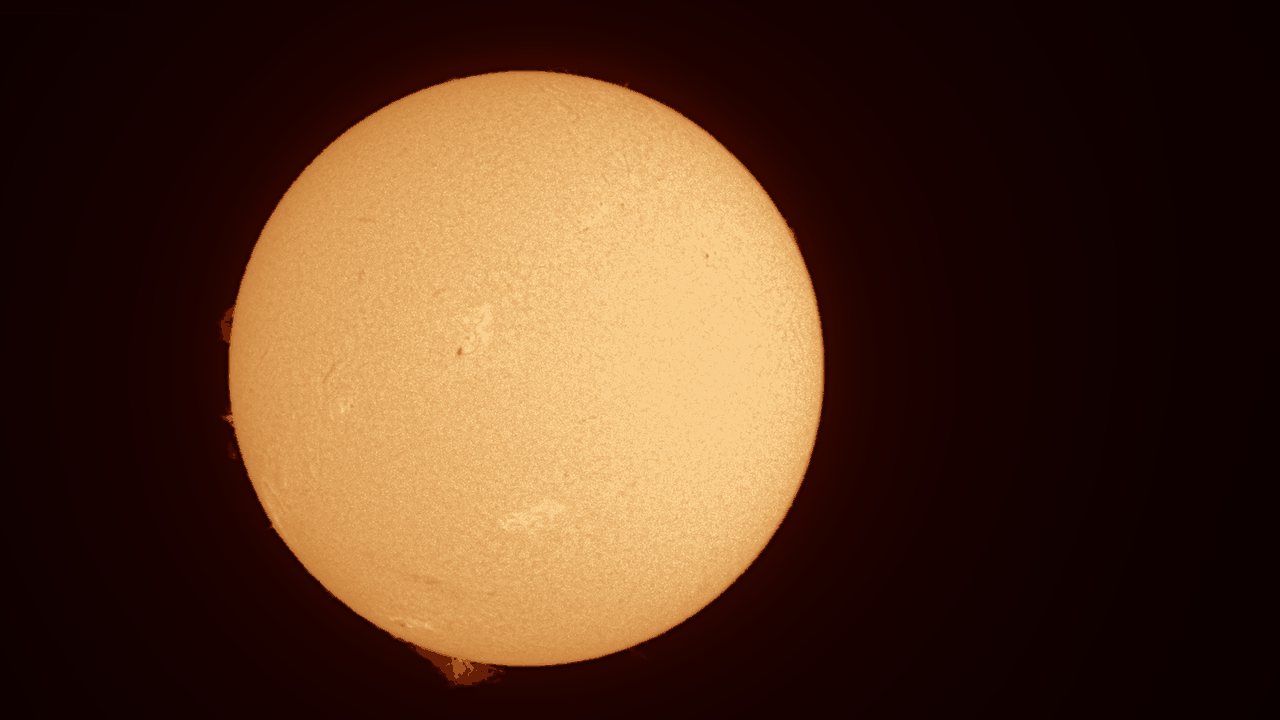
Goal: a sharp, orange full-disc picture of the chromosphere from an H-alpha capture, as a 16-bit TIFF.
You need: a SER (best) or AVI of the full disc, a few hundred frames or more,
with the filter in the name (for example 2026-10-19_Sun_Ha_001.ser). See
Capturing for Helia.
In the app
- Open the file (Ctrl+O). Helia reads the filter from the name, so the Quick stack card says H-alpha detected and offers the red channel and the best 25 per cent of the frames. If the name does not say, press H-alpha.
- Press Stack with recommended settings.
- On Sharpen, the recommended H-alpha wavelets are already on (gains 1.50, 1.45, 1.25, 1.05; noise cuts 1.8, 1.0, 0.5). Use Before / after to check they help, and ease a gain down if the grain looks coarse.
- On Colour, H-alpha is already selected. Try Invert for prominences.
- Export a TIFF 16-bit.
The pictures for each step, from a real capture, are in the walkthrough.
On the command line
helia stack disc-sample.ser -o sun-ha.tif --preset ha --sharpen wavelet
This is the real output for a 100-frame, 1920 x 1080, 16-bit SER on a laptop with a mid-range GPU (the times are that machine's, not a promise):
input:    SER 1920x1080 16-bit, 100 frames
note:     The header flag says big-endian, but the pixel data only makes sense as little-endian; Helia reads it that way.
backend:  GPU (NVIDIA GeForce RTX 3050 Ti Laptop GPU (Vulkan, DiscreteGpu))
settings: H-alpha (chosen); red channel, keep 25%, alignment points 64 px
edit:     1. wavelet sharpen, 6 layers, gains 1.50,1.45,1.25,1.05,1.00,1.00, noise thresholds 1.80,1.00,0.50,0.00,0.00,0.00 (x MAD sigma)
[   0.8s] building reference
[   1.2s] aligning frames
[   1.9s] stacking
[   2.1s] sharpening and editing
[   2.1s] colourising
[   2.1s] writing
frames:  100 total, 25 kept, 50 registered
points:  615 of 2135 alignment points active
align:   phase correlation (limb fit not confident enough, 0.42); confidence mean 1.00, least 1.00 (sampled)
masked:  196 x 20 at (0, 0), flat in the result
disc:    centre (788.4, 553.1), radius 447.2 px
detail:  stack 0.00106 vs best single frame 0.00115 (0.92x)
sharpened: detail 0.00137 after the edits, 0.00106 before (1.29x)
noise:   finest-layer sigma 0.00017 before, 0.00001 after the edits
timing:  scoring frames 0.52s, building reference 0.12s, aligning frames 0.24s, measuring alignment points 0.32s, stacking 0.45s, finishing 0.01s (total 2.18s)
wrote:   sun-ha.tif
Reading it:
- settings is what Helia chose and why.
--preset hagives the red channel, 25 per cent of frames and the orange look. - masked is the burned-in timestamp it found and kept alignment off.
- align says whole frames were aligned by phase correlation because the limb fit was not confident (the disc is not entirely in the frame, or the limb is soft). It is a normal outcome; see Align.
- sharpened is Helia's detail measure, about 1.29 times higher after the wavelets, with the finest-layer noise much lower.
The result, reduced in size:
If it is not right
- A fine grid: see Fixing a Bayer grid.
- Soft: keep fewer frames (
--keep 15%) in good seeing, or look at the quality curve in Analyse. - Halos or grain after sharpening: lower the gains, or see Troubleshooting.
- Prominences too faint: add Invert, or a second export with stronger levels. Prominences and disc differ greatly in brightness; a single picture cannot show both fully (HDR compositing is on the roadmap).