Fixing a Bayer grid
Symptom: the stacked picture is covered by a fine grid or chessboard, with neighbouring pixels alternating between bright and dark.
Cause: a colour camera records one colour per pixel in a repeating 2 x 2 pattern (a Bayer mosaic). The pictures must be demosaiced before they are stacked. If a file says it is mono although the pixels are a mosaic, a stacker that trusts the header stacks the mosaic itself.
The picture shows the same 120 x 80 pixel patch of a real capture, magnified, once read as mono and once as Helia reads it by default:
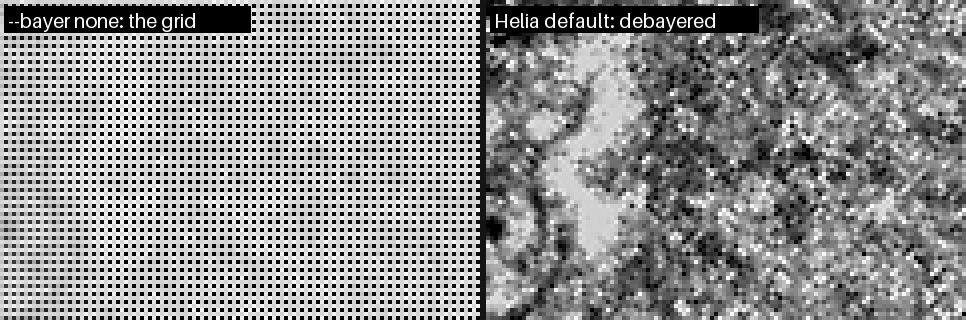
Behind a narrow-band filter such as H-alpha the grid is stark, because the blue pixels receive almost no light.
Helia usually fixes it for you
For a SER file that says mono, Helia measures the four pixel positions of a 2 x 2 cell on the disc in a few frames. If they differ in the way a colour-filter array would make them, it says so and debayers. Check what it decided:
helia info bayer-sample.ser
Header, as written in the file
  ColorID:           0 (MONO)
  PixelDepth:        8 bit
  FrameCount:        631
  ...

Helia will use
  Bayer pattern:     RGGB           (detection)
  Bit depth:         8 bit          (header)
  Byte order:        not used (8-bit) (header)
  Row order:         top to bottom  (header)

Mosaic check (2x2 pixel positions, share of full scale)
  means:             79.6%  77.6%  77.4%  0.3%
  spread:            135.0% over 5 frame(s)

warning:  The SER header says mono (ColorID 0), but the frames hold a Bayer mosaic that looks like RGGB: ...
Read the second list: the Bayer pattern is RGGB and its source is detection,
so the header was overruled by the pixels. The four numbers are the average
brightness at the four positions of a cell. Here one position is 0.3 per cent while
the others are about 78 per cent: the blue pixel of an H-alpha capture, which sees
almost nothing. In the app the same message is the Check this card on the
Open step.
If a stack that you made with an older Helia shows the grid, stack it again.
If it still shows, or the colours are wrong
Tell Helia what you know:
helia stack capture.ser -o out.tif --bayer rggb    # force a pattern
helia stack capture.ser -o out.tif --bayer none    # it really is mono
In the app, use the Bayer pattern buttons at the foot of the Open step: Auto,
Mono, RGGB, GRBG, GBRG, BGGR. The list above them then shows override as the
source.
- Red and blue swapped. The mosaic says which diagonal is green but not which of the other two pixels is red. Helia settles it from the layout a SharpCap sidecar states, the colour the filter passes, the camera model, and finally by taking the dimmer of the two as blue. If you stack a single channel (H-alpha takes red) a wrong pick matters, and the result looks like noise: try the other pattern of the same family, RGGB or BGGR, GRBG or GBRG.
- A mosaic too faint to see. If the four positions are within 2 per cent of each
other the data is called mono; between 2 and 5 per cent Helia cannot tell and
uses the sidecar's colour space if there is one. Give
--bayeryourself. - An upside-down picture is a different problem:
--flip-rows(or Bottom to top under Row order), and give--bayerfor the picture after the flip.
More: Troubleshooting.