Sharpening and adjustments
A stack is cleaner and smoother than any single frame, but it is not as sharp as the telescope could be. Sharpening brings the fine detail back. Helia offers three methods, each with recommended values for your filter, and a set of everyday adjustments: denoise, levels, a curve, crop, rotate, flip and resize.
Everything here is non-destructive. The stack is never changed. Your choices are an ordered list of operations that Helia applies to the stacked image: on a shrunk copy for the live preview, and on the full-size stack when you export. The list is written into the output file, so a picture always says how it was made.
Sharpening runs on the mono stack, before colour. Detail and noise are measurements; colour is presentation, and is applied to the sharpened image afterwards (see Colourising).
Sharpening can create artefacts. Every method can draw halos beside bright edges, ring around the limb and round sunspots, turn noise into a texture that looks like detail, and make a soft image look processed. None of them can add detail the telescope and the seeing did not record. Use Before / after to compare, and ease off as soon as the picture starts to look different in kind rather than just crisper. If the recommended values look overdone for your capture, they are overdone: turn them down.
Which method
| Method | What it does | Reach for it when | Risk |
|---|---|---|---|
| Wavelets (the default) | Splits the image into layers by detail size (an a-trous transform), lifts or lowers each layer, and removes what is not clearly above the noise in each | Almost always: it sharpens fine and medium detail and keeps noise down at the same time | Low if the noise cuts are set; noise turns to grain if they are zero |
| Unsharp mask | Adds back a share of the difference between the image and a blur of it | You want a light, predictable touch, or one size of detail | Halos beside sharp edges at high amounts |
| Deconvolution (Richardson-Lucy) | Undoes a known blur, the point spread function (PSF), by repeated correction | The stack is good, the blur is about the same everywhere and you want the best the data can give | The most: ringing, speckle and over-sharpening. The limb guard (below) controls the worst of it |
Wavelets
The image is smoothed repeatedly with a small spline (the a-trous, or "with
holes", transform: 1 4 6 4 1 over 16, with the taps spread twice as far apart
at every step). The difference between two steps is a layer. Layer 1 holds
the finest detail and most of the noise; layer 2 fine detail such as granulation
and fibrils; each higher layer larger structure. This is the transform behind
Registax.
Each layer has two numbers:
- Gain. 1 leaves the layer alone, above 1 sharpens it, below 1 softens it.
- Noise cut. Detail weaker than this many noise sigmas is taken to be noise and removed. 0 keeps everything. The noise level of each layer is measured from the image itself, from the median absolute deviation of the layer (a few bright features do not move it), so the cut follows your capture rather than a fixed number.
A layer with gain 1 and noise cut 0 is left exactly as it is: with every layer at its neutral setting the result is the input, bit for bit.
Unsharp mask
The radius (a Gaussian sigma in pixels) is the size of the blur that is subtracted, so it picks the size of detail that is boosted. The amount is how much of the difference is added back: 0.6 is gentle, 2 strong. The threshold leaves detail weaker than it alone, so noise is not boosted.
Deconvolution
Richardson-Lucy deconvolution estimates the sharp image that, blurred by the PSF, gives the stack you have, by repeating a multiplicative correction. Helia adds total-variation (TV) regularisation (Dey et al., 2006), which keeps noise from being amplified into speckle.
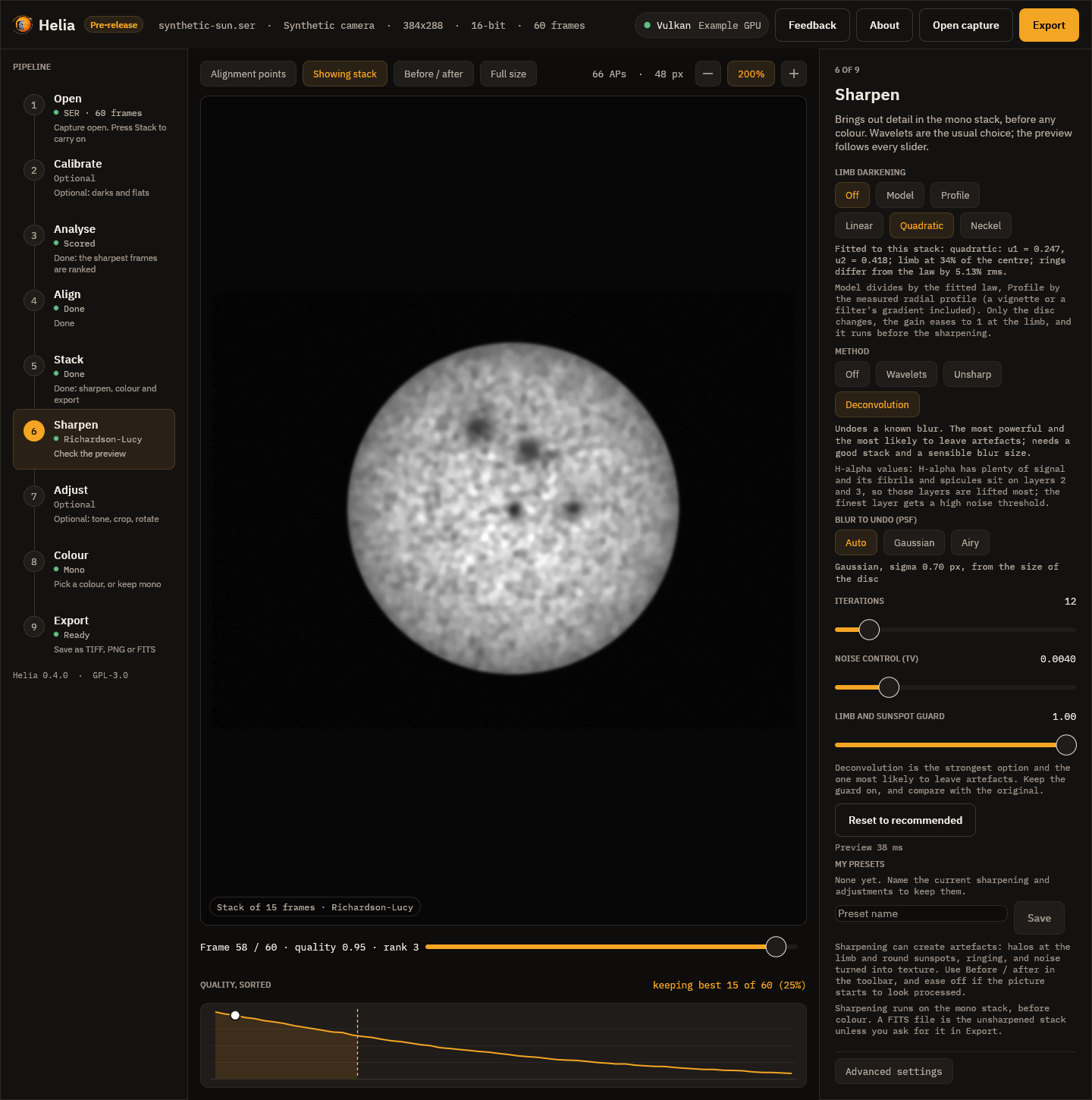
- Blur to undo (PSF). Auto is a Gaussian sized from the image scale: Helia
measures the radius of the disc in pixels, from that works out the arc seconds
per pixel, and assumes a stack that is about 2 arc seconds across at half
maximum. It never goes below 0.7 pixel, because a smaller blur is below the
sampling and there is nothing to recover. Gaussian is the same shape with a
sigma you choose, for seeing and a slightly soft focus. Airy is the
diffraction pattern of a circular aperture, for a sharp, steady image through a
small telescope; give the radius of its first dark ring in pixels (on the
command line,
airy-scope:656,100,0.9works it out from the wavelength in nanometres, the aperture in millimetres and the pixel scale in arc seconds). - Iterations. More is sharper and noisier; stop when noise starts to look like texture.
- Noise control (TV). The weight of the regularisation, 0 to 0.05.
- Limb and sunspot guard. Deconvolving a bright edge leaves a bright halo inside it and a dark one outside; the solar limb and the edge of a sunspot are the worst cases. For every pixel the guard measures how large a step lies within reach of the blur, as a share of the image's range, and where that is large (the limb, an umbra) it holds the result inside the range of the original image around that pixel. A true sharpening of an edge has its values on the two sides of the edge, so the edge still steepens, but a halo beyond them cannot form. Granulation and filaments, which have little contrast, are untouched. The guard is on by default; its strength runs from 0 (off) to 1.
How well the guard works is measured, not asserted. On a synthetic limb (a flat disc on dark sky, blurred by a Gaussian of sigma 2 pixels, with noise, then deconvolved for 30 iterations) the largest excursion beyond either plateau within 12 pixels of the limb is 16.7% of the step without the guard and 1.1% with it. Round a synthetic sunspot of the same blur the figures are 10.9% and 1.9%. The test suite fails if the guarded figures reach 2%.
Recommended values for each filter
The values come with the filter presets and follow the same rule as the rest of the recommendations: a safe starting point, never the last word. Faint lines (Ca II K and H, He I D3, H-beta) are noisy, so they get higher noise cuts, gentler gains and a shorter deconvolution. White light has the most signal and the finest structure, so it takes the strongest settings. H-alpha sits between, with its fibrils on layers 2 and 3.
The two photospheric filters, white light and Na I D, are tuned for granulation.
It sits on layers 2 and 3 at a few per cent contrast, so those layers get the
largest gains and no noise cut (a cut there removes granulation with the noise,
which is how the 0.2.0 defaults lost it); the finest layer keeps its cut so pixel
noise is not boosted. See White-light granulation,
which also shows how to measure the result with helia measure.
| Filter | Wavelet gains, layers 1 to 6 | Noise cuts, layers 1 to 6 | Unsharp amount | Deconvolution iterations |
|---|---|---|---|---|
| H-alpha | 1.50, 1.45, 1.25, 1.05, 1, 1 | 1.8, 1.0, 0.5, 0, 0, 0 | 0.60 | 12 |
| Ca II K and H | 1.30, 1.40, 1.25, 1.05, 1, 1 | 2.5, 1.5, 0.8, 0.3, 0, 0 | 0.45 | 8 |
| Mg I b | 1.40, 1.40, 1.20, 1.05, 1, 1 | 2.2, 1.3, 0.6, 0, 0, 0 | 0.50 | 10 |
| Na I D | 1.20, 1.80, 1.50, 1.10, 1, 1 | 2.0, 0, 0, 0, 0, 0 | 0.50 | 10 |
| He I D3 | 1.30, 1.35, 1.20, 1.05, 1, 1 | 2.5, 1.5, 0.8, 0.2, 0, 0 | 0.40 | 8 |
| H-beta | 1.30, 1.40, 1.25, 1.05, 1, 1 | 2.5, 1.5, 0.8, 0.3, 0, 0 | 0.45 | 8 |
| White light | 1.50, 1.80, 1.50, 1.10, 1, 1 | 1.0, 0, 0, 0, 0, 0 | 0.80 | 20 |
| Not recognised | 1.50, 1.45, 1.25, 1.05, 1, 1 | 1.8, 1.0, 0.5, 0, 0, 0 | 0.60 | 12 |
The unsharp radius follows the image scale (1.4 times the default blur, between 1 and 3 pixels). The full table, with the thresholds, TV weights and denoise strengths, is generated from the code: see Colour presets.
Limb darkening
The disc is brighter at the centre than at the limb, because the line of sight
reaches a cooler, shallower layer there. With mu the cosine of the angle from
the local vertical (sqrt(1 - (r/R)^2) at radius r on a disc of radius R),
the brightness relative to the centre is a law L(mu):
Law (--limb-law) | L(mu) | Coefficients |
|---|---|---|
linear | 1 - u (1 - mu) | u |
quadratic (default) | 1 - u1 (1 - mu) - u2 (1 - mu)^2 | u1, u2 |
neckel | 1 - sum a_k (1 - mu^k), k = 1 to 5 | a1 to a5 |
The fit. Helia fits the law to the azimuthal median of the stack, in rings
one pixel wide about the fitted disc centre, out to 97% of the radius (the limb
itself is blurred by the seeing). A median ignores sunspots, granulation,
filaments and plage, which cover a minority of each ring. The sky level just
outside the limb is subtracted first. The fit is linear in the coefficients and
exact; the five-term form has a light ridge, because the powers of mu are
nearly collinear and the rings barely determine five numbers (compare the law,
not the terms). Every helia stack prints it and the API returns it:
limb: quadratic: u1 = 0.470, u2 = 0.046; limb at 48% of the centre; rings differ from the law by 0.67% rms
helia measure image.fits --limb fits all three laws to an existing image and
prints the measured profile beside them. The fit measures the image, not the
Sun: an uncorrected vignette, a radial gradient from an etalon, or a disc that
is cut by the frame all read as limb darkening. Flats
(Calibration) remove the first; the last is the reason for the
partial-disc row below.
Flatten. --flatten model (or the Model chip in the Sharpen step) divides
the disc by the fitted law; --flatten profile divides it by the measured
profile itself (smoothed over a few rings), which also removes any other radial
gradient. It runs first in the list, before denoise and sharpening, so the
wavelets and deconvolution see flat contrast and a gain set for the centre is
right at the limb too. It works on helia edit as well, and as an edit
{"op": "flatten", "source": "model", "law": "quadratic"} in a preset or an API
job. What it leaves alone:
- Everything outside the limb: prominences have their own brightness, which has nothing to do with the photosphere's darkening.
- The last 1.5% of the radius: the gain eases to 1 there. The limb is a blur of disc and sky, and a gain of two or three would turn it into a bright rim.
- The bright end of the disc: the gain is scaled so the 99.9th percentile of the disc is where it was. Dividing out the darkening brightens the limb side, and an image with a brighter side (the etalon sweet spot in these captures) would otherwise clip at white.
With no clear disc (a cropped region) the edit leaves the image alone, and the
limb: line says so. A flat disc is for looking and for sharpening and
compositing; the stack itself and the FITS file are not flattened unless you ask
(--sharpen-fits applies the edits to FITS too).
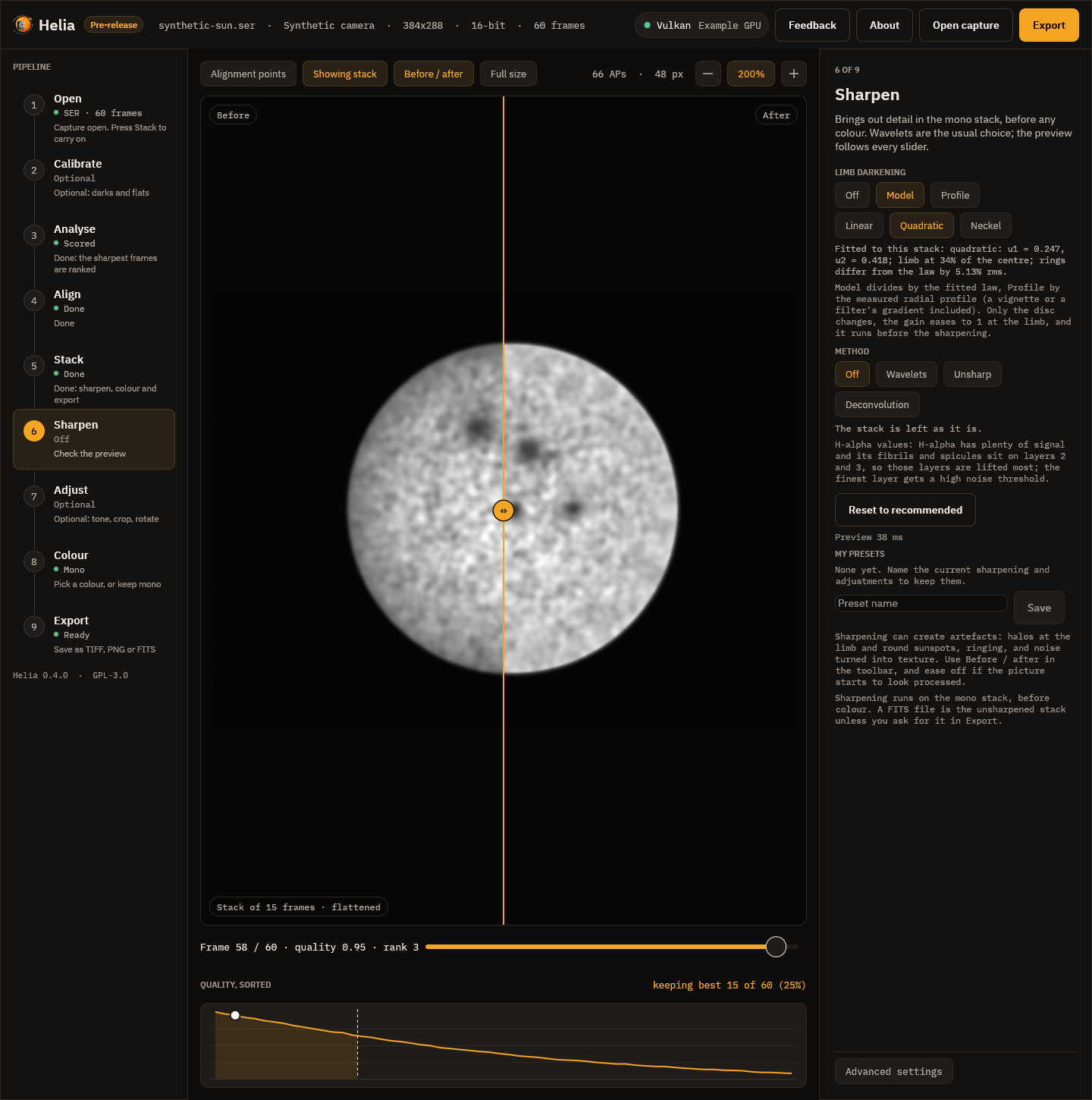
The picture is a synthetic capture; the fit under the chips is the one made on that stack.
What the real captures say
The four sodium captures (ASI482MC, Na D, 589.3 nm, stacked with the Na D
preset), fitted with helia measure --limb:
| Capture | Disc | Linear u | Quadratic u1, u2 | Limb level (linear, quadratic) | Rings off the law (quadratic) |
|---|---|---|---|---|---|
Sun_Test.ser | whole | 0.539 | 0.546, -0.012 | 46%, 47% | 0.71% |
15_20_57.ser | whole | 0.497 | 0.470, 0.046 | 50%, 48% | 0.67% |
15_32_09.avi | whole | 0.555 | 0.515, 0.070 | 44%, 41% | 0.79% |
14_42_57.avi | 63% of the limb | 0.720 | 0.710, 0.018 | 28%, 27% | 3.58% |
The five-term fit of the three whole discs gives a1 = 0.44 to 0.45, a2 = 0.04
to 0.14, a3 = 0.02 to 0.04, a4 = -0.001 to 0.07, a5 = -0.10 to -0.08, with
the limb at 47% to 52% of the centre.
Against the literature, as far as it could be checked from the sources available while writing this (the Neckel and Labs 1994 coefficient table itself was not available, so the five-term values are not compared):
- Allen's Astrophysical Quantities (Cox 2000), as quoted for the Sun at 550 nm:
quadratic
u1= 0.47,u2= 0.23, a limb at 30% of the centre. - The linear coefficient is 0.56 at 600 nm and 0.95 at 320 nm (Tatum, Stellar Atmospheres, chapter 6); darkening is weaker towards the red.
The Na D passband is between those two, and the fits sit where that puts them.
The linear coefficient of the three whole discs (0.50 to 0.56) brackets the 0.56
at 600 nm, and the quadratic u1 of 15_20_57.ser (0.470) is the 0.47 of the
550 nm table. The limb is brighter than at 550 nm (41% to 48% against 30%),
which is the direction a redder band predicts. Caveats on all of this: u2 is
poorly determined (it is -0.012 on one capture and 0.23 in the table) because
u1 and u2 trade against each other when the rings stop at mu = 0.24; a
narrow line image is not a continuum, and the D lines are formed higher than the
continuum, so line-core darkening differs from continuum darkening; the cameras
are not radiometrically calibrated and the captures are not flat-fielded; and
the green channel of a colour camera is a broad band. The partial disc
(14_42_57.avi) is outside what the method supports: the rings are not full
circles, the fitted radius is larger than the frame and the fit is a poor one
(3.6% rms), so its coefficients are not a measurement of anything.
Flattening 15_20_57.ser with either source takes the fitted linear
coefficient from 0.497 to -0.000 (model) and 0.000 (profile), with the rings
0.74% and 0.35% off a flat line (the profile removes the whole radial gradient,
the model only the law). The granulation does not move: the granulation band of
helia measure is 2.050% before, 2.052% with the model and 2.049% with the
profile, the fine band 1.573%, 1.572% and 1.571%. This capture also has a bright
patch on one side that is not radial (the filter's sweet spot); flattening leaves
it, as it should, and the bright-end scaling is what stops it clipping.
Adjustments
The Adjust step holds the everyday edits. Each is optional and each is recorded in the file.
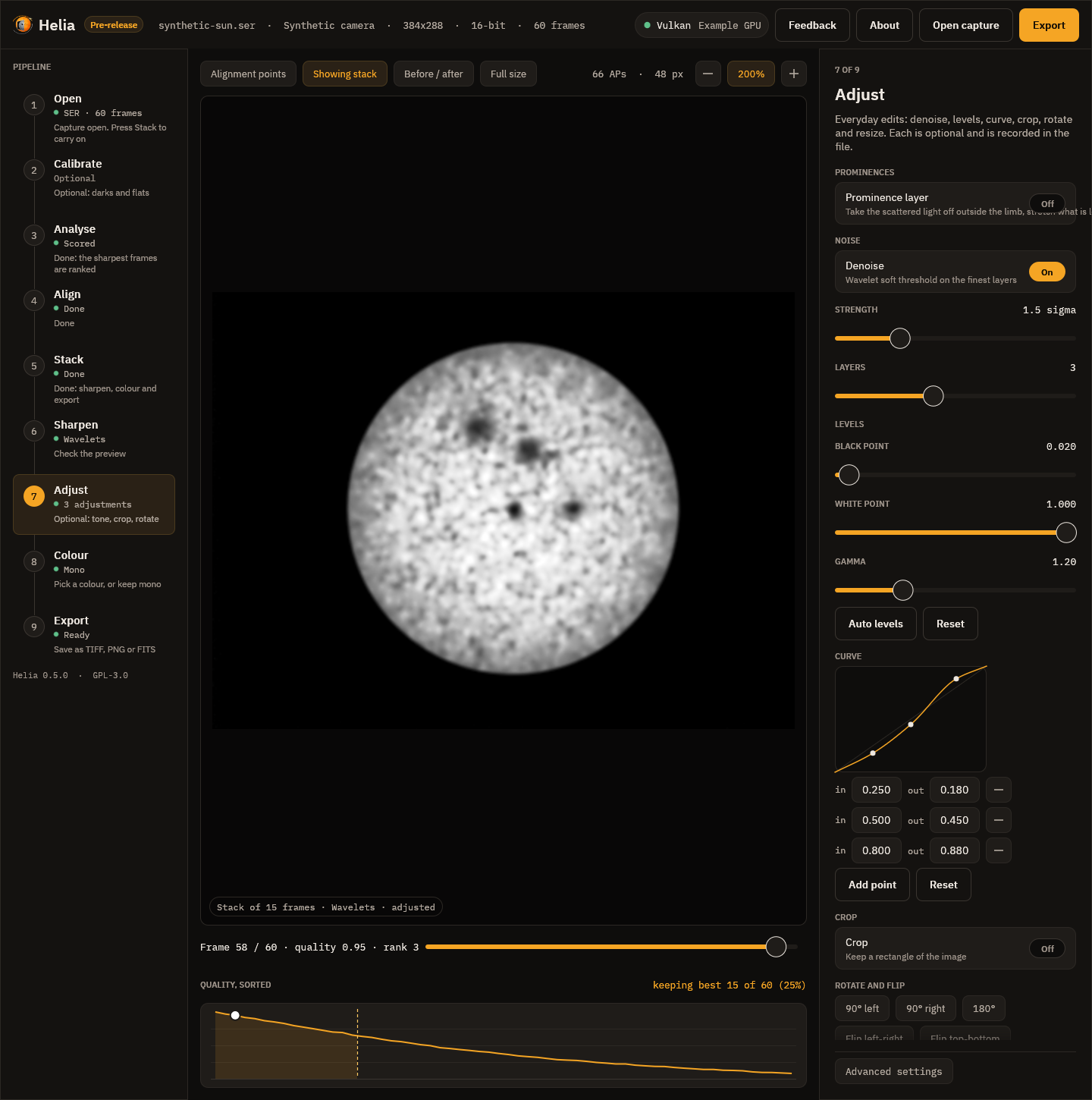
- Denoise. A wavelet soft threshold on the finest layers: strength is the threshold of layer 1 in noise sigmas, and each coarser layer gets less. On flat sky it lowers the noise a good deal; across a sharp edge it leaves the contrast alone (see the tests, below). It runs before sharpening.
- Levels. A black point, a white point and a gamma. Above gamma 1 the mid-tones are brighter. Auto levels sets the points to the 0.1% and 99.9% points of the stack. Levels never lower a darker pixel below a lighter one, and between the two points they can be undone exactly.
- Curve. A tone curve through up to 16 points, drawn as a monotone cubic, so
it never overshoots between the points and never makes a darker input brighter
than a lighter one. In the app you click the plot to add a point, drag a point
to move it and double-click it to remove it; with the plot focused,
[and]choose a point and the arrow keys nudge it. A dragged point stops at its neighbours (0.005 apart in input, and between their outputs), which is what keeps the curve rising. See Editing the curve. - Crop. A rectangle, in pixels. Exact.
- Rotate and flip. Quarter turns and mirrors move whole pixels and are exact. Other angles are interpolated (Lanczos-3) and enlarge the canvas to hold the whole picture; the corners are filled with the level of the image border.
- Resize. A scale from 10% to 400%. Shrinking averages exactly the area each new pixel covers; enlarging interpolates with Lanczos-3.
The order is fixed: flatten (if asked), denoise, the sharpening method, levels, the curve, crop, rotate, flip, resize. For another order, write the list by hand (see saved presets below).
The live preview
In the app, every slider updates the picture as you drag it. The preview is made from the stack shrunk by a power of two until it is at most 1280 pixels on a side, the sizes in pixels (radii, crop) shrink with it, and the wavelet layers finer than the preview can show are left out. It is therefore a close look, not a proof: what is written is always made from the full-size stack. Press Full size in the toolbar when you want the preview at full size to judge fine detail at 100% zoom; it is slower and a notice says so.
The work runs on the GPU when there is one, and on the CPU otherwise, off the window's thread. One preview is made at a time: while you drag, the latest position is picked up when the last render ends, so the window never queues work it will throw away. The inspector shows how long the last preview took. Anything slower than about a seventh of a second gets a notice, as everything else does.
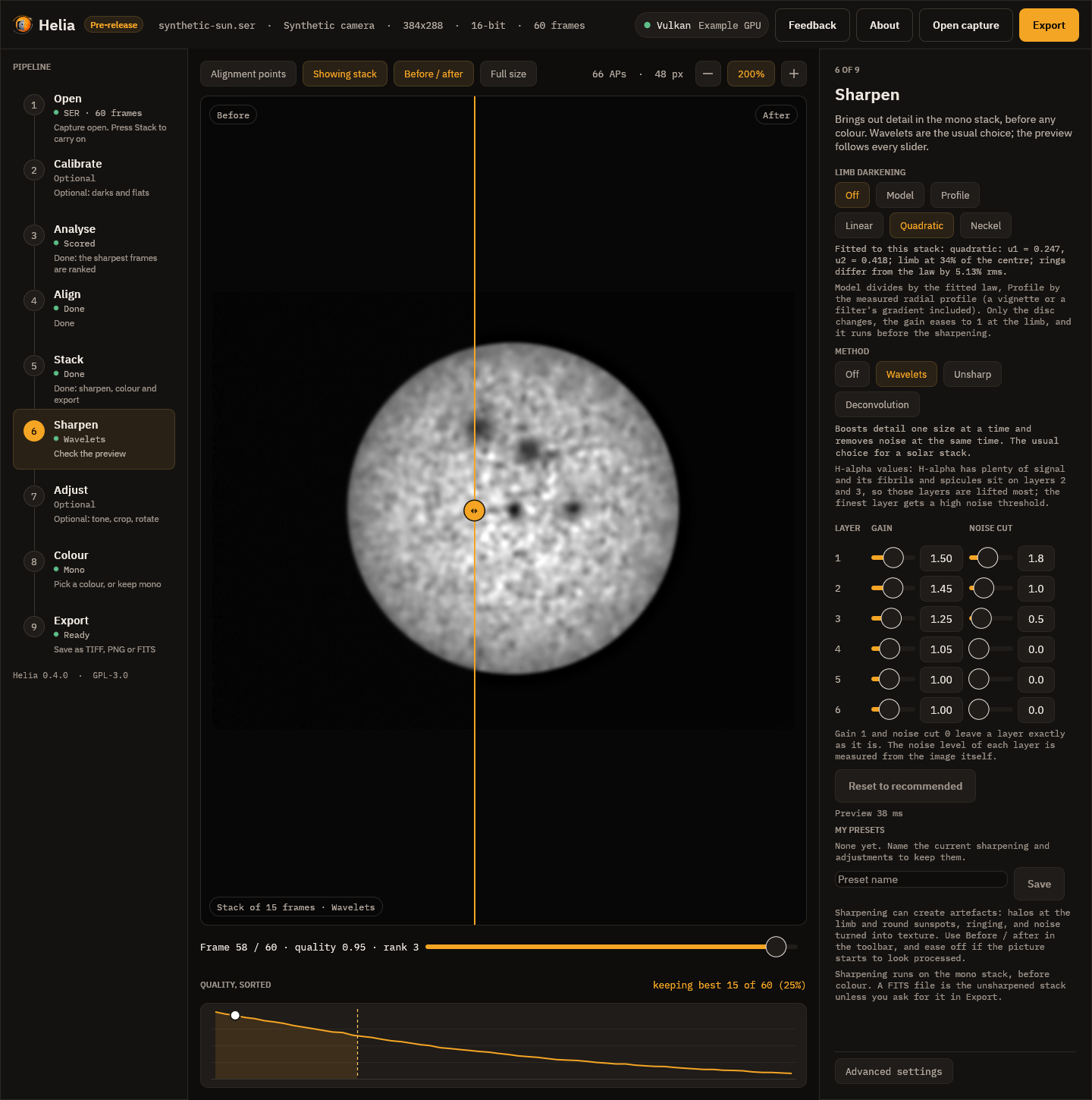
Before / after splits the picture: the stack as it was on the left, with your edits on the right, and a line to drag. Both halves have the same crop, rotation and size, so they line up.
Deconvolution has a blur, iterations, noise control and the guard:
The Adjust step:
Saved presets
My presets, in the Sharpen step, keeps the whole list (sharpening and
adjustments) under a name. Type a name and press Save; press a preset to use
it, or the minus beside it to delete it. A preset is a small readable file in
the presets folder: $HELIA_EDIT_PRESETS if that is set, otherwise
%APPDATA%\helia\edit-presets on Windows or
$XDG_CONFIG_HOME/helia/edit-presets (~/.config/helia/edit-presets) elsewhere.
For example:
{
  "name": "H-alpha gentle",
  "filter": "ha",
  "edits": [
    {"op": "wavelet", "layers": [{"gain": 1.3, "threshold": 2.0}, {"gain": 1.3, "threshold": 1.0}]},
    {"op": "levels", "gamma": 1.1}
  ]
}
A file can also hold just the list, [ ... ]. Missing values take their defaults.
The app shows one operation of each kind in the fixed order; a preset with
repeats or another order is still run in full by the command line and the API.
The operations are objects with an op of unsharp (radius, amount,
threshold), wavelet (layers, each with gain and threshold),
deconvolve (psf, iterations, tv, protect; the psf is
{"kind": "auto"}, {"kind": "gaussian", "sigma": 1.6} or
{"kind": "airy", "radius": 2.2}), denoise (strength, layers), levels
(black, white, gamma, out_black, out_white), curve (points, each
[in, out]), crop (x, y, width, height), rotate (degrees), flip
(axis: horizontal or vertical) and resize (scale, or width and
height).
On the command line
helia stack sharpens with --sharpen wavelet, unsharp, rl or none (the
default), using the recommended values of the filter; every value has a flag that
overrides it:
helia stack sun_Ha.ser -o sun.tif --sharpen wavelet
helia stack sun_Ha.ser -o sun.tif --sharpen wavelet --wavelet-gains 2.0,1.5 --wavelet-noise 2.5
helia stack sun_Ha.ser -o sun.tif --sharpen unsharp --unsharp-radius 1.8 --unsharp-amount 0.9
helia stack sun_Ha.ser -o sun.tif --sharpen rl --rl-iterations 25 --rl-psf airy-scope:656,100,0.9
helia stack sun_Ha.ser -o sun.tif --sharpen wavelet --denoise --gamma 1.2 --crop 100,80,1600,900
helia stack sun_Na.ser -o sun.tif --flatten model --sharpen wavelet
helia edit stack.fits -o flat.tif --flatten profile --limb-law neckel
A flag for one method without that method is an error that says which method to
add. Lists such as --wavelet-gains 2.0,1.5 replace the first layers and leave
the others at their recommended values.
helia edit applies the same operations to an image that already exists, a
TIFF, PNG or FITS, mono or colour:
helia edit stack.fits -o sharp.tif --sharpen wavelet --preset ha
helia edit sun.tif -o sun-cropped.tif --crop 200,150,1200,900 --rotate 90 --resize 50%
helia edit stack.fits -o again.tif --edits "H-alpha gentle"
helia edit stack.fits -o x.tif --sharpen rl --save-edits "My deconvolution"
--edits takes the name of a saved preset or a path to a .json file, and the
other flags are added after it. --save-edits keeps the resulting list as a
preset. A colour image is edited channel by channel and stays colour. When the
image is mono, helia edit prints how much finer detail the edits gave it and
what they did to the noise (see below).
In the API
A job's config takes sharpen (wavelet, unsharp, rl or none, with the
filter's recommended values) and edits, a list of operations in the form above,
applied after sharpen. See The API.
What the files say
The edits are recorded, in words and as the list itself, so that a file says how it was made and the edit can be repeated:
| File | Where the note is |
|---|---|
| TIFF | the ImageDescription tag |
| PNG | the Description text chunk |
| FITS | HISTORY cards in the header |
The note reads, for example: Helia edits, applied in order to the stack (2 operations); sharpening runs on the mono stack before any colour, then 1. wavelet sharpen, 6 layers, gains 1.50,1.45,..., noise thresholds ..., and last Helia edit list (JSON): followed by the whole list as JSON.
FITS is the unsharpened stack by default. A FITS file is for further
processing and measurement, so Helia writes the stack as it is and says so in the
header; the edits go into TIFF and PNG. If you want the sharpening in the FITS
file too, ask for it: the Edit the FITS too switch in the Export step,
--sharpen-fits on the command line, or "sharpen_fits": true in a job. The
file then holds the edited mono image, and its header says so.
Does it work?
The tests check the claims on synthetic images where the truth is known:
- Deconvolution recovers detail. A synthetic sun with granulation and sunspots, blurred by a Gaussian of sigma 1.8 pixels with noise: after 25 iterations the root-mean-square error against the clean truth falls from 0.0349 to 0.0163 (the test requires below 80% of the start). The same with an Airy blur: from 0.0180 to 0.0044.
- The limb guard holds. See the figures above.
- Wavelet layers at gain 1 and noise cut 0 return the input exactly.
- Levels and curves rise monotonically for every valid setting, and levels undo exactly between their black and white points.
- Crop, rotate, flip and resize move the right pixels: a quarter turn clockwise sends the top-left corner to the top-right, four turns return the original, and halving averages 2 by 2 blocks.
- Denoise lowers the noise on flat regions from 0.0202 to 0.0048 (the test requires under 60% of the start) while the contrast of an edge goes from 0.401 to 0.390 (the test requires above 95%).
- The GPU agrees with the CPU on every operation, within 1e-4 for the filter operations and 2e-3 after 12 iterations of deconvolution (see The GPU parity rule).
On real captures
Four captures of the Sun from 2022-07-17 (a ZWO ASI482MC; the files are not in
the repository, and Helia could not tell their filter from the names, so the
generic recommended values apply) were stacked with the defaults, written as FITS
(the unsharpened stack), and then sharpened by each method with its recommended
values. The figures are from the helia edit summary. Detail is Helia's
existing sharpness metric, the gradient energy of the image after a 2 pixel
Gaussian smoothing, as a ratio to the stack; noise is the median-based sigma of
the finest wavelet layer, which is mostly noise, before and after.
| Capture | Wavelets: detail, noise | Unsharp mask: detail, noise | Deconvolution: detail, noise |
|---|---|---|---|
15_20_57.ser, 1920 x 1080, 16-bit, 100 frames | 1.25x, 0.00028 to 0.00001 | 1.03x, 0.00028 to 0.00028 | 1.03x, 0.00028 to 0.00028 |
15_32_09.avi, 720 x 540, 8-bit, 1000 frames | 1.25x, 0.00036 to 0.00010 | 1.03x, 0.00036 to 0.00036 | 1.03x, 0.00036 to 0.00039 |
14_42_57.avi, 1920 x 1080, 8-bit, 630 frames | 1.22x, 0.00031 to 0.00008 | 1.03x, 0.00031 to 0.00031 | 1.02x, 0.00031 to 0.00200 |
Sun_Test.ser, 1920 x 1080, 8-bit, 631 frames | 1.24x, 0.00679 to 0.00001 | 1.04x, 0.00679 to 0.00835 | 1.02x, 0.00679 to 0.00777 |
What it says:
- Wavelets raise the detail metric by about a quarter on all four and take most of the noise out of the finest layer at the same time. With the white-light values the gain is 1.29x to 1.32x. (After a noise cut the median-based noise figure is close to zero by construction: most of the layer is zero.)
- Unsharp mask and deconvolution barely move this metric. That is partly the
metric: it smooths by 2 pixels, and these two work below that scale (the
default unsharp radius is 1 pixel and the automatic blur is 0.7 pixel, the
smallest allowed). It is not only the metric, though. On
14_42_57.avithe deconvolution raises the finest-layer noise six-fold. This was first put down to a fixed pattern of the sensor (faint vertical stripes), and Calibration measures it: the sensor does have stripes, but they grow by 5% under deconvolution, while the share of the energy above 0.3 cycles per pixel goes from 2% to 70%. So the rise is broadband noise at the finest scale, which no dark or flat removes, and a calibration estimated from the capture itself did not change it. Look at the picture, not the number, and take the wavelets.
On these stacks the recommended wavelets are the method to start with, and deconvolution gains little and risks a lot. That is one capture session through one camera, not a general result.
How fast
The live preview renders at most 1280 pixels on a side. Best of five on an NVIDIA
A100 (Vulkan) and on the same machine's 24 CPU threads (not otherwise idle),
cargo test -p helia-gpu --test parity preview_latency -- --ignored --nocapture:
| Edit, 1280 x 960 | CPU | GPU |
|---|---|---|
| Wavelets, 6 layers (recommended) | 25 ms | 20 ms |
| Unsharp mask | 6 ms | 7 ms |
| Denoise and levels | 21 ms | 16 ms |
| Deconvolution, 20 iterations, Gaussian blur | 433 ms | 74 ms |
| Deconvolution, 20 iterations, Airy blur | 1549 ms | 112 ms |
On the GPU every preview is within the 150 ms the sliders aim for. On the CPU the
filters are too, but deconvolution is not, and the app says so with a notice
(Sharpening and colouring the preview) while it works. A one-off helia edit
of a 1920 x 1080 image, process start to file written, took 0.1 to 0.3 s for
wavelets on the CPU and about 1 s on the GPU (most of it opening the device),
and 0.3 to 1.4 s for deconvolution at its recommended iterations on either. The
app opens the device once and keeps it.
Limits
- Geometry (crop, rotate, flip, resize) always runs on the CPU; it costs next to nothing beside a filter.
- Deconvolution handles one PSF for the whole image. Seeing that changes across the disc is handled by the alignment points of the stack, not here.
- An Airy blur is limited to a first dark ring of 6 pixels; wavelet transforms to 8 layers; curves to 16 points; a list to 64 operations.
- The preview approximates the export (see above); it is not a bit-exact rehearsal of it.