Colourising
A solar capture through a narrow filter is a picture of one colour of light, so the stack is monochrome. The orange of H-alpha, the violet of calcium and the yellow of sodium are choices made when a picture is shared, not something the camera measured. Helia gives each common solar line a recommended look, and applies it only when you ask for colour.
Colour is presentation, not measurement. For a filter capture the stack stays mono. A FITS file is never coloured by a look and its pixels are never touched. (White light with a colour camera is the exception: see True colour.) Colour goes to a 16-bit RGB TIFF and an 8-bit PNG, and every file Helia writes records which look was used (see What the files say). If you need numbers, use the FITS file; if you want to share a picture, use the colour one.
True colour
The looks below are for narrow-band captures, where the camera records one colour
of light and the colours are a convention. White light taken with a colour camera
is different: the Sun really is several colours at once, and the camera records
all of them in its Bayer mosaic. --colour true (API colour: "true", the True
colour chip in the Stack step) stacks that.
- One alignment. The frames are scored, aligned globally and measured at the alignment points on the luminance (the mean of the three planes), once. The red, green and blue planes are then stacked with those same shifts, alignment point field and frame weights, so the three planes see the same sky. It costs three stacks (and three reads of the capture) rather than one.
- Channel alignment. The air disperses colours, so at a low Sun red and blue
sit a fraction of a pixel to either side of green. Each of the stacked red and
blue planes is registered to the green by phase correlation and moved by what
that finds (
--no-channel-alignskips it). A shift under 0.05 px is noise and one over 6 px or with a poor lock (confidence under 0.3) is not believed; the history andsummary.true_colour.channelssay what was applied. The shift is measured on the planes as demosaiced: the Malvar-He-Cutler method borrows green's edges into red and blue, so it hides about a quarter of a displacement (on the synthetic test, 0.45 of 0.6 px), and the planes then agree with each other, which is what the picture needs. - White balance (
--white-balance).auto, the default, makes the middle of the disc (inside 80% of the radius) neutral: gains for red and blue that bring their means to the green's.offkeeps the sensor's own balance, and1.9,1,1.5gives the three gains. A raw sensor does not weigh the colours as the eye does, sooffis rarely what you want for a picture. A channel that holds far less than the green (blue behind a sodium filter) is held at a gain of 4 with a warning, rather than amplified into noise: true colour is for white light. - Scale. All three channels share one scale, chosen so that the 99.99th percentile of the brightest channel of each pixel is 1. Nothing clips, and the balance of the colours is the white balance, not the scale.
- Edits. Sharpening, levels and the other edits run on each channel, as they do for any colour image, so a limb-darkening flatten also corrects the colour of the limb, which darkens differently in each channel. Areas that were flattened in every frame (burned-in text, exclusions) are made grey, so the balance does not tint them.
- Files. An RGB TIFF or PNG, or a FITS cube of three planes; see
Output formats. A look (
--presetcolours,--invert,--colour-strength) and--channeldo not apply, and asking for them is an error. The luminance is what the alignment, the limb fit, the crop and the summary use.
It needs a raw colour capture (a Bayer mosaic): a mono capture, or one that is already demosaiced, has no colours to stack and is refused before any work is done.
What the real captures say
The four captures available are all ASI482MC (RGGB), and three of them are
sodium, where the blue pixels are empty. helia stack --colour true --preset white --keep 12% on them (the gains include the common scale):
| Capture | Gains (red, green, blue) | Channel alignment |
|---|---|---|
Sun_Test.ser (sodium) | 0.96, 1.02, 4.10 (blue held at the cap) | red +0.89, +0.00 px; blue not moved |
15_20_57.ser (sodium) | 1.07, 1.00, 3.99 (blue held) | red +1.18, -0.09 px; blue +0.06, -0.01 px |
15_32_09.avi (sodium) | 0.82, 1.31, 5.23 (blue held) | red +1.83, -0.25 px; blue +0.40, 0.00 px |
14_42_57.avi (broad, low contrast) | 0.76, 1.09, 0.96 | red +0.11, +0.10 px; blue -0.17, -0.14 px |
The sodium captures show why the cap exists (an uncapped blue gain of 15 to 23
would be all noise) and that true colour is not for them: their red and green
planes show different things through a sodium filter, so the red shift of a pixel
or two is the planes disagreeing, not dispersion. 14_42_57.avi is the one
broad-band capture; its planes agree to under a fifth of a pixel, and the CPU and
the GPU (an A100) give the same gains and the same shifts to three decimals
(5.4 s and 4.0 s for 630 frames). There is no good white-light capture in the test
set, so the colour of a real white-light disc has not been checked. What is
checked, with known answers, is a synthetic colour disc: the balance, the
dispersion (and that planes of the same scene are found not to move), the crop
and the files; and the device against the CPU, with and without alignment points,
to 4e-7 in the samples.
The presets
Each preset is a filter, with a recommended way to process its captures and a look. The table is generated from the code that colours the pictures, so it is always what Helia does. The ramp runs from black to white through the colours of the look; the swatch after it is what a mid-grey becomes.
| Id | Filter | Wavelength | Hue | Ramp, black to white | Mid-grey becomes | Bayer channel | Frames kept |
|---|---|---|---|---|---|---|---|
ha | H-alpha | 656.3 nm | orange-red | #A95A21 | red (r) | 25% | |
cak | Ca II K | 393.4 nm | violet | #5D3D9B | blue (b) | 30% | |
cah | Ca II H | 396.8 nm | violet | #703096 | blue (b) | 30% | |
mg | Mg I b | 517.3 nm | green | #429B42 | green (g) | 30% | |
na | Na I D | 589.0 / 589.6 nm | yellow-orange | #A06212 | green (g) | 12% | |
he-d3 | He I D3 | 587.6 nm | yellow | #9B8617 | all combined (lum) | 25% | |
hbeta | H-beta | 486.1 nm | blue-cyan | #2474A0 | blue (b) | 30% | |
white | White light | continuum | warm neutral | #807A70 | all combined (lum) | 12% |
Why each preset recommends what it does:
- H-alpha (
ha): H-alpha is deep red, so a colour camera records it almost only in the red pixels; the green and blue pixels add noise, not detail. - Ca II K (
cak): Ca K is at the violet edge of vision and a sensor sees it in its blue pixels. The line is faint, so a few more frames (30%) are kept to average the noise down. - Ca II H (
cah): Ca H sits 3.4 nm from Ca K, so it takes the same channel and frame share. It is drawn a touch redder so the two can be told apart in a pair. - Mg I b (
mg): 517.3 nm is green, which is where the green pixels of a Bayer sensor respond. The line is dim, so 30% of the frames are kept. - Na I D (
na): 589 nm is yellow, which a Bayer sensor splits between its red and green pixels, and the sodium filter passes almost nothing to the blue ones. Averaging all three channels mixes those empty blue pixels into the stack and prints the mosaic as a fine diagonal hatch over the granulation, so the green channel (two pixels in four) is stacked: on the owner's captures it holds 1.4 to 2.1 times the granulation contrast of the luminance. It shows granulation, so only the best 12% of frames are kept and the alignment points are a few granules wide. - He I D3 (
he-d3): 587.6 nm is yellow-green, shared by the red and green pixels, so the luminance of all three is used. It is drawn yellower than sodium. - H-beta (
hbeta): 486.1 nm is blue-cyan and a sensor sees it in its blue pixels. It is faint, so 30% of the frames are kept. - White light (
white): A white-light capture already carries all three colours, so the luminance is stacked, and a slight warm tint stands in for the solar spectrum. It shows granulation, so only the best 12% of frames are kept and the alignment points are a few granules wide.
The numbers behind each colour, for anyone who wants to reproduce it:
| Id | Tone exponent | Gains (R, G, B) | Exponents (R, G, B) |
|---|---|---|---|
ha | 0.85 | 1.00, 0.85, 0.60 | 0.70, 1.50, 2.60 |
cak | 0.90 | 0.85, 0.78, 1.00 | 1.35, 1.90, 0.80 |
cah | 0.90 | 0.90, 0.70, 1.00 | 1.15, 2.10, 0.85 |
mg | 0.90 | 0.80, 1.00, 0.75 | 1.80, 0.80, 1.70 |
na | 0.90 | 1.00, 0.74, 0.40 | 0.75, 1.05, 2.80 |
he-d3 | 0.90 | 1.00, 0.92, 0.45 | 0.80, 0.90, 2.60 |
hbeta | 0.90 | 0.55, 0.85, 1.00 | 2.20, 1.00, 0.75 |
white | 1.00 | 1.00, 0.96, 0.88 | 1.00, 1.00, 1.00 |
The recommended sharpening of each filter (see Sharpening and adjustments). Wavelet gains and noise cuts are for layers 1 to 6, finest first; the unsharp radius comes from the image scale, and the deconvolution blur is measured from the disc.
| Id | Wavelet gains | Wavelet noise cuts | Unsharp amount | Unsharp threshold | Deconvolution iterations | TV weight | Denoise |
|---|---|---|---|---|---|---|---|
ha | 1.50, 1.45, 1.25, 1.05, 1.00, 1.00 | 1.80, 1.00, 0.50, 0.00, 0.00, 0.00 | 0.60 | 0.003 | 12 | 0.004 | 1.5 |
cak | 1.30, 1.40, 1.25, 1.05, 1.00, 1.00 | 2.50, 1.50, 0.80, 0.30, 0.00, 0.00 | 0.45 | 0.004 | 8 | 0.005 | 2.0 |
cah | 1.30, 1.40, 1.25, 1.05, 1.00, 1.00 | 2.50, 1.50, 0.80, 0.30, 0.00, 0.00 | 0.45 | 0.004 | 8 | 0.005 | 2.0 |
mg | 1.40, 1.40, 1.20, 1.05, 1.00, 1.00 | 2.20, 1.30, 0.60, 0.00, 0.00, 0.00 | 0.50 | 0.004 | 10 | 0.005 | 1.8 |
na | 1.20, 1.80, 1.50, 1.10, 1.00, 1.00 | 2.00, 0.00, 0.00, 0.00, 0.00, 0.00 | 0.50 | 0.003 | 10 | 0.005 | 1.5 |
he-d3 | 1.30, 1.35, 1.20, 1.05, 1.00, 1.00 | 2.50, 1.50, 0.80, 0.20, 0.00, 0.00 | 0.40 | 0.004 | 8 | 0.005 | 2.0 |
hbeta | 1.30, 1.40, 1.25, 1.05, 1.00, 1.00 | 2.50, 1.50, 0.80, 0.30, 0.00, 0.00 | 0.45 | 0.004 | 8 | 0.005 | 2.0 |
white | 1.50, 1.80, 1.50, 1.10, 1.00, 1.00 | 1.00, 0.00, 0.00, 0.00, 0.00, 0.00 | 0.80 | 0.002 | 20 | 0.003 | 1.0 |
Why each filter is sharpened the way it is:
- H-alpha (
ha): H-alpha has plenty of signal and its fibrils and spicules sit on layers 2 and 3, so those layers are lifted most; the finest layer gets a high noise threshold. - Ca II K (
cak): Ca K is faint and noisy, so the gains are gentler, the noise thresholds higher and the deconvolution short: sharpening noise only makes a prettier mess. - Ca II H (
cah): Ca H is as faint as Ca K and takes the same careful settings. - Mg I b (
mg): Mg b2 is dim, so the noise thresholds are a little higher than for H-alpha and the deconvolution shorter. - Na I D (
na): Sodium D is photospheric: granulation is its finest low-contrast detail. Layers 2 and 3 (granule size) are lifted most and carry no noise threshold, because a threshold there removes granulation with the noise; the finest layer keeps its threshold. - He I D3 (
he-d3): He D3 shows only in faint prominences and flares, so it is sharpened with the most restraint. - H-beta (
hbeta): H-beta is faint, like the calcium lines, and takes the same gentle settings. - White light (
white): White light has the most signal and the finest structure (granulation), so it takes the strongest gains and the longest deconvolution. Layers 2 and 3 (granule size) are lifted most and carry no noise threshold, because a threshold there removes granulation with the noise.
The processing recommendations apply to raw colour cameras and to the share of frames kept:
- Bayer channel. A colour sensor records each wavelength mostly in one kind
of pixel, so stacking that plane alone (
--channel rfor H-alpha) avoids the noise of the other two. A mono camera has no channels and ignores this. - Frames kept. Faint lines (calcium, magnesium, H-beta) are noise limited, so 30 per cent of the frames are kept instead of 25 to average more of it away.
- Alignment point size is not a property of the filter. Helia chooses it from the image size, about a sixteenth of the short side rounded to a multiple of 8 and kept between 32 and 96 pixels.
Every recommendation is only a default. --keep, --channel and --ap-size
(and the same controls in the app and the API) override it.
How the colours are made
Colourising is the classic amateur method: levels and gamma on the grey value,
then a gain and an exponent for each of red, green and blue. For a mono value
v from 0 to 1, a preset with tone exponent g, gains k and exponents e
gives, for each channel,
t   = v ^ g                      (after inversion: v becomes 1 - v)
rgb = mix(t, min(1, k * t ^ e), strength)
Each exponent is positive, so every channel rises steadily from black to its gain: a darker input never gets a brighter output. The result is sampled once into a table of 4096 colours, which the CPU and the GPU both look up with the same linear interpolation, so they agree to within a rounding error.
- Invert turns the picture negative before it is coloured. A disc-inverted
H-alpha image shows filaments and prominences clearly, and is common practice.
An inverted picture is exactly the normal look read backwards: a pixel of value
vgets the colour that the normal look gives to1 - v. - Strength mixes between grey (0 per cent) and the full colour (100 per cent). It is a way to keep a hint of colour, or none.
- Mono is the preset-free choice: the grey stack as it is, optionally inverted.
Where the conventions come from
There is no formal standard for solar false colour. The project's research notes (State of the art, October 2026, section 6.2) record that amateur practice is greyscale, pseudo-colour, partly inverted and inverted pseudo-colour variants per filter, that H-alpha is commonly rendered red-orange, and that no source for a Ca K false colour was found. Helia therefore follows the colour of the line's wavelength where the eye can see it (H-alpha red, magnesium green, sodium and helium yellow, H-beta blue-cyan), a conventional violet for the two calcium lines at the edge of vision, and a slightly redder violet for Ca H so a pair can be told apart. They are a starting point; change the look in the app if you prefer another.
In the desktop app
After a stack, Helia moves to the Colour step (between Sharpen and Export).
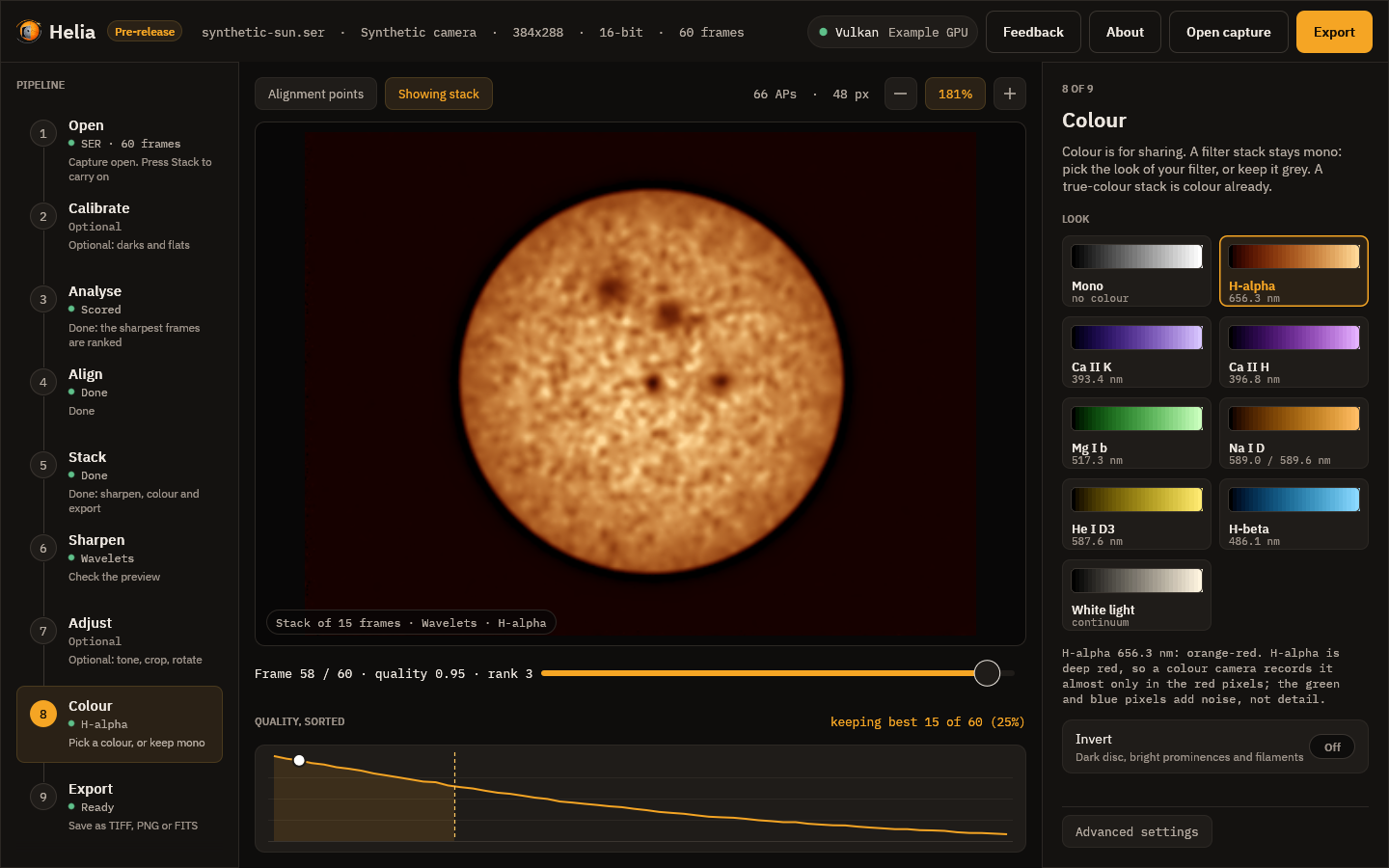
- The cards show each look as a ramp from black to white, with its name and wavelength. Click one and the stack in the viewer changes straight away; it is made on a background thread, so the window stays responsive.
- Invert and Strength change the preview as you move them.
- The text under the cards says why the preset recommends what it does.
- The app remembers the look you last chose for each filter, in its settings file, so the next H-alpha capture starts with the look you used last time.
A capture with the filter in its name starts with that filter's own look, so the usual path needs no choices at all. The Export step says what will be written, and the viewer shows the stack as it will be exported.
On the command line
helia stack ha.ser -o ha.tif --preset ha          # recommended settings and colour
helia stack ha.ser -o ha.png --preset ha --invert # a shareable inverted picture
helia stack Sun_CaK.ser -o cak.tif --colour auto  # colour from the detected filter
helia stack sun.ser -o sun.tif --colour mono      # plain grey, even if detected
helia stack ha.ser -o ha.tif --colour cak         # a different look for the same stack
helia stack ha.ser -o ha.tif --preset ha --colour-strength 0.6
helia presets
--preset <id>says which filter the capture was taken with. It applies the recommended channel and frame share and colours a.tifor.pngoutput.--colour <auto|mono|id>chooses only the colour.autouses the preset you gave or the filter Helia detected (and fails with a clear message if there is none).--invertand--colour-strengthadjust the look.- Without
--presetor--colour, the output is grey, and Helia prints a tip if it detected a filter. - For
.fits, colour options are noted in the header and the pixels stay unaltered mono.
See the CLI reference for every option.
Exporting a colour table
The look of a filter can be written as a colour table, to colour the same stack in another program so that the picture matches one made here (#23):
helia lut ha -o ha.cube                 # a 1D .cube LUT, 256 entries
helia lut ha -o ha.lut                  # an ImageJ / Fiji .lut
helia lut cak -o cak.csv --size 1024    # value,red,green,blue as text
helia lut ha -o ha-strip.png --invert --strength 0.8
| Format | File | Read by |
|---|---|---|
cube | a 1D .cube: a title, the domain and size rows of red, green, blue | DaVinci Resolve, Adobe tools and others |
csv | value,red,green,blue, one row per entry | spreadsheets and scripts |
imagej | a .lut of 768 raw bytes (256 red, 256 green, 256 blue) | ImageJ and Fiji |
png | a strip image size wide, 32 high | anything that loads an image |
--format says the format, or the extension of -o does; --size is 2 to 4096
entries (an ImageJ table is always 256); --invert and --strength are the colour
options of the stack. The table is the one Helia colours with, resampled by the
same linear interpolation, so a 4096-entry table reproduces it exactly and the
.cube of a filter applied to its mono stack gives the same picture up to the
rounding of the other program. In the app, the Colour step has the same four
formats under Colour table, and the API serves
GET /api/v1/presets/{id}/lut?format=cube&size=256&invert=false&strength=1.
Colour is presentation, not measurement: the table says nothing about the Sun.
In the API
GET /api/v1/presets lists the presets with their recommendations and colour
parameters, and POST /api/v1/captures/inspect reports the settings it would
use for a capture (recommended). A job takes preset, colour, invert and
colour_strength in its config. See The API.
How the filter is recognised
Helia looks for the filter in these places, most trusted first, and stops at the first match:
- the file name (without its extension);
- the name of the folder the file is in;
- the SharpCap
CameraSettings.txtnext to it: itsFilter,Filter Name,Filter Wheel,Target,DescriptionandNotesentries; - the instrument, telescope and observer strings of a SER header;
- the name of the folder above.
The text is split into words at punctuation, at a lower-case to upper-case change
(SunHa is Sun and Ha) and between letters and digits (cak3934). A word,
or two or three words run together (Ca II K is caiik), must then match
exactly, ignoring case:
| Filter | Words |
|---|---|
| H-alpha | ha, halpha, h-alpha, hydrogen alpha, 656 |
| Ca II K | cak, ca k, ca ii k, calcium k, 393 |
| Ca II H | cah, ca h, ca ii h, calcium h, 396 |
| Mg I b | mg, mgb, mgi, magnesium, 517 |
| Na I D | na, nad, sodium, 589 |
| He I D3 | d3, hed3, helium, 587 |
| H-beta | hb, hbeta, h-beta, 486 |
| White light | white, whitelight, wl, continuum, cont |
A number such as 656 counts only on its own, so a date like 2026-05-17 is not
mistaken for a wavelength. A word inside a longer word never counts: Hampshire
is not H-alpha and Sha_nal is nothing. If the filter is not recognised, the
app asks once with a chooser, and the command line uses plain defaults and says
filter not recognised.
What the files say
Every file records the look it was written with, in words, so a coloured picture cannot be mistaken for a measurement later:
| File | Where the note is |
|---|---|
| TIFF | the ImageDescription tag |
| PNG | the Description text chunk (and Software: Helia) |
| FITS | HISTORY cards in the header |
The note reads like Colour is presentation, not measurement: preset ha (H-alpha 656.3 nm, orange-red), invert off, strength 1.00. The FITS pixels are written
exactly as they would be without it; only the header differs.
The same places also record how the capture was read, whether or not a colour look was chosen, so a stack can be traced back later. These lines are always written:
Capture read as: Bayer RGGB (detection), 16-bit (header), little-endian (detection)
SER header: ColorID 0 (MONO), 16-bit, big-endian
Bayer detection: 2x2 position means 79.6% / 77.6% / 77.4% / 0.3% of full scale, spread 135%, 5 frames
Overrides: --bayer none, --bit-depth 16
The first says which Bayer pattern was used (or none (mono)), the bit depth and
(for 16-bit data) the byte order, each with its source (header, sidecar, detection or
override), and adds rows flipped when --flip-rows was given. The second is
the SER header's own claim, the third appears only when a mosaic was detected,
and the fourth only when you overrode something. When the stack was calibrated
there is one more line for each master (Calibration: dark subtracted (master dark of 64 frame(s), sigma-clip 3, exposure 0.6400 ms, from darks.ser, fp:...), the same
for the flat and for the bad pixels); see Calibration.
TIFF joins the lines with
; , PNG puts them in the text chunk, and FITS has one HISTORY card (or more,
when a line is long) for each.
What it does not do
- It colours the stacked image only. Prominence and disc compositing into one high-dynamic-range picture is separate work, tracked in issue #23; colourising here is the colour part of that issue.
- There are no user-defined palettes or exported lookup tables yet.
- Sharpening comes before colouring, and is its own step (Sharpening and adjustments): the colour is applied to the sharpened mono image, never the other way round.