2. Quick stack
The Stack with recommended settings button on the Open step does the whole middle of the job for you: it applies the settings on the card, scores and aligns the frames, stacks the best of them, and moves on to Sharpen with the filter's recommended wavelets already applied.
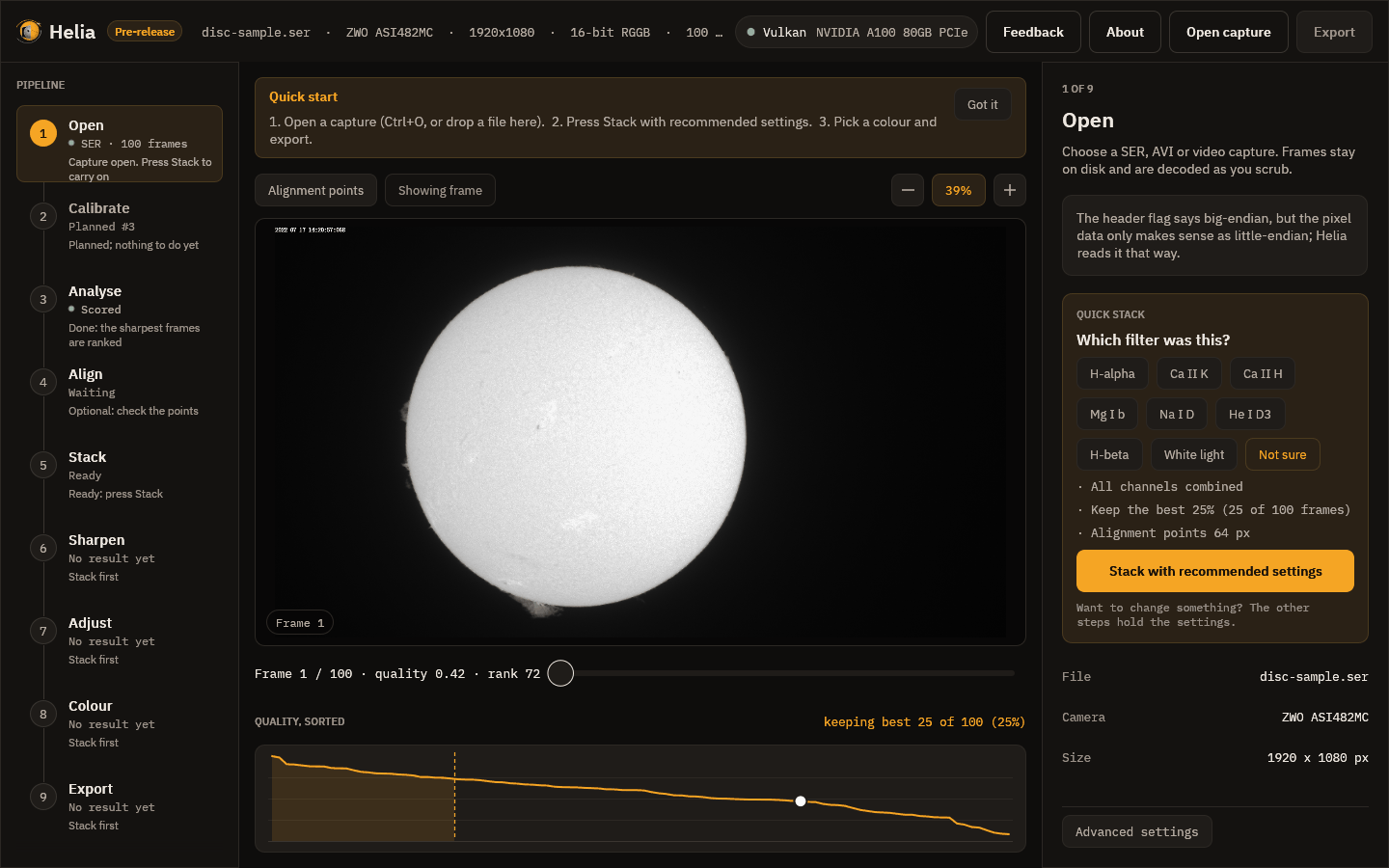
Use it when you want a good first picture. The rest of the steps then become a place to adjust, not a place you must visit.
What happens when you press it
- A notice above the picture names the current stage, with a progress bar, the time left, and a Cancel button. The stages are Scoring the frames, Building the reference image, Aligning the frames, Measuring the alignment points, Stacking the best frames and Finishing the image.
- When it ends, a message at the bottom right says how it went. For the full-disc capture: Stacked 25 of 100 frames in 1.9 s. For the 1,000-frame H-alpha capture: Stacked 250 of 1,000 frames in 2.7 s. (The times are those of one machine with a GPU, not a promise.)
- The viewer switches to the stacked image and the Export button lights up.
- Helia moves on to Sharpen.
If something looks wrong, the settings are in the other steps, and pressing the button again puts the recommended settings back.
Do I need the other steps?
Often not. The steps exist so that you can look closer when a result disappoints: